FFmpegVideoPlayer.Avalonia
3.1.0-preview.4
See the version list below for details.
dotnet add package FFmpegVideoPlayer.Avalonia --version 3.1.0-preview.4
NuGet\Install-Package FFmpegVideoPlayer.Avalonia -Version 3.1.0-preview.4
<PackageReference Include="FFmpegVideoPlayer.Avalonia" Version="3.1.0-preview.4" />
<PackageVersion Include="FFmpegVideoPlayer.Avalonia" Version="3.1.0-preview.4" />
<PackageReference Include="FFmpegVideoPlayer.Avalonia" />
paket add FFmpegVideoPlayer.Avalonia --version 3.1.0-preview.4
#r "nuget: FFmpegVideoPlayer.Avalonia, 3.1.0-preview.4"
#:package FFmpegVideoPlayer.Avalonia@3.1.0-preview.4
#addin nuget:?package=FFmpegVideoPlayer.Avalonia&version=3.1.0-preview.4&prerelease
#tool nuget:?package=FFmpegVideoPlayer.Avalonia&version=3.1.0-preview.4&prerelease


FFmpegVideoPlayer.Avalonia
Standalone FFmpeg media player for Avalonia 12. It owns source resolution, streaming, playback lifecycle, cancellation and cleanup for local video/audio, HTTP media, seekable streams, DASH manifests and YouTube URLs.
Install
The preview line is published as 3.1.0-preview.4; the stable line is 3.0.4.
dotnet add package FFmpegVideoPlayer.Avalonia --version 3.1.0-preview.4
This preview requires Avalonia 12.1.0+ (below 13) and targets .NET 10 only. The single package contains the Avalonia control, Core and OpenTK/OpenAL audio implementation; applications do not reference separate player packages.
The managed player API is cross-platform, but the native payload is platform-specific: FFmpeg 8.1.2 DLLs are bundled only for Windows x64. Windows x86/ARM64, macOS, and Linux require a compatible system FFmpeg installation or an explicitly supplied native-library path. OpenAL Soft audio DLLs are bundled separately for Windows x64, x86, and ARM64.
YouTube video and audio are kept as separate adaptive streams, but FFmpeg reads the signed media URLs directly with HTTP range requests. This avoids downloading the same startup ranges through an intermediate proxy and preserves the selected stream's full quality.
Quick start
1. Initialize FFmpeg (e.g. in Program.cs before the app starts):
using FFmpegVideoPlayer.Core;

FFmpegInitializer.Initialize();
2. Add the control in XAML:
xmlns:ffmpeg="clr-namespace:Avalonia.FFmpegVideoPlayer;assembly=Avalonia.FFmpegVideoPlayer"

<ffmpeg:VideoPlayerControl Source="C:\path\to\video.mp4" ShowControls="True" />
Video and audio-only files are both supported, for example .mp4, .mov, .mp3, .wav, .flac, .ogg, and .m4a.
Source also accepts direct HTTP(S) and YouTube URLs. Source changes are resolved
asynchronously and stale opens are cancelled automatically:
<ffmpeg:VideoPlayerControl
    Source="https://youtu.be/Ppejf4-YmSM"
    AutoPlay="True"
    ShowOpenButton="False" />
Applications with a small set of known tutorial videos can resolve their YouTube metadata in the background. This does not download the full video; it reads metadata and the small MP4 initialization/index ranges needed to prepare playback:
await YouTubeMediaSourceResolver.Instance.PreloadAsync(
    "https://youtu.be/Ppejf4-YmSM",
    cancellationToken);
For custom headers, in-memory media or manifests, use the typed API:
var source = MediaSource.FromUri(
    new Uri("https://media.example/video.mp4"),
    headers: new Dictionary<string, string> { ["Authorization"] = "Bearer …" });

var result = await player.OpenAsync(
    source,
    new MediaOpenOptions
    {
        OpenTimeout = TimeSpan.FromSeconds(20),
        ReadTimeout = TimeSpan.FromSeconds(30)
    },
    cancellationToken);
OpenAL Soft binaries for Windows x64, x86 and ARM64 are included in the package.
FFmpeg
| Platform | Default |
|---|---|
| Windows x64 | Bundled DLLs in the package |
| Windows x86 / ARM64 | Compatible system FFmpeg 8 native libraries or a custom path |
| macOS (x64 / ARM64) | System/Homebrew (brew install ffmpeg); can auto-install |
| Linux (x64 / ARM64) | System packages (apt/dnf/pacman); can auto-install with passwordless sudo |
On every row except Windows x64, FFmpeg is a system/native prerequisite; it is not
contained in the NuGet package. Automatic installation, where supported, installs that
system prerequisite. The required FFmpeg 8 library ABI is avcodec-62, avformat-62,
avutil-60, swresample-6, and swscale-9.
Custom FFmpeg path:
FFmpegInitializer.Initialize(customPath: @"C:\ffmpeg\bin", useBundledBinaries: false);
Subscribe to StatusChanged for progress during discovery or auto-install.
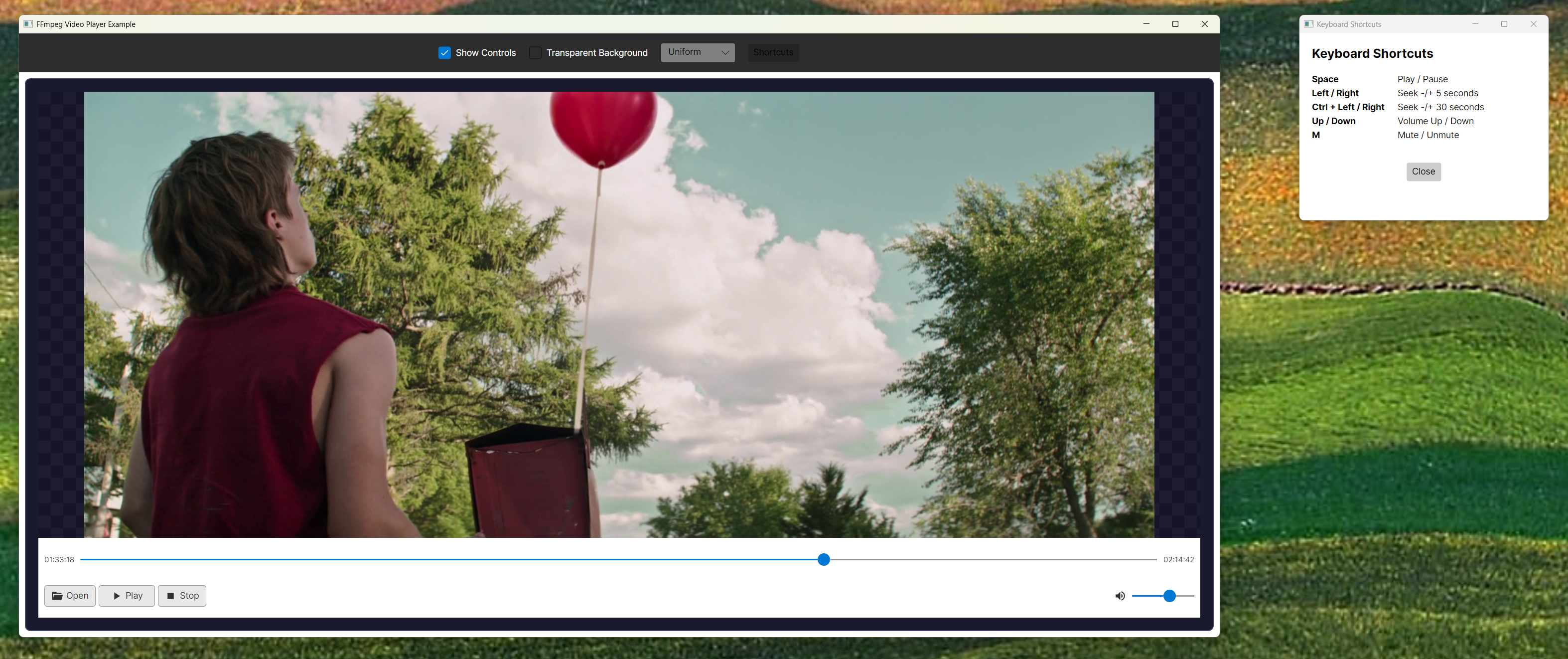
Example
git clone https://github.com/jojomondag/FFmpegVideoPlayer.Avalonia.git
cd FFmpegVideoPlayer.Avalonia/examples/FFmpegVideoPlayerExample
dotnet run
VideoPlayerControl
Sources: Source for a path/URL, or typed Media for reusable
MediaSource recipes.
Lifecycle: PlaybackState, LastError, MediaOpening, MediaOpened,
FirstFramePresented, MediaFailed, PlaybackStateChanged, and MediaEnded.
Methods: OpenAsync, Open, OpenUri, CloseAsync, Play, Pause,
Stop, TogglePlayPause, Seek, and ToggleMute.
Presentation: AutoPlay, Volume, ShowControls, ShowOpenButton,
VideoStretch, VideoBackground, EnableKeyboardShortcuts, RenderingMode
(Cpu / OpenGL), AudioPlayerFactory, and IconProvider.
Shortcuts: Space (play/pause), arrow keys (seek/volume), M (mute)
Set AudioPlayerFactory to customize or disable audio. OpenAL via OpenTK is the default.
Custom icons: implement IIconProvider and set IconProvider.
The included Material icon set can be selected without an extra icon dependency:
<ffmpeg:VideoPlayerControl
    Source="recording.mp4"
    IconProvider="{x:Static ffmpeg:MaterialVideoIconProvider.Instance}" />
Subscribe to Diagnostic to integrate playback and audio-output information with
your application's logger. It reports a player ID, timing, lifecycle kind and,
where applicable, stream information or audio sample rate/channel count. An audio
output failure is observable even when a video can continue silently. The default
OpenTK backend remains inside the library; AudioPlayerFactory is only needed for
a custom backend (return null to explicitly disable output).
player.Diagnostic += (_, diagnostic) =>
    Debug.WriteLine($"{diagnostic.PlayerId}: {diagnostic.Kind}");
Diagnostics can arrive on worker threads. Marshal UI work to Avalonia's dispatcher. Observer exceptions are isolated from playback. Nothing is written to disk automatically; source metadata, error messages and exceptions may contain private information, so redact them before persisting or sharing diagnostics.
Before application shutdown, capture the controls while their windows are still attached and close them while the Avalonia dispatcher is running:
var results = await MediaPlayerLifetime.CloseAllAsync(players);
foreach (var result in results.Where(result => !result.Succeeded))
    ReportCloseFailure(result.Exception);
Every distinct player is awaited even if another close fails. The helper does not
dispose the controls or shut down the application. MediaFileTypes in Core offers
case-insensitive audio/video extension hints; opening the actual source determines
codec support.
Build from source
The repository builds with the .NET 10 SDK:
dotnet build FFmpegVideoPlayer.Avalonia.sln -c Release
dotnet test FFmpegVideoPlayer.Avalonia.sln -c Release --no-build
dotnet pack Avalonia.FFmpegVideoPlayer.csproj -c Release -o artifacts/packages
Build output and intermediates go under artifacts/bin and artifacts/obj.
The library's regression-test source is in tests/; tests and build output are
excluded from the NuGet package. The example is a standalone player demonstration.
Remove generated build files with PowerShell:
./build/clean.ps1
This preserves NuGet packages and release records. Use -WhatIf to preview cleanup.
License
The managed project code is licensed under MIT. The NuGet package also redistributes
FFmpeg and OpenAL Soft native libraries under their respective GNU LGPL terms. See
THIRD-PARTY-NOTICES.md for provenance, checksums, source
availability, replacement rights, and the packaged license-text locations.
| Product | Versions Compatible and additional computed target framework versions. |
|---|---|
| .NET | net10.0 is compatible. net10.0-android was computed. net10.0-browser was computed. net10.0-ios was computed. net10.0-maccatalyst was computed. net10.0-macos was computed. net10.0-tvos was computed. net10.0-windows was computed. |
-
net10.0
- Avalonia (>= 12.1.0 && < 13.0.0)
- FFmpeg.AutoGen (>= 8.0.0.1)
- OpenTK.Audio.OpenAL (>= 4.9.4)
- YoutubeExplode (>= 6.6.0)
NuGet packages
This package is not used by any NuGet packages.
GitHub repositories
This package is not used by any popular GitHub repositories.
| Version | Downloads | Last Updated |
|---|---|---|
| 3.1.0-preview.5 | 57 | 11/18/2026 |
| 3.1.0-preview.4 | 71 | 11/11/2026 |
| 3.1.0-preview.3 | 103 | 10/10/2026 |
| 3.0.4 | 179 | 11/11/2026 |
| 3.0.3 | 543 | 9/30/2026 |
| 3.0.2 | 373 | 8/10/2026 |
| 3.0.1 | 132 | 8/10/2026 |
| 3.0.0 | 283 | 7/17/2026 |
| 2.9.0 | 388 | 5/29/2026 |
| 2.8.1 | 216 | 5/20/2026 |
| 2.8.0 | 333 | 4/24/2026 |
| 2.7.1 | 182 | 4/24/2026 |
| 2.7.0 | 170 | 4/24/2026 |
| 2.6.3 | 302 | 3/31/2026 |
| 2.6.2 | 156 | 3/31/2026 |
| 2.6.1 | 171 | 3/25/2026 |
| 2.6.0 | 145 | 3/25/2026 |
| 2.5.8 | 147 | 3/25/2026 |
| 2.5.7 | 144 | 3/25/2026 |
| 2.5.6 | 153 | 3/25/2026 |
v3.1.0-preview.4: Fixes a deadlock when resuming or seeking a paused audio-only file in the OpenTK/OpenAL backend, brought over from 3.0.4 (thanks coolguru81, PR #7).