DiScope 0.1.1
dotnet tool install --global DiScope --version 0.1.1
dotnet new tool-manifest
dotnet tool install --local DiScope --version 0.1.1
#tool dotnet:?package=DiScope&version=0.1.1
nuke :add-package DiScope --version 0.1.1
DiScope


See your .NET dependency injection graph, and the bugs hiding in it.
DiScope reads the real IServiceCollection of your ASP.NET Core or Worker app, draws the dependency graph, and flags
the DI mistakes that normally only show up at runtime or in production: captive dependencies, missing registrations,
cycles, shadowed registrations and more.
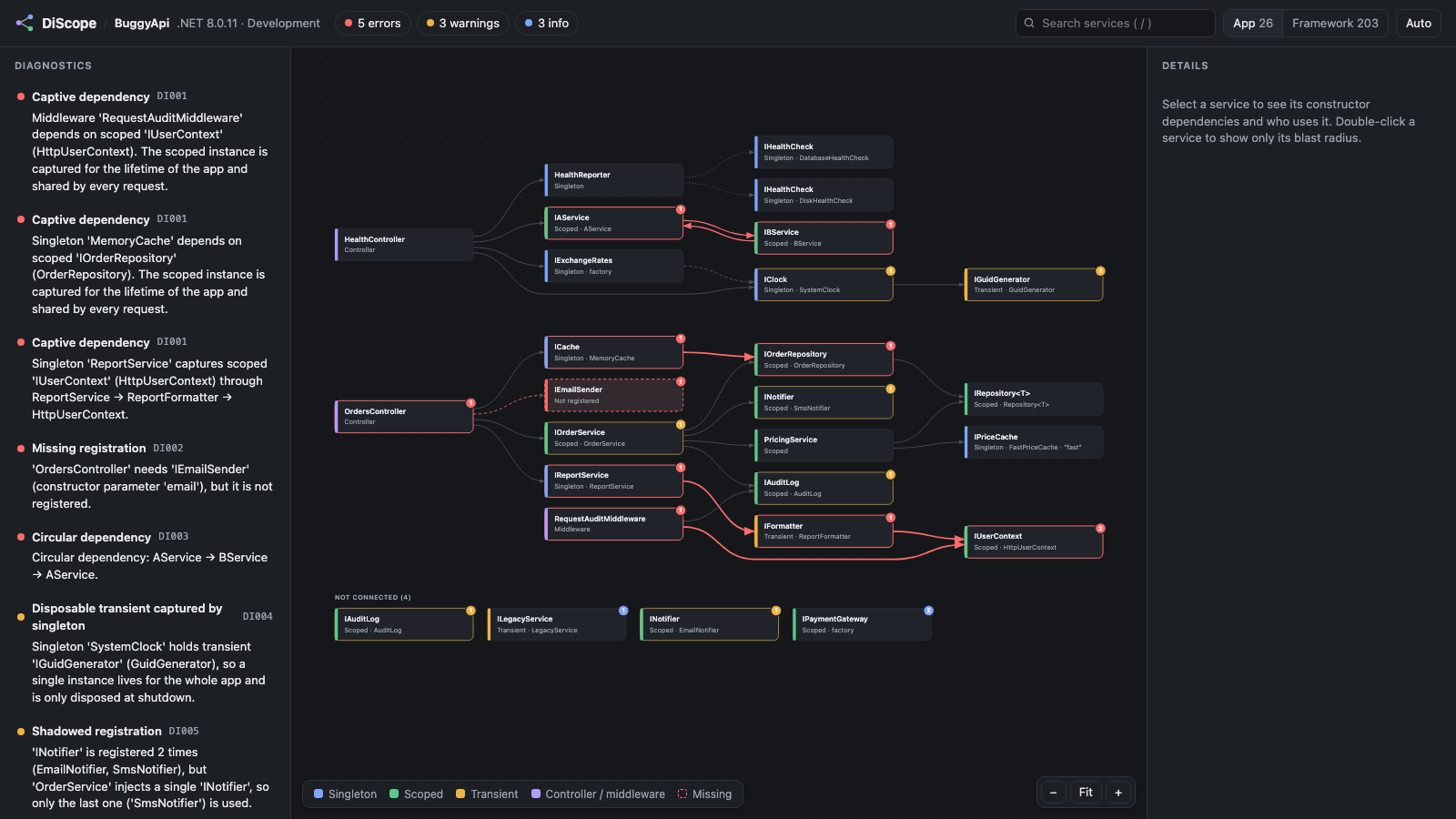
$ discope samples/BuggyApi

  error DI001: Singleton 'MemoryCache' depends on scoped 'IOrderRepository' (OrderRepository).
  error DI001: Singleton 'ReportService' captures scoped 'IUserContext' through ReportService → ReportFormatter → HttpUserContext.
  error DI002: 'OrdersController' needs 'IEmailSender' (constructor parameter 'email'), but it is not registered.
  error DI003: Circular dependency: AService → BService → AService.
  warning DI005: 'INotifier' is registered 2 times (EmailNotifier, SmsNotifier), but 'OrderService' injects a single 'INotifier'...

BuggyApi: 226 services (23 from the app), 3 controllers/middleware — 5 error(s), 3 warning(s), 3 info.
Report: discope-report.html
Why
ValidateOnBuild throws on the first problem it meets, only when you run the app in Development, and it can't see
everything. Controllers aren't registered in the container, so a missing dependency there only fails on the first request.
A second registration that silently replaces the first, duplicates and unused services are never reported. And you never
get a picture of how it all fits together. DiScope shows you the whole picture at once:
- Accurate. It captures the registrations your app actually makes, including extension methods from libraries,
TryAdd*, Scrutor-style scanning, keyed services and open generics. It doesn't guess from source code. - Safe. The app is stopped right after its services are registered. Kestrel never starts, hosted services never run, and nothing is resolved.
- Fast. A few seconds for a typical API, most of it
dotnet build. - CI-friendly. Compiler-style output and a non-zero exit code on errors.
Install
dotnet tool install -g DiScope
Requires the .NET 8 SDK or newer. Analyzed apps must target .NET 8 or newer.
Use
discope                                # the project in the current folder → discope-report.html
discope src/MyApi --open               # analyze and open the interactive graph
discope MyApi.csproj --format text     # compiler-style lines, e.g. in CI
discope MyApi.csproj -f net9.0 --format json -o di.json
discope MyApi.csproj --format mermaid  # paste into a README or pull request
| Option | |
|---|---|
--format html\|json\|mermaid\|text |
Output format (default html) |
-o, --out <path> |
Output file (- for stdout) |
--open |
Open the report when done |
--no-build |
Skip dotnet build |
-c, --configuration / -f, --framework |
Build configuration and target framework |
-e, --environment <name> |
Environment the app runs in (default Development) |
--fail-on error\|warning\|none |
When to exit with code 1 (default error) |
-- <args> |
Arguments passed to your app's Main |
In CI (GitHub Actions)
- run: dotnet tool install -g DiScope
- run: discope src/MyApi --format text --fail-on error
The interactive report
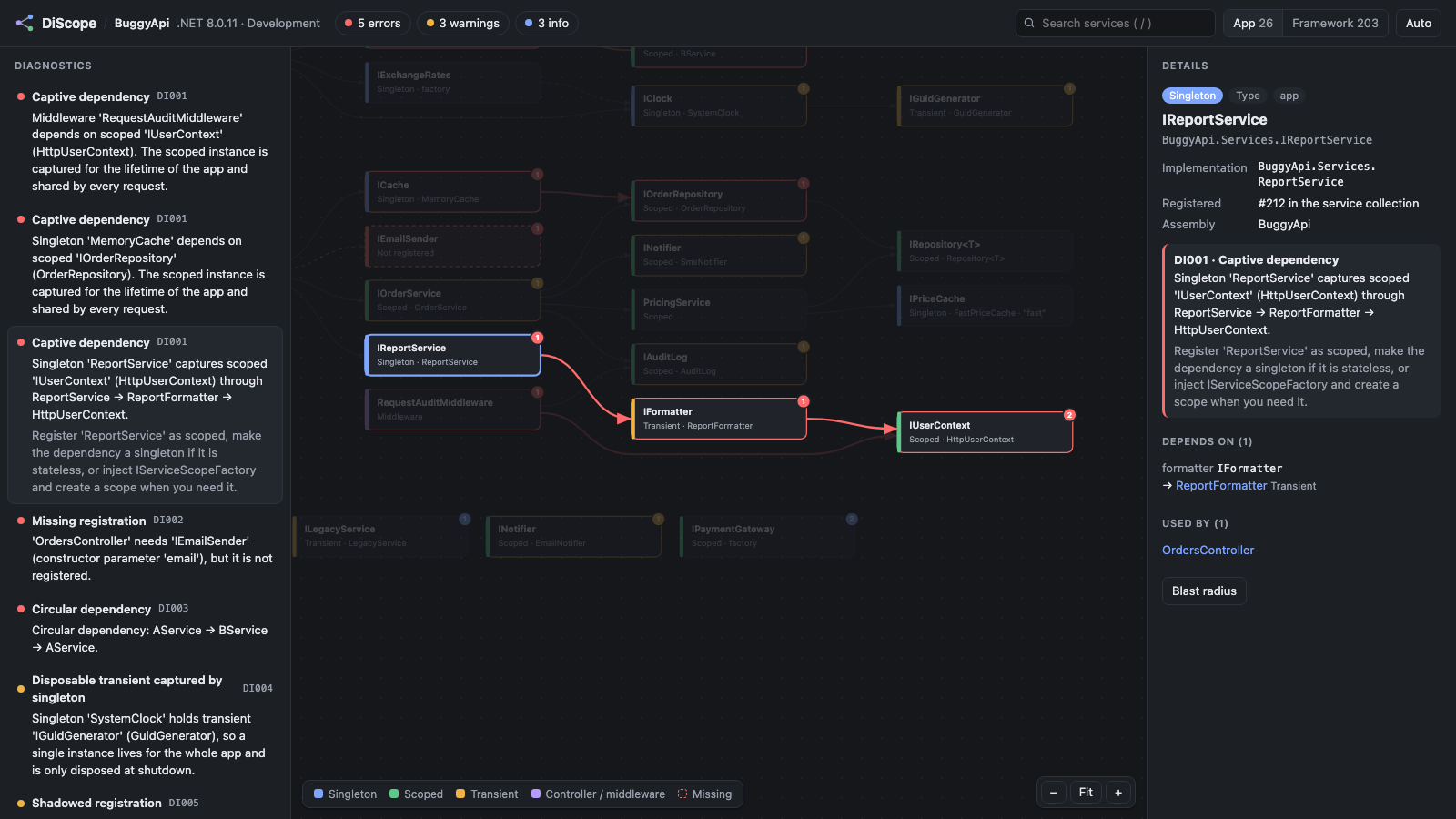
- Graph: consumers on the left, dependencies on the right. Colors show lifetimes. Red edges are captive paths, and dashed nodes are missing registrations.
- Click a service to see its constructor parameters, what each one resolves to, and who uses it.
- Double-click for its blast radius: only the services it depends on and the ones that depend on it.
- Click a diagnostic to highlight its exact path.
- Search (
/), fit (F), App / Packages / Framework filters, light and dark themes.
Rules
| ID | Severity | What it finds |
|---|---|---|
| DI001 | Error | Captive dependency: a singleton (or conventional middleware) holds a scoped service, directly or through transients |
| DI002 | Error | Missing registration: a constructor parameter that nothing provides (also checks controllers, hubs, Razor Pages and middleware) |
| DI003 | Error | Circular dependency, including decorators that resolve themselves |
| DI004 | Warning / Info | Transient captured by a singleton: a warning when the transient is IDisposable |
| DI005 | Warning | Shadowed registration: several implementations, but a single T is injected, so only the last one is used |
| DI006 | Warning | Duplicate registration: the same service, implementation and lifetime registered twice |
| DI007 | Info | Possibly unused: nothing in the graph depends on it |
| DI008 | Info | Factory with unknown dependencies: DiScope reads factory lambdas' code to find GetRequiredService<T>() calls. When it finds none, it says so |
| DI009 | Error | Cannot be constructed: abstract types, or no public constructor |
Issues that only involve framework services are ignored. You only see what you can fix.
How it works
discope MyApi.csproj
  ├─ dotnet build, then find bin/…/MyApi.dll
  ├─ dotnet exec --runtimeconfig MyApi.runtimeconfig.json --depsfile MyApi.deps.json DiScope.Agent.dll
  │     The agent runs INSIDE your app's process, on your app's framework and package versions.
  │     It listens to the "Microsoft.Extensions.Hosting" diagnostic events, adds one last ConfigureServices
  │     callback, snapshots the IServiceCollection, and stops the host before it is built.
  ├─ For each registration: pick the constructor the way Microsoft.Extensions.DependencyInjection does
  │  (the longest one that can be satisfied), resolve each parameter (keyed, IEnumerable<T>, open generics...),
  │  and read factory lambdas' IL for GetRequiredService<T>() calls
  └─ Run the rules → HTML / JSON / Mermaid / text
The agent only uses the BCL and touches DI types through reflection, so it works whichever
Microsoft.Extensions.* version your app uses.
Note: your
Program.csruns up tobuilder.Build(). If it does real work before that (migrations, network calls), guard it withif (Environment.GetEnvironmentVariable("DISCOPE") is null). DiScope setsDISCOPE=1.
Repository layout
| Path | |
|---|---|
src/DiScope.Agent |
Runs inside the analyzed app and captures the graph (BCL only) |
src/DiScope.Core |
Graph model, rules, exporters, and the viewer (Viewer/viewer.html) |
src/DiScope.Cli |
The discope dotnet tool |
samples/BuggyApi |
An API with one deliberate DI bug per rule (.NET 8 and .NET 10) |
samples/LegacyWorker |
Classic Host.CreateDefaultBuilder worker with EF Core 9 and a catch-all Main |
tests/ |
Rule unit tests, and end-to-end tests against both samples |
editors/vscode |
VS Code extension: graph panel, Problems integration, go to source |
dotnet test                                                       # all tests
dotnet run --project src/DiScope.Cli -- samples/BuggyApi --open   # try it
node editors/vscode/test/smoke.js "$PWD/src/DiScope.Cli/bin/Debug/net8.0/discope.dll"   # VS Code extension smoke test
Roadmap
- Publish the VS Code extension (
cd editors/vscode && npx @vscode/vsce package) - Roslyn analyzers with code fixes for instant squiggles
- Visual Studio extension (tool window + Error List)
- Minimal API handler parameters,
--entrymode for class libraries, namespace clustering for very large graphs
Contributing
Bug reports, especially false positives, and new rule ideas are very welcome. See CONTRIBUTING.md. Please follow the code of conduct, and report security issues as described in SECURITY.md.
License
| Product | Versions Compatible and additional computed target framework versions. |
|---|---|
| .NET | net8.0 is compatible. net8.0-android was computed. net8.0-browser was computed. net8.0-ios was computed. net8.0-maccatalyst was computed. net8.0-macos was computed. net8.0-tvos was computed. net8.0-windows was computed. net9.0 was computed. net9.0-android was computed. net9.0-browser was computed. net9.0-ios was computed. net9.0-maccatalyst was computed. net9.0-macos was computed. net9.0-tvos was computed. net9.0-windows was computed. net10.0 was computed. net10.0-android was computed. net10.0-browser was computed. net10.0-ios was computed. net10.0-maccatalyst was computed. net10.0-macos was computed. net10.0-tvos was computed. net10.0-windows was computed. |
This package has no dependencies.
| Version | Downloads | Last Updated |
|---|---|---|
| 0.1.1 | 56 | 10/10/2026 |