DemaConsulting.VersionMark
2.0.0-beta.1
Prefix Reserved
dotnet tool install --global DemaConsulting.VersionMark --version 2.0.0-beta.1
dotnet new tool-manifest
dotnet tool install --local DemaConsulting.VersionMark --version 2.0.0-beta.1
#tool dotnet:?package=DemaConsulting.VersionMark&version=2.0.0-beta.1&prerelease
nuke :add-package DemaConsulting.VersionMark --version 2.0.0-beta.1
VersionMark


Overview
VersionMark is a .NET tool for capturing and publishing tool version information across CI/CD environments. It tracks which versions of build tools, compilers, and dependencies are used in different jobs and environments, and publishes consolidated version reports to markdown documentation.
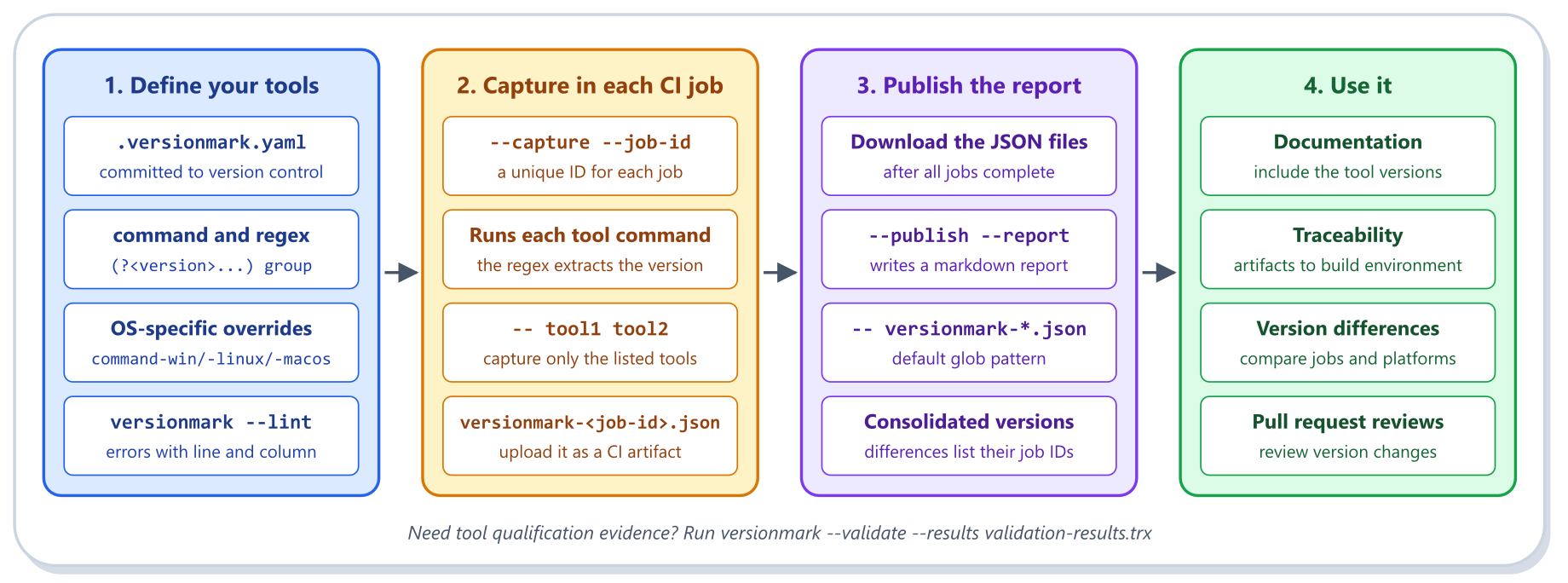
The workflow below shows how to use it: define your tools in .versionmark.yaml, capture their versions in each
CI job with a unique job ID, publish the captured JSON files as a consolidated markdown report, and use the report
for documentation, traceability, and reviews.
Features
- Version Capture: Captures tool versions from CI/CD jobs and saves them to JSON files
- Version Publishing: Publishes captured versions to markdown documentation
- Configuration Linting: Validates
.versionmark.yamlfiles with precise error locations - Job-ID Tracking: Associates captured versions with specific CI/CD job identifiers
- Version Consolidation: Collapses common versions across jobs while highlighting conflicts
- OS-Specific Overrides: Supports platform-specific version capture commands
- Self-Validation: Runs built-in self-verification tests to confirm correct operation
- Continuous Compliance: Compliance evidence generated automatically on every CI run, following the Continuous Compliance methodology
Installation
dotnet tool install -g DemaConsulting.VersionMark
Usage
1. Create Configuration File
Create a .versionmark.yaml file in your repository:
tools:
  dotnet:
    command: dotnet --version
    regex: '(?<version>\d+\.\d+\.\d+)'

  node:
    command: node --version
    regex: 'v(?<version>\d+\.\d+\.\d+)'
2. Capture Tool Versions
In your CI/CD job, capture tool versions with a job identifier:
versionmark --capture --job-id "windows-net10"
This creates a JSON file with captured versions (e.g., versionmark-windows-net10.json).
3. Publish to Documentation
After all jobs complete, publish the captured versions to markdown:
versionmark --publish --report versions.md
Building
pwsh ./build.ps1
User Guide
The VersionMark User Guide is available on the VersionMark releases page.
Contributing
See CONTRIBUTING.md for guidelines on how to contribute to this project.
License
Copyright (c) DEMA Consulting. Licensed under the MIT License. See LICENSE for details.
By contributing to this project, you agree that your contributions will be licensed under the MIT License.
Support
Command-Line Options
Usage: versionmark [options]
       versionmark --lint [<config-file>]
       versionmark --capture --job-id <id> [options] [-- tool1 tool2 ...]
       versionmark --publish --report <file> [options] [-- pattern1 pattern2 ...]
| Option | Description |
|---|---|
| General | |
-v, --version |
Display version information |
-?, -h, --help |
Display help message |
--silent |
Suppress console output |
--log <file> |
Write output to log file |
--depth <depth> |
Heading depth for validation and publish mode (default: 1, 1-6) |
| Lint Mode | |
--lint [<config-file>] |
Check configuration file (default: .versionmark.yaml) |
| Capture Mode | |
--capture |
Enable capture mode |
--job-id <id> |
(Required) Unique identifier for this CI/CD job |
--output <file> |
Output JSON file (default: versionmark-<job-id>.json) |
-- <tools...> |
List of tool names to capture (default: all tools in config) |
| Publish Mode | |
--publish |
Enable publish mode |
--report <file> |
(Required) Output markdown file path |
--report-depth <depth> |
Heading depth for markdown output (default: --depth value, 1-6) |
-- <patterns...> |
Glob patterns for JSON files (default: versionmark-*.json) |
| Self-Validation | |
--validate |
Run self-validation tests |
--results <file> |
Write validation results to file (.trx or .xml) |
Configuration File
The .versionmark.yaml file defines which tools to capture and how to extract their versions:
tools:
  # Basic tool definition
  dotnet:
    command: dotnet --version
    regex: '(?<version>\d+\.\d+\.\d+)'

  # Tool with OS-specific overrides
  gcc:
    command: gcc --version
    command-win: gcc.exe --version
    command-linux: gcc-13 --version
    command-macos: gcc-14 --version
    regex: 'gcc \(.*\) (?<version>\d+\.\d+\.\d+)'
Configuration Options
Each tool in the tools dictionary supports the following properties:
- command: Shell command to execute to get version information
- regex: Regular expression with a named
versioncapture group using .NET syntax(?<version>...) - command-win: (Optional) Command override for Windows
- command-linux: (Optional) Command override for Linux
- command-macos: (Optional) Command override for macOS
- regex-win: (Optional) Regex override for Windows
- regex-linux: (Optional) Regex override for Linux
- regex-macos: (Optional) Regex override for macOS
Output Format
Capture Output (JSON)
Capture mode creates a JSON file with the following structure:
{
  "JobId": "windows-net10",
  "Versions": {
    "dotnet": "10.0.100",
    "node": "20.11.0"
  }
}
Publish Output (Markdown)
Publish mode generates a markdown list consolidating versions from all jobs:
# Tool Versions

- **dotnet**: 10.0.100
- **node**: 20.11.0
When a tool has the same version across all jobs, it is shown without job identifiers. When versions differ, each version is listed with the jobs that use it shown in parentheses.
Self-Validation
VersionMark includes built-in self-validation tests. Run with --validate:
versionmark --validate
Use --results to save results in TRX or JUnit XML format:
versionmark --validate --results results.trx
versionmark --validate --results results.xml
If any tests fail, the exit code will be non-zero.
| Product | Versions Compatible and additional computed target framework versions. |
|---|---|
| .NET | net10.0 is compatible. net10.0-android was computed. net10.0-browser was computed. net10.0-ios was computed. net10.0-maccatalyst was computed. net10.0-macos was computed. net10.0-tvos was computed. net10.0-windows was computed. net11.0 is compatible. |
This package has no dependencies.