DemaConsulting.TextLint.Tool
0.1.0-beta.3
Prefix Reserved
See the version list below for details.
dotnet tool install --global DemaConsulting.TextLint.Tool --version 0.1.0-beta.3
dotnet new tool-manifest
dotnet tool install --local DemaConsulting.TextLint.Tool --version 0.1.0-beta.3
#tool dotnet:?package=DemaConsulting.TextLint.Tool&version=0.1.0-beta.3&prerelease
nuke :add-package DemaConsulting.TextLint.Tool --version 0.1.0-beta.3
TextLint



TextLint is a fast text linter for source code and documentation, delivered as the
DemaConsulting.TextLint .NET library and the DemaConsulting.TextLint.Tool .NET tool
(command textlint), which is a thin command-line front-end over the library.
Status: under active development. TextLint is being developed to provide cspell-compatible
spell-checking, configured by a .textlint.yaml file, using embedded English and technical-term
dictionaries, and to check files in parallel across all processor cores. Both the library and the textlint
tool can already do this: they load a .textlint.yaml settings file, select the files to check, check
their spelling in parallel with cspell's word-splitting, ignore, directive, and word-list rules, and look
words up in the embedded dictionaries. Custom ignore patterns and the remaining cspell settings are not
supported yet.
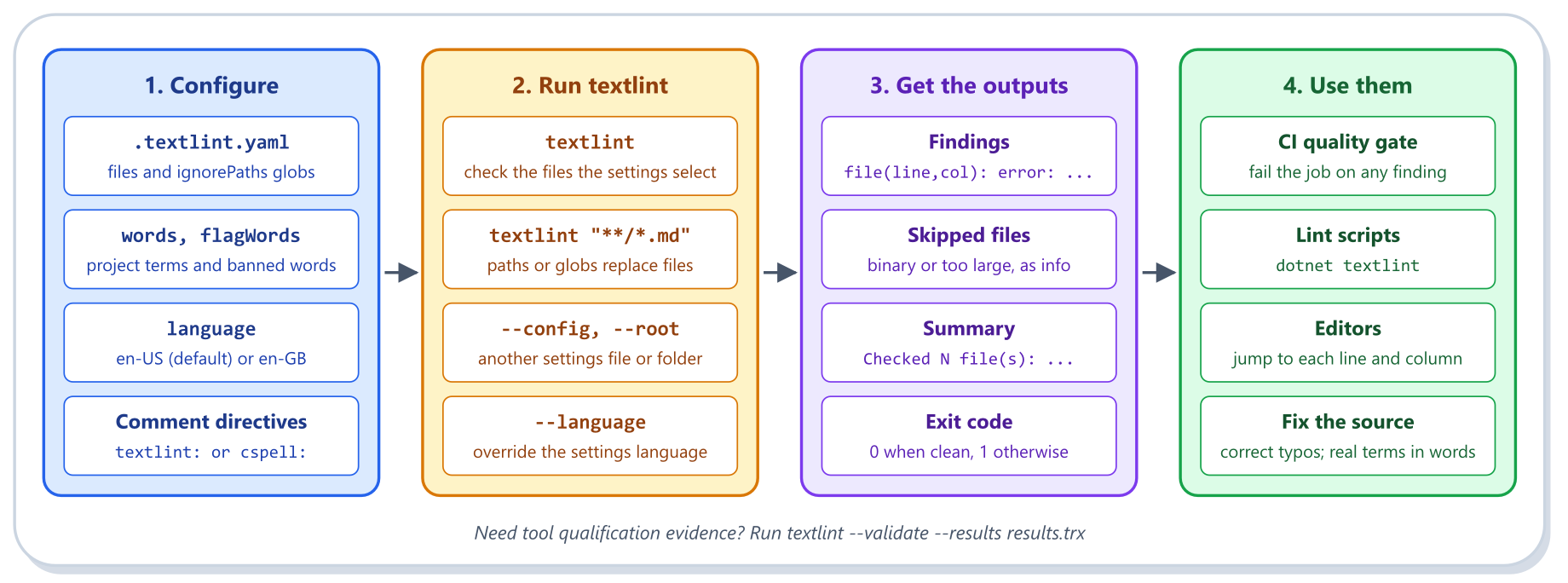
The workflow below shows how to use the tool: configure the files to check, the project words, and the language
in .textlint.yaml, run textlint locally or in a CI pipeline, and use the compiler-style findings, summary, and
exit code as a CI quality gate, in lint scripts, and in editors to fix the source.
Features
The project currently provides:
- Settings File: The library loads a cspell-compatible
.textlint.yaml(keysversion,files,ignorePaths,enableGlobDot,language,words,ignoreWords,flagWords,minWordLength,maxFileSize,ignoreRegExpList,patterns,ignoreRandomStrings, andminRandomLength), reporting every problem with its file, line, and column; unsupported keys are errors - File Selection: The library selects files from glob patterns (brace alternatives, bare names at any depth, case-sensitive matching, cspell-style hidden-file rules), skipping excluded directories without scanning them
- Spell Checking: The library checks the spelling of a string or of every selected file, in parallel, and
returns deterministic findings with file, line, column, and word. It splits camelCase and snake_case
identifiers (case-separated parts that together form a known word, such as
WeasyPrintinWeasyPrintTool, are accepted), ignores URLs, email addresses, hashes, and encoded data, skips text that matches theignoreRegExpListpatterns of the settings (JavaScript regular expressions, translated and validated when the settings are loaded) and ofignoreRegExpcomments, Markdown link targets, and random-looking tokens, honors thedisable-style comments (with the prefixescspell:andtextlint:), and reads UTF-8 and UTF-16 files. A parity test compares it with the real cspell, and the differences are documented - Word Lookup: The library reports whether a word is known to American English (the default), British
English, or both (including derived forms such as
testability, with the regional spellings kept apart), plus a dictionary of technical terms (programming languages, tools, companies, file types, and licenses, and a reviewed list of general technical and scientific terms such asmetafileandbigram, known in every language selection). The dictionaries are embedded in the assembly, so no data files are needed, and lookups are safe from many threads at once. Project-specific words belong in thewordssetting; general terms that other projects would need are proposed as an issue or pull request (see the user guide) - Command-Line Spell Checker: The
textlinttool checks the files you name (or those of the settings file) and reports each issue asfile(line,column): error: message, a format that editors and CI systems link to, followed by a summary. It accepts relative and absolute paths and globs, backslash paths on Windows, and exits with 0 only when everything was checked and no issue was found - Standardized Command-Line Interface: Context class handling common arguments
(
--version,--help,--silent,--validate,--results,--depth,--log) - Self-Validation: Built-in validation tests with TRX/JUnit output, including real spell-checking scenarios
- Multi-Platform Support: Builds and runs on Windows, Linux, and macOS
- Multi-Runtime Support: The
textlinttool requires .NET 10; theDemaConsulting.TextLintlibrary supports .NET 10 and 11 - Comprehensive CI/CD: GitHub Actions workflows with quality checks, builds, and integration tests
- Linting Enforcement: markdownlint, TextLint, and yamllint enforced on every CI run
- Continuous Compliance: Compliance evidence generated automatically on every CI run, following the Continuous Compliance methodology
- SonarCloud Integration: Quality gate and security analysis on every build
- Documentation Generation: Automated build notes, user guide, code quality reports, requirements, justifications, and trace matrix
- Requirements Traceability: Requirements linked to passing tests with auto-generated trace matrix
Installation
Install the tool globally using the .NET CLI (installing requires the .NET SDK; running the tool requires the .NET 10 runtime):
dotnet tool install -g DemaConsulting.TextLint.Tool
The reusable library is published separately as the DemaConsulting.TextLint NuGet package (for .NET 10 and 11)
for applications that want to embed TextLint (it loads settings, selects files, checks spelling, and looks words
up; its API will grow as further capabilities are added):
dotnet add package DemaConsulting.TextLint
Library Usage
Load a .textlint.yaml settings file, check the spelling of the files it selects, and print every finding:
using DemaConsulting.TextLint.Configuration;
using DemaConsulting.TextLint.SpellChecking;

// Problems in the file are returned, not thrown
var result = await SettingsLoader.LoadAsync(".textlint.yaml");
if (!result.Succeeded)
{
    foreach (var diagnostic in result.Diagnostics)
    {
        // For example: .textlint.yaml(3,1): error: 'caseSensitive' is not a supported setting.
        Console.Error.WriteLine(diagnostic);
    }

    return;
}

// Check every selected file under the current directory on all processor cores
var check = await SpellChecker.CheckAsync(result.Settings!, Directory.GetCurrentDirectory());
foreach (var issue in check.Issues)
{
    // For example: docs/guide.md(12,5): error: Unknown word 'wrold'
    Console.WriteLine(issue);
}

// Files that were skipped or could not be read are reported separately
foreach (var problem in check.FileDiagnostics)
{
    Console.WriteLine(problem);
}

Console.WriteLine($"{check.FilesChecked} files checked, {check.Issues.Count} findings");
The findings are ordered by file path, then line, then column, whatever the number of files checked at the same
time (SpellCheckOptions.MaxDegreeOfParallelism limits it). A file that is locked, binary, or too large is a
FileDiagnostic in the result and never stops the run; check.HasProblems is the value to base an exit code on.
Check a string of text without any file, with settings built in code:
var settings = new TextLintSettings
{
    Language = "en-GB",
    Words = ["TextLint"],
    MinWordLength = 4,
};
var checker = new TextChecker(settings);

foreach (var issue in checker.Check("The wrold of TextLint", "greeting.txt"))
{
    Console.WriteLine(issue); // greeting.txt(1,5): error: Unknown word 'wrold'
}
File selection is also available on its own. It takes the patterns directly, so pass the values you want:
using DemaConsulting.TextLint.FileSelection;

var settings = new TextLintSettings
{
    Files = ["**/*.{md,cs}"],
    IgnorePaths = ["node_modules"],
};
var files = FileSelector.Select("/path/to/repo", settings.Files, settings.IgnorePaths, settings.EnableGlobDot);
Patterns typed on a command line are more forgiving than patterns in a settings file: they may be absolute,
and on Windows may use backslashes. CommandLinePathResolver turns them into a search directory and
validated patterns, and tells you how to name the files it finds:
// For example: textlint C:\work\project\docs\*.md   (or ./docs/*.md, or .\docs\*.md on Windows)
var selection = CommandLinePathResolver.Resolve(Directory.GetCurrentDirectory(), args);
var files = FileSelector.Select(selection.RootDirectory, selection.Patterns, settings.IgnorePaths);

foreach (var file in files)
{
    // The absolute path when the user typed an absolute path, otherwise the relative path
    Console.WriteLine(selection.GetDisplayPath(file.RelativePath));
}
The supported .textlint.yaml keys are version, files, ignorePaths, enableGlobDot, language,
words, ignoreWords, flagWords, minWordLength, maxFileSize, ignoreRegExpList, patterns,
ignoreRandomStrings, and minRandomLength; any other key is an error. See the
User Guide for the settings reference, the glob pattern rules, the pattern rules and predefined
names, the comment directives, and the
differences from cspell.
Look words up in the embedded dictionaries. The default is American English; pass a language name, or a
comma-separated list, to choose another (en is the same as en-US, the others are en-GB and
combinations such as en-US,en-GB):
using DemaConsulting.TextLint.Dictionaries;

var american = SpellingDictionary.Default;                  // American English plus technical terms
var british = SpellingDictionary.ForLanguages("en-GB");     // British English plus technical terms
var both = SpellingDictionary.ForLanguages("en-US, en-GB"); // either spelling

american.IsKnown("favorite");   // true
american.IsKnown("favourite");  // false: a British spelling
british.IsKnown("favourite");   // true
both.IsKnown("favourite");      // true
american.IsKnown("Kubernetes"); // true: technical terms are known in every language
american.IsKnown("don\u2019t"); // true: the typographic apostrophe matches the straight one
american.IsKnown("TABLE");      // true: letter case is ignored
american.IsKnown("tabel");      // false: a misspelling
IsKnown takes a ReadOnlySpan<char>, so a word can be checked inside larger text without copying, and
it neither allocates nor throws for any text; empty text, text longer than 64 characters, and text outside
Latin-1 are simply not known. Accents matter (café is known, cafè is not). An unsupported language such
as en-AU throws an ArgumentException that names it. The dictionaries load on first use and are shared by
the whole process, so one SpellingDictionary can be used from many threads at once.
Usage
Check files by naming them. Quote glob patterns so that your shell does not expand them first; ** matches
any number of directories:
# Check the markdown files below the current directory, with the settings in ./.textlint.yaml if there is one
textlint "**/*.md"

# Check specific files; relative paths, absolute paths, and (on Windows) backslash paths are all accepted
textlint README.md docs/guide.md
textlint C:\work\project\README.md
textlint C:\work\project\docs     # an absolute path naming a directory checks every file below it

# With no patterns, the 'files' setting of ./.textlint.yaml selects the files
textlint

# Use another settings file, another project folder, and another language
textlint --config ci/textlint.yaml "**/*.md"
textlint --root ../other-project "docs/**/*.md"
textlint --language en-GB "**/*.md"

# Accept patterns that match no files (for example a folder that may not exist yet)
textlint --allow-empty "generated/**/*.md"

# Check the changed files, but only when there are any: with no patterns at all the tool has nothing to check,
# and that is a usage error that --allow-empty does not excuse
changed=$(git diff --name-only -- '*.md'); [ -z "$changed" ] || textlint --allow-empty $changed

# Limit the number of files checked at the same time
textlint --max-parallelism 2 "**/*.md"

# Display version
textlint --version

# Display help
textlint --help

# Run self-validation
textlint --validate

# Save validation results (--result is an accepted alias for --results)
textlint --validate --results results.trx
textlint --validate --result results.xml

# Set heading depth for embedded validation output
textlint --validate --depth 2

# Silent mode with logging
textlint --silent --log output.log "**/*.md"
Command-Line Options
| Option | Description |
|---|---|
[globs...] |
Files to check (paths or globs); they replace the files setting |
--config <file> |
Settings file (default: .textlint.yaml in the root directory) |
--root <dir> |
Directory that globs and the default settings file are relative to |
--language <languages> |
Dictionary language, e.g. en-US or en-GB; overrides the settings |
--allow-empty |
Accept patterns that match no files (default: exit code 1) |
--max-parallelism <#> |
Maximum number of files checked at the same time (default: processors) |
-v, --version |
Display version information |
-?, -h, --help |
Display help message |
--silent |
Suppress console output (usage errors still go to stderr) |
--validate |
Run self-validation |
--results <file>, --result <file> |
Write results to .trx (TRX) or .xml (JUnit XML) file. |
--depth <#> |
Set heading depth for markdown output (default: 1) |
--log <file> |
Write output to log file |
The settings file is .textlint.yaml in the root directory (the current directory unless --root is given),
or the file named by --config. No parent directory is searched. Without a settings file the default settings
apply and the tool says so.
Exit Codes
| Code | Meaning |
|---|---|
0 |
Every selected file was checked and no issue was found (skipped binary files do not count) |
1 |
Anything else: issues, an unreadable file, no files matched, no files named, or a settings or usage error |
Output
Results are written to standard output; errors of the tool itself (a bad argument, a settings error, a missing directory) are written to standard error. Each issue is one line in the compiler style that editors and CI systems understand, followed by files that were skipped, and a summary:
TextLint Tool version <version>
Copyright (c) DEMA Consulting

info: No settings file found in '/work/project'; using the default settings.
docs/guide.md(12,5): error: Unknown word 'wrold'
src/Program.cs(40,9): error: Flagged word 'utilize'; suggestions: use
assets/logo.dat: info: The file looks like binary data: it contains a NUL character in its first 1,024 characters.
Checked 120 file(s): 2 issue(s) in 2 file(s), 1 skipped, 0 could not be checked.
Paths are relative to the root directory with / separators, unless you typed an absolute path, in which case
the absolute path is shown.
Error Handling
Unrecognized, missing, empty, or repeated arguments cause the tool to print an error message to standard error and exit with a non-zero exit code. For example:
Error: Unsupported argument '--unknown'
A settings file that cannot be used is reported with its file, line, and column, and nothing is checked:
/work/project/.textlint.yaml(3,1): error: 'caseSensitive' is not a supported setting.
This behavior enables CI/CD pipelines to detect and surface misconfiguration failures automatically.
Self Validation
Running self-validation produces a report containing the following information:
# DEMA Consulting TextLint Tool

| Information         | Value                                              |
| :------------------ | :------------------------------------------------- |
| Tool Version        | <version>                                          |
| Machine Name        | <machine-name>                                     |
| OS Version          | <os-version>                                       |
| DotNet Runtime      | <dotnet-runtime-version>                           |
| Time Stamp          | <timestamp> UTC                                    |

✓ TextLintTool_VersionDisplay - Passed
✓ TextLintTool_HelpDisplay - Passed
✓ TextLintTool_CheckCleanFile - Passed
✓ TextLintTool_CheckMisspelling - Passed
✓ TextLintTool_CheckSettingsFile - Passed
✓ TextLintTool_CheckSettingsError - Passed
✓ TextLintTool_CheckGlobsReplaceFiles - Passed
✓ TextLintTool_CheckInlineDirective - Passed
✓ TextLintTool_CheckLanguageOption - Passed
✓ TextLintTool_CheckBinaryFileSkipped - Passed
✓ TextLintTool_CheckNoFilesMatched - Passed
✓ TextLintTool_CheckAbsolutePath - Passed

Total Tests: 12
Passed: 12
Failed: 0
Each test in the report proves:
TextLintTool_VersionDisplay---versionoutputs a valid version string.TextLintTool_HelpDisplay---helpoutputs usage and options information.TextLintTool_CheckCleanFile- A correctly spelled file is accepted with exit code 0.TextLintTool_CheckMisspelling- A misspelling is reported at its line and column with exit code 1.TextLintTool_CheckSettingsFile- The settings file in the root is found and applied.TextLintTool_CheckSettingsError- An invalid settings file is reported with its position, and nothing is checked.TextLintTool_CheckGlobsReplaceFiles- Patterns on the command line replace thefilessetting.TextLintTool_CheckInlineDirective- In-document directives suppress findings.TextLintTool_CheckLanguageOption---languageselects the American or the British dictionary.TextLintTool_CheckBinaryFileSkipped- A binary file is reported as information and does not fail the run.TextLintTool_CheckNoFilesMatched- A selection that matches no files fails unless--allow-emptyis given.TextLintTool_CheckAbsolutePath- A file named by an absolute path is reported by that path.
Use --depth <#> to control the heading level of the validation output (default: 1).
This is useful when embedding validation output into a larger markdown document:
# Embed validation at heading level 2
textlint --validate --depth 2
See the User Guide for more details on the self-validation tests.
On validation failure the tool will exit with a non-zero exit code.
Documentation
Generated documentation includes:
- Build Notes: Release information and changes
- User Guide: Comprehensive usage documentation
- Code Quality Report: CodeQL and SonarCloud analysis results
- Requirements: Functional and non-functional requirements
- Requirements Justifications: Detailed requirement rationale
- Trace Matrix: Requirements to test traceability
Contributing
See CONTRIBUTING.md for guidelines on reporting bugs, suggesting features, and submitting pull requests, and for how to run TextLint on this repository from source.
Third-Party Data
The library embeds English and technical-term dictionaries built from third-party data: SCOWL (a permissive license by Kevin Atkinson, with the notices of the Hunspell affix rules and of the SCOWL data they were generated from) and the English word lists of cspell-dicts for English, and the MIT-licensed cspell-dicts packages by Street Side Software for technical terms. The default list of text that is never spell-checked, and the patterns that recognize comment directives, are ported from cspell-lib (MIT license). A table of the letters that JavaScript treats as the same when a pattern ignores case is derived from the Unicode Character Database (Unicode License v3). The required license notices are in THIRD-PARTY-NOTICES.txt, which is also included at the root of both NuGet packages, and the provenance of every list is described in the dictionaries README.
License
Copyright (c) DEMA Consulting. Licensed under the MIT License. See LICENSE for details.
By contributing to this project, you agree that your contributions will be licensed under the MIT License.
| Product | Versions Compatible and additional computed target framework versions. |
|---|---|
| .NET | net10.0 is compatible. net10.0-android was computed. net10.0-browser was computed. net10.0-ios was computed. net10.0-maccatalyst was computed. net10.0-macos was computed. net10.0-tvos was computed. net10.0-windows was computed. |
This package has no dependencies.
| Version | Downloads | Last Updated |
|---|---|---|
| 0.1.0-beta.6 | 62 | 11/26/2026 |
| 0.1.0-beta.5 | 8,377 | 11/18/2026 |
| 0.1.0-beta.4 | 6,053 | 11/15/2026 |
| 0.1.0-beta.3 | 61 | 11/13/2026 |
| 0.1.0-beta.2 | 8,176 | 11/9/2026 |
| 0.1.0-beta.1 | 159 | 11/7/2026 |