ConfigContraband 0.7.27
See the version list below for details.
dotnet add package ConfigContraband --version 0.7.27
NuGet\Install-Package ConfigContraband -Version 0.7.27
<PackageReference Include="ConfigContraband" Version="0.7.27"> <PrivateAssets>all</PrivateAssets> <IncludeAssets>runtime; build; native; contentfiles; analyzers</IncludeAssets> </PackageReference>
<PackageVersion Include="ConfigContraband" Version="0.7.27" />
<PackageReference Include="ConfigContraband"> <PrivateAssets>all</PrivateAssets> <IncludeAssets>runtime; build; native; contentfiles; analyzers</IncludeAssets> </PackageReference>
paket add ConfigContraband --version 0.7.27
#r "nuget: ConfigContraband, 0.7.27"
#:package ConfigContraband@0.7.27
#addin nuget:?package=ConfigContraband&version=0.7.27
#tool nuget:?package=ConfigContraband&version=0.7.27
<p align="center"> <img src="https://raw.githubusercontent.com/georgepwall1991/ConfigContraband/main/assets/configcontraband-icon.png" width="96" height="96" alt="ConfigContraband icon — Roslyn analyzer for .NET Options and appsettings validation"> </p>
ConfigContraband
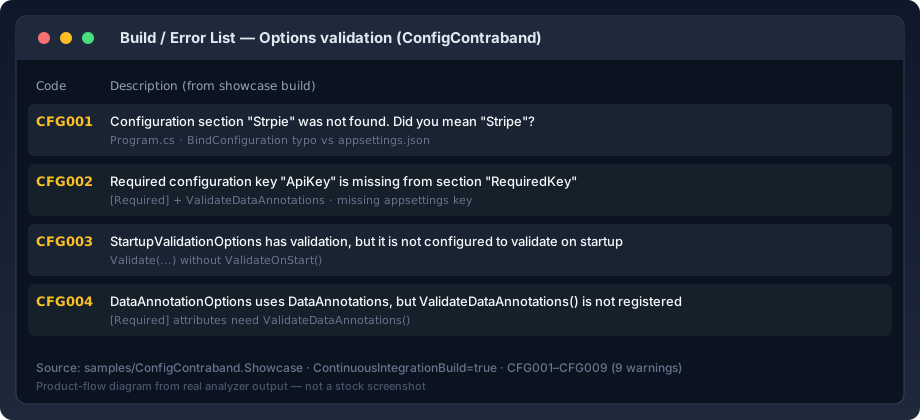
Compile-time Options validation for .NET — a Roslyn analyzer that checks BindConfiguration, ValidateOnStart, ValidateDataAnnotations, and appsettings.json against your IOptions types so broken configuration fails in the editor and CI, not production.
Install
<PackageReference Include="ConfigContraband" Version="0.7.27" PrivateAssets="all" />
dotnet add package ConfigContraband
No runtime dependency. Analyzers run at build time and in supported IDEs. Visible appsettings*.json files are passed automatically via buildTransitive props.
What it catches
- Section typos in
BindConfiguration(...)/Configure<T>(GetSection(...)) - Missing
[Required]keys in visible appsettings - Validation without
ValidateOnStart()orValidateDataAnnotations() - Nested options that look validated but are skipped
- Misspelled JSON keys, strict unknown-key failures, and scalar conversion errors
- Direct
IConfigurationreads whose path is missing from visible appsettings
When the analyzer cannot prove a configuration shape statically, it stays quiet.
See it work
Next steps
- Copy-paste green sample: ConfigContraband.Quickstart
- Full rule reference (
CFG001–CFG009): README on GitHub - Optional IntelliSense schema tool: ConfigContraband.Tool
Learn more about Target Frameworks and .NET Standard.
This package has no dependencies.
NuGet packages
This package is not used by any NuGet packages.
GitHub repositories
This package is not used by any popular GitHub repositories.
| Version | Downloads | Last Updated |
|---|---|---|
| 0.9.2 | 13 | 8/25/2026 |
| 0.9.1 | 31 | 8/25/2026 |
| 0.9.0 | 90 | 8/12/2026 |
| 0.8.0 | 85 | 8/12/2026 |
| 0.7.29 | 85 | 8/12/2026 |
| 0.7.28 | 83 | 8/12/2026 |
| 0.7.27 | 98 | 8/12/2026 |
| 0.7.26 | 107 | 7/26/2026 |
| 0.7.25 | 108 | 7/26/2026 |
| 0.7.24 | 105 | 7/25/2026 |
| 0.7.23 | 99 | 7/25/2026 |
| 0.7.22 | 105 | 7/21/2026 |
| 0.7.21 | 104 | 7/21/2026 |
| 0.7.20 | 95 | 7/16/2026 |
| 0.7.19 | 104 | 7/16/2026 |
| 0.7.18 | 95 | 7/16/2026 |
| 0.7.17 | 100 | 7/16/2026 |
| 0.7.16 | 98 | 7/16/2026 |
| 0.7.15 | 100 | 7/16/2026 |
| 0.7.14 | 100 | 7/16/2026 |
Conversion and trust release: short NuGet-only README, package summary, green Quickstart sample with zero-CFG CI proof, issue templates, SemVer/path-to-1.0 note, and tool package icon/release-notes parity. Diagnostic IDs and severities are unchanged.