CPMigrate 3.88.0
See the version list below for details.
dotnet tool install --global CPMigrate --version 3.88.0
dotnet new tool-manifest
dotnet tool install --local CPMigrate --version 3.88.0
#tool dotnet:?package=CPMigrate&version=3.88.0
nuke :add-package CPMigrate --version 3.88.0
<div align="center">
<img src="https://raw.githubusercontent.com/georgepwall1991/CPMigrate/main/docs/images/logo.png" alt="CPMigrate logo" width="132" />
CPMigrate
Stop hand-editing .csproj files. Stop "update everything and pray."
One binary migrates you to Central Package Management, scores the rot, and ships updates that refuse to break your build.
<img src="https://raw.githubusercontent.com/georgepwall1991/CPMigrate/main/docs/images/banner.png" alt="CPMigrate — migrate, analyze, and update NuGet packages" width="100%" />




Install · 30-second path · See it work · CLI reference · Docs site ↗
</div>
You inherit a 40-project solution.
Newtonsoft.Jsonis at six different versions. Something transitive has a CVE nobody's looked at since 2023. The intern's migration PR touched every.csprojby hand and missed three. CPMigrate is the binary that makes that a one-command problem — and then keeps it solved.
The problem 🎯
NuGet dependency drift is a slow leak. Version sprawl, duplicate references, transitive conflicts, and unpatched CVEs pile up silently — until the build breaks at the worst possible moment or an audit finds a vulnerable package you didn't know you shipped. Hand-migrating to Central Package Management is tedious and lossy; updating packages blind is Russian roulette with your test suite.
CPMigrate replaces both with three things that actually hold up:
- 🔍 A dry-run-first migration that shows you the exact
Directory.Packages.propsdiff before it touches a byte. - 📊 A dependency health scoreboard — 17 rules across 14 analyzers, a 0–100 score, severity-gated CI exits.
- 🛡️ Updates that roll themselves back the instant
dotnet testgoes red — and with--bisect, keep the largest subset that stays green instead of nuking all 38 because one broke. - 🚑 CVEs that fix themselves — minimally.
--remediatemoves each vulnerable package to the lowest version that clears its advisory, tests it, rolls back on red, then re-scans to prove the CVE is gone.
What it catches 🕵️
| Rule | What it finds | Severity | |
|---|---|---|---|
| 🟥 | SecurityVulnerability | Known CVEs in direct and transitive deps (--audit) |
Critical |
| 🟧 | InlineVersionUnderCpm | Inline Version overriding the central pin (auto-fixable; VersionOverride stays — it is deliberate) |
High |
| 🟧 | CpmNotEnabled | Props file exists but central management is switched off (auto-fixable — refused while projects still declare Version inline, since that is --migrate's job) |
High |
| 🟧 | MissingPackageVersion | A reference with no version, inline or central — restore fails | High |
| 🟧 | LicenseRisk | Copyleft (GPL/AGPL) & proprietary licenses (--licenses) |
High |
| 🟨 | VersionInconsistency | Same package, different versions across projects (auto-fixable) | Moderate |
| 🟨 | FloatingVersion | 4.* or [4.0.0,) — restore picks the version, so the build isn't reproducible |
Moderate |
| 🟨 | TransitiveConflict | Divergent transitive graphs (auto-pinnable) | Moderate |
| 🟨 | EolTargetFramework | Project targets net6.0, net7.0, net9.0, netcoreapp, or another end-of-life runtime |
Moderate |
| 🟦 | DuplicatePackageCasing | Newtonsoft.Json vs newtonsoft.json |
Low |
| 🟦 | RedundantReference | The same PackageReference twice in one project |
Low |
| 🟦 | OutdatedPackage / DeprecatedPackage | Behind the feed / abandoned packages | Low |
| 🟦 | OrphanedPackageVersion | Central pins no project references anymore (auto-fixable) | Low |
| 🟦 | DevelopmentDependencyLeak | An analyzer, test SDK, coverage, or source-gen package — or a nuspec-declared developmentDependency — referenced without PrivateAssets="all", so it flows to every consumer (auto-fixable) |
Low |
| 🟦 | RedundantDirectReference | A direct reference already provided transitively (auto-fixable under CPM — refused without it, since the direct reference may be the only thing holding the version) | Low |
| ⬜ | FrameworkAlignment | Projects drifting across TargetFramework values |
Info |
Every finding carries a stable rule ID — paste it straight into cpmigrate --explain <RuleId> for the why and the fix. Full reference: docs/rules.md.
30-second path ⚡
# 0 · is my machine even ready?
cpmigrate --doctor

# 1 · score the rot (CI-safe exit codes: 0 clean · 5 findings · 8 incomplete)
cpmigrate --analyze --audit --outdated --deprecated --output Json --quiet > analysis.json

# 2 · preview the migration as a unified diff — nothing written
cpmigrate -s ./MySolution.sln --dry-run --diff

# 3 · migrate to Central Package Management — and prove it changed nothing that ships
cpmigrate -s ./MySolution.sln --verify

# 4 · update packages; tests fail → automatic rollback
cpmigrate --update-packages --bisect

# 5 · clear every CVE with the smallest bump that fixes it — then prove it's gone
cpmigrate --remediate --dry-run     # the plan
cpmigrate --remediate               # apply · test · roll back on red · re-scan
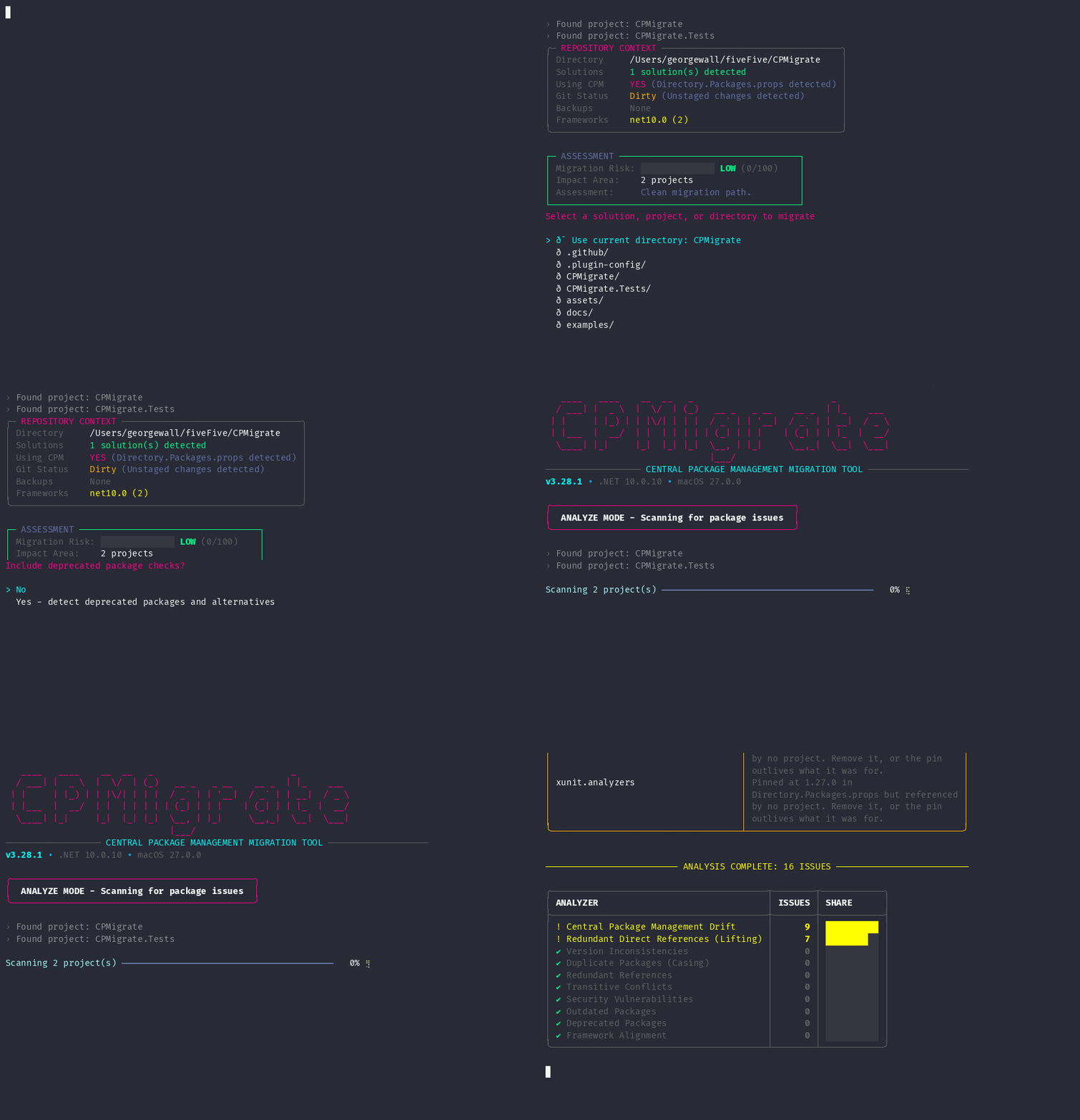
No flags? Bare cpmigrate drops you into Mission Control, an interactive wizard. One project? cpmigrate --project ./src/Api/Api.csproj --dry-run. Monorepo? cpmigrate --batch ./repo --batch-parallel. Team defaults? cpmigrate --init scaffolds a .cpmigrate.json.
Install 📦
Requires .NET SDK 8.0 or later. The tool itself targets net10.0 with LatestMajor roll-forward.
dotnet tool install --global CPMigrate --version 3.88.0
dotnet tool update --global CPMigrate # or: cpmigrate --update
| Channel | Command |
|---|---|
| Homebrew | brew tap georgepwall1991/cpmigrate && brew install cpmigrate |
| 🪟 Winget | winget install GeorgeWall.CPMigrate (after the package is indexed) |
| 📦 Windows portable | CPMigrate-portable-win-x64.zip from Releases |
| 💻 From source | git clone https://github.com/georgepwall1991/CPMigrate.git && dotnet build |
Indexing lag after a fresh release?
dotnet nuget locals http-cache --clear
See it work 🎬
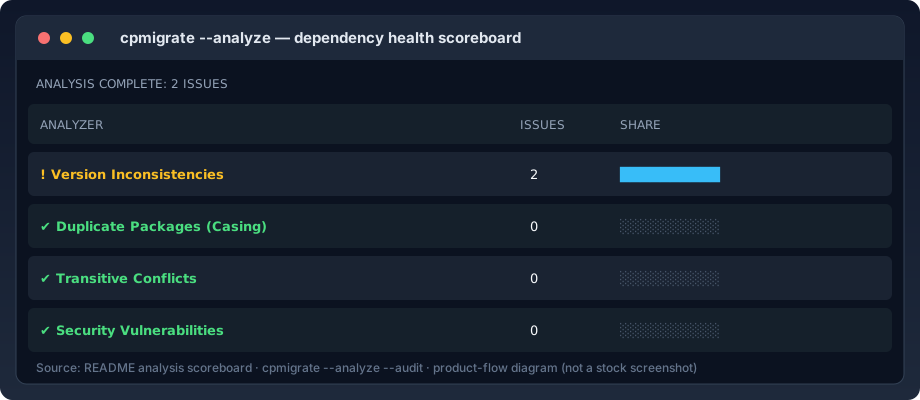
The scoreboard — a 0–100 health meter, not a wall of text
────────────────────────── ! ANALYSIS COMPLETE — 4 ISSUES ──────────────────────────

              ╭──────────────── ANALYZER SCOREBOARD ────────────────╮
              │ ANALYZER                       │ ISSUES │  STATUS   │
              ├────────────────────────────────┼────────┼───────────┤
              │ ! Version Inconsistencies      │      3 │  3 FOUND  │
              │ ✖ Security Vulnerabilities     │      1 │  1 FOUND  │
              │ ✔ Duplicate Packages (Casing)  │      0 │     PASS  │
              │ ✔ Transitive Conflicts         │      0 │     PASS  │
              │ ✔ Redundant References         │      0 │     PASS  │
              ╰────────────────────────────────╯

   Dependency Health  ██████████████████░░░  78/100  GOOD
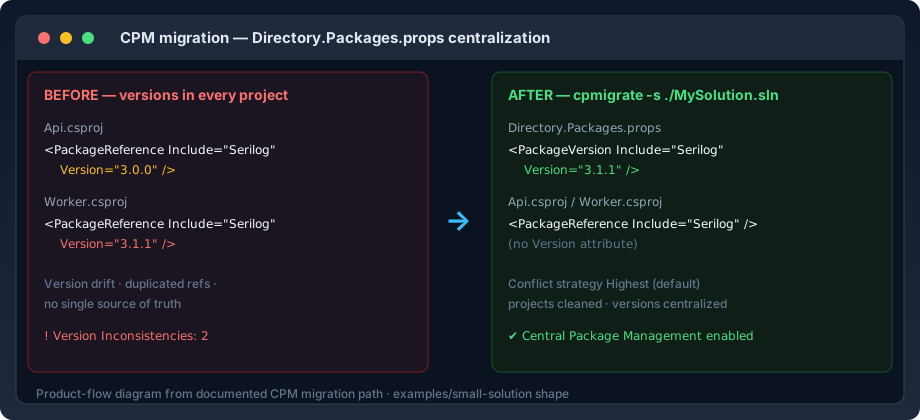
The migration — see the diff before it lands
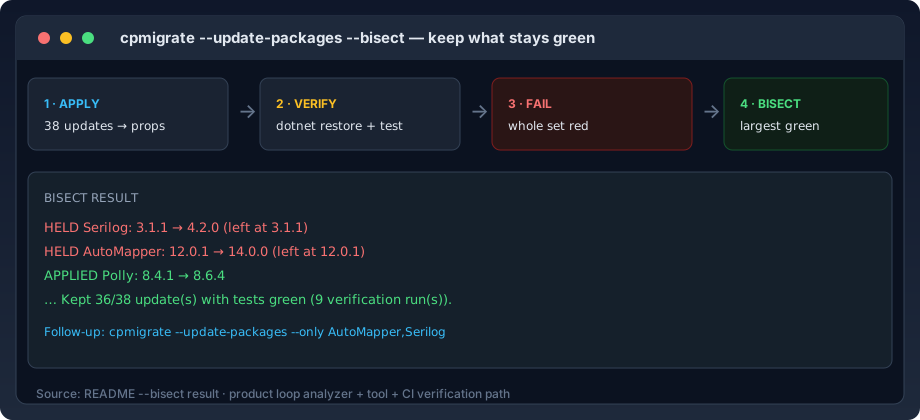
The bisect — keep 36/38 instead of reverting all 38
Mission Control — the interactive wizard
Feature snapshot 🧩
| Surface | What you get |
|---|---|
| 🏗️ CPM migration | Generate Directory.Packages.props, strip inline versions, conflict strategies, --merge |
🔎 --verify |
Restores before and after a migration, --analyze --fix, or --unify-props, diffs the resolved graph, attributes every change to what caused it |
| 🔬 Dependency analysis | 17 rules / 14 analyzers + scoreboard + 0–100 health score; JSON / SARIF / Markdown / CSV |
| 🩹 Auto-fix | Version, casing, redundant refs, transitive pin |
| 🔁 Safe updates | Latest versions + dotnet test + automatic rollback |
🔪 --bisect |
Largest green update subset; names the held-back packages |
🚑 --remediate |
Clears CVEs with the smallest version bump that fixes them — test-verified, rolled back on red, then re-scanned to prove it. Names the CVE, not just the advisory URL |
🧱 Directory.Build.props |
Unify repeated properties across projects |
| 🏢 Batch / monorepo | Sequential or parallel multi-solution runs, with a --report Markdown rollup |
| 💾 Backup & rollback | Timestamped on-disk backups for every destructive path — --list-backups --output Json for CI |
📄 .sln + .slnx |
Classic solutions and Visual Studio 17.10+ .slnx |
🩺 --doctor |
Environment diagnostics: SDK, NuGet, disk space, write access, backup dir, workspace, config, git — or --output Json for CI |
--init |
Scaffold .cpmigrate.json with team defaults |
📟 --status |
One-shot workspace health dashboard — or --output Json for CI |
🌳 --tree |
Dependency tree, direct + transitive — ASCII, or --output Json for CI |
🕵️ --why |
Trace one or more packages (--why A,B,C shares one workspace scan): who declares each, who inherits it, version drift — as text or --output Json (one JSON document per run; multi-ID runs emit a why-many document) for CI |
🔀 --diff |
Unified diff preview on every dry run — migration, --unify-props, fix, update, remediate; capture it with --diff-file for CI |
Why not just do it by hand?
| Manual CPM | Ad-hoc scripts | dotnet package list |
CPMigrate | |
|---|---|---|---|---|
Generates Directory.Packages.props |
✋ | ⚠️ | ✖ | ✅ |
| Conflict resolution strategy | ✖ | ️ | ✖ | ✅ |
| Dependency health scoreboard | ✖ | ✖ | ✖ | ✅ |
| Auto-fixers | ✖ | ️ | ✖ | ✅ |
| Test-verified updates + rollback | ✖ | ✖ | ✖ | ✅ |
| Bisect to keep green subset | ✖ | ✖ | ✖ | ✅ |
| Machine-readable CI output | ✖ | ️ | ️ | ✅ |
| Repeatable across a monorepo | ✖ | ⚠️ | ✖ | ✅ |
Who this is for
- 🧑💼 Solution owners dragging a codebase onto
Directory.Packages.props - 🛠️ App teams modernizing package management without a hand-edited migration PR
- 🏙️ Monorepo / multi-solution teams standardizing one dependency policy
- 🤖 CI/CD maintainers who need gates that can't be fooled by an incomplete scan
🖥️ The whole toolbox
<details open> <summary><b>🩺 Diagnostics & workspace</b> — know your state before you change it</summary>
cpmigrate --doctor                 # SDK, NuGet reachability, disk, write access, backup dir, workspace, config, git — one table
cpmigrate --doctor --output Json   # the same checks as one JSON document for CI
cpmigrate --status                 # repo-context dashboard, no wizard
cpmigrate --status --output Json   # the same facts as one JSON document for CI
cpmigrate --tree --transitive      # ASCII dependency tree per project
cpmigrate --tree --output Json    # the same scan as one JSON document for CI
cpmigrate --why Newtonsoft.Json    # who declares it, who inherits it, do versions drift
cpmigrate --why A,B,C              # same answers for a deny-list of packages, one scan
cpmigrate --why Newtonsoft.Json --output Json   # the same answer, as one JSON document for CI
cpmigrate --why A,B,C --output Json   # all three answers, as one why-many JSON document for CI
cpmigrate --init                   # scaffold .cpmigrate.json (interactive or CI-safe)
</details>
<details open> <summary><b>🔎 Migration & verification</b> — change the build, then prove what changed</summary>
cpmigrate -s ./MySolution.sln --dry-run --diff   # preview, nothing written
cpmigrate -s ./MySolution.sln --dry-run --diff-file changes.patch   # same preview, captured as a file artifact
cpmigrate -s ./MySolution.sln --verify           # migrate, then prove the graph didn't move
cpmigrate -s ./MySolution.sln --verify --verify-strict   # demand a literal no-op
cpmigrate -s ./MySolution.sln --verify --output Markdown # the receipt, for the PR body
cpmigrate -s ./MySolution.sln --analyze --fix --verify   # fix, then prove it still restores
cpmigrate -s ./MySolution.sln --unify-props --verify     # unify, then prove only the hoisted refs moved
</details>
<details open> <summary><b>🔬 Analysis & auto-fix</b> — find the rot, then fix it</summary>
cpmigrate --analyze --audit --outdated --deprecated --licenses --transitive
cpmigrate --analyze --fix                       # apply every auto-fixable finding (backed up first — undo with --rollback)
cpmigrate --analyze --fix-dry-run               # preview the fixes
cpmigrate --analyze --fix-dry-run --diff        # …as unified diffs of the exact file contents
cpmigrate --analyze --fail-on High              # gate CI without failing on old debt
cpmigrate --analyze --write-baseline            # accept today's debt; fail only on new
</details>
<details open> <summary><b>🔁 Updates & bisect</b> — move forward without fear</summary>
cpmigrate --update-packages --dry-run
cpmigrate --update-packages                     # update · test · rollback on red
cpmigrate --update-packages --bisect            # keep the largest green subset
cpmigrate --update-packages --only Serilog,Polly   # chase the held-back ones
</details>
📚 CLI reference
Every flag, in one place. Collapsible so the page stays scannable.
<details open> <summary><b>Diagnostics & workspace</b></summary>
| Option | Default | Description |
|---|---|---|
--doctor |
false |
Diagnose the environment: SDK, NuGet, disk space, workspace writability, backup directory access, config, git — --output Json prints the same checks as one JSON document |
--init |
false |
Scaffold a .cpmigrate.json (interactive, or CI-safe defaults) — --output Json prints the outcome as one JSON document (status: created/overwritten/exists) |
--status |
Print a workspace health dashboard (solutions, projects, CPM, config, git, backups, frameworks) and exit — --output Json prints the same facts as one JSON document |
|
--tree |
false |
Dependency tree per project (add --transitive for the full graph). With --output Json, emits a tree document instead of the ASCII rendering: every discovered project's direct and transitive packages, each project carrying a scanned flag so an unread project is never mistaken for an empty one |
--why |
— | Explain where one or more comma-separated packages come from (--why A,B,C): direct declarations (inline vs central pin), update-only amendments, transitive introducers, and version drift across projects — each package's answer rendered under its own banner from one workspace scan. The exit code is the worst of the per-package answers: any incomplete scan → 8, else any not-found → 1, else 0. With --output Json, one ID emits the single-package whyReport document; several IDs emit a why-many document with one entry per package under results and the same folded exit code mirrored at the top |
</details>
<details open> <summary><b>Migration & core</b></summary>
| Option | Short | Default | Description |
|---|---|---|---|
--solution |
-s |
cwd | Path to a .sln / .slnx file, a project file, or a directory — a directory with no solution is scanned for projects recursively |
--project |
-p |
A specific project file, or a directory holding one | |
--output-dir |
-o |
. |
Where Directory.Packages.props is written |
--dry-run |
-d |
false |
Preview changes without modifying files |
--diff |
false |
Render a unified diff during --dry-run or --fix-dry-run (migration, --unify-props, fix, --update-packages, or --remediate preview) |
|
--merge |
false |
Merge into an existing props file instead of failing | |
--conflict-strategy |
Highest |
Highest · Lowest · Fail |
|
--interactive-conflicts |
false |
Prompt for each version conflict | |
--keep-attrs |
-k |
false |
Leave inline Version attributes in place |
--verify |
false |
Prove the migration, --analyze --fix, or --unify-props didn't change what restores. Two restores; exit 9 on drift nothing explains, rolled back |
|
--verify-strict |
false |
Fail on any graph change, including explained ones. Requires --verify |
|
--interactive |
-i |
false |
Launch the Mission Control wizard |
</details>
<details open> <summary><b>Analysis & auto-fix</b></summary>
| Option | Short | Default | Description |
|---|---|---|---|
--analyze |
-a |
false |
Run dependency health analysis |
--transitive |
false |
Include transitive dependencies | |
--audit |
false |
Security vulnerability scanning | |
--outdated |
false |
Outdated package checks | |
--deprecated |
false |
Deprecated package checks | |
--licenses |
false |
Flag copyleft / proprietary / unknown licenses from restored nuspecs | |
--fix |
false |
Apply auto-fixes (with --analyze) — every file lands in .cpmigrate_backup before its first write, so --rollback undoes a fix run too |
|
--fix-dry-run |
false |
Preview auto-fixes; --diff/--diff-file render the exact file changes |
|
--fix-rule |
Comma-separated rule IDs to restrict --fix/--fix-dry-run to (e.g. OrphanedPackageVersion,InlineVersionUnderCpm) |
||
--fail-on |
Info |
Lowest severity that fails: Info·Low·Moderate·High·Critical·Never |
|
--rules |
Per-rule policy: Rule=Severity pairs, or Rule=none to switch a rule off |
||
--max-parallelism |
procs (≤8) | Projects scanned at once for --audit/--outdated/--deprecated, and for the concurrent per-project scans behind --tree/--why |
|
--baseline |
Accepted-findings file; reported but never fail the build | ||
--write-baseline |
false |
Record current findings as the baseline, then exit |
Tuning rules to the codebase. --fail-on is one global threshold, so silencing a noisy rule means lowering the gate for everything. --rules re-grades or removes rules individually, before the threshold is applied:
cpmigrate --analyze --rules "OutdatedPackage=none,LicenseRisk=Critical"
Unknown rule IDs are rejected, not ignored — a typo that quietly left a rule armed would look exactly like a working policy. A disabled rule is different from a baselined one: baselined findings stay visible so the debt gets paid down, while a disabled rule reports nothing at all. Either way the policy is echoed in the terminal and published in JSON (summary.disabledRules, summary.severityOverrides), so issuesFound: 0 can always be told apart from findings that were configured away. Set "rules" in .cpmigrate.json to apply it team-wide.
Gating on a codebase with existing debt. --fail-on High narrows the gate without narrowing the report — sub-threshold findings still show in terminal, JSON, and SARIF; only the exit code changes. It can never suppress exit 8 (incomplete scan). Record the current state once, then fail only on what's new:
cpmigrate --analyze --audit --write-baseline              # commit .cpmigrate-baseline.json
cpmigrate --analyze --audit --baseline .cpmigrate-baseline.json
Baselined findings stay visible everywhere (suppressed: true in JSON, kind: "external" in SARIF). A finding is keyed by rule + package + projects — a version drifting 13.0.1 → 13.0.2 stays suppressed; spreading to a new project does not.
Baselines rot as the debt gets paid down, and a run that reads one now says so: entries that matched nothing show up as summary.baselineStaleEntries (plus a Markdown summary row and a terminal warning) so you can remove them from the file by hand. Do not reach for --write-baseline to prune: it replaces the baseline with every current finding, silently accepting new debt alongside the cleanup. Entries citing a rule ID the catalog no longer has — usually a renamed or deleted rule — are reported separately (summary.baselineUnknownRuleCodes, terminal warning pointing at cpmigrate --explain all) rather than being counted as fixed debt. Nothing is pruned automatically.
</details>
<details open> <summary><b>Package updates</b></summary>
| Option | Default | Description |
|---|---|---|
--update-packages |
false |
Update all packages, test, rollback on failure; --dry-run [--diff|--diff-file] previews the exact props edits |
--include-prerelease |
false |
Include pre-release versions |
--bisect |
false |
Keep the largest green subset instead of reverting all |
--bisect-budget |
16 |
Max restore+test cycles a bisection may spend |
--bisect-test-filter |
dotnet test --filter expression per probe |
|
--only |
Comma-separated package IDs to restrict the update to |
How --bisect thinks. The whole set is verified first (one run if it's healthy). On failure it halves: a clean half is banked into the baseline every later probe builds on; a failing half splits again until one package is held back. Probing against the banked-good set — not each package alone — catches failures that need two packages together. Cost ≈ 2·log₂(n) cycles. Exit 0 when green with ≥1 applied (check summary.packagesHeldBack in JSON for a partial), 7 when nothing could be kept. --bisect can't combine with --dry-run.
Transitive pins need the switch. --transitive finds newer versions of packages your graph only reaches indirectly — but a PackageVersion for a package nothing references directly is inert unless the workspace sets CentralPackageTransitivePinningEnabled. Rather than write pins that change nothing and report them as applied, the run withholds them and names the property (in the terminal and as packageUpdates[].withheld / summary.transitivePackagesWithheld in JSON); set it in Directory.Packages.props or Directory.Build.props and they apply on the next run. Migration is the exception: --transitive there is an explicit request for live transitive pins, so when the scan introduces packages no project references directly, the generated or merged Directory.Packages.props also carries the property (an explicit false — in the props file or a governing Directory.Build.props — is preserved with a warning, never flipped).
</details>
<details open> <summary><b>Security remediation</b></summary>
| Option | Default | Description |
|---|---|---|
--remediate |
false |
Clear known advisories: move each vulnerable package to the lowest version that fixes it, run dotnet test, roll back on red, then re-scan to prove the CVEs are gone |
--allow-major |
false |
Let --remediate apply a fix that crosses a major version. Withheld and reported by default |
--remediate also honours --bisect, --bisect-budget, --bisect-test-filter, --only, --dry-run (with --diff/--diff-file for the exact props edit), --include-prerelease, --no-backup and --output Json.
Why "lowest" and not "latest". --update-packages asks what is newest, which is right for staying current and wrong for clearing a CVE: it turns a one-patch security fix into an unrelated feature upgrade and drags in every behaviour change since. A remediation diff should be the smallest change that makes the advisory go away, so a reviewer can see it is a security fix and nothing else.
Where the fix version comes from. Findings still come from dotnet list package --vulnerable — CPMigrate adds no advisories of its own. But the SDK reports only a severity and an advisory URL, never the version that fixes it. --remediate looks that one advisory up by its exact GHSA id at OSV.dev, reads the affected ranges, and picks the lowest published version outside all of them. It is a remediation oracle, not a second scanner: it cannot invent a finding, and it is the reason the receipt can finally print a CVE number instead of a URL.
It re-scans rather than asserting. After verification goes green, the vulnerability scan runs again and the receipt reports what that found — remediation.advisoriesAfter is measured, never derived by subtracting what was applied. Exit 0 requires it to be zero.
cpmigrate --remediate --dry-run                 # the plan: every advisory, the minimum version that clears it
cpmigrate --remediate                           # apply · restore · test · roll back on red · re-scan
cpmigrate --remediate --bisect                  # keep the largest subset that stays green
cpmigrate --remediate --allow-major             # permit major bumps when no in-major fix exists
cpmigrate --remediate --output Json --quiet     # the receipt, for CI
⚠️ Air-gapped CI: the advisory oracle needs
api.osv.dev. If it is unreachable,--remediateexits8and writes nothing rather than falling back to a latest-version bump — an unproven fix must not go green.
</details>
<details> <summary><b>Modernization · batch · backup · output · rules</b></summary>
Modernization
| Option | Default | Description |
|---|---|---|
--unify-props |
false |
Promote common properties and items to Directory.Build.props, with a backup --rollback undoes. Names the projects that newly receive each entry; --verify proves the hoisted references are the only graph change; --dry-run [--diff|--diff-file] previews the exact writes (--output Json emits the candidates, outcome, backup, and receipt) |
--force |
false |
Skip confirmation prompts |
Batch processing
| Option | Default | Description |
|---|---|---|
--batch |
Recursively scan a directory for solutions | |
--batch-parallel |
false |
Process solutions in parallel |
--batch-continue |
false |
Continue past a failing solution |
--report <PATH> |
Write a Markdown rollup of the batch run to a file | |
--exclude |
Comma-separated directory names to skip during batch discovery, in addition to the built-in set |
Backup & rollback
| Option | Short | Default | Description |
|---|---|---|---|
--rollback |
-r |
false |
Restore the most recent backup |
--no-backup |
-n |
false |
Disable backup creation |
--backup-dir |
. |
Backup directory location | |
--list-backups |
false |
List backups with timestamps & file counts — --output Json prints the same history as one JSON document |
|
--prune-backups |
false |
Delete old backups per --retention — --output Json prints the outcome as one JSON document (status: pruned/noBackups/nothingToPrune/failed) |
|
--prune-all |
false |
Delete all backups — --output Json prints the outcome as one JSON document |
|
--retention |
5 |
Backups to keep when pruning | |
--add-gitignore |
false |
Add the backup dir to .gitignore |
|
--gitignore-dir |
. |
Where to create .gitignore if missing |
Output & logging
| Option | Short | Default | Description |
|---|---|---|---|
--output |
Terminal |
Terminal · Json · Sarif · Markdown · Csv (Sarif/Csv need --analyze; Markdown needs --analyze or --verify) |
|
--output-file |
Write Json/Sarif/Markdown/Csv to a file |
||
--diff-file |
Append every dry-run unified diff — migration, --unify-props, --fix-dry-run, --update-packages, or --remediate — to a file; created empty when nothing changes, missing when the run crashed; rejected for every other command |
||
--quiet |
-q |
false |
Suppress non-essential output |
--verbose |
-v |
false |
Diagnostic logging to cpmigrate.log |
Rules, completions & self-update
| Option | Description |
|---|---|
--explain <RuleId> |
What a rule means, why it matters, how to fix it (--explain all lists every rule) — --output Json prints the rule as one JSON document |
--completions <Shell> |
Emit a completion script and exit: Bash · Zsh · Fish · PowerShell |
--update |
Check for and install the latest CPMigrate — --dry-run reports without installing, --force runs unattended; --output Json emits the outcome as a document (updated · alreadyLatest · checkFailed · dryRun · nonInteractive · declined · failed) |
Completions are generated from the live option list — enums and paths complete too, so they can't drift. --explain IDs paste straight from build logs and SARIF (issueCode / ruleId); a near-miss suggests the real rule, an unknown ID exits non-zero so a CI typo is visible.
</details>
🚪 Exit codes
The contract a CI gate is written against — and the one thing a script can't discover by trying.
| Code | Name | Meaning |
|---|---|---|
0 |
Success | Operation completed successfully |
1 |
ValidationError | Invalid command-line options |
2 |
FileOperationError | File I/O or permission failure |
3 |
VersionConflict | Unresolvable conflict (with --conflict-strategy Fail) |
4 |
NoProjectsFound | No .csproj / .fsproj / .vbproj files discovered |
5 |
AnalysisIssuesFound | Analysis detected issues (your CI gate) |
6 |
UnexpectedError | Unhandled exception |
7 |
TestFailure | Tests failed after update (rollback done); with --bisect, only when nothing could be kept |
8 |
IncompleteAnalysis | A scan didn't finish — treat as re-run, never as clean |
9 |
GraphDrift | --verify found the resolved graph moved unexplained, or couldn't prove it hadn't |
10 |
RemediationIncomplete | --remediate ran but an advisory is still there: no version fixes it, the fix is a withheld major, or tests held it back |
⚠️ Exit
8is the whole point of the gate. If a project fails to scan, the run reports nothing for the part it couldn't read. A green0on an incomplete scan would let a vulnerability slip through. Always branch on8.
⚠️ Exit
9is the only code that says the files are fine and the build isn't. A migration that rewrites every.csprojperfectly and quietly ships a different version of a package exits0on every other measure.
🤖 CI/CD integration
Strict JSON contract
--output Json --quiet guarantees JSON-only stdout against a published schema:
cpmigrate --analyze --audit --outdated --deprecated --output Json --quiet > analyze.json
cpmigrate -s ./MySolution.sln --dry-run --output Json --quiet > migrate.json
Key off outputSchemaVersion, not the tool version. Two gotchas: success: true ≠ "no findings" (read summary.issuesFound / issuesAtOrAboveThreshold), and absent fields are meaningful (no issuesBaselined = no baseline used, not zero suppressions). --output Csv gives one row per finding for spreadsheets.
SARIF → PR annotations
- name: Install CPMigrate
  run: dotnet tool install --global CPMigrate
- name: Analyze dependencies
  id: analyze
  run: |
    set +e
    cpmigrate --analyze --audit --outdated --deprecated \
      --output Sarif --output-file cpmigrate.sarif --quiet
    echo "exit_code=$?" >> "$GITHUB_OUTPUT"
- name: Upload SARIF
  if: always() && hashFiles('cpmigrate.sarif') != ''
  uses: github/codeql-action/upload-sarif@v3
  with:
    sarif_file: cpmigrate.sarif
- name: Require a completed scan
  run: |
    code="${{ steps.analyze.outputs.exit_code }}"
    case "$code" in 0|5) ;; *) echo "::error::incomplete scan (exit $code)"; exit 1 ;; esac
Capture the exit code — don't continue-on-error, which would swallow 8 and go green on exactly the case the upload exists to catch.
Markdown → job summary / PR comment
cpmigrate --analyze --audit --outdated --output Markdown --quiet >> "$GITHUB_STEP_SUMMARY"
Verdict-first, severity breakdown, findings linked to their rules, baselined rows marked, incomplete scans flagged, long lists collapsed behind <details>. Post to a PR with gh pr comment "$N" --body-file report.md. Full guide: georgepwall1991.github.io/CPMigrate/guides/ci-cd.
Gate a migration PR on the resolved graph
A migration PR is sixty changed files, and git diff cannot answer the only question that matters: does this change what we ship? --verify answers it, and exits 9 when it can't.
- name: Migrate and verify
  id: migrate
  run: |
    set +e
    cpmigrate -s ./MySolution.sln --verify --force --output Markdown --quiet > receipt.md
    echo "exit_code=$?" >> "$GITHUB_OUTPUT"
- name: Publish the receipt
  if: always() && hashFiles('receipt.md') != ''
  run: cat receipt.md >> "$GITHUB_STEP_SUMMARY"
- name: Require an accounted-for graph
  run: |
    code="${{ steps.migrate.outputs.exit_code }}"
    [ "$code" = "0" ] || { echo "::error::resolved graph moved unexplained (exit $code)"; exit 1; }
--verify rolls the change back on drift it can't account for — the migration, or the fixes under --analyze --fix — so a failed job leaves the tree as it found it. Add --verify-strict when the migration must be a literal no-op — then any graph change fails, even one the receipt explains.
After any rollback — including this one — run dotnet restore before building. Backups cover project files and Directory.Packages.props, not obj/, so obj/project.assets.json can still hold resolved graphs written after the backup was taken (by the verification captures, or by a test-verified update's restore). External tools that read obj/ directly will see the undone graph until a fresh restore rewrites it. CPMigrate itself always clears those files before reading, so its own verdicts are unaffected.
❓ FAQ
<details> <summary><b>How do I migrate a solution to Central Package Management?</b></summary>
cpmigrate -s ./MySolution.sln --dry-run --diff to preview, then cpmigrate -s ./MySolution.sln --verify to apply. CPMigrate extracts every <PackageReference>, resolves conflicts by strategy, generates Directory.Packages.props, and strips inline Version attributes — with a timestamped backup you can --rollback to. --verify then proves the result restores to the same graph it started from.
</details>
<details> <summary><b>Does migrating to CPM change what my code builds against?</b></summary>
It can, and that's the point of --verify. Moving a version from a .csproj into Directory.Packages.props is a no-op — but when two projects disagree about a package, the migration has to pick one, and --conflict-strategy Highest (the default) silently upgrades the loser. That's a real change to shipped binaries, and git diff can't show it to you.
--verify restores before and after, diffs the fully-resolved graph per project and target framework, and reports every version that moved alongside the decision that caused it — plus anything reachable from it. Changes nothing accounts for fail the run (exit 9) and roll the migration back. On Serilog it reports: 221 resolved versions, 216 unchanged, 5 moved, all from one PolySharp unification.
</details>
<details> <summary><b>What <i>is</i> <code>Directory.Packages.props</code>?</b></summary>
The file NuGet Central Package Management reads versions from, so every project shares one version per package instead of declaring its own. CPMigrate generates and maintains it. Microsoft's CPM docs cover the format.
</details>
<details> <summary><b>Can it roll back a bad update?</b></summary>
Two ways. --update-packages runs dotnet test and rolls back on failure. --update-packages --bisect keeps the largest green subset and names the held-back packages. Migrations get timestamped backups restorable with cpmigrate --rollback.
</details>
<details> <summary><b>Can it actually fix a CVE, not just report one?</b></summary>
Yes — cpmigrate --remediate. For each advisory --audit reports, it finds the lowest published version that clears it, applies only those bumps, runs dotnet test, and rolls back on red (--bisect keeps the largest green subset). Then it runs the vulnerability scan again and reports what that second scan found: remediation.advisoriesAfter is measured, not inferred, and exit 0 requires it to be zero.
Lowest rather than latest is deliberate. --update-packages asks what is newest, which turns a one-patch security fix into an unrelated feature upgrade. A remediation diff should be the smallest change that makes the advisory go away.
The findings still come from dotnet list package --vulnerable — CPMigrate adds no advisories of its own. Only the fix version is looked up externally, by exact GHSA id at OSV.dev, which is also how the receipt can name a CVE instead of a URL. If that lookup can't be reached, the run exits 8 and writes nothing rather than guessing.
</details>
<details> <summary><b>Does it work in CI/CD?</b></summary>
It's built for it. --output Json --quiet for strict stdout, --output Sarif for PR annotations, --output Markdown for the step summary, --output Csv for spreadsheets. Exit codes are contract-level: 5 = findings, 8 = incomplete scan.
</details>
<details> <summary><b>Does it support <code>.slnx</code> and monorepos?</b></summary>
Yes — classic .sln and VS 17.10+ .slnx, and --batch recursively discovers every solution, optionally in parallel (--batch-parallel) and continue-on-failure (--batch-continue), with an isolated backup per solution.
</details>
<details> <summary><b>Can I gate on vulnerabilities without failing on existing debt?</b></summary>
Yes. --audit scans direct + transitive CVEs; --fail-on High narrows the gate while still reporting everything; --write-baseline records today's findings once so CI fails only on new debt. Baselined findings stay visible in every report.
</details>
<details> <summary><b>Which .NET versions are supported?</b></summary>
The tool targets .NET 10 with LatestMajor roll-forward and runs on any machine with .NET SDK 8.0+. Your projects can target anything — CPMigrate edits XML directly, and only restores or builds your solution when you ask it to: --verify, --update-packages, --transitive, --audit, --outdated, and --deprecated.
</details>
🔧 Configuration
cpmigrate --init writes a .cpmigrate.json (CLI flags always win):
{
  "$schema": "https://raw.githubusercontent.com/georgepwall1991/CPMigrate/main/schemas/cpmigrate.schema.json",
  "conflictStrategy": "Highest",
  "backup": true,
  "addGitignore": true,
  "failOn": "High",
  "baseline": ".cpmigrate-baseline.json",
  "retention": { "enabled": true, "maxBackups": 5 },
  "excludeDirectories": ["node_modules", "bin", "obj", ".git", "packages"],
  "analyze": true,
  "audit": true,
  "outdated": true,
  "deprecated": true,
  "licenses": true,
  "transitive": false,
  "maxParallelism": 4
}
Discovered by walking up from the solution/project path (or cwd). excludeDirectories adds directory names to the built-in batch-scan exclusions rather than replacing them (--exclude overrides it for one run). Contradictory settings warn; malformed JSON reports the exact line and column. Unknown keys are named, not ignored — a typo like fialOn warns did you mean 'failOn'? instead of silently leaving the setting unset (nested keys too, e.g. inside retention). Keys that differ only in case still deserialize normally and are not flagged. The run itself never fails on an unknown key. The analysis toggles — analyze, transitive, audit, outdated, deprecated, licenses, maxParallelism — are team policy the same way failOn and rules are: which checks the default scan runs is a decision about the codebase, not about the invocation.
Compatibility ✅
- .NET SDK: 8.0+ (tool targets
net10.0,LatestMajorroll-forward) - Projects:
.csproj/.fsproj/.vbproj - Solutions:
.slnand.slnx - CPM: generates and consumes standard NuGet Central Package Management files
--verifycosts two full solution restores — one for the baseline, one for the result — and needs the feed both times. It is opt-in for that reason. A restore that fails either time is reported as exit9, never as a clean graph.--verifyfails closed rather than guessing. Three shapes it will not measure, each reported by name rather than silently skipped: two projects in one directory (they share a singleobj/project.assets.json, so neither can be read independently); two projects that would be reported under the same name; and a project that redirects its intermediate output (MSBuildProjectExtensionsPath,BaseIntermediateOutputPath,ProjectAssetsFile), since finding its graph needs MSBuild evaluation this pass does not perform. In each case the run exits9— a verification that cannot tell two projects apart has verified neither.--verifyneeds the solution, not a directory holding several. Discovery can pick one interactively, but the restore still targets the directory, whichdotnet restorerejects. Pass-s ./Path/To/Solution.slnxwhen a directory contains more than one.--verifyis incompatible with--output Csv, which carries analyzer findings and has no shape for a receipt. Use--output Jsonor--output Markdown.
🧪 Examples & benchmarks
- Starter repo:
examples/small-solution/ - Monorepo:
examples/monorepo/ - Benchmarks:
docs/benchmarks.md
🗓️ Release cadence
Stable releases weekly (versioned + changelogged); RCs for fast feedback. Source of truth: CHANGELOG.md. Policy: docs/release-cadence.md.
📡 Telemetry (opt-in)
Disabled by default. Set CPMIGRATE_TELEMETRY_OPT_IN=true to emit command-level metrics only (operation, duration, exit-code category, high-level flags) — never paths, package names, file contents, or source. Stored locally at ~/.cpmigrate/telemetry/events.ndjson.
🤝 Contributing
Fork → git checkout -b feature/thing → write tests → dotnet test → open a PR. The drift tests hold the docs to the code, so update the README tables when you touch a flag.
📜 License
MIT — see LICENSE.
<div align="center">
Built by George Wall · cpmigrate · make the build boring again.
⭐ Star it · 🐛 Report a bug · 📖 Docs site
</div>
| Product | Versions Compatible and additional computed target framework versions. |
|---|---|
| .NET | net10.0 is compatible. net10.0-android was computed. net10.0-browser was computed. net10.0-ios was computed. net10.0-maccatalyst was computed. net10.0-macos was computed. net10.0-tvos was computed. net10.0-windows was computed. |
This package has no dependencies.
| Version | Downloads | Last Updated |
|---|---|---|
| 4.4.0 | 56 | 9/15/2026 |
| 4.3.0 | 46 | 9/15/2026 |
| 4.2.0 | 54 | 9/15/2026 |
| 4.1.0 | 62 | 9/15/2026 |
| 3.99.0 | 62 | 9/15/2026 |
| 3.98.0 | 69 | 9/15/2026 |
| 3.97.0 | 53 | 9/15/2026 |
| 3.96.0 | 64 | 9/15/2026 |
| 3.95.0 | 64 | 9/15/2026 |
| 3.94.0 | 50 | 9/15/2026 |
| 3.93.0 | 57 | 9/15/2026 |
| 3.92.0 | 59 | 9/15/2026 |
| 3.91.0 | 58 | 9/15/2026 |
| 3.90.0 | 59 | 9/15/2026 |
| 3.89.0 | 74 | 9/14/2026 |
| 3.88.0 | 78 | 9/14/2026 |
| 3.87.0 | 71 | 9/14/2026 |
| 3.86.0 | 84 | 9/14/2026 |
| 3.85.0 | 82 | 9/14/2026 |
| 3.84.0 | 78 | 9/14/2026 |
3.88.0 closes the remaining empty-backup-path holes: CreateBackupForProject returns null on an empty path even with backups enabled, and RestoreFile fails fast rather than probing the working directory for a coincidentally named backup file.