Blazonia.ComponentGenerator
12.0.0-preview1
dotnet tool install --global Blazonia.ComponentGenerator --version 12.0.0-preview1
dotnet new tool-manifest
dotnet tool install --local Blazonia.ComponentGenerator --version 12.0.0-preview1
#tool dotnet:?package=Blazonia.ComponentGenerator&version=12.0.0-preview1&prerelease
nuke :add-package Blazonia.ComponentGenerator --version 12.0.0-preview1
🪢 Blazonia

English | 中文
🤔 What is this?
Blazonia enables developers to use the <a href="https://dotnet.microsoft.com/en-us/apps/aspnet/web-apps/blazor">Blazor</a> syntax to build <a href="https://avaloniaui.net/">Avalonia</a> applications. Compared to Avalonia’s original XAML syntax, Blazonia’s Blazor-based approach is more concise and straightforward, allowing you to develop pages using a single file. It is particularly suitable for small to medium-sized client applications.
✨ Note
- 🚫 After using Blazonia, there will be no HTML code or WebView components involved.
- 🤩 Fully utilizes native Avalonia controls
Thanks to Avalonia's cross-platform capabilities, Blazonia enables developers to rapidly build beautiful, pixel-perfect applications for 💻 desktop, 📱 mobile, and 🌐 web platforms.
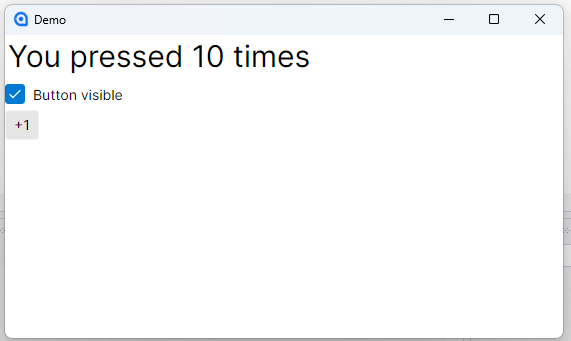
🌰 A Simple Example
<StackPanel>
    <Label FontSize="30">You pressed @_count times </Label>
    <CheckBox @bind-IsChecked="_showButton">Button visible</CheckBox>
    @if (_showButton == true)
    {
        <Button OnClick="OnButtonClick">+1</Button>
    }
</StackPanel>

@code {

    int _count;

    bool? _showButton = true;

    void OnButtonClick() => _count++;
}
🛫 Getting Start
New Project
- Install the project template
dotnet new install BlazoniaTemplate
- Create a new project with the template
dotnet new blazonia -o BlazoniaApp
Use in an Existing Project
- Install Blazonia
dotnet add package Blazonia
- Create a new Razor component
<StackPanel>
    <TextBlock FontSize="30">Hello World</TextBlock>
</StackPanel>
- Use Blazonia controls in axaml
<UserControl
            ...
			 xmlns:b="https://blazonia.github.io"
			 xmlns:pages="clr-namespace:YourProject.RazorPages"
             ...
             >
	<b:BlazoniaControl x:TypeArguments="pages:Hello"/>
</UserControl>
📃 Razor Page Navigation?
- Replace
BlazoniaControlwithBlazoniaNavigationControlcontrol
<UserControl
            ...
			 xmlns:b="https://blazonia.github.io"
			 xmlns:pages="clr-namespace:YourProject.RazorPages"
             ...
             >
	<b:BlazoniaNavigationControl x:TypeArguments="pages:Page1"/>
</UserControl>
- Inject the INavigation object for page navigation
@inject INavigation Navigation

<StackPanel>
    <TextBlock FontSize="30">Page 1</TextBlock>
    <Button OnClick="@OnButtonClick">Go to Page2</Button>
</StackPanel>

@code {
    async Task OnButtonClick()
    {
        await Navigation.NavigateToAsync("/page2", null);
    }
}
- Use the @page attribute to mark the url
@page "/page2"
@inject INavigation Navigation

<StackPanel>
    <TextBlock FontSize="30">Page 2</TextBlock>
    <Button OnClick="@OnButtonClick">Back</Button>
</StackPanel>

@code {
    async Task OnButtonClick()
    {
        await Navigation.PopAsync();
    }
}
✂ NativeAot and Trimming
Blazonia supports NativeAot and trimming features, but you need to add the TrimmerRootDescriptor property to your project to let the trimmer preserve all metadata of the Razor components
<linker>
	<assembly fullname="YourProject">
		<namespace fullname="Razor Component NameSpace" preserve="all" />
	</assembly>
</linker>
<Project Sdk="Microsoft.NET.Sdk">
     ...
	<ItemGroup>
		<TrimmerRootDescriptor Include="..\root.xml" />
	</ItemGroup>
</Project>
⚠️ Notes
Please use Rider or VS Code to develop the project, as the code hints for razor files in Visual Studio 2022 may fail.
🗨 Communication
- Discord Server: https://discord.gg/qtDKFgRAcg
- QQ Group: 1063998889

This project is based on multiple upstream repositories. See NOTICE for details.
| Product | Versions Compatible and additional computed target framework versions. |
|---|---|
| .NET | net10.0 is compatible. net10.0-android was computed. net10.0-browser was computed. net10.0-ios was computed. net10.0-maccatalyst was computed. net10.0-macos was computed. net10.0-tvos was computed. net10.0-windows was computed. |
This package has no dependencies.
| Version | Downloads | Last Updated |
|---|---|---|
| 12.0.0-preview1 | 189 | 2/27/2026 |
| 11.3.0 | 163 | 12/27/2025 |
| 11.2.1 | 129 | 12/27/2025 |
| 0.0.0-alpha.0.901 | 195 | 12/22/2025 |
| 0.0.0-alpha.0.900 | 111 | 12/20/2025 |
| 0.0.0-alpha.0.899 | 118 | 12/20/2025 |
| 0.0.0-alpha.0.897 | 289 | 12/17/2025 |
| 0.0.0-alpha.0.894 | 206 | 7/7/2025 |
| 0.0.0-alpha.0.890 | 213 | 4/21/2025 |
| 0.0.0-alpha.0.889 | 237 | 4/17/2025 |
| 0.0.0-alpha.0.888 | 205 | 4/16/2025 |
| 0.0.0-alpha.0.887 | 228 | 4/16/2025 |
| 0.0.0-alpha.0.886 | 210 | 4/16/2025 |
| 0.0.0-alpha.0.882 | 238 | 4/15/2025 |
| 0.0.0-alpha.0.881 | 237 | 4/15/2025 |
| 0.0.0-alpha.0.880 | 294 | 4/16/2025 |