Aspose.PDF FOSS for .NET




Aspose.PDF FOSS for .NET is a free, open-source PDF library for .NET Framework 4.8, .NET Standard 2.0 and .NET 8+ that reads, creates,
modifies, and converts PDF documents. A Document object model, task-oriented facades, and
converters cover the common PDF scenarios: text, forms, annotations, security and signatures,
rendering, accessibility, and comparison.
Navigation
At a Glance
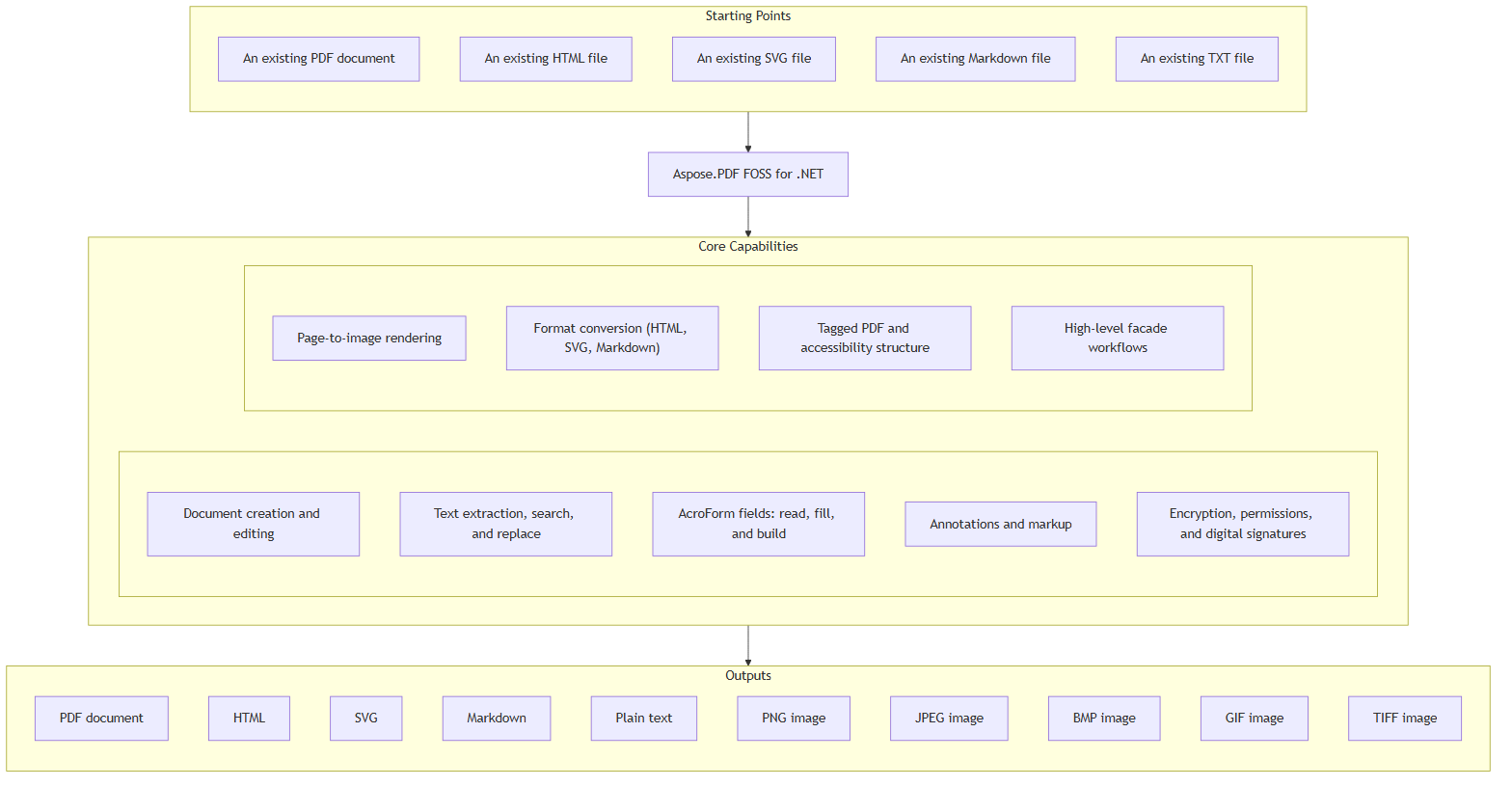
Key Capabilities
- Open an existing PDF or create one from scratch with
Document, then add, delete, reorder,
rotate, resize, or copy pages across documents through Page and PageCollection; full
round-trip save and incremental save preserve bookmarks and outlines, page labels, named
destinations, document info, XMP metadata, and optional content (OCG) layers; DictionaryEditor
edits the raw dictionary behind a page, the catalog or a resources dictionary.
- Standard 14 font handling, TrueType / OpenType embedding and subsetting, and Type 1 (PostScript)
and Type 3 font parsing are handled through
FontRepository and FontEmbedder; the Standard 14
widths and bounding boxes follow Adobe's own AFM files, and OpenTypeFeatures applies a face's
liga, onum, stylistic-set and other feature tables to a run on request.
- Extract text with
TextAbsorber, TextFragmentAbsorber, ParagraphAbsorber, and
TableAbsorber; find and replace across pages — including cross-operator and ligature-aware
spans — and build new text with TextBuilder, TextFragment, TextSegment, TextStamp, and
FormattedText, with Bidi (RTL) support and AGL Unicode mapping.
- Read, fill, and build AcroForm fields — text, checkbox, radio, choice, button, signature, date,
rich text, file-select (
FileSelectBoxField) and paper-barcode (BarcodeField) — through Form,
Field, FormFieldBuilder, FormEditor, and FormDataConverter, including field-level flatten
and JSON/XFDF form-data import and export.
- Add and edit every standard annotation type — link, text, free-text, highlight,
square/circle/line/polyline, ink, stamp, popup, file attachment, screen, redaction, watermark,
pre-press marks, and rich media — with appearance generation and flatten. Applying a redaction
(
RedactionAnnotation.Redact, PdfAnnotationEditor.RedactArea) removes what lies under the
area for good — glyphs, path segments, image pixels, the annotations it touches and the
alternate text restating it — rather than covering it. Document-level
attachments in Document.EmbeddedFiles keep the name, description, MIME type, checksum, dates
and AFRelationship their FileSpecification declares, including names outside Latin-1.
- Encrypt and decrypt with RC4-40, RC4-128, AES-128, and AES-256, and sign documents with PKCS#1
and PKCS#7 / CMS detached signatures — including DocMDP certifying signatures, RFC 3161
document timestamps, and external signing through an
ExternalSignature or a SignHash
callback — through PdfFileSecurity, PdfFileSignature, PdfSigner, and PdfCertificate.
Verification (RSA, and ECDSA on the NIST prime curves) checks the certificate chain against the
machine and per-user trust stores when ValidationOptions asks for it;
PdfFileSignature.TryVerifySignature reports a VerificationResult instead of throwing,
SignaturesCompromiseDetector detects forged or wrapped signatures and content appended after
them, and UnsignedContentAbsorber lists the pages, widgets, annotations and forms changed
after the last signature.
Document permissions can be read and set directly on Document, Document.EncryptMetadata
decides whether the XMP packet is encrypted with the rest of the file, and HiddenDataSanitizer
strips metadata, actions and JavaScript, attachments, annotations, private application data and
search indexes from the saved file.
- Render pages to PNG, JPEG, BMP, TIFF, or SVG with
PngDevice, JpegDevice, BmpDevice,
TiffDevice, ThumbnailDevice, and SvgDevice through the pluggable IPageRenderer (by default
GdiPlusPageRenderer on Windows and the managed SoftwarePageRenderer elsewhere), with every
text rendering mode including stroked and clipped text, luminosity soft masks, axial gradients
with any number of colour stops, mesh shading types 4-7 (free-form and lattice-form Gouraud,
Coons, and tensor-product patch meshes), JBIG2 decoding and lossless encoding, and JPEG /
JPEG2000 / CCITT-Fax filters; SvgExtractor writes the vector graphics of a page, or a chosen
set of them, to standalone SVG.
- Convert PDF to and from HTML and SVG, load Markdown, XML (
Document.BindXml), plain-text
(TXT), PostScript, or Encapsulated PostScript files, and export to Markdown, plain text, PDF/A
(1A through 4F), or PDF/UA-1, using HtmlLoadOptions / HtmlSaveOptions, SvgLoadOptions,
MdLoadOptions, MarkdownSaveOptions, TxtLoadOptions, PsLoadOptions, and
PdfFormatConversionOptions.
- High-level, task-oriented facades cover common workflows:
PdfFileEditor for
concatenate/split/resize/extract, PdfBookmarkEditor for outline CRUD with XML/HTML export,
PdfContentEditor for annotations/stamps/replace-text, PdfFileStamp for header/footer/
page-number stamping, PdfFileSanitization to repair a file too damaged to load (header/EOF
waste, broken cross-reference table), plus PdfFileInfo, PdfFileMend, PdfAnnotationEditor,
PdfPageEditor, PdfConverter, PdfExtractor, and PdfViewer.
- Read an existing
/StructTreeRoot tree and walk its Aspose.Pdf.LogicalStructure element
hierarchy, or build tagged content from scratch with ITaggedContent's typed structure
elements — including the ruby and warichu inline elements and the StructureTypeStandard
role set — setting document language, title, alternate text, and marked content for
accessibility. Or let the PDF/UA conversion tag a document itself through
PdfFormatConversionOptions.AutoTaggingSettings: it finds the headings, paragraphs, lists,
figures, links, running headers and footers, and the tables — ruled, ruled cell by cell with no
column rule drawn, or set in aligned columns — with their header rows, merged cells and the rows
a band of figures holds, a table running over pages read as one. StructureElement.GetMarkedContent
reads back the text runs and images an element marks.
- Compare two documents or two pages:
SideBySidePdfComparer writes a result PDF that sets both
versions side by side with deletions marked on the left and insertions on the right, with
whitespace handling, comparison / exclusion areas, and marker colours set through
SideBySideComparisonOptions; TextPdfComparer produces a page-by-page or whole-document edit
list with statistics, rendered by HtmlDiffOutputGenerator, MarkdownDiffOutputGenerator,
JsonDiffOutputGenerator, or PdfOutputGenerator; GraphicalPdfComparer diffs the rendered
pixels of two pages; the Aspose.Pdf.Comparison.Diff model sits under all of them.
- Extract tabular data and build tables with
Table, Row, Cell, and TableAbsorber —
columns sized from their content or fitted to the page through ColumnAdjustment, header rows
repeated on every page, and row-spanning cells that survive a page break; lay out flowing
BoxBlock containers (borders, padding, rounded CornerRadii, background pictures) and
ListBlock lists; stamp Bates numbers with PageCollection.AddBatesNumbering; draw
with Graph, Rectangle, Circle, Ellipse, Arc, Line, and Curve; and extract or place
images through ImagePlacementAbsorber and XImageCollection.
Installation
This library publishes prebuilt binaries to NuGet as
Aspose.PDF.FOSS:
dotnet add package Aspose.PDF.FOSS --version 26.10.0
Or with a <PackageReference>:
<PackageReference Include="Aspose.PDF.FOSS" Version="26.10.0" />
The package ships builds for netstandard2.0, net48, net8.0, net9.0 and net10.0, so it runs on
.NET Framework 4.8, on every runtime that consumes .NET Standard 2.0, and on .NET 8, 9 and 10; NuGet
picks the matching build for your project. The modern targets pull in one NuGet dependency, System.Drawing.Common
(8.0.0); the netstandard2.0 and net48 targets add the packages that carry APIs their BCL lacks
(System.Text.Json, System.Memory, System.Security.Cryptography.Pkcs,
System.Text.Encoding.CodePages, Microsoft.Bcl.HashCode). On Windows, System.Drawing.Common
backs the default GdiPlusPageRenderer, printing through PdfViewer, and the members that hand
out System.Drawing images (e.g. ImageDevice.GetBitmap, StampInfo.Image,
ImagesDifference.DifferenceToImage). Those image members and printing (except a print-to-file job with
a .pdf target) are Windows-only on every target and throw PlatformNotSupportedException on Linux/macOS — use the byte-array / Stream
overloads instead, or read raw pixel data from the renderer's RgbaBuffer. Everything else —
text, forms, parsing, encryption and signing, page-to-image rendering with PngDevice,
JpegDevice, BmpDevice and TiffDevice (through the managed SoftwarePageRenderer off
Windows), image merging in PdfConverter (except to GIF), and GraphicalPdfComparer — runs on Windows, Linux,
and macOS with the library's own codecs.
To build from source instead:
git clone https://github.com/aspose-pdf-foss/Aspose.PDF-FOSS-for-.NET.git
cd Aspose.PDF-FOSS-for-.NET
dotnet build src/Aspose.Pdf.Foss.csproj -c Release
Building all five targets needs the .NET 10 SDK (add -f net8.0, for example, to build one). Then reference src/Aspose.Pdf.Foss.csproj from your project (e.g. dotnet add reference), or
add the built Aspose.Pdf.Foss.dll as an assembly reference.
Dependencies
Required Package Dependencies
System.Drawing.Common (8.0.0) — on Windows it backs the default GDI+ page renderer, printing,
and the members that return System.Drawing images (e.g. ImageDevice.GetBitmap,
StampInfo.Image). Those members and printing are Windows-only on every target and throw
PlatformNotSupportedException on Linux/macOS; everything else falls back to managed code and
is cross-platform.- On netstandard2.0 and net48 only:
System.Text.Json, System.Memory,
System.Security.Cryptography.Pkcs, System.Text.Encoding.CodePages and Microsoft.Bcl.HashCode,
which supply APIs those base class libraries do not have.
Optional Dependencies
No optional third-party package dependencies.
Native and System Requirements
- .NET Framework 4.8, a .NET Standard 2.0 runtime, or .NET 8.0 or later, on Windows, Linux, or
macOS (.NET Framework on Windows only). No native libraries are required.
Development Dependencies
No development-only third-party package dependencies beyond the standard .NET SDK/test tooling
used to build and run the test suite (see Development and Testing).
Quick Start
Create a new PDF, then open an existing one and extract its text:
using Aspose.Pdf;
using Aspose.Pdf.Text;

// Create a new PDF document
using var doc = Document.Create();
var page = doc.Pages.Add();
var fragment = new TextFragment("Hello, World!");
fragment.TextState.FontSize = 24;
page.Paragraphs.Add(fragment);
doc.Save("output.pdf");

// Open an existing PDF and extract its text
using var existing = Document.Open("input.pdf");
var absorber = new TextAbsorber();
absorber.Visit(existing.Pages[1]);
Console.WriteLine(absorber.Text);
Additional Examples
More real, runnable examples, adapted from the library's own test suite.
Add a Link Annotation With a URI Action
using Aspose.Pdf;
using Aspose.Pdf.Annotations;

using var doc = Document.Open("input.pdf");
var page = doc.Pages[1];

var action = PdfAction.CreateUri("https://example.org");
page.Annotations.AddLinkAnnotation(new Rectangle(10, 10, 100, 30), action);

doc.Save("output.pdf");
<details>
<summary>View Additional Examples</summary>
Find Matching Text
using Aspose.Pdf;
using Aspose.Pdf.Text;

using var doc = Document.Open("input.pdf");
var absorber = new TextFragmentAbsorber("Hello");
absorber.Visit(doc.Pages[1]);
Console.WriteLine($"Found {absorber.TextFragments.Count} matches");
Add a Stamp Annotation
using Aspose.Pdf;

using var doc = Document.Open("input.pdf");
doc.Pages[1].Annotations.AddStampAnnotation(
    new Rectangle(100, 700, 200, 750), "Approved!", "Approved");
doc.Save("output.pdf");
Inspect a Choice Field's Options
using Aspose.Pdf;
using Aspose.Pdf.Forms;

using var doc = Document.Open("form.pdf");
var field = (ChoiceField)doc.Form!.Fields[0];
var options = field.Options;
for (int i = 1; i <= options.Count; i++)
    Console.WriteLine($"{options[i].Value}: {options[i].Name}");
Render a Page to SVG
using Aspose.Pdf;
using Aspose.Pdf.Devices;

using var doc = Document.Open("input.pdf");
var device = new SvgDevice();
string svg = device.Process(doc.Pages[1]);
File.WriteAllText("page1.svg", svg);
Find and Replace Text
using Aspose.Pdf;
using Aspose.Pdf.Text;

using var doc = Document.Open("input.pdf");
var absorber = new TextFragmentAbsorber("old text");
absorber.Visit(doc);

foreach (var fragment in absorber.TextFragments)
    fragment.Text = "new text";

doc.Save("output.pdf");
using Aspose.Pdf;

using var doc = Document.Open("form.pdf");
foreach (var field in doc.Form!.Fields)
    Console.WriteLine($"{field.FullName} = {field.Value}");
Encrypt a PDF
using Aspose.Pdf;

using var doc = Document.Open("input.pdf");
doc.Encrypt("user-pw", "owner-pw", Permissions.PrintDocument, CryptoAlgorithm.AESx256);
doc.Save("encrypted.pdf");
Convert HTML to PDF
using Aspose.Pdf;

using var doc = Document.Open("input.html", new HtmlLoadOptions());
doc.Save("output.pdf");
Render a Page to PNG
using Aspose.Pdf;
using Aspose.Pdf.Devices;

using var doc = Document.Open("input.pdf");
var device = new PngDevice(new Resolution(300));
device.Process(doc.Pages[1], "page1.png");
Sign a PDF
using Aspose.Pdf.Facades;
using Aspose.Pdf.Forms;

using var signer = new PdfFileSignature();
signer.BindPdf("input.pdf");
var sig = new PKCS7("my.pfx", "pfx-password");
signer.Sign(1, "reason", "contact", "location", true,
    new System.Drawing.Rectangle(100, 100, 200, 60), sig);
signer.Save("signed.pdf");
</details>
API Reference
The primary entry point is Document, which exposes its pages through Document.Pages (a
PageCollection of Page objects), its interactive form through Document.Form, and its
security surface through PdfFileSecurity and PdfFileSignature. The public API surface includes
983 public types across 36 modules, summarized in the module-grouped tables below.
<details>
<summary>View the Core API Surface</summary>
Core API
| Class |
Description |
BaseOperatorCollection |
Standalone operator-list class — surface mirrors OperatorCollection but is detached from any page. |
BeforePageGenerate |
Callback fired once per page just before the document writer serialises that page. |
BuildVersionInfo |
Build and version information for the library. |
CallBackGetHocr |
External OCR callback. |
CallBackGetHocrWithPage |
External OCR callback variant that also passes the source Page so the implementation can inspect existing content (e.g. /Rotate) before producing hOCR. |
CollectionItem |
Per-file metadata entries declared by a portfolio /Collection's schema, exposed as a typed dictionary on CollectionItem. |
ContentsAppender |
Buffers operators to prepend to / append to a page's content stream. |
CosPdfBoolean |
A boolean value. |
CosPdfDictionary |
A dictionary value, editable in place: reads resolve references through the owning document, writes go straight into the dictionary. |
CosPdfName |
A name value, written with its leading slash. |
CosPdfNumber |
A numeric value. |
CosPdfPrimitive |
Base of the editor's values. |
CosPdfString |
A string value, literal or hexadecimal. |
DictionaryEditor |
Edits the dictionary behind a page, a document's catalog or a resources dictionary as a map of names to ICosPdfPrimitive values. |
Document |
Represents a PDF document. |
DocumentCollection |
Enumerable collection of Document instances; GetEnumerator() throws NotImplementedException in this edition (see Scope and Limitations). |
DocumentInfo |
Represents the document information dictionary. |
EmbeddedFileCollection |
Collection of embedded files in a document. |
EncryptedPayload |
Wraps the /EP entry on an embedded-file file-spec — the encrypted-payload that signals a PDF 2.0 unencrypted-wrapper document. |
ExtGStateValue |
One /ExtGState entry — name plus stroke/fill alpha factors. |
FileParams |
Wraps the /Params dict on an embedded-file stream (PDF §7.11.3 Table 46). |
FileSpecification |
Represents an embedded file specification (PDF §7.11.3). |
FontSubstitutionHandler |
Delegate fired when the renderer fails to resolve a font referenced by a content stream. |
Group |
Group / blending colour space dictionary (PDF 32000 §11.6.5). |
Image |
Image compositing can be customized using the BlendMode enumeration, which includes common blend operations such as Multiply and Screen. |
ImagePlacement |
Represents an image placement found on a PDF page — the position, size, and resolution of an image XObject as it appears on the page (after CTM transformation). |
ImagePlacementAbsorber |
Absorbs image placement information from PDF pages. |
ImagePlacementCollection |
A collection of ImagePlacement items. |
ImageStamp |
Adds an image to a PDF page. |
InterruptMonitor |
A handle for asking a long-running operation to stop. |
JavaScriptCollection |
Document-level JavaScript scripts (PDF spec §12.6.4.16). |
LaunchActionOperationConverter |
LaunchActionOperationConverter converts a LaunchActionOperation value to its string representation via ToString, exposing the strings strOpen and strPrint. |
Layer |
A PDF layer (Optional Content Group) as exposed through Layers. |
MergeOptions |
Merge tuning knobs honored by Merge(MergeOptions, Document[]) and friends. |
OcspSettings |
OCSP (Online Certificate Status Protocol) settings for the signer's revocation-check / OCSP-stapling path. |
Operator-Pdf |
Top-level base for all PDF content-stream operators. |
OperatorCollection |
Collection of content stream operators for a page. |
Opi |
Open Prepress Interface (OPI) metadata wrapper for an XForm. |
OptimizationOptions-Pdf |
Document-scoped alias for OptimizationOptions. |
Page |
Represents a page in a PDF document. |
PageActionCollection |
Per-page additional actions (PDF 32000 §12.6.3 /AA entries). |
PageExtensions |
Extension methods over Page that manipulate the page content stream. |
PageInfo |
Container for page dimension and margin properties. |
PageResources |
Provides access to a page's resource collections (fonts, images). |
PageTransition |
Represents a page transition effect (PDF32000 §12.4.4). |
RawOperator |
An unparsed operator token from a content stream — used as a fallback for operators not covered by the typed Operators hierarchy. |
RepairOptions |
Options describing what repair is needed. |
Resolution |
Represents the resolution (DPI) for device rendering and image placement. |
Resources |
Type alias for PageResources, matching the Resources class name. |
TimestampSettings |
RFC 3161 Time-Stamp Authority (TSA) settings consumed by the signer when embedding a timestamp token into the PKCS#7 envelope. |
Value |
One typed value pulled out of a CollectionItem dict by TryGet*Value. |
WarningInfo |
A warning raised while a document is loaded or processed: its WarningMessage and WarningType. |
Watermark |
Watermark applied to a page. |
XForm |
Represents a Form XObject (reusable content stream with its own resources). |
XFormCollection |
Collection of XForm (Form XObject) resources on a page. |
XFormResources |
Resources (fonts, xobjects) on an XForm's stream dict. |
Interfaces
| Interface |
Description |
ICosPdfPrimitive |
A value in a PDF dictionary as the data editor shows it: a name, a string, a number, a boolean or a nested dictionary. |
IDocumentFontUtilities |
Per-document font helper contract — implemented by FontUtilities. |
IOperatorSelector |
Visitor interface for Accept(IOperatorSelector). |
IWarningCallback |
Receives the warnings a load or conversion raises, through its Warning method. |
Enumerations
| Enumeration |
Description |
AFRelationship |
Relationship between an embedded file and the document content that references it (/AFRelationship, PDF 2.0 §7.11.3). |
FileEncoding |
Compression / encoding used for the embedded file stream's data (consumed by Encoding). |
Fixup |
Pre-defined PDF fixup operations accepted by Stream, bool, object[]). |
ImageDeleteAction |
Action taken by Delete(int, ImageDeleteAction) when the image being removed is still referenced from the page content. |
ImageFileType |
Recognised image-source file types reported by Image.FileType. |
ImageFilterType |
ImageFilterType enum defines the compression filters Jpeg2000, Flate, Jpeg, and CCITTFax that can be applied when re‑encoding images. |
LaunchActionOperation |
LaunchActionOperation enum defines the possible launch operations: None, Open, and Print. |
NoCharacterAction-Pdf |
Action taken when the configured font does not have a glyph for a character in the stamp text. |
PasswordType |
Identifies which password (if any) is in effect on an encrypted PDF. |
PdfAStandardVersion |
PdfAStandardVersion enum lists supported PDF/A conformance levels, including PDF_A_1A, PDF_A_2B, PDF_A_3U, and PDF_A_4. |
Permissions |
Permissions.PrintDocument, ModifyContent, ExtractContent, etc., are enum values that can be combined to set document security settings. |
PrintScaling |
Page scaling a viewer applies in its print dialog (viewer preferences /PrintScaling): None or AppDefault. |
ReturnAction |
The ReturnAction enum is used by RichMediaAnnotation.Accept(visitor) to indicate whether the visitor should Continue processing or Abort. |
Rotation |
Page rotation in quarter turns: None, on90, on180, on270 (and on360). |
TabOrder |
Tab order applied to widget annotations on a page (PDF 32000 /Tabs entry). |
WarningType |
Categories of warnings emitted during save/load. |
Actions
| Class |
Description |
ActionCollection |
Collection of actions associated with an annotation. |
GoToAction |
An action that jumps to a destination in the same document (/S /GoTo), such as a page or an explicit view of a page. |
GoToRemoteAction |
Go-to-remote action — jumps to a destination in a different PDF file . |
GoToURIAction |
Alias for UriAction, matching the public API name. |
HideAction |
Hide action (/S /Hide, PDF 32000 §12.6.4.10): sets or clears the hidden flag of the annotations it targets. |
ImportDataAction |
An import-data action (/S /ImportData): imports field data from the FDF/XFDF file identified by the action's /F file specification. |
JavascriptAction |
An action that runs a JavaScript script (/S /JavaScript). |
LaunchAction |
An action that launches an application or opens a file (/S /Launch). |
NamedAction |
NamedAction.CreateUri(uri) builds a URI action that can be linked to from annotations or form fields. |
PdfAction |
Base class for PDF actions. |
SubmitFormAction |
Submit-form action — sends form field data to a URL or remote file (PDF 32000-1:2008 §12.7.5.2). |
UriAction |
An action that opens a web address (/S /URI), given by Uri. |
Enumerations
| Enumeration |
Description |
ActionType |
The type of a PDF action. |
Annotations
| Class |
Description |
Annotation |
Represents a PDF annotation. |
AnnotationActionCollection |
The actions a widget annotation runs on its events (/AA): 14 named events such as OnEnter, OnFormat and OnValidate, plus the activation action. |
AnnotationCollection |
Collection of annotations on a page. |
AnnotationSelector |
Visitor that filters annotations across one or more pages. |
AppearanceDictionary |
Appearance-stream dictionary on an annotation (/AP entry): maps appearance-state name → XForm. |
BleedMarkAnnotation |
BleedMarkAnnotation can be instantiated with a page and position, and provides methods to update its appearance, flatten it, and write XFDF data. |
Border |
Represents the border of an annotation or field widget. |
CaretAnnotation |
A caret annotation: a mark that shows where text should be inserted. |
Characteristics |
Annotation characteristics (border, rotation, etc.). |
CircleAnnotation |
A circle annotation: an ellipse drawn inside the annotation rectangle. |
ColorBarAnnotation |
The ColorBarAnnotation constructor creates a color‑bar annotation on a page by specifying the page, rectangle and a CMYK color selector. |
CommonFigureAnnotation |
Common base for square and circle annotations — a figure drawn inside a rectangle, optionally inset by /RD (PDF 32000 §12.5.6.8). |
Dash |
Represents a dash pattern for borders. |
DefaultAppearance |
Represents the default appearance of a free text annotation. |
DocumentActionCollection |
Document-level /AA additional-action dictionary (PDF 32000-1 §12.6.3 Table 195). |
ExplicitDestination |
Represents an explicit destination in a PDF document (e.g. |
FieldDateTimeFormatter |
Formats a date/time value string according to an Acrobat-style date format. |
FieldNumberCurrencyFormatter |
Formats a numeric string as a currency value. |
FieldNumberPercentFormatter |
Formats a numeric string as a percentage (multiplies by 100 first). |
FileAttachmentAnnotation |
Represents a file attachment annotation. |
FitBExplicitDestination |
Fit-bounding-box destination (/FitB). |
FitBHExplicitDestination |
FitBH destination (/FitBH) — fit bounding box horizontally at Top. |
FitBVExplicitDestination |
FitBV destination (/FitBV) — fit bounding box vertically at Left. |
FitExplicitDestination |
Fit-the-page destination (/Fit). |
FitHExplicitDestination |
Fit horizontally at /Top (/FitH). |
FitRExplicitDestination |
FitR rectangle destination (/FitR). |
FitVExplicitDestination |
Fit vertically at /Left (/FitV). |
FixedPrint |
The /FixedPrint matrix and translations of a watermark annotation, applied when the page is printed. |
FreeTextAnnotation |
FreeTextAnnotation constructors allow creating a free‑text annotation on a specific page rectangle with a defined appearance. |
GenericAnnotation |
Fallback annotation class for annotation subtypes that have no dedicated model (e.g. |
HighlightAnnotation |
Highlight text markup annotation. |
InkAnnotation |
An ink annotation: one or more freehand paths, each given as a list of points. |
LineAnnotation |
A line annotation: a single straight line between two points on the page, with optional line-ending shapes. |
LinkAnnotation |
A link annotation: a clickable area on the page that jumps to a destination or runs an action, such as opening a web address. |
MarkupAnnotation |
Base class of the markup annotations: title, subject, rich text, creation date, opacity, pop-up, replies and review states. |
Measure |
Measure-units metadata attached to a LineAnnotation (PDF 32000 §12.5.6.13 measure dictionaries). |
MediaClip |
A media clip object (PDF §13.2.4) — the actual media data or section thereof. |
MediaClipData |
A media clip data object (PDF §13.2.4.2) — full media data via a file specification. |
MediaClipSection |
A media clip section object (PDF §13.2.4.3) — a temporal section of another clip. |
MediaRendition |
A media rendition (PDF §13.2.3.2) — pairs a media clip with playback parameters. |
MovieAnnotation |
A movie annotation: plays a movie file in a rectangle on the page. |
NumberFormat |
One number-format entry — describes how a measurement value is rendered (precision, separators, before/after text). |
NumberFormatList |
The number formats of a measure's units (Measure.NumberFormatList). |
PDF3DAnnotation |
A 3D annotation that shows 3D artwork (U3D or PRC data) in a rectangle on the page. |
PDF3DArtwork |
A 3D artwork dictionary referenced by a PDF 3D annotation. |
PDF3DContent |
Embedded-stream content for a 3D artwork (U3D or PRC). |
PDF3DCrossSection |
A single cross-section through a PDF 3D model. |
PDF3DCrossSectionArray |
Ordered collection of PDF3DCrossSection entries applied to a PDF 3D view. |
PDF3DCuttingPlaneOrientation |
Orientation angles for the cutting plane of a 3D cross-section. |
PDF3DLightingScheme |
Lighting scheme applied to a PDF 3D artwork. |
PDF3DRenderMode |
Render mode applied to a 3D artwork view. |
PDF3DStream |
PDF /3DD stream wrapper — pairs a PDF3DArtwork with its document-owned content stream. |
PDF3DView |
Camera and render-state snapshot of a 3D artwork. |
PDF3DViewArray |
Indexed collection of PDF3DView snapshots. |
PageInformationAnnotation |
A page-information printer's-mark annotation that shows the file name and date in the page margin. |
PdfActionCollection |
Collection of PdfAction entries attached to an annotation (or any other action-bearing PDF object). |
PolyAnnotation |
Common base for polygon and polyline annotations — a chain of connected vertices (PDF 32000 §12.5.6.9). |
PolygonAnnotation |
A polygon annotation: a closed shape through a list of vertices. |
PolylineAnnotation |
A polyline annotation: an open line through a list of vertices. |
PopupAnnotation |
A pop-up annotation: the window that shows the text of its parent markup annotation. |
PrinterMarkAnnotation |
Aggregate printer's-mark generator. |
RedactAnnotation |
Backward-compatible alias for RedactionAnnotation. |
RedactionAnnotation |
Represents a redaction annotation. |
RegistrationMarkAnnotation |
A registration-mark printer's-mark annotation placed at the middle of one page side for pre-press alignment. |
Rendition |
A rendition object (PDF §13.2.3) — describes a media object to be played by a rendition action. |
RenditionAction |
A rendition action (PDF §12.6.4.14) — controls the playing of multimedia content. |
RichMediaAnnotation |
A rich-media annotation: embeds video, audio or other media assets and settings for playing them on the page. |
RichTextToFlatStructureTransformer |
Transforms rich text annotation content (XHTML with arbitrarily nested spans) into a flat structure where every leaf text node becomes a single <span style="."> with the fully-merged CSS from all ancestor elements. |
ScreenAnnotation |
The ScreenAnnotation class lets you add a screen annotation to a page by providing the page, rectangle, and media file, and exposes AnnotationType, Action, and Title properties. |
SelectorRendition |
A selector rendition (PDF §13.2.3.3) — chooses among alternative renditions. |
SoundAnnotation |
A sound annotation: an icon on the page that plays embedded audio when activated. |
SoundData |
The sound stream of a sound annotation: sample rate, channels, bits per sample, encoding and the raw samples. |
SoundSampleData |
SoundSampleData constructors allow specifying samplingRate alone or together with numberOfSoundChannels, bitsPerChannel, and SoundSampleDataEncodingFormat. |
SquareAnnotation |
The SquareAnnotation.Accept(visitor) method implements the visitor pattern, allowing custom processing of annotation objects. |
SquigglyAnnotation |
Squiggly text markup annotation. |
StampAnnotation |
A rubber-stamp annotation: a stamp such as "Approved" or "Draft", or a custom image, shown on the page. |
StrikeOutAnnotation |
StrikeOut text markup annotation. |
TextAnnotation |
A text annotation: a sticky note shown as an icon on the page, whose text opens in a pop-up. |
TextMarkupAnnotation |
Base class for the text-markup annotations (Highlight, Underline, StrikeOut, Squiggly) — those whose geometry is a set of QuadPoints over page text. |
TextStyle |
Bundled font / colour / alignment style applied to a free-text annotation's rich text. |
TrimMarkAnnotation |
A trim-mark printer's-mark annotation placed at one corner of the page to show where the sheet is cut. |
UnderlineAnnotation |
Underline text markup annotation. |
WatermarkAnnotation |
Represents a watermark annotation that can be added to a PDF page. |
WidgetAnnotation |
A widget annotation: the visible part of a form field on a page, such as a text box or a check box. |
XYZExplicitDestination |
XYZ explicit destination: display the page at position (left, top) with zoom factor. |
Interfaces
| Interface |
Description |
IAppointment |
Marker interface for any object that can be stored in an outline item's Destination, a link annotation's Destination, Document.OpenAction, or a named-destination collection. |
Enumerations
| Enumeration |
Description |
ActivationEvent |
When a rich-media annotation is activated: on Click, PageOpen or PageVisible. |
AnnotationFlags |
Annotation flags as defined in PDF spec Table 165. |
AnnotationState |
Review or marked-state of a markup annotation, as defined by PDF 32000 §12.5.6.3 (text annotations, /StateModel + /State entries). |
AnnotationStateModel |
Which state model a AnnotationState belongs to. |
AnnotationType |
Annotation subtype as defined in PDF spec Table 169. |
BorderEffect |
Border effect applied to annotations. |
BorderStyle |
Border style for annotations and fields. |
CapStyle |
Cap style used by ink strokes (free-hand drawings). |
CaptionPosition |
Caption-position within a LineAnnotation. |
CaretSymbol |
Caret-symbol style for CaretAnnotation. |
ColorsOfCMYK |
CMYK channel selector used by ColorBarAnnotation. |
ContentType |
The kind of media a rich-media annotation plays: Audio, Video or Unknown. |
ExplicitDestinationType |
Explicit destination type, mirroring PDF 32000 §12.3.2.2 names. |
FileIcon |
Named-icon style for FileAttachmentAnnotation (/Name entry). |
FractionStyle |
How fractional values are rendered (decimal / fraction / round / truncate). |
FreeTextIntent |
Intent (sub-purpose) of a free-text annotation. |
HighlightingMode |
Highlighting mode for link annotations. |
Justification |
Justification of a free-text annotation's content. |
LightingSchemeType |
Lighting-scheme nominal type (PDF 32000-1 §13.6.4). |
LineEnding |
Line annotation ending styles (/LE entry elements). |
LineIntent |
Line annotation intents (/IT entry). |
PDF3DActivation |
How the embedded 3D model becomes active (PDF 32000-1 §13.6.2, AAS entry of the 3D activation dictionary). |
PolyIntent |
Intent of a polygon or polyline annotation (/IT entry). |
PredefinedAction |
Named viewer commands targeted by a NamedAction (PDF 32000 §12.6.4.11). |
PrinterMarkCornerPosition |
Corner a printer-mark annotation sits in (used by bleed-/trim-marks). |
PrinterMarkSidePosition |
Side a printer-mark annotation sits on. |
PrinterMarksKind |
The set of printer's-mark families AddPrinterMarks generates on a page (PDF 32000 pre-press marks). |
RenderModeType |
Render-mode nominal type (PDF 32000-1 §13.6.5). |
RenditionType |
The kind of a rendition (PDF §13.2.3): the /S entry of its dictionary. |
ReplyType |
Reply-relationship between a markup annotation and its InReplyTo target. |
RichTextFontStyles |
Rich-text run styles applied via Color). |
SoundEncoding |
Sample encoding of a sound annotation's stream: Raw, Signed, MuLaw or ALaw. |
SoundIcon |
The icon a sound annotation shows: Mic or Speaker. |
SoundSampleDataEncodingFormat |
SoundSampleDataEncodingFormat enum defines the supported audio encodings: Raw, Signed, muLaw, and ALaw. |
StampIcon |
Named stamp-icon style for StampAnnotation (/Name entry, PDF 32000 §12.5.6.14). |
TextAlignment |
Horizontal text alignment for annotation text boxes. |
TextIcon |
Named-icon style for TextAnnotation (PDF 32000 §12.5.6.4 /Name entries). |
Artifacts
| Class |
Description |
Artifact |
Represents a PDF artifact — a marked content sequence tagged as /Artifact (PDF 32000 §14.8.2.2). |
ArtifactCollection |
Collection of artifacts on a page. |
BackgroundArtifact |
Represents a background artifact (a coloured block or image painted behind page content). |
BatesNArtifact |
A Bates-numbering pagination artifact: a zero-padded running number with optional prefix and suffix. |
HeaderArtifact |
Represents a header artifact — a page-level running head tagged Artifact /Subtype /Header (PDF 32000 §14.8.2.2). |
PageCollectionExtensions |
Pagination stamping over a PageCollection (Bates numbering and similar page-set artifacts). |
PaginationArtifact |
Base class for artifacts stamped across a page range by AddPagination — e.g. Bates numbering. |
WatermarkArtifact |
Represents a watermark artifact that can be added to a PDF page. |
Enumerations
| Enumeration |
Description |
ArtifactSubtype |
Enumerates artifact subtypes. |
ArtifactType |
Enumerates artifact types as defined by PDF 32000 §14.8.2.2. |
Subset |
Which pages of a document a pagination artifact applies to. |
Collections
| Class |
Description |
Collection |
PDF Portfolio collection. |
CollectionField |
One column in a PDF Portfolio's collection schema (PDF spec §7.11.5 Table 75). |
CollectionSchema |
Schema of a PDF Portfolio collection (PDF spec §7.11.5 Table 74). |
ImageCollection |
Collection of image XObjects on a page. |
ImageXObject |
Represents an image XObject found in a PDF page's resources. |
PageCollection |
Collection of pages in a PDF document. |
XImage |
An image XObject in a page's resources: size, colour type, raw data, alternate text, replace, save and delete. |
XImageCollection |
Collection of image XObjects on a page, with XImage-typed accessors and editing helpers. |
Enumerations
| Enumeration |
Description |
CollectionFieldSubtype |
Predefined collection field subtypes (PDF spec §7.11.5 Table 75). |
Color
| Class |
Description |
Color-Pdf |
Represents a color value used in PDF documents. |
Enumerations
| Enumeration |
Description |
ColorSpace |
Device colour space: DeviceRGB, DeviceCMYK or DeviceGray. |
ColorType |
Represents the color type of a page. |
Comparison
| Class |
Description |
ComparisonOptions |
Options for a text comparison: which part of each page to read, what to leave out, and how to order the edits a difference produces. |
DocumentComparisonStatistics |
Counts over a whole document comparison: the document totals, plus the counts of each page in order. |
HtmlDiffOutputGenerator |
Writes a comparison result as HTML: a style sheet with inserted, deleted, equal and strikethrough classes, then the compared text with each edit as a span of its class. |
JsonDiffOutputGenerator |
Writes a comparison result as JSON: an array of edits, each carrying the operation name and the run of text it applies to. |
MarkdownDiffOutputGenerator |
Writes a comparison result as Markdown: unchanged text as-is, inserted text in bold, deleted text in bold and struck through. |
OutputTextStyle |
The three styles a comparison output draws with - one per edit kind - plus whether deleted text is struck through as well as coloured. |
PdfOutputGenerator |
Writes a comparison result as a PDF: the HTML output laid out by the HTML converter on the page geometry the caller supplies, one edit list per page. |
SideBySidePdfComparer |
Compares the text of two pages or two documents and writes a result PDF showing both versions side by side with the changes highlighted (deletions on the left page, insertions on the right). Static Compare overloads target a file path or a stream. |
SideBySideComparisonOptions |
Options for the side-by-side comparer: whitespace ComparisonMode, AdditionalChangeMarks, ExcludeTables, per-side comparison and exclusion areas, and the DeleteColor / InsertColor markers. |
SideBySideDocsComparisonResult |
Result of a document-level comparison: HasChanges, plus per-page FirstDocChanges / SecondDocChanges highlights and the per-page FullChanges edit sequences. |
SideBySidePagesComparisonResult |
Result of a page-level comparison: HasChanges, the FirstPageChanges / SecondPageChanges highlights, and the FullChanges edit list. |
EditContainer |
A single highlighted change in a side-by-side result: its Id, the DiffOperation it came from, and the Rects it covers on the page. |
GraphicalPdfComparer |
Renders two pages and compares them pixel by pixel, with configurable Resolution, mark Color, and Threshold. Windows only — it hands back System.Drawing bitmaps. |
ImagesDifference |
The pixel difference of two rendered pages: raw Difference / Stride / Height, the SourceImage and GetDestinationImage(), and DifferenceToImage(). Windows only. |
DiffOperation |
A single edit produced when diffing two texts: an Operation (Equal / Delete / Insert) together with the run of text it applies to. |
DiffUtils |
Text helpers used by the diff engine: common prefix/suffix extraction and re-assembly of the source / destination text from a list of DiffOperations. |
MergingOptimizer |
Semantic clean-up pass: eliminates equalities that are no larger than the edits surrounding them (folding those short common runs back into the adjacent delete/insert), then re-merges the result into canonical form. |
OperationsMerger |
Merges a diff into its canonical minimal form: coalesces adjacent runs of the same operation, and for a mixed delete/insert run factors any common prefix into the preceding equality and any common suffix into the following equality. |
OperationsSlideMerger |
Shifts a single edit that is surrounded on both sides by equalities sideways to eliminate one of those equalities, canonicalising the diff. |
TextItemComparisonStatistics |
Counts over one compared text: how many characters it held in all, and how many characters and edit runs were deleted from it or inserted into it. |
TextPdfComparer |
Compares the text of two documents. |
Interfaces
| Interface |
Description |
IDiffOptimizationOperation |
A post-processing pass that normalises a diff — a mutable list of DiffOperations — in place, preserving the source and destination texts while producing a cleaner or more canonical sequence of edits. |
IFileOutputGenerator |
Writes the result of a text comparison to a file. |
IStringOutputGenerator |
Renders the result of a text comparison to a string, for a caller that wants the markup itself rather than a file - the same content an IFileOutputGenerator would write. |
Enumerations
| Enumeration |
Description |
ComparisonMode |
How the side-by-side comparer treats whitespace: Normal compares the extracted runs as-is, IgnoreSpaces compares only non-space characters, and ParseSpaces reconstructs inter-word spaces and line breaks from glyph geometry first. |
EditOperationsOrder |
When a delete and an insert are emitted for the same position, which one an optimizer places first in the resulting operation sequence. |
Operation |
The kind of edit a DiffOperation represents when diffing two texts: a run that is unchanged, deleted from the source, or inserted in the destination. |
Content
| Class |
Description |
BDC |
BDC — Begin marked content with properties. |
BI |
BI — Begin inline-image object. |
BMC |
BMC — Begin marked-content sequence (no properties). |
BT |
BT — Begin text object. |
BX |
BX — Begin compatibility section. |
BasicSetColorAndPatternOperator |
Common base for SCN/scn (basic color or pattern). |
BasicSetColorOperator |
Common base for the rg/RG/g/G/k/K family. |
BlockTextOperator |
Common base for the BT / ET delimiters. |
Clip |
W — Set clipping path (nonzero winding rule). |
ClosePath |
h — Close subpath. |
ClosePathEOFillStroke |
b* — Close, fill, and stroke path (even-odd rule). |
ClosePathFillStroke |
b — Close, fill, and stroke path (nonzero winding rule). |
ClosePathStroke |
s — Close and stroke path. |
ConcatenateMatrix |
cm — Concatenate matrix to CTM. |
ContentStreamBuilder |
Builds PDF content stream bytes using the operator syntax from PDF32000 §8-9. |
CurveTo |
c — Append cubic Bézier curve with three control points. |
CurveTo1 |
v — Append cubic Bézier curve; first control point is current point. |
CurveTo2 |
y — Append cubic Bézier curve; second control point coincides with final point. |
DP |
DP — Designate marked-content point with property list. |
Do |
Do — Invoke named XObject. |
EI |
EI — End inline-image object. |
EMC |
EMC — End marked content. |
EOClip |
W* — Set clipping path (even-odd rule). |
EOFill |
f* — Fill path (even-odd rule). |
EOFillStroke |
B* — Fill and stroke path (even-odd rule). |
ET |
ET — End text object. |
EX |
EX — End compatibility section. |
EndPath |
n — End path without filling or stroking. |
ExtGState |
Represents an Extended Graphics State dictionary (PDF32000 §8.4.5). |
ExtractedPath |
Represents a complete path with its painting mode and color. |
Fill |
f — Fill path (nonzero winding rule). |
FillStroke |
B — Fill and stroke path (nonzero winding rule). |
GRestore |
Q — Restore graphics state. |
GS |
gs — Set parameters from named ExtGState resource. |
GSave |
q — Save graphics state. |
GlyphPosition |
One element of a TJ-style glyph-position array: a string with an optional preceding/following position adjustment (in 1/1000 text units). |
GraphicsState |
Tracks the PDF graphics state during content stream parsing (PDF32000 §8.4). |
ID-Operators |
ID — Begin image data (after the inline-image dictionary). |
LineTo |
l — Append straight line segment to (X, Y). |
MP |
MP — Designate marked-content point (no properties). |
MoveTextPosition |
Td — Move text position: translate text origin by (X, Y). |
MoveTextPositionSetLeading |
TD — Move text position and set leading: translate by (X, Y) and set leading to -Y. |
MoveTo |
m — Begin new subpath at (X, Y). |
MoveToNextLine |
T* — Move to next line using current leading. |
MoveToNextLineShowText |
' — Move to next line and show text. |
ObsoleteFill |
F — Fill path (deprecated; equivalent to f). |
Operator-Operators |
Back-compat alias for Operator kept so existing using Aspose.Pdf.Operators; code and the concrete operator subclasses (GSave, BT, ET, …) in this namespace continue to bind. |
OperatorSelector |
Visitor that filters content-stream operators by concrete type. |
PathExtractor |
Extracts vector paths from PDF page content streams. |
PathSegment |
Represents a segment of a path. |
Re |
re — Append rectangle (X, Y, Width, Height) as a complete subpath. |
RealSpelling |
How a real number is spelled in a content stream. |
SelectFont |
Tf — Select font and size. |
SetAdvancedColor |
scn — Set color (with optional pattern name) in current color space (non-stroking). |
SetAdvancedColorStroke |
SCN — Set color (with optional pattern name) in current color space (stroking). |
SetCMYKColor |
k — Set CMYK fill color. |
SetCMYKColorStroke |
K — Set CMYK stroke color. |
SetCharWidth |
d0 — Set glyph width in a Type 3 font. |
SetCharWidthBoundingBox |
d1 — Set glyph width and bounding box in a Type 3 font. |
SetCharacterSpacing |
Tc — Set character spacing. |
SetColor |
sc — Set color in current color space (non-stroking). |
SetColorOperator |
Common base for the SC/SCN/sc/scn family. |
SetColorRenderingIntent |
ri — Set color rendering intent. |
SetColorSpace |
cs — Set color space for non-stroking operations. |
SetColorSpaceStroke |
CS — Set color space for stroking operations. |
SetColorStroke |
SC — Set color in current color space (stroking). |
SetDash |
d — Set dash pattern. |
SetFlat |
i — Set flatness tolerance. |
SetGlyphsPositionShowText |
TJ — Show text with individual glyph positioning (array of strings and numeric adjustments). |
SetGray |
g — Set gray fill color. |
SetGrayStroke |
G — Set gray stroke color. |
SetHorizontalTextScaling |
Tz — Set horizontal text scaling. |
SetLineCap |
J — Set line cap style. |
SetLineJoin |
j — Set line join style. |
SetLineWidth |
w — Set line width. |
SetMiterLimit |
M — Set miter limit. |
SetRGBColor |
rg — Set RGB fill color. |
SetRGBColorStroke |
RG — Set RGB stroke color. |
SetSpacingMoveToNextLineShowText |
" — Set word/char spacing, move to next line, and show text. |
SetTextLeading |
TL — Set text leading. |
SetTextMatrix |
Tm — Set text matrix. |
SetTextRenderingMode |
Tr — Set text rendering mode. |
SetTextRise |
Ts — Set text rise. |
SetWordSpacing |
Tw — Set word spacing. |
ShFill |
sh — Paint shading specified by named resource. |
ShowText |
Tj — Show text string. |
Stroke |
S — Stroke path. |
TextOperator |
Common base for all text-related operators (BT/ET, Tx state, text-show, text-place). |
TextPlaceOperator |
Common base for text-positioning operators (Td, TD, T*, Tm). |
TextShowOperator |
Common base for text-showing operators (Tj, TJ, ', "). |
TextStateOperator |
Common base for text-state operators (Tc, Tw, Tz, TL, Tf, Tr, Ts). |
Structs
| Struct |
Description |
PathCommand |
A single path construction command with coordinates. |
Enumerations
| Enumeration |
Description |
LineCap |
Line cap style. |
LineJoin |
Line join style. |
PathOp |
Path construction operator type. |
PathOperationType |
Represents a type of path operation. |
PathPaintMode |
Represents a single path painting operation. |
Converters
| Class |
Description |
MarkdownConverterOptions |
Options for PDF-to-Markdown conversion. |
MarkdownSaveOptions |
Save options for the PDF → Markdown converter (doc.Save(path, new MarkdownSaveOptions())). |
MdLoadOptions |
Options for loading Markdown files as PDF documents. |
PageSizeInfo |
Page size configuration for document loading. |
PdfToHtmlConverter |
Converts PDF pages to HTML markup. |
PdfToMarkdownConverter |
Converts PDF pages to Markdown text. |
PdfToSvgConverter |
Converts PDF pages to SVG format. |
PdfToTextConverter |
Converts PDF pages to plain text. |
PsLoadOptions |
Options for loading PostScript (.ps) and Encapsulated PostScript (.eps) files as PDF documents. |
SvgLoadOptions |
Options for loading SVG files as PDF documents. |
TxtLoadOptions |
Options for loading a plain-text (.txt) file as a PDF document. |
Enumerations
| Enumeration |
Description |
ConversionEngines |
Available conversion engines. |
Devices
| Class |
Description |
BmpDevice |
Renders PDF document pages into BMP image format. |
DocumentDevice |
Abstract base for whole-document rendering devices. |
GdiPlusPageRenderer |
PDF page renderer that rasterizes through GDI+ (Graphics). |
GifDevice |
Renders PDF document pages into GIF image format. |
ImageDevice |
Abstract base class for image rendering devices (PNG, JPEG, BMP, TIFF). |
ImagePageDevice |
Default PageDevice that delegates to any ImageDevice — PngDevice / JpegDevice / BmpDevice / TiffDevice. |
JpegDevice |
Renders PDF document pages into JPEG image format. |
JpegEncoder |
A function that encodes RGBA pixel data to JPEG. |
Margins |
Page margins in points for TIFF rendering. |
PageDevice |
Abstract base for single-page rendering devices. |
PageSize-Devices |
Represents a physical page size in points. |
PdfDocumentDevice |
Default DocumentDevice implementation that saves the document as a PDF (Document.Save round-trip). |
PngDevice |
Renders PDF document pages into PNG image format. |
RgbaBuffer |
Raw RGBA pixel buffer returned by a IPageRenderer. |
SoftwarePageRenderer |
Built-in software PDF page renderer. |
SvgDevice |
Converts a PDF page to SVG markup. |
TextDevice |
Extracts text from PDF pages. |
ThumbnailDevice |
Renders PDF document pages into thumbnail PNG images. |
TiffDevice |
Renders PDF document pages into TIFF image format. |
TiffSettings |
Settings for TIFF image generation (color depth, compression). |
Interfaces
| Interface |
Description |
IPageRenderer |
Renders a PDF page to an RGBA pixel buffer. |
Enumerations
| Enumeration |
Description |
ColorDepth |
Color depth options for TIFF encoding. |
CompressionType |
TIFF compression algorithm options. |
FormPresentationMode |
How form fields are rendered (canonical Production / Editor split). |
PageCoordinateType |
Which page-box the rendered image extents come from. |
ShapeType |
Shape type for TIFF rendering. |
Drawing
| Class |
Description |
Arc |
An arc shape (portion of an ellipse). |
Circle |
A circle shape. |
Color-Drawing |
Color for drawing shapes. |
CssBackground |
The CSS background geometry of one picture in one area: how large it is, where it sits, and how a rounded or spaced repeat reshapes and spreads it. |
CssBackgroundTile |
A picture placed in an area: x and y of its bottom-left corner, its width and height. |
Curve |
A Bézier curve shape. |
DrawingPath |
A path shape composed of move, line, and curve segments. |
DrawingRectangle |
A rectangle shape. |
Ellipse |
An ellipse shape. |
GradientAxialShading |
Defines a linear (axial) gradient for use as a fill pattern: a start and end colour, or any number of colour Stops, each with its own opacity. |
GradientStopSpec |
One colour stop as given: its colour, its position and its hint. |
Graph |
A graph container that holds drawable shapes and renders them to a content stream. |
Line |
A line shape. |
LinearGradientLayout |
A linear gradient laid out as an axial shading, with CSS colour-stop rules: the axis to paint along (Coords), the part of the vector it covers (Domain, 0 at the vector's start, 1 at its end) and the colour pieces over it (Segments). |
LinearGradientSegment |
One piece of a laid-out gradient: from one colour to another over [Start, End] of the vector, along t to the power Exponent. |
Path |
A shape composed of other shapes: the children's outlines join one path that is painted once with the parent's GraphInfo, so the region a line and two arcs enclose can be filled as a whole. |
PatternColorSpace |
Marks the Pattern colour space, for fills and strokes painted with a tiling or shading pattern. |
Point-Drawing |
A 2D point (x, y). |
Polygon |
A polygon shape (closed path with arbitrary vertices). |
Rectangle-Drawing |
A rectangle shape in the Drawing namespace (distinct from Aspose.Pdf.Rectangle which is a page rectangle). |
Shape |
Base class for drawable shapes. |
Enumerations
| Enumeration |
Description |
CssBackgroundEdge |
Where a background picture sits along one axis (CSS background-position). |
CssBackgroundRepeat |
How a background picture repeats along one axis (CSS background-repeat). |
CssBackgroundSizing |
How a background picture is sized in its area (CSS background-size). |
GradientHintKind |
How the point where a stop's colour is half-way to the next one is given. |
GradientOffsetKind |
How a colour stop's position is given. |
GradientSpread |
How a gradient continues past the ends of its colour stops. |
ImageFormat |
Specifies the encoding format of an image. |
Enums
| Class |
Description |
Id |
Pair of byte strings that make up the /ID array in the PDF trailer. |
Enumerations
| Enumeration |
Description |
Direction |
Predominant text-flow direction recorded in the viewer-preferences dictionary. |
ExtendedBoolean |
A tri-state Boolean — True/False plus an Undefined sentinel used at deserialization time when a value isn't carried on the PDF dictionary entry. |
FieldValueType |
Logical value type carried by a CollectionField. |
HorizontalAlignment |
Describes horizontal alignment. |
PageLayout |
Page-layout entry written to the catalog (PDF32000 Table 28). |
PageMode |
Page-mode entry written to the catalog (PDF32000 Table 28). |
PdfVersion |
PDF specification version targeted by the document header. |
PrintDuplex |
Print-duplex value recorded in viewer preferences (PDF32000 Table 150). |
VerticalAlignment |
Describes vertical alignment. |
Exceptions
| Class |
Description |
BoundsOutOfRangeException |
Thrown when an element is inserted into a parent container whose bounds check mode is ThrowExceptionIfDoesNotFit and the element does not fit the container rectangle. |
CrashReportOptions |
Configures crash-report emission for GenerateCrashReport. |
DeprecatedFeatureException |
Thrown when a mechanism ISO 32000-2 retires is used on a PDF 2.0 document — RC4 under the 2.0 encryption flag, a legacy security handler, or the raw-RSA / enveloping PKCS#7 signature subfilters. |
EmptyValueException |
Thrown when an operation requires a value the caller left empty. |
FontEmbeddingException |
Thrown when a font marked for embedding may not be written into the document (its licence flags forbid embedding). |
FontNotFoundException |
Thrown when a requested font cannot be located (no system font with that name, no matching custom-font source, etc.). |
IncorrectFontUsageException |
Thrown during text extraction when the content stream issues a text-showing operator (Tj/TJ/'/") while no font is set in the current graphics state — i.e. |
InvalidFormTypeOperationException |
Thrown when an operation is attempted on the wrong form type (e.g. |
InvalidPasswordException |
Thrown when a password-protected operation is attempted without supplying a valid password (e.g. |
InvalidPdfFileFormatException |
Thrown when a stream cannot be opened as a PDF (bad header, truncated file, or otherwise unrecognisable as PDF). |
MissingOptionalDependencyException |
Thrown when a feature needs an optional package the application has not referenced (e.g. System.Drawing.Common for printing); the message names what to install. |
PdfException |
Represents errors that occur during PDF application execution. |
PdfExceptionMessages |
Centralised message strings surfaced by the library's exceptions and security diagnostics. |
PdfTextDecodingException |
Thrown when text content cannot be decoded — e.g. |
SanitizationException |
Thrown when a document structure is recognised as a signature-forgery attack (e.g. Universal Signature Forgery / USF or Signature Wrapping / SWA) during signature verification. |
UnsupportedFontTypeException |
Thrown when a file cannot be opened as a font because its format is not a supported font program (e.g. |
ValidationIssue |
Represents a validation issue found in a PDF document. |
Facades
| Class |
Description |
AlignmentType |
Horizontal-alignment selector for legacy facade APIs (e.g. |
AutoFiller |
Repeatedly stamps a template PDF with rows from a DataTable: for each row, fills the form fields whose names match column names, flattens (except those listed in UnFlattenFields), and appends the resulting pages to the output. |
BDCProperties |
Properties for a BDC / DP marked-content operator (/MCID and /Lang). |
Bookmark |
A single bookmark extracted from a document's outline tree by ExtractBookmarks(). |
Bookmarks |
An ordered, indexable collection of Bookmark entries returned by ExtractBookmarks(). |
ContentsResizeParameters |
Parameters for ResizeContents describing margins, content size, and whether the page media box should change to match. |
ContentsResizeValue |
Represents a content-resize value. |
CorruptedItem |
One file the Concatenate path could not parse — recorded only when CorruptedFileAction is set to skip-and-continue. |
DocumentPrivilege |
Represents document access permissions (P value in encryption dictionary). |
FontColor |
Represents a font color using RGB components. |
Form-Facades |
Facade for form field manipulation including XML import/export. |
FormDataConverter |
Bridges PDF form-data formats (FDF / XFDF / XML) with DataTable and direct stream-to-stream transforms. |
FormEditor |
Facade for form operations: fill fields, flatten forms, import/export data. |
FormFieldFacade |
Represents the visual appearance attributes of a form field. |
FormImportResult |
Per-field result of a form-data import operation. |
FormattedText |
Represents formatted text used in stamp and mend operations. |
FormattedTextFont |
Represents a font reference returned by FormattedText.getFont(). |
LineInfo |
Line drawing parameters for PdfContentEditor.DrawCurve. |
PageBreak |
Describes a single horizontal cut on a source page: PageNumber (1-based) identifies the page in the source document, Position the PDF y-coordinate where the page is split. |
PdfAnnotationEditor |
Facade for annotation manipulation: import/export XFDF, delete, flatten, redact. |
PdfBookmarkEditor |
Facade for bookmark (outline) manipulation: create, extract, delete bookmarks. |
PdfContentEditor |
Facade for content-level editing: text replacement, link creation, image operations. |
PdfConverter |
Facade for converting PDF pages to images. |
PdfExtractor |
Facade for extracting text and images from a PDF document. |
PdfFileEditor |
Real-only additions to PdfFileEditor: exception-handling state, Try* wrappers around the existing working methods, and MemoryStream/file overloads for SplitToBulks/SplitToPages that wrap the real byte[] implementations already present in PdfFileEditor.cs. |
PdfFileInfo |
Facade for accessing PDF document metadata and properties. |
PdfFileMend |
Facade for adding text and images to existing PDF documents. |
PdfFileSanitization |
Repairs damaged PDF files at the byte level so they open again: trims waste before %PDF- and after the final %%EOF and rebuilds a broken cross-reference table / trailer by re-scanning the indirect objects, without parsing the file into a Document. |
PdfFileSecurity |
Facade for encrypting, decrypting, and changing passwords on PDF files. |
PdfFileSignature |
Facade for signing and reading digital signatures in PDF documents. |
PdfFileStamp |
Facade for adding stamps, page numbers, headers, footers, and watermarks. |
PdfJavaScriptStripper |
Removes all JavaScript from a PDF document. |
PdfPageEditor |
Facade for page-level editing: rotation, resizing, margin adjustment, and page box manipulation (CropBox, TrimBox, BleedBox, ArtBox). |
PdfPrintPageInfo |
The page being printed, passed to the PdfViewer print events (PageNumber). |
PdfQueryPageSettingsEventHandler |
Event handler for PdfViewer.PdfQueryPageSettings, raised before each page is printed so the caller can change its page settings. |
PdfViewer |
Façade for viewing / printing a PDF document. |
PdfXmpMetadata |
Dictionary-style facade over a PDF document's XMP metadata stream. |
RenderingOptions-Facades |
Rendering options used by PdfConverter and other facade classes. |
ReplaceTextStrategy |
Configures how ReplaceText(string, string) matches and substitutes text. |
SignatureName |
Identifies a signature field by both its partial name (Name) and full hierarchical name (FullName), and reports whether the field currently carries a signature value via HasSignature. |
Stamp-Facades |
Represents a stamp to be applied via PdfFileStamp facade. |
StampInfo |
Contains information about a stamp on a page. |
TextProperties |
Text-display properties consumed by the *TextOperator family. |
VerticalAlignmentType |
Vertical-alignment selector for legacy facade APIs (e.g. |
ViewerPreference |
Bag of const int bit-flags describing viewer preferences (page mode, page layout, fullscreen behaviour, duplex, print scaling, reading direction). |
Interfaces
| Interface |
Description |
IFacade |
A facade bound to one document: BindPdf and Close. |
ISaveableFacade |
A facade that can save the document it is bound to. |
Enumerations
| Enumeration |
Description |
Algorithm |
Encryption algorithm family used by PdfFileSecurity. |
AutoRotateMode |
Auto-rotation behaviour for the PDF viewer. |
BlendingColorSpace |
Blend-mode colour-space hint passed to a Stamp. |
ConcatenateCorruptedFileAction |
How the facade reacts to corrupted input during Concatenate. |
DataType |
Form-data source / destination kind consumed by FormDataConverter. |
DefaultMetadataProperties |
Well-known XMP-basic-schema property keys exposed by PdfXmpMetadata as a typed alternative to raw "xmp:<name>" strings. |
EncodingType |
Encoding type enumeration for FormattedText. |
ExtractImageMode |
Image extraction mode — matches docs.aspose.com Aspose.Pdf.ExtractImageMode. |
ExtractTextMode |
Text extraction mode — matches docs.aspose.com "Pure" (0) / "Raw" (1). |
FieldType-Facades |
The type of an AcroForm field, as used by AddField and related facade operations. |
FontStyle |
Font style enumeration for FormattedText. |
ImageMergeMode |
Layout strategy used by MergeImages when combining multiple input images into a single output image. |
ImportStatus |
Outcome of importing a single field's value. |
KeySize |
Key strength selector paired with Algorithm to pick the concrete RC4/AES variant used by PdfFileSecurity. |
NoCharacterAction-Facades |
What to do when the replacement font lacks a glyph for a character. |
PdfConverterImageFormat |
Image format for PdfConverter output. |
PositioningMode |
Text positioning mode for PdfFileMend. |
PropertyFlag |
Attribute flags applied to a form field via SetFieldAttribute. |
Scope-Facades |
How many matches to replace per call. |
StampType |
Stamp kind exposed by StampInfo. |
SubmitFormFlag |
Format of the data posted by a Submit form action — set per field via SetSubmitFlag. |
WordWrapMode-Facades |
Word wrap mode for PdfFileMend text operations. |
| Class |
Description |
AcroFormData |
Form-level AcroForm dictionary data surfaced by the form JSON export. |
AppearanceEntry |
One state of a widget appearance variant (the body of an /AP/N, AP/D, or /AP/R entry). |
AppearanceImageData |
One image XObject of a widget appearance's resources, captured for the form export. |
BarcodeField |
A text form field whose widget carries a /PMD (PaperMetaData) dictionary: a paper-barcode field with its symbology and module geometry. |
ButtonField |
Push-button form field (FT=Btn with Pushbutton flag set). |
CheckboxField |
A check-box form field, checked or unchecked, including grouped check boxes that share one name. |
ChoiceField |
Base class of list-box and combo-box fields: options, selected items, values and indices, multi-select and editable flags. |
ComboBoxField |
Combo box (drop-down) form field — a ChoiceField with the Combo flag set. |
DateField |
A text field presenting a date with a popup JavaScript calendar. |
DefaultResourcesData |
Form-level default resources (/DR) surfaced by the form JSON export. |
DocMDPSignature |
Pairs a Signature (which carries the signing certificate) with the DocMDPAccessPermissions level a certifying signature will impose. |
ExportFieldsToJsonOptions |
Options passed to ExportToJson. |
ExternalSignature |
A detached PKCS#7 signature configuration built around an already-loaded platform certificate — typically from the OS certificate store, a smartcard or an HSM — rather than a PFX file. |
Field |
Represents a form field. |
FieldExportingData |
Data-transfer object describing a single form field (or the form-level AcroForm dictionary) as produced by the form JSON export. |
FieldSerializationResult |
Per-field outcome of an ExportToJson or ImportFromJson call. |
FileSelectBoxField |
A text field that holds a file path and offers a file-select dialog: a TextBoxField whose /Ff carries the FileSelect bit. |
FlattenSettings |
Settings for Flatten(FlattenSettings). |
Form-Forms |
Represents the interactive form (AcroForm) of a PDF document. |
FormFieldBuilder |
Creates new interactive form fields and adds them to a PDF document. |
IconFit |
PDF Annotation Handler "IF" entry — icon-fit dictionary for push-button widgets. |
ListBoxField |
List box form field — a ChoiceField without the Combo flag. |
Option |
Class represents option of choice field. |
OptionCollection |
Mutable collection of Option values backed by the owning ChoiceField's /Opt entry. |
PKCS1 |
A PKCS#1 signature configuration. |
PKCS7 |
A PKCS#7 signature configuration. |
PKCS7Detached |
A detached PKCS#7 (CMS) signature configuration. |
RadioButtonField |
A radio-button group field: a set of option widgets of which at most one is selected. |
RadioButtonGroup |
A logical radio-button group — a set of mutually exclusive options sharing the same field name in the AcroForm hierarchy. |
RadioButtonOption |
A single option within a radio button group. |
RadioButtonOptionField |
One option of a RadioButtonField. |
RichTextBoxField |
A Tx form field that carries the rich-text flag (bit 26 of /Ff). |
Signature |
Represents a digital signature in a PDF document. |
SignatureCustomAppearance |
Visual-layout knobs for a signature's appearance stream — font, size, padding and which signer metadata strings are rendered inside the widget annotation. |
SignatureField |
SignatureField.Sign(signature) applies a digital signature to a form field, and Flatten() can make the signature appearance permanent in the document. |
SignHash |
External-signer callback. |
TextBoxField |
The TextBoxField class lets developers create AcroForm text fields with multiple constructors and supports adding barcodes and images to the field. |
XFA |
XmlNode-based accessor for the document's XFA packets (template / datasets / config / form / xdp). |
XfaAccessor |
Provides indexer access to XFA field values by path. |
XfaField |
Represents a single field of an XFA form addressed by its template SOM path (e.g. |
Enumerations
| Enumeration |
Description |
BoxShape |
Outer shape of a checkbox / radio-button widget border. |
BoxStyle |
Visual style of the checkbox glyph (/MK /CA mapping). |
DocMDPAccessPermissions |
/DocMDP /TransformParams /P access-permission levels per PDF 32000-1 §12.8.2.2. |
FieldSerializationStatus |
Outcome of serializing a single form field through ExportToJson or ImportFromJson. |
FieldType-Forms |
The type of a form field. |
FormType |
Represents the type of a PDF form. |
IconCaptionPosition |
PDF Annotation Handler "TP" entry — caption / icon layout for push-button widgets. |
ScalingMode |
How a button icon is scaled to fit its rectangle (/MK /IF /SW). |
ScalingReason |
When to scale the icon to fit its rectangle (/MK /IF /S). |
SignDependentElementsRenderingModes |
How widgets dependent on signature appearance are rendered when the form is converted. |
SubjectNameElements |
X.500 distinguished-name components rendered inside the visible signature appearance when UseDigitalSubjectFormat is set. |
Symbology |
Barcode symbology carried by a barcode form field's /PMD (PaperMetaData) dictionary. |
Functions
| Class |
Description |
ExponentialFunction |
Exponential interpolation function (§7.10.3). |
PdfFunction |
Abstract base for all PDF function types. |
PostScriptEvaluator |
PostScript calculator evaluator for Type 4 PDF functions (PDF32000 §7.10.5). |
PostScriptFunction |
PostScript calculator function (§7.10.5). |
SampledFunction |
Sampled function (§7.10.2): lookup table with linear interpolation. |
StitchingFunction |
Stitching function (§7.10.4): combines sub-functions over sub-domains. |
Generator
| Class |
Description |
BackgroundPicture |
A picture painted as a block's background (CSS background-image), over its background colour and under its border and content. |
BaseParagraph |
Base class for paragraph-level DOM content (text fragments, tables, images, header/footer fragments, floating boxes). |
BorderInfo |
Represents border information for table cells and rows. |
BoxBlock |
A box that holds other paragraphs: CSS's block container. |
Cell |
Represents a cell in a table row. |
Cells |
A collection of cells in a row. |
ColumnInfo |
ColumnInfo stores table layout details, exposing ColumnWidths, ColumnSpacing, and ColumnCount properties for precise column sizing. |
CornerRadii |
The rounding of a box's four corners -- CSS border-radius. |
CornerRadius |
How far one corner of a box is rounded: the corner is a quarter of an ellipse Horizontal wide and Vertical tall. |
FileHyperlink |
Hyperlink that launches an external file (e.g. |
FloatingBox |
Represents a floating box that can be positioned absolutely or flowed on a page. |
GraphInfo |
Stroke / fill settings for drawable shapes and table-cell borders. |
HeaderFooter |
Represents a header or footer that can be applied to PDF pages. |
Heading |
Represents a TOC heading entry that links to a destination page. |
Hyperlink |
Base type for hyperlinks attached to text fragments or annotations. |
LevelFormat |
Per-heading-level TOC formatting descriptor (line-dash style, margins, indent, text state). |
ListBlock |
A list: items laid one under another, each item's paragraphs set in a column the list indents past its markers, and each item's marker set on the item's first line. |
ListBlockItem |
One item of a ListBlock: its marker and its paragraphs. |
LocalHyperlink |
Hyperlink that jumps to another paragraph or page in the same document. |
MarginInfo |
Represents margin information for page elements. |
Note |
A footnote or endnote attached to a TextFragment. |
Paragraphs |
Container for paragraph-level content (text fragments, tables, images, header/footer fragments, etc.) attached to a Page, Cell, HeaderFooter or FloatingBox. |
ReservedBlock |
A block of the flow whose content its caller lays out and paints itself: the flow reserves the room, the caller fills it. |
ReservedPart |
One part of a ReservedBlock: the height it takes from the top of its room, whether the block continues on the next page, and the caller's own state for painting it; the flow adds the page it landed on and its rectangle. |
ReservedRoom |
The room a ReservedBlock's part is offered: the region's left edge and width, and the cursor's height with the lowest the part may reach under it, all in the page's own points (y up). |
Row |
Represents a row in a table. |
Rows |
A collection of rows in a table. |
Table |
Represents a table that can be added to a PDF page. |
TocInfo |
Table of contents information for a page. |
WebHyperlink |
Hyperlink that opens an external URL. |
Enumerations
| Enumeration |
Description |
BackgroundBoxArea |
One of the boxes a block is drawn in, from the outside in (CSS background-origin and background-clip). |
BorderCornerStyle |
Corner-rounding style for a Table's border box. |
BorderSide |
Specifies which sides of a border to draw. |
ColumnAdjustment |
How a Table sizes its columns. |
ParagraphPositioningMode |
How Left / Top are interpreted. |
RuleStyle |
How a rule -- a side of a border -- is built across its width: the CSS border-style structures. |
TableBroken |
TableBroken enum indicates how a table is split across pages, with values None, Vertical, VerticalInSamePage, and IsInNextPage. |
Geometry
| Class |
Description |
Matrix |
Represents a 3x3 transformation matrix [a b 0; c d 0; e f 1]. |
Matrix3D |
4×3 affine 3D matrix used to position the camera of a PDF 3D view. |
PageSize-Pdf |
Standard page size constants (dimensions in points, portrait orientation). |
Point-Pdf |
Represents a point in 2D space. |
Point3D |
Represents a point in 3D space (used by 3D annotations). |
Rectangle-Pdf |
Represents a rectangle defined by lower-left and upper-right coordinates (PDF user-space convention: Y increases upward). |
Groupprocessor
| Struct |
Description |
ObjectKey |
Identifies a PDF indirect object by its object number and generation number. |
Helpers
| Class |
Description |
BoundsCheckableList |
A list of T that optionally enforces container bounds on insertion. |
OptimizedMemoryStream |
A growable in-memory stream that can exceed the 2 GB single-array limit of MemoryStream by storing data in fixed-size chunks. |
PolygonsHelper |
Polygon and rectangle geometry utilities — point/polygon containment, segment hit-testing and rectangle/polygon classification. |
Enumerations
| Enumeration |
Description |
BoundsCheckMode |
How a BoundsCheckableList{T} reacts when an item lies outside its container. |
RectanglePosition |
Position of a rectangle relative to a polygon, as returned by GetRectanglePositionRelativePolygon. |
HTML
| Class |
Description |
CssSavingInfo |
Context passed to a CssSavingStrategy callback. |
CssSavingStrategy |
Callback invoked for each generated CSS file. |
CssUrlMakingStrategy |
Callback that lets the caller customise the URL written into href attributes of <link> elements that reference CSS. |
CssUrlRequestInfo |
Context passed to a CssUrlMakingStrategy callback. |
HtmlFragment |
Represents an HTML content fragment that can be added to PDF pages via HeaderFooter.Paragraphs or Page.Paragraphs. |
HtmlImageSavingInfo |
Context passed to a per-image saving callback. |
HtmlLoadOptions |
Options for loading HTML content into PDF. |
HtmlPageMarkupSavingInfo |
Context passed to a HtmlPageMarkupSavingStrategy callback. |
HtmlPageMarkupSavingStrategy |
Callback invoked for each generated HTML page. |
HtmlSaveOptions |
Options for saving a PDF document as HTML. |
ResourceSavingStrategy |
Callback invoked for each generated resource (image / font); returns the file name to save the resource as, or null to skip. |
Enumerations
| Enumeration |
Description |
AntialiasingProcessingType |
Antialiasing pass applied to the resulting HTML. |
FontEncodingRules |
Backing-byte enum: the Aspose.Pdf reflection signature is byte-typed. |
FontSavingModes |
How fonts are emitted into the output HTML. |
HtmlDocumentType |
HTML document flavour produced by HtmlSaveOptions. |
HtmlImageType |
Image type produced for embedded raster content. |
HtmlMarkupGenerationModes |
Granularity of HTML markup produced. |
HtmlMediaType |
Specifies the media type for HTML rendering. |
HtmlPageLayoutOption |
How the generated PDF page layout reacts to wide HTML content. |
ImageParentTypes |
Container element that hosts an image. |
LettersPositioningMethods |
How letter positions are encoded in the output CSS. |
PartsEmbeddingModes |
Whether and how secondary parts (CSS / images / fonts) are embedded. |
RasterImagesSavingModes |
How raster images are saved alongside the HTML. |
Interop
| Class |
Description |
BitmapInfo |
Raw pixel data with its size and pixel layout, used to add an uncompressed bitmap to a page's image resources. |
Interfaces
| Interface |
Description |
IIndexBitmapConverter |
A converter that reduces a bitmap to 1-, 4- or 8-bit indexed colour. |
Enumerations
| Enumeration |
Description |
PixelFormat |
Pixel layout of a BitmapInfo: Bgra32, Bgr24, Gray8, Rgba32, Rgb24 or Argb32. |
Io
| Class |
Description |
ZDeflaterOutputStream |
zlib (RFC 1950) deflating output stream — a public helper matching the Aspose.Pdf surface. |
ZInflaterInputStream |
zlib (RFC 1950) inflating input stream — a public helper matching the Aspose.Pdf surface. |
Logicalstructure
| Class |
Description |
AnnotElement |
An annotation structure element (tag /Annot) that marks an annotation in the reading order. |
ArtElement |
An article structure element (tag /Art): a self-contained body of text. |
AttributeName |
A typed value for a standard attribute name (the /Name-valued entries in an attribute object, e.g. |
BibEntryElement |
A bibliography-entry structure element (tag /BibEntry). |
BlockQuoteElement |
A block-quotation structure element (tag /BlockQuote). |
CaptionElement |
A caption structure element (tag /Caption) for a table, figure or list. |
CodeElement |
A computer-code structure element (tag /Code). |
DivElement |
A generic block-level grouping structure element (tag /Div). |
DocumentElement |
The document root structure element (/S Document). |
Element-LogicalStructure |
Common base for nodes in the logical-structure tree. |
ElementList |
An ordered list of structure elements, as returned by ChildElements. |
FigureElement-LogicalStructure |
FigureElement also offers AdjustPosition(settings) to reposition the figure according to layout settings. |
FormElement |
A form structure element (tag /Form) that marks a form field or other interactive widget. |
FormulaElement |
A formula structure element (tag /Formula), an illustration with alternate text. |
HeaderElement |
A heading structure element: tag /H, or /H1, /H2 ... when created with a level. |
HeaderElementTextConflictException |
Thrown at save when a header element linked via LinkTocPageTitleToHeaderElement carries its own text that differs from the TOC page's TocInfo title — the two would render conflicting navigation titles. |
IllustrationElement |
Abstract base for illustration-kind structure elements (Figure, Formula). |
IndexElement |
An index structure element (tag /Index) holding the entries of an index. |
LinkElement |
A link structure element (tag /Link) that marks a hyperlink. |
ListElement |
A list structure element (tag /L) that holds list items. |
ListLBodyElement |
A list-item body structure element (tag /LBody): the content of a list item. |
ListLIElement |
A list-item structure element (tag /LI), a child of a list element. |
ListLblElement |
A list-item label structure element (tag /Lbl): the bullet or number of a list item. |
MarkedContentItem |
A piece of page content a structure element marks (a run of text in one style, or an image), returned by GetMarkedContent in reading order. |
MCRElement |
A marked-content reference leaf (role "MCR") emitted by the auto-tagger to mark where a structure element's page content lives. |
NonStructElement |
NonStructElement.SetTag(tag) assigns a custom tag to a non‑structural element, influencing its identification in the PDF structure tree. |
NoteElement |
A note structure element (tag /Note), such as a footnote or endnote. |
OBJRElement |
An object reference (role "OBJR") — links a structure element to a PDF object on a page (typically an annotation, e.g. |
ParagraphElement |
ParagraphElement provides methods to modify its text, tag, ID, and hierarchical position within a PDF structure. |
PartElement |
A part structure element (tag /Part): a large division of a document. |
PrivateElement |
A private structure element (tag /Private) for content an application keeps out of the standard structure. |
QuoteElement |
An inline quotation structure element (tag /Quote). |
ReferenceElement |
A reference structure element (tag /Reference): a citation to content elsewhere in the document. |
RubyChildElement |
Base for the ruby-annotation content elements (RB, RT, RP) that appear only inside a RubyElement. |
RubyElement |
A ruby structure element (tag /Ruby): base text with its annotation text, as in Japanese ruby. |
RubyRBElement |
Ruby base text (RB) content element. |
RubyRPElement |
Ruby punctuation (RP) content element. |
RubyRTElement |
Ruby annotation text (RT) content element. |
SectElement |
SectElement provides methods such as AppendChild, SetTag, SetText, and Remove to build and manipulate structural elements within a PDF document. |
SpanElement |
SpanElement methods such as AppendChild, SetTag, SetText, SetId, AdjustPosition, and ChangeParentElement let developers build and manipulate structured PDF content. |
StructTreeRootElement |
The /StructTreeRoot wrapper at the top of the logical- structure tree. |
StructureAttribute |
A single tagged-PDF structure attribute (key plus one typed value). |
StructureAttributes |
An owner-scoped set of StructureAttribute objects attached to a structure element (one PDF attribute dictionary with a fixed /O owner). |
StructureElement |
Base class for tagged-PDF logical-structure elements. |
StructureElementAttributes |
The attribute manager exposed by Attributes. |
StructureTextState |
Text-state snapshot used to format inline structure-element runs. |
StructureType |
A structure-type role (the /S entry value), exposed via S. |
StructureTypeCategory |
Category of a standard structure type per ISO 32000-1 §14.8.4: grouping, block-level, inline-level or illustration. |
StructureTypeStandard |
The PDF standard structure types (ISO 32000-1 Tables 333–337) as singletons, so StructureElement.StructureType compares by identity; Tag is the role name written to /S. |
TOCElement |
A table-of-contents structure element (tag /TOC) that holds TOC items. |
TOCIElement |
A table-of-contents item structure element (tag /TOCI), a child of a TOC element. |
TableElement |
A table structure element (tag /Table) whose rows are /TR elements, directly or inside head, body and footer groups. |
TableTBodyElement |
A table-body structure element (tag /TBody) that groups body rows. |
TableTDElement |
TableTDElement.ColSpan and RowSpan properties allow a cell to span multiple columns or rows within a Table. |
TableTFootElement |
A table-footer structure element (tag /TFoot) that groups footer rows. |
TableTHElement |
A table header-cell structure element (tag /TH), a child of a table row. |
TableTHeadElement |
A table-header structure element (tag /THead) that groups header rows. |
TableTRElement |
A table-row structure element (tag /TR) that holds /TD and /TH cells. |
TOCpageHasNoTitleException |
Thrown by LinkTocPageTitleToHeaderElement when the TOC page's TocInfo carries no title — the tagged-TOC navigation header must mirror an existing page title (PDF/UA-1 tagged TOC support). |
WarichuChildElement |
Base for the warichu content elements (WT, WP) that appear only inside a WarichuElement. |
WarichuElement |
A warichu structure element (tag /Warichu): a comment set in two smaller lines inside a line of text. |
WarichuWPElement |
Warichu punctuation (WP) content element. |
WarichuWTElement |
Warichu text (WT) content element. |
Interfaces
| Interface |
Description |
ITextElement |
A structure element that can carry inline text content (written to the element's /ActualText entry). |
Enumerations
| Enumeration |
Description |
AttributeKey |
Standard tagged-PDF attribute keys (ISO 32000-1 §14.8.5). |
AttributeOwnerStandard |
Standard owners of a tagged-PDF attribute set (the /O entry of an attribute object, ISO 32000-1 Table 348). |
MarkedContentKind |
What a MarkedContentItem paints. |
Navigation
| Class |
Description |
DestinationArray |
Opaque wrapper around a PDF destination array, created by NamedDestination factory methods. |
DestinationCollection |
Named-destination collection exposed as IEnumerable<KeyValuePair<string, object>> for API compatibility. |
NamedDestination |
Represents a named destination in the document (PDF32000 §12.3.2.3). |
NamedDestinationCollection |
Collection of named destinations in the document. |
OutlineBuilder |
Builder for creating bookmarks (outlines) programmatically. |
OutlineCollection |
The top-level bookmarks (outline items) of a document, backed by its /Outlines tree. |
OutlineItem |
Represents a bookmark (outline item) in the document outline hierarchy. |
OutlineItemBuilder |
Builder for a single outline item with fluent API. |
OutlineItemCollection |
The document outline (bookmark tree). |
Outlines |
Document-level bookmark (outline) collection. |
PageLabel |
Represents a page label range. |
PageLabelBuilder |
Builder for creating page labels on a document. |
PageLabelCollection |
Collection of page label ranges from the /PageLabels number tree. |
Enumerations
| Enumeration |
Description |
NumberingStyle |
Numbering style for page labels. |
Optimization
| Class |
Description |
AutoTaggingSettings |
Settings controlling automatic structure-tree generation during conversion. |
FontEmbeddingOptions |
Font-embedding behaviour during conversion. |
HeadingLevels |
Heading-level recognition tuning for AutoTaggingSettings. |
ImageCompressionOptions |
Image-compression sub-options for OptimizationOptions. |
OptimizationOptions-Optimization |
Class which describes document optimization algorithm. |
PdfANonSpecificationFlags |
PDF/A non-spec compliance toggles. |
PdfASymbolicFontEncodingStrategy |
Strategy for re-encoding symbolic fonts during PDF/A conversion. |
PdfFormatConversionOptions |
Options for converting a PDF document to a specific PDF/A conformance level. |
QueueItem |
One entry in the priority queue — names a single (platformID, platformSpecificID) cmap subtable. |
RgbToDeviceGrayConversionStrategy |
Converts all RGB color operators and image color spaces on a page to DeviceGray. |
ToUnicodeProcessingRules |
Rules applied when generating ToUnicode CMaps during conversion. |
Enumerations
| Enumeration |
Description |
CMapEncodingTableType |
OpenType cmap subtable selector. |
ConvertErrorAction |
Action to take when a conversion error is found. |
ConvertSoftMaskAction |
Soft-mask handling strategy during PDF/A conversion. |
ConvertTransparencyAction |
Action to take when transparency is encountered during PDF/A conversion. |
HeadingRecognitionStrategy |
Algorithm used to detect headings during auto-tagging. |
ImageCompressionVersion |
Strategy version for image compression. |
ImageEncoding |
How image streams are re-encoded during optimization. |
PdfFormat |
PDF format/conformance level for validation and conversion. |
PuaProcessingStrategy |
Strategy for processing Private-Use-Area Unicode characters. |
RemoveFontsStrategy |
Strategy for removing or excluding fonts during conversion. |
SegmentAlignStrategy |
Strategy for collapsing adjacent text segments during PDF/A conversion. |
Options
| Class |
Description |
BorderPartStyle |
One side of a border in HTML output: width in points, colour and line type. |
CompositingParameters |
Image-blending parameters consumed by Stream, int, float, float, float, float, CompositingParameters). |
ConversionProgressEventHandler |
Callback that receives a ProgressEventHandlerInfo as a conversion advances (e.g. HtmlSaveOptions.CustomProgressHandler). |
EmbeddedImagesSavingStrategy |
Callback returning the file name to use for an embedded image during SVG save. |
LayerCollection |
Represents the collection of layers on a specific page. |
LayerEntry |
Represents a layer being built by OptionalContentBuilder. |
LoadOptions |
Base class for options that control how a non-PDF source (HTML, SVG, Markdown and so on) is loaded and converted into a PDF document. |
MarginPartStyle |
One side of a MarginInfo: either a fixed PDF-point value or an auto-fit hint. |
OptionalContentBuilder |
Creates optional content groups (layers) in a PDF document. |
OptionalContentGroup |
Represents an Optional Content Group (layer) in a PDF document. |
OptionalContentProperties |
Collection of Optional Content Groups (layers) in a document. |
OutputIntent |
Represents a PDF OutputIntent entry (PDF32000 §14.11.5). |
OutputIntents |
Collection of OutputIntent entries on the document catalog's /OutputIntents array. |
PdfSaveOptions |
Options for saving a document as PDF. |
ProgressEventHandlerInfo |
Progress of a conversion, passed to a ConversionProgressEventHandler: event type, current value and maximum. |
RenderingOptions-Pdf |
Rendering options used by the page-to-image converters (PngDevice, JpegDevice, PdfConverter, …). |
ResourceLoadingResult |
What a ResourceLoadingStrategy callback returns: the resource data, or that loading was cancelled, with its MIME type and encoding when known. |
ResourceLoadingStrategy |
Callback invoked by the HTML loader to resolve an external resource by URI. |
ResourceSavingInfo |
Context passed to a ResourceSavingStrategy callback: the resource type, its content and the suggested file name. |
SaveOptions |
The SaveOptions class exposes properties such as SaveFormat, CloseResponse, and WarningHandler to control PDF saving behavior. |
SvgImageSavingInfo |
Context passed to the SVG image-saving callback: the image content, its type and the suggested file name. |
SvgSaveOptions |
SvgSaveOptions provides properties such as SaveFormat to control how a PDF is saved as SVG. |
UnifiedSaveOptions |
Common base class for save options of conversions to other formats, such as HTML and SVG. |
ViewerPreferences |
Represents the document's viewer preferences (PDF32000 §12.2). |
Enumerations
| Enumeration |
Description |
BlendMode |
PDF blend modes (Table 136 of PDF 32000-1:2008). |
DefaultState |
Default visibility state of an Optional Content Group (layer). |
HtmlBorderLineType |
Line style of a border in HTML output: None, Dotted, Dashed, Solid, Double, Groove, Ridge, Inset or Outset. |
LoadFormat |
Source format selector used by LoadOptions. |
NodeLevelResourceType |
NodeLevelResourceType enum distinguishes between Font and Image resources when working with structural elements. |
PageLayoutMode |
Page layout mode for the document (PDF32000 §12.2, Table 28). |
PageModeValue |
Page mode specifying how the document should be displayed on opening (PDF32000 §12.2, Table 28). |
ProgressEventType |
Conversion-progress milestones reported via EventType. |
SaveFormat |
Save format enumeration. |
SvgExternalImageType |
Image format used by the SVG embedded-image saver. |
Printing
| Class |
Description |
CustomPrintEventArgs |
Event args raised by PdfViewer.CustomPrint: the printer surface the page was drawn on. |
Duplex |
How a printer prints on both sides of a sheet. |
PageSettings |
Per-page print settings: paper, source bin, orientation, margins, colour and resolution. |
PageSettingsExtensions |
Converts page settings to and from System.Drawing.Printing.PageSettings. |
PaperKind |
A standard paper size, numbered as Windows DMPAPER_* does. |
PaperSize |
A sheet size in hundredths of an inch, standard or custom. |
PaperSizeExtensions |
Converts paper sizes to and from System.Drawing.Printing.PaperSize. |
PaperSizes |
The standard paper sizes, one per PaperKind. |
PaperSource |
The paper bin a print job draws from. |
PaperSourceExtensions |
Converts paper sources to and from System.Drawing.Printing.PaperSource. |
PaperSourceKind |
The bin a printer draws paper from. |
PaperSources |
The standard paper sources, one per PaperSourceKind. |
PdfQueryPageSettingsEventArgs |
Event args supplied to PdfViewer.PdfQueryPageSettings: the settings the next sheet will use. |
PrinterResolution |
A printer resolution, either a named quality band or a dpi pair. |
PrinterResolutionExtensions |
Converts printer resolutions to and from System.Drawing.Printing.PrinterResolution. |
PrinterResolutionKind |
A printer resolution expressed as a quality band. |
PrinterSettings |
Printer-side settings: printer name, copies, collation, page range, duplex, print-to-file. |
PrinterSettingsExtensions |
Converts printer settings to and from System.Drawing.Printing.PrinterSettings. |
PrintingOptionalDependencyGuard |
Turns the bare FileNotFoundException a missing System.Drawing.Common raises at the first printing call into a MissingOptionalDependencyException naming the package to add. |
PrintRange |
Which pages of a document a print job covers. |
StartEndPageEventArgs |
Event args raised by PdfViewer.StartPage / EndPage. |
Security
| Class |
Description |
BitString |
A variable-length bit string supporting bitwise operations, concatenation, substring extraction, and conversion to/from bytes and hex. |
CertificateEncryptionOptions |
Bundles the public certificate used to encrypt a document and the private-key store needed to decrypt it. |
CompromiseCheckResult |
What a SignaturesCompromiseDetector found: the signatures whose structure is a recognised forgery, and how much of the document the sound signatures cover. |
EncryptionInfo |
Information about a document's encryption. |
EncryptionParameters |
Parameters parsed from the document's /Encrypt dictionary and passed to Initialize when a custom security handler takes over for an alternative /Filter. |
HashAlgorithmFactory |
Creates a HashAlgorithm for a DigestHashAlgorithm. |
HiddenDataSanitizationOptions |
Options controlling which categories of hidden or sensitive data HiddenDataSanitizer strips from a document. |
HiddenDataSanitizer |
Strips hidden or sensitive data (annotations, JavaScript/actions, attachments, optional-content layers, form fields, metadata) from a document per the supplied HiddenDataSanitizationOptions. |
MathExtensions |
Small integer math helpers shared by the security primitives. |
PdfCertificate |
Represents a certificate + private key for PDF signing. |
PdfSigner |
Signs PDF documents with X.509 certificates using PKCS#7/CMS detached signatures. |
Result |
The outcome of UnsignedContentAbsorber.TryGetContent: the signatures it looked at and the content added after the last one. |
Sha3_256 |
SHA3-256 (FIPS 202) — own Keccak implementation. |
Sha3_384 |
SHA3-384 (FIPS 202) — own Keccak implementation. |
Sha3_512 |
SHA3-512 (FIPS 202) — own Keccak implementation. |
SignatureAlgorithmInfo |
Algorithm + digest + envelope-standard triple extracted from a PDF signature value. |
SignatureAppearance |
Defines the visual appearance for a digital signature annotation. |
SignatureLengthMismatchException |
Thrown when a produced signature does not fit the space reserved for /Contents because length estimation was skipped (Signature.AvoidEstimatingSignatureLength). |
SignatureOptions |
Options for signing a PDF document. |
SignaturesCompromiseDetector |
Checks the signatures of a document for the known structural attacks - a universal signature forgery (an empty, hollow or fabricated /Contents or /ByteRange), a signature wrapping attack (unsigned bytes hidden in the /Contents gap) - and measures whether the sound signatures cover the whole file or content was appended after them (an incremental saving attack). |
TimestampAlgorithmInfo |
Algorithm info for an RFC 3161 document-timestamp signature (/SubFilter ETSI.RFC3161). |
UnsignedContent |
The objects that lie past the last signature's covered range. |
UnsignedContentAbsorber |
Finds the content a signed document acquired AFTER its last signature. |
ValidationOptions |
Tunes the verification policy used by Verify(SignatureName, ValidationOptions, out ValidationResult). |
ValidationResult |
Verification outcome produced by Verify(SignatureName, ValidationOptions, out ValidationResult). |
VerificationResult |
Result of a non-throwing signature verification (PdfFileSignature.TryVerifySignature, Signature.TryVerify). |
Interfaces
| Interface |
Description |
ICustomSecurityHandler |
Pluggable custom security handler — implement this to handle non-Standard /Filter entries (e.g. |
Enumerations
| Enumeration |
Description |
CryptoAlgorithm |
PDF encryption algorithm. |
CryptographicStandard |
Cryptographic envelope standard reported by a PDF signature SubFilter entry. |
DigestHashAlgorithm |
Digest hash algorithm used by a PDF signature (PKCS#7 messageDigest attribute). |
SignatureAlgorithmType |
Signing-algorithm family extracted from a signature's PKCS#7 signatureAlgorithm OID. |
SignaturesCoverage |
How much of a document the signatures it carries actually cover. |
ValidationMethod |
Revocation-check protocol selector used by ValidationMethod. |
ValidationMode |
How aggressively VerifySignature(string, ValidationOptions, out ValidationResult) reports problems. |
ValidationStatus |
Outcome categories reported by Status. |
VerificationState |
Outcome of a signature verification. |
Shading
| Class |
Description |
AxialShading |
Axial (linear) shading (Type 2, §8.7.4.3). |
CoonsPatchShading |
Coons patch mesh (Type 6, §8.7.4.5.7). |
FreeFormGouraudShading |
Free-form Gouraud-shaded triangle mesh (Type 4, §8.7.4.5.5). |
FunctionBasedShading |
Function-based shading (Type 1, §8.7.4.2). |
LatticeFormGouraudShading |
Lattice-form Gouraud-shaded triangle mesh (Type 5, §8.7.4.5.6). |
Pattern |
Abstract base for all PDF pattern types. |
RadialShading |
Radial (circular) shading (Type 3, §8.7.4.4). |
ShadingBase |
Abstract base for all PDF shading types (§8.7.4.1). |
ShadingPattern |
Shading pattern (PatternType 2, §8.7.3.2): smooth gradient. |
TensorPatchShading |
Tensor-product patch mesh (Type 7, §8.7.4.5.8). |
TilingPattern |
Tiling pattern (PatternType 1, §8.7.3.1): repeating tile. |
Enumerations
| Enumeration |
Description |
ShadingType |
Shading type — /ShadingType entry. |
Stamps
| Class |
Description |
PageNumberStamp |
A stamp that adds page numbers to PDF pages. |
PdfPageStamp |
Stamps the content of one PDF page onto another page. |
Stamp-Pdf |
Base class for stamps applied to a page via Page.AddStamp. |
TextStamp |
A text stamp that can be applied to PDF pages. |
WatermarkStamp |
A watermark stamp that draws diagonal text across the page. |
Structure
| Class |
Description |
Element-Structure |
A node in a PDF's logical-structure tree (the /StructTreeRoot /K subtree, plus their /K descendants). |
ElementCollection |
A live, mutable collection of structure elements held under a parent's /K array. |
FigureElement-Structure |
A figure structure element (/S = "Figure") that wraps a raster or vector picture. |
RootElement |
Top-level wrapper for the PDF /StructTreeRoot dictionary. |
StructElement |
A generic structure element (anything other than the recognised typed subclasses). |
TextElement |
A text-bearing structure element (Span / P / Quote / Note / Reference / BibEntry). |
Tagged
| Class |
Description |
MarkedContentInfo |
Information about a marked content sequence, used to wrap content in BDC/EMC operators. |
PositionSettings |
Layout/position settings for a tagged structure element, passed to AdjustPosition. |
StructTreeElement |
Read-only view of a single structure element in a tagged document's structure tree: its role, accessibility text, attributes, marked-content references, and child elements. |
StructTreeRoot |
Read-only view of a tagged document's structure-tree root (/StructTreeRoot). |
StructureElementBuilder |
Builder for creating a structure element with children and marked content. |
StructureTreeBuilder |
Builds a logical structure tree for a tagged PDF document. |
TaggedContent |
Provides access to tagged PDF metadata (title, language) and the logical structure tree. |
TaggedException |
Exception thrown when a tagged PDF structure operation violates PDF spec constraints. |
Interfaces
| Interface |
Description |
ITaggedContent |
The author-facing surface for a tagged PDF document. |
Text
| Class |
Description |
AbsorbedCell |
Represents a cell in an absorbed table. |
AbsorbedRow |
Represents a row in an absorbed table. |
AbsorbedTable |
Represents a table detected on a PDF page. |
CharInfo |
Per-character layout information (glyph rectangle + page position). |
CharInfoCollection |
The characters of a TextSegment (TextSegment.Characters): each one's position and glyph rectangle, filled by TextFragmentAbsorber for the segments it finds. |
CustomFontSubstitutionBase |
Base class for a user-defined font substitution: override TrySubstitute to supply a replacement font for an original font name. |
ExternalFontCache |
Manages the set of folders searched for external (non-embedded) TrueType/OpenType faces during rendering and conversion. |
FileFontSource |
A font source backed by a single font file on disk. |
FolderFontSource |
A font source that searches fonts in a specific directory. |
Font |
Type alias for FontInfo, matching the Font class name. |
FontAbsorber |
Collects all fonts used in a PDF document or a single page. |
FontCollection |
Collection of fonts referenced by a page. |
FontData |
Represents a font with its name and type. |
FontEmbedder |
Embeds TrueType fonts into PDF documents for custom text rendering. |
FontInfo |
Information about a font used in a PDF. |
FontRepository |
Provides access to fonts available for use in PDF documents. |
FontSource |
Base class for font sources. |
FontSourceCollection |
A collection of font sources used by FontRepository. |
FontSubstitution |
Base type for font substitutions held in FontSubstitutionCollection. |
FontSubstitutionCollection |
The list of font substitutions registered in FontRepository.Substitutions. |
FontUtilities |
Provides font management utilities for a document. |
MarkupParagraph |
A paragraph within a markup section. |
MarkupSection |
A section of text on a page — a spatially coherent group of lines. |
MemoryFontSource |
A font source backed by an in-memory font byte buffer. |
OpenTypeFeatures |
The OpenType features a font carries, and what a run of text becomes once they are applied: liga turns "fi" into the single glyph a good face draws it with, onum draws digits that sit on the old-style line, ss01 picks a face's first stylistic set. |
OriginalFontSpecification |
The font a custom substitution is asked to replace: its name, whether it is embedded, and whether substitution is unavoidable. |
PageMarkup |
Represents the text markup of a single page, organized into sections. |
ParagraphAbsorber |
Absorbs text from PDF pages and organizes it into sections and paragraphs. |
ParagraphAbsorberOptions |
Options for ParagraphAbsorber controlling section detection thresholds. |
PdfFontView |
Thin engine-font view behind Font.iPdfFont, kept for API compatibility. |
PhysicalTextSegment |
Physical (page-space) projection of an absorbed TextSegment. |
Position |
The Position class can be used to specify X and Y indents for layout adjustments; its XIndent and YIndent properties are read‑only after construction. |
RegexManager |
Global configuration for regular-expression text search (for example via TextFragmentAbsorber). |
SimpleFontSubstitution |
A font substitution that replaces one font name with another: when the original name matches exactly (case-sensitive), the substitute font is looked up in FontRepository. |
SystemFontSource |
A font source that searches the system's installed fonts. |
TabStop |
Represents a single tab stop position. |
TabStops |
A collection of tab stop positions for text layout. |
TableAbsorber |
Detects and extracts tables from PDF pages by analyzing text positions and line drawing operations. |
TextAbsorber |
Extracts text from PDF pages by parsing content streams. |
TextBuilder |
Appends text fragments to a PDF page by registering fonts in the page resources and writing content stream operators. |
TextDecorationStyle |
The geometry of an underline or strike-through rule the flow draws under a run: a filled rectangle as wide as the text, Thickness + ThicknessEm × size tall, centred Offset + OffsetEm × size from the baseline (negative = below), in Color or, when that is null, the text's own fill colour. |
TextEditOptions |
Options that control how text is edited (replaced, font-substituted, language-transformed). |
TextExtractionError |
Diagnostic produced by TextFragmentAbsorber when a page-level extraction fails or partially succeeds. |
TextExtractionErrorLocation |
Structured location of a TextExtractionError within a page's content stream. |
TextExtractionOptions |
Options for text extraction operations. |
TextFormattingOptions |
Represents text formatting options for a TextParagraph. |
TextFragment |
Represents a fragment of text on a page with position and style information. |
TextFragmentAbsorber |
Searches for text fragments on PDF pages, optionally matching a search phrase. |
TextFragmentCollection |
A 1-indexed collection of TextFragment objects, matching the public API. |
TextFragmentState |
Fragment-level text formatting state. |
TextOptions |
Base class for text-processing options. |
TextParagraph |
Represents a text paragraph that can be placed on a page via AppendParagraph. |
TextReplaceOptions |
Options for text replacement operations. |
TextReplacer |
Finds and replaces text in PDF content streams. |
TextSearchOptions |
Options for text search operations in PDF documents. |
TextSegment |
A single segment within a TextFragment. |
TextSegmentCollection |
A 1-indexed collection of TextSegment objects belonging to a TextFragment. |
TextState |
Text formatting state. |
Interfaces
| Interface |
Description |
IFontOptions |
Per-font runtime options (currently only the font-embedding error toggle). |
Enumerations
| Enumeration |
Description |
ClippingPathsProcessingMode |
How clipping paths are processed when text edits affect clipped regions. |
CoordinateOrigin |
How the lowest Y coordinate of a text fragment is interpreted in positioning APIs (CoordinateOrigin and per-segment SetPosition overloads). |
FontReplace |
Font-replacement strategy when the original font cannot encode replacement text. |
FontSizeAdjustment |
Font size adjustment strategy when replaced text has a different size. |
FontStyles |
Represents a position on a page. |
FontSubsetStrategy |
Strategy for font subsetting when saving a document. |
FontType |
Font type classification. |
FontTypes |
Stream-loadable font formats accepted by Stream, FontTypes). |
LanguageTransformation |
Language transformation behavior (RTL, ligatures, etc). |
LineSpacingMode |
How line spacing is interpreted (font-derived vs full glyph extent). |
NoCharacterAction-Text |
Action to perform if font does not contain required character. |
ReplaceAdjustment |
Specifies how text replacement adjustments are handled. |
Scope-Text |
Replace-scope selector (canonical screaming-snake naming). |
TabAlignmentType |
Tab alignment type for tab stops. |
TabLeaderType |
Tab leader character type. |
TextFormattingMode |
Specifies how extracted text is formatted. |
TextRenderingMode |
PDF text rendering mode (Tr operator). |
WordWrapMode-Text |
Word wrap mode that controls how text wraps within a paragraph rectangle. |
Vector
| Class |
Description |
GraphicElement |
Single vector-graphics element (path segment, image, text run) extracted from a PDF content stream. |
GraphicElementCollection |
Mutable collection of GraphicElement entries. |
GraphicsAbsorber |
Extracts the painted vector sub-paths of a page as SubPath elements, each carrying its page-space bounding Rectangle. |
SubPath |
A single painted sub-path extracted from a content stream: its construction operators (in their original user-space coordinates), the CTM in effect when it was drawn, and the painting operator that closed it. |
SvgExtractionOptions |
What SvgExtractor takes from a page and how it groups it. |
SvgExtractor |
Writes the vector graphics of a page, or a chosen part of them, as SVG documents. |
XFormPlacement |
A Form XObject invocation (Do) found in a content stream. |
Xmp
| Class |
Description |
Metadata |
XMP metadata accessor exposed by per-resource members such as Metadata. |
XmpField |
One named XMP field — a (prefix, local-name) pair plus a typed value. |
XmpMetadata |
Provides access to XMP metadata embedded in the PDF. |
XmpPacketContainer |
The XMP packet exposed by getData; its WorkingPacket yields the live RDF/XML. |
XmpPdfAExtensionField |
One field of a PDF/A XMP-extension structured value type. |
XmpPdfAExtensionObject |
One PDF/A XMP-extension property/value pair. |
XmpPdfAExtensionProperty |
One PDF/A XMP-extension property declaration (name, value, value type, category, description). |
XmpPdfAExtensionSchema |
One PDF/A XMP-extension schema, holding a description and its associated XmpPdfAExtensionObjects. |
XmpPdfAExtensionSchemaDescription |
Human-readable description of a PDF/A XMP extension schema. |
XmpPdfAExtensionValueType |
One PDF/A XMP-extension structured value type, holding its fields. |
XmpValue |
Represents a typed XMP metadata value. |
XmpWorkingPacket |
A working XMP packet; GetXml returns the packet's RDF/XML with rdf:RDF as the document element so callers can XPath into it. |
Enumerations
| Enumeration |
Description |
XmpFieldType |
XMP field categories (matches the Aspose.Pdf reflection signature exactly — the underlying integer values are not load-bearing because callers compare against the named members). |
XmpPdfAExtensionCategoryType |
Whether a PDF/A XMP-extension property is for external (publicly visible) or internal (private) use. |
Detailed Member Reference
Document and Pages
Document
Create() -> DocumentOpen(path) -> Document / Open(data) -> Document / Open(stream) -> DocumentOpen(path, htmlLoadOptions) / Open(path, mdLoadOptions) / Open(path, svgLoadOptions)Pages -> PageCollectionForm -> FormSave(path) / Save(stream, options) / ToArray() -> byte[]Encrypt(userPassword, ownerPassword, permissions, algorithm)Decrypt()Convert(PdfFormatConversionOptions) -> bool
PageCollection
Add() -> Page / Add(width, height) -> PageAt(oneBasedIndex) -> Page
Page
Annotations -> AnnotationCollectionResources -> ResourcesParagraphs -> Paragraphs
Text
TextAbsorber
Visit(page) / Visit(form) / Visit(pdf)Text -> string
TextFragmentAbsorber
Visit(page) / Visit(pdf)TextFragments -> TextFragmentCollection
Field
ExportToJson(stream)Flatten()
ChoiceField
Options -> OptionCollection (1-based; each Option has Value and Name)AddOption(optionName) / AddOption(export, name)DeleteOption(optionName)
Annotations and Actions
AnnotationCollection
AddLinkAnnotation(rect, action)AddStampAnnotation(rect, contents, stampName)AddTextAnnotation(rect, contents, title, open)AddFreeTextAnnotation(rect, contents, fontName, fontSize, color)
PdfAction
CreateUri(uri)CreateGoTo(pageIndex, fitType)CreateJavaScript(script)CreateNamed(name)CreateLaunch(filePath)
Rendering
SvgDevice
Process(page) -> stringProcess(page, output) / Process(page, outputFileName)
PngDevice / JpegDevice / BmpDevice / TiffDevice / ThumbnailDevice
Process(page, output) / Process(page, outputFileName) / Process(page) -> byte[]
(inherited from ImageDevice)
</details>
Documentation & Resources
- Getting started guide — installation, walkthroughs, and
feature guides for this library.
- How-to guides & FAQ — task-focused answers for common
PDF-processing questions.
- Full API reference — the complete, browsable
reference for all 983 public types (the API Reference section above covers the essentials).
- Found a bug or have a feature request?
Open an issue on GitHub.
<details>
<summary>View In-Repo Documentation Guides</summary>
| Guide |
Description |
| Getting Started |
Installation, first program, core concepts (document lifecycle, 1-based page indexing, saving) |
| Working with Text |
Extract, search, and replace text; build new text with TextBuilder / TextParagraph; tab stops |
| Working with Pages |
Add, delete, reorder, rotate, and resize pages; copy pages across documents; merge & split |
| Fonts |
Standard 14, embedding & subsetting, custom fonts (FontRepository), substitution, inspection |
| Working with Forms |
Read, fill, and build AcroForm fields (text, checkbox, radio, choice, button, signature) |
| Working with Annotations |
Read, create, and modify PDF annotations; watermarks; flatten |
| Bookmarks & Navigation |
Outlines/bookmarks, named destinations, and page labels |
| Security and Encryption |
Encrypt / decrypt (RC4 / AES-128 / AES-256), document permissions, digital signatures (PKCS#7) |
| Metadata & XMP |
Document Info dictionary (Title/Author/…) and the XMP metadata packet |
| Converters |
PDF ↔ HTML, PDF ↔ Markdown, PDF ↔ SVG, PostScript / EPS → PDF, PDF → plain text |
| Rendering |
Render pages to PNG, JPEG, BMP, TIFF; SVG and plain-text output; page renderers; resolution + color depth control |
| Optimization |
Compress images, subset fonts, link duplicate streams, PDF/A validation + conversion, auto-tagging for PDF/UA, document repair |
| Working with Tables |
Extract tabular data with TableAbsorber; build tables with Table / Row / Cell |
| Tagged PDF |
Read and build /StructTreeRoot trees; ITaggedContent authoring API |
| Comparison |
Side-by-side text comparison into a result PDF, graphical page diff, and the Diff edit model |
| Facades |
High-level task-oriented APIs (PdfFileEditor, PdfFileSecurity, PdfFileSignature, PdfBookmarkEditor, PdfContentEditor, ...) |
| API Reference |
Public classes organised by namespace, plus a list of what is not included |
</details>
Scope and Limitations
- AI-assisted workflows (LLM summarisation, OCR-aided extraction) and one-call low-code façades
are out of scope by design.
- There are no dedicated multithreading APIs; this edition is
single-threaded for a single
Document instance.
- Format converters are limited to PDF, HTML, SVG, Markdown, plain text, XML, and PostScript —
DOCX, EPUB, MHT, XPS, PCL, LaTeX, DJVU, OFD, and CGM conversion are not included.
- PostScript and Encapsulated PostScript are read by an interpreter that runs the program and
records what it paints (
PsLoadOptions). It covers the language core, paths, clipping,
transformations, colour, sampled images, user paths, forms, tiling patterns, composite fonts,
and text in both the standard faces and any face whose program is supplied through
FontsFolders. Smooth shading (shfill) is skipped, and the raster-device controls
(halftones, screens, transfer functions) are accepted and ignored.
PdfViewer prints through an installed printer on Windows only: the page range, copies, paper,
margins, orientation and scale the Aspose.Pdf.Printing settings ask for are honoured, and
the viewer raises its start-page, end-page, custom-print, query-page-settings and end-print
events as the job runs, counting the copies it prints. A page reaches the printer as drawing
commands — glyph outlines, paths and the page's own images at their native size — so the
printer rasterises it at its own resolution. A page is sent as a rendered image instead when
PrintAsImage or PrintAsGrayscale is set, when it shows Type 3 text, or when it holds content
composited from pixels (transparency groups, blend modes, soft masks); that image is rendered
at Resolution DPI with the bare paper left transparent. Auto-rotation follows
AutoRotateMode, and page settings made without a printer are bound to the default printer's.
PrintPageDialog raises no dialog because the library has no windowing dependency. A
print-to-file job with a .pdf target is written directly and needs no printer at all. A
missing System.Drawing.Common package surfaces as a MissingOptionalDependencyException
that names the package to add.- The members that take or return
System.Drawing images — ImageDevice.GetBitmap,
StampInfo.Image, XImage.Grayscaled, FigureElement.Image, TextBoxField.AddImage, the
ImagesDifference bitmaps, and the hOCR Document.Convert callbacks — are Windows-only.
- Signing (PKCS#1, PKCS#7, DocMDP certifying, external
SignHash signing, RFC 3161 document
timestamps) and verification work, and ValidationOptions.CheckCertificateChain is honoured
(chain trust from the machine and per-user stores). OCSP and CRL revocation checks are not
implemented: asking for them through ValidationOptions.ValidationMethod reports the result as
undefined, failing the verification only in Strict mode. An LTV signature embeds the signer's
certificate in the DSS but no revocation data.
PdfFileEditor.MakeNUp and MakeBooklet impose pages as a plain scaled grid or as folded
two-up sheets, controlled only by the sheet size, the grid and the page order.- Dynamic XFA forms are read, laid out from their own content — field heights, per-edge border
chrome, captions, rich text — and can be flattened to real AcroForm pages; XFA datasets
round-trip through the AcroForm
/XFA entry, sync with AcroForm fields, and export / import via
FDF, XFDF, and XML. Fine-grained authoring of individual XFA dataset fields is still limited.
PDF3DAnnotation content (artwork, views, cross-sections, lighting) is read and round-trips,
but the 3D content stream is not regenerated on save and the page renderer does not display the
3D model.- Side-by-side and text comparison are text-based: they compare extracted text runs, so a change
that leaves the text identical — a recoloured heading, a moved image — does not register. Use
GraphicalPdfComparer for those.
- Auto-tagging infers the structure — paragraphs, headings, lists, tables, figures — from the page
layout, so the tree it builds for an unusual layout may need correcting by hand.
- PDF/A conversion applies the part-specific fix-ups (transparency flattened or removed for
PDF/A-1, embedded files converted for PDF/A-2, an sRGB output intent added), but content it
cannot repair — such as text showing glyphs its font lacks — is reported in the conversion log
rather than fixed.
- Colour management is approximate: an ICC-based colour space renders as the device space with
the same number of components (the profile itself is not applied), and
DeviceN / Separation
colours render through their tint transform to the alternate space.
- Rendering is not pixel-identical across platforms: the managed renderer used off Windows and the
GDI+ one on Windows can differ slightly in sub-pixel glyph positioning, image dithering and
anti-aliasing weight.
DocumentCollection.GetEnumerator() is not yet implemented and throws
NotImplementedException.
Development and Testing
dotnet test tests/Aspose.Pdf.Foss.Tests.csproj
The test project (Aspose.Pdf.Foss.Tests) is an xUnit suite that runs on net8.0, net10.0 and
net48 (add -f net8.0 to run one target); every runnable example in this
README traces back to a real test method in tests/ — including
tests/AnnotationCreationTests.cs, tests/Actions/PdfActionTests.cs,
tests/ChoiceFieldOptionsTests.cs, and tests/Content/ContentExtractionTests.cs. CI runs the
same restore/build/test sequence on Windows via
.github/workflows/build.yml.
License
This project is licensed under the MIT License. The MIT License permits use, copying,
modification, distribution, sublicensing, and commercial use, provided its copyright and
permission notice are retained. The software is provided without warranty.