Apos.Shapes
0.7.7
dotnet add package Apos.Shapes --version 0.7.7
NuGet\Install-Package Apos.Shapes -Version 0.7.7
<PackageReference Include="Apos.Shapes" Version="0.7.7" />
<PackageVersion Include="Apos.Shapes" Version="0.7.7" />
<PackageReference Include="Apos.Shapes" />
paket add Apos.Shapes --version 0.7.7
#r "nuget: Apos.Shapes, 0.7.7"
#:package Apos.Shapes@0.7.7
#addin nuget:?package=Apos.Shapes&version=0.7.7
#tool nuget:?package=Apos.Shapes&version=0.7.7
Apos.Shapes
Shape rendering library for MonoGame and KNI.



Description
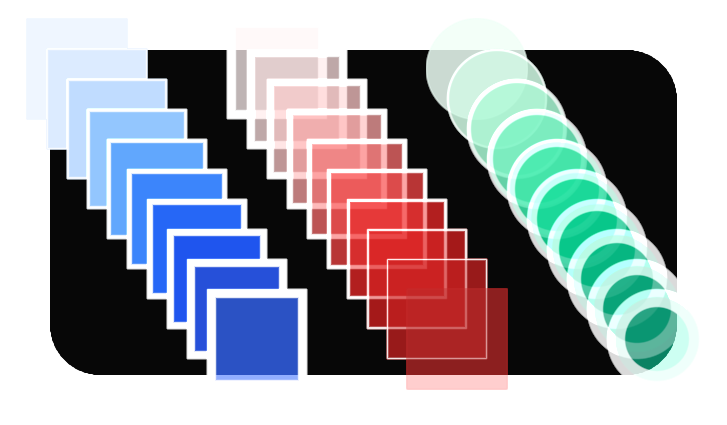
This library draws crisp anti-aliased shapes on the GPU using SDFs. It also draws text with the FontStashSharp API and textures with the SpriteBatch API. Shapes, text, and textures can be interleaved in any order. Everything renders together in a single batch that never needs to break.
Special thanks to Inigo Quilez for doing a lot of the work on the math functions.
Features
- 10 shapes: Circle, Ellipse, Line, Path, Rectangle, Hexagon, Equilateral Triangle, Triangle, Arc, Ring
Fill,Border, andDrawvariants for every shape- Paths draw a polyline as one continuous shape: translucent strokes blend once even where segments meet, with round, miter, or bevel joins and round, butt, or square caps, mixable within one path. Points come from an array or one at a time with
BeginPath/PathTo/EndPath.closed: true, orClosePath(), joins the last point back to the first, which is also how a curve or an ellipse gets dashed: flatten it to a closed path - Rounded corners (per-corner radii on rectangles), rotation, and adjustable anti-aliasing
- Dashed outlines and strokes: borders dash along the perimeter, lines, arcs, rings, and paths cut into dashes (flat or round-capped, down to dotted lines), with the pattern fitted to the shape so it closes seamlessly
- Gradients: linear, radial, conical, spiral, and more, with repeat styles and Oklab / Oklch / RGB color interpolation
- Blue noise dithering so slow gradients don't band on 8-bit displays
- Text (FontStashSharp API)
- Textures (SpriteBatch API)
- Clipping to a rectangle
- One batch for everything. Mixing shapes, text, and textures never breaks the batch
- Precompiled shader embedded in the assembly using ShadowDusk. No need for Wine to build on Linux or OSX.
- Works with MonoGame 3.8.2+ and KNI
Documentation
You can also try the library directly in your browser here.
Getting started
Install with:
dotnet add package Apos.Shapes
Set the HiDef profile in your game's constructor. (With KNI, use FL10_0 instead.) Create a ShapeBatch, then draw between Begin and End:
using Apos.Shapes;

public class Game1 : Game {
    GraphicsDeviceManager _graphics;
    ShapeBatch _sb;

    public Game1() {
        _graphics = new GraphicsDeviceManager(this);
        _graphics.GraphicsProfile = GraphicsProfile.HiDef;
    }

    protected override void LoadContent() {
        _sb = new ShapeBatch(GraphicsDevice);
    }

    protected override void Draw(GameTime gameTime) {
        GraphicsDevice.Clear(new Color(17, 24, 39));

        _sb.Begin();
        _sb.FillCircle(new Vector2(120, 120), 75, new Color(96, 165, 250));
        _sb.DrawRectangle(new Vector2(240, 70), new Vector2(150, 100), new Color(220, 38, 38), Color.White, 4f, 20f);
        _sb.BorderLine(new Vector2(120, 240), new Vector2(390, 240), 15, Color.White, 2f);
        _sb.End();

        base.Draw(gameTime);
    }
}
Read the Getting started guide for the full walkthrough.
Other projects you might like
- Apos.Gui - UI library for MonoGame.
- Apos.Input - Polling input library for MonoGame.
- Apos.History - A C# library that makes it easy to handle undo and redo.
- Apos.Content - Content builder library for MonoGame.
- Apos.Framework - Game architecture for MonoGame.
- AposGameStarter - MonoGame project starter. Common files to help create a game faster.
| Product | Versions Compatible and additional computed target framework versions. |
|---|---|
| .NET | net8.0 is compatible. net8.0-android was computed. net8.0-browser was computed. net8.0-ios was computed. net8.0-maccatalyst was computed. net8.0-macos was computed. net8.0-tvos was computed. net8.0-windows was computed. net9.0 was computed. net9.0-android was computed. net9.0-browser was computed. net9.0-ios was computed. net9.0-maccatalyst was computed. net9.0-macos was computed. net9.0-tvos was computed. net9.0-windows was computed. net10.0 was computed. net10.0-android was computed. net10.0-browser was computed. net10.0-ios was computed. net10.0-maccatalyst was computed. net10.0-macos was computed. net10.0-tvos was computed. net10.0-windows was computed. |
-
net8.0
- FontStashSharp.MonoGame (>= 1.5.2)
- MonoGame.Extended (>= 5.3.1)
NuGet packages (3)
Showing the top 3 NuGet packages that depend on Apos.Shapes:
| Package | Downloads |
|---|---|
|
Apos.Gui
UI library for MonoGame. |
|
|
Gum.Shapes.MonoGame
Package Description |
|
|
FlatRedBall2.MonoGame
A modern, lightweight 2D game engine built on MonoGame and KNI. |
GitHub repositories (4)
Showing the top 4 popular GitHub repositories that depend on Apos.Shapes:
| Repository | Stars |
|---|---|
|
vchelaru/Gum
Flexible layout tool for creating UI on any platform
|
|
|
Apostolique/Apos.Gui
UI library for MonoGame.
|
|
|
itsBuggingMe/Frent
A high performance component oriented take on ECS that supports sparse sets and archetypes seamlessly.
|
|
|
Apostolique/Mitten
Infinite canvas drawing application.
|
| Version | Downloads | Last Updated |
|---|---|---|
| 0.7.7 | 0 | 7/23/2026 |
| 0.7.6 | 0 | 7/22/2026 |
| 0.7.5 | 58 | 7/22/2026 |
| 0.7.4 | 107 | 7/19/2026 |
| 0.7.3 | 94 | 7/19/2026 |
| 0.7.2 | 91 | 7/18/2026 |
| 0.7.1 | 91 | 7/18/2026 |
| 0.7.0-alpha | 91 | 7/13/2026 |
| 0.6.10-alpha | 2,829 | 5/17/2026 |
| 0.6.9-alpha | 5,952 | 5/12/2026 |
| 0.6.8 | 2,141 | 3/1/2026 |
| 0.6.7 | 150 | 2/28/2026 |
| 0.6.6-alpha | 130 | 2/1/2026 |
| 0.6.5-alpha | 127 | 2/1/2026 |
| 0.6.4-alpha | 123 | 1/31/2026 |
| 0.6.3-alpha | 1,137 | 1/24/2026 |
| 0.6.2-alpha | 188 | 1/13/2026 |
| 0.6.1-alpha | 127 | 1/13/2026 |
| 0.6.0-alpha | 130 | 1/11/2026 |
| 0.5.2 | 845 | 12/27/2025 |