mostlylucid.consoleimage.video
4.5.1
dotnet add package mostlylucid.consoleimage.video --version 4.5.1
NuGet\Install-Package mostlylucid.consoleimage.video -Version 4.5.1
This command is intended to be used within the Package Manager Console in Visual Studio, as it uses the NuGet module's version of Install-Package.
<PackageReference Include="mostlylucid.consoleimage.video" Version="4.5.1" />
For projects that support PackageReference, copy this XML node into the project file to reference the package.
<PackageVersion Include="mostlylucid.consoleimage.video" Version="4.5.1" />
<PackageReference Include="mostlylucid.consoleimage.video" />
For projects that support Central Package Management (CPM), copy this XML node into the solution Directory.Packages.props file to version the package.
paket add mostlylucid.consoleimage.video --version 4.5.1
The NuGet Team does not provide support for this client. Please contact its maintainers for support.
#r "nuget: mostlylucid.consoleimage.video, 4.5.1"
#r directive can be used in F# Interactive and Polyglot Notebooks. Copy this into the interactive tool or source code of the script to reference the package.
#:package mostlylucid.consoleimage.video@4.5.1
#:package directive can be used in C# file-based apps starting in .NET 10 preview 4. Copy this into a .cs file before any lines of code to reference the package.
#addin nuget:?package=mostlylucid.consoleimage.video&version=4.5.1
#tool nuget:?package=mostlylucid.consoleimage.video&version=4.5.1
The NuGet Team does not provide support for this client. Please contact its maintainers for support.
mostlylucid.consoleimage.video
Real-time video to ASCII art rendering using FFmpeg for .NET 10.


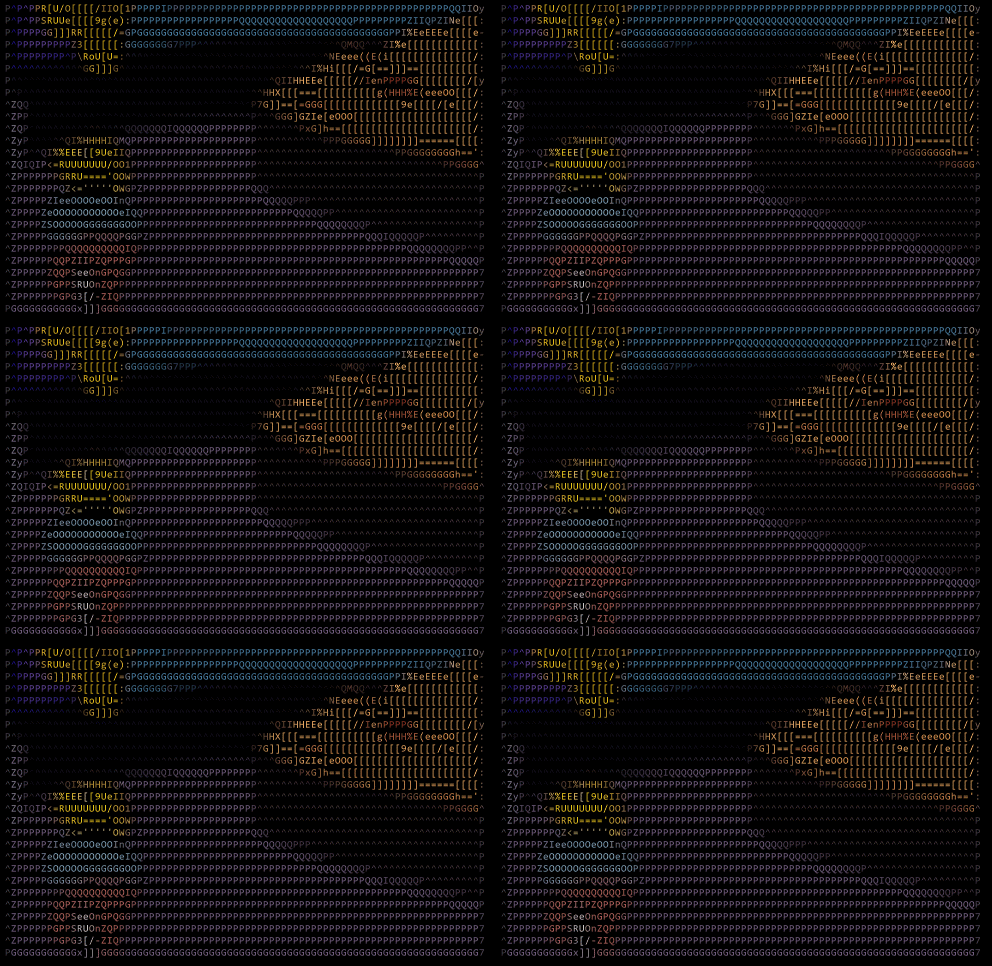
Video Render Modes
| ASCII | ColorBlocks | Braille |
|---|---|---|
 |
 |
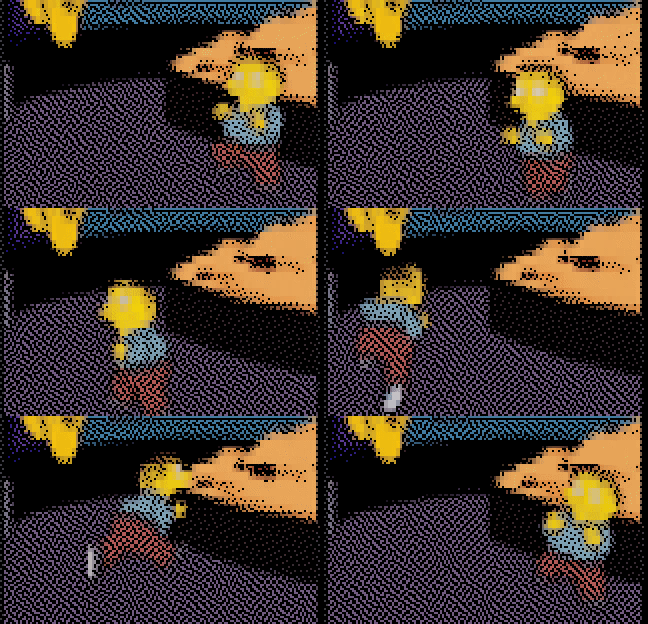 |
| Shape-matched characters | Unicode half-blocks (2x res) | 2x4 dot patterns (highest res) |
Features
- Zero setup - FFmpeg auto-downloads on first use
- Hardware acceleration - CUDA, DXVA2, VideoToolbox, VAAPI
- URL streaming - Play from HTTP/HTTPS sources
- Time range playback - Start/end time control
- Multiple render modes - ASCII, ColorBlocks, Braille
- Handles images too - JPG, PNG, GIF, WebP all supported
Quick Start
using ConsoleImage.Video.Core;

// Simple one-liner - FFmpeg auto-downloads if needed
await VideoPlayer.PlayAsync("video.mp4");

// With render mode
await VideoPlayer.PlayAsync("video.mp4", new VideoRenderOptions
{
    RenderMode = VideoRenderMode.ColorBlocks
});

// Stream from URL
await VideoPlayer.PlayAsync("https://example.com/video.mp4");

// With cancellation support
using var cts = new CancellationTokenSource();
Console.CancelKeyPress += (s, e) => { e.Cancel = true; cts.Cancel(); };
await VideoPlayer.PlayAsync("video.mp4", cancellationToken: cts.Token);
VideoRenderOptions
var options = new VideoRenderOptions
{
    // Render mode
    RenderMode = VideoRenderMode.Braille,  // Ascii, ColorBlocks, Braille

    // Playback control
    SpeedMultiplier = 1.5f,     // 0.5 = half, 2.0 = double speed
    LoopCount = 3,              // 0 = infinite
    StartTime = 30,             // Start at 30 seconds
    EndTime = 60,               // End at 60 seconds

    // Performance
    TargetFps = 24,             // Override video FPS
    FrameStep = 2,              // Skip every other frame
    UseHardwareAcceleration = true,
    BufferAheadFrames = 5,

    // Display
    ShowStatus = true,          // Show progress/info line
    UseAltScreen = true         // Use alternate screen buffer
};

await VideoPlayer.PlayAsync("video.mp4", options);
Video Information
var info = await VideoPlayer.GetInfoAsync("video.mp4");

Console.WriteLine($"Duration: {info.Duration}s");
Console.WriteLine($"Resolution: {info.Width}x{info.Height}");
Console.WriteLine($"FPS: {info.FrameRate}");
Console.WriteLine($"Codec: {info.VideoCodec}");
Advanced: Direct Player Control
For more control, use VideoAnimationPlayer directly:
using var player = new VideoAnimationPlayer("video.mp4", options);
await player.PlayAsync(cancellationToken);
FFmpeg Auto-Download
FFmpeg downloads automatically on first use:
- Windows/Linux: From BtbN/FFmpeg-Builds
- macOS: From evermeet.cx/ffmpeg
Cache location:
- Windows:
%LOCALAPPDATA%\consoleimage\ffmpeg - Linux/macOS:
~/.local/share/consoleimage/ffmpeg
Hardware Acceleration
Auto-detected per platform:
- Windows: DXVA2, CUDA (NVIDIA)
- macOS: VideoToolbox
- Linux: VAAPI, CUDA
Supported Formats
- Video: MP4, MKV, AVI, MOV, WebM, and any FFmpeg-supported format
- Images: JPG, PNG, GIF (animated), WebP, BMP, TIFF
Related Packages
- mostlylucid.consoleimage - Core image rendering ( dependency)
- mostlylucid.consoleimage.spectre - Spectre.Console integration
License
Public domain - UNLICENSE
| Product | Versions Compatible and additional computed target framework versions. |
|---|---|
| .NET | net10.0 is compatible. net10.0-android was computed. net10.0-browser was computed. net10.0-ios was computed. net10.0-maccatalyst was computed. net10.0-macos was computed. net10.0-tvos was computed. net10.0-windows was computed. |
Compatible target framework(s)
Included target framework(s) (in package)
Learn more about Target Frameworks and .NET Standard.
-
net10.0
- mostlylucid.consoleimage (>= 4.5.1)
NuGet packages
This package is not used by any NuGet packages.
GitHub repositories
This package is not used by any popular GitHub repositories.
| Version | Downloads | Last Updated |
|---|---|---|
| 4.5.1 | 55 | 2/1/2026 |
| 4.5.0 | 58 | 2/1/2026 |
| 4.5.0-rc0 | 56 | 2/1/2026 |
| 4.5.0-alpha2 | 52 | 2/1/2026 |
| 4.5.0-alpha1 | 55 | 2/1/2026 |
| 4.5.0-alpha0 | 52 | 2/1/2026 |
| 4.1.2 | 102 | 1/26/2026 |
| 4.1.2-rc4 | 91 | 1/26/2026 |
| 4.1.2-rc3 | 90 | 1/26/2026 |
| 4.1.2-rc2 | 84 | 1/26/2026 |
| 4.1.2-rc1 | 85 | 1/26/2026 |
| 4.1.2-rc0 | 84 | 1/26/2026 |
| 4.1.1-alpha2 | 84 | 1/26/2026 |
| 4.1.1-alpha1 | 84 | 1/26/2026 |
| 4.1.1-alpha0 | 104 | 1/26/2026 |
| 4.1.0 | 87 | 1/25/2026 |
| 4.1.0-rc0 | 88 | 1/25/2026 |
| 4.1.0-alpha3 | 86 | 1/26/2026 |
| 4.1.0-alpha2 | 85 | 1/25/2026 |
| 4.1.0-alpha1 | 88 | 1/25/2026 |
| 4.1.0-alpha0 | 83 | 1/25/2026 |
| 4.0.0-rc4 | 86 | 1/25/2026 |
| 4.0.0-rc2 | 88 | 1/25/2026 |
| 4.0.0-rc1 | 80 | 1/25/2026 |
| 4.0.0-rc0 | 92 | 1/25/2026 |
| 3.2.0 | 90 | 1/24/2026 |
| 3.1.0 | 99 | 1/24/2026 |
| 3.0.2 | 94 | 1/24/2026 |
| 3.0.0 | 93 | 1/24/2026 |
| 2.7.1 | 86 | 1/24/2026 |
| 2.7.0 | 89 | 1/24/2026 |
| 2.6.9-preview2 | 80 | 1/24/2026 |
| 2.6.9-preview1 | 84 | 1/24/2026 |
| 2.6.9-preview0 | 81 | 1/24/2026 |
| 2.6.6 | 100 | 1/22/2026 |
| 2.6.5 | 87 | 1/22/2026 |
| 2.6.4 | 91 | 1/22/2026 |
| 2.6.3 | 84 | 1/22/2026 |
| 2.6.1 | 81 | 1/22/2026 |
| 2.6.0 | 86 | 1/22/2026 |
| 2.5.1 | 88 | 1/22/2026 |
| 2.0.0-alpha0 | 90 | 1/21/2026 |