VirtualContactSheet 2.0.0
dotnet add package VirtualContactSheet --version 2.0.0
NuGet\Install-Package VirtualContactSheet -Version 2.0.0
<PackageReference Include="VirtualContactSheet" Version="2.0.0" />
<PackageVersion Include="VirtualContactSheet" Version="2.0.0" />
<PackageReference Include="VirtualContactSheet" />
paket add VirtualContactSheet --version 2.0.0
#r "nuget: VirtualContactSheet, 2.0.0"
#:package VirtualContactSheet@2.0.0
#addin nuget:?package=VirtualContactSheet&version=2.0.0
#tool nuget:?package=VirtualContactSheet&version=2.0.0
VirtualContactSheet (.NET)


Virtual Contact Sheet — a contact-sheet generator, originally a C# port of vcs.rb. It composes a grid ("contact sheet") with a metadata header, optional title, per-thumbnail captions, drop shadows, polaroid frames, and a signature footer — either from frames extracted from a video at regular intervals, or from a folder (or list) of images.
- Frame capture & metadata: FFMpegCore — wraps
ffmpeg/ffprobe; binaries can be onPATHor pointed to viaffBinaryFolder - Composition / drawing: SkiaSharp (MIT) — chosen for its native drop-shadow, text, and canvas compositing support
- Image decoding: SkiaSharp again — jpg, png, gif, bmp, webp, heif/heic, avif …, with EXIF orientation applied
- Targets: .NET 10, cross-platform (Windows / Linux / macOS)
Example
A 4×4 contact sheet with a custom footer:
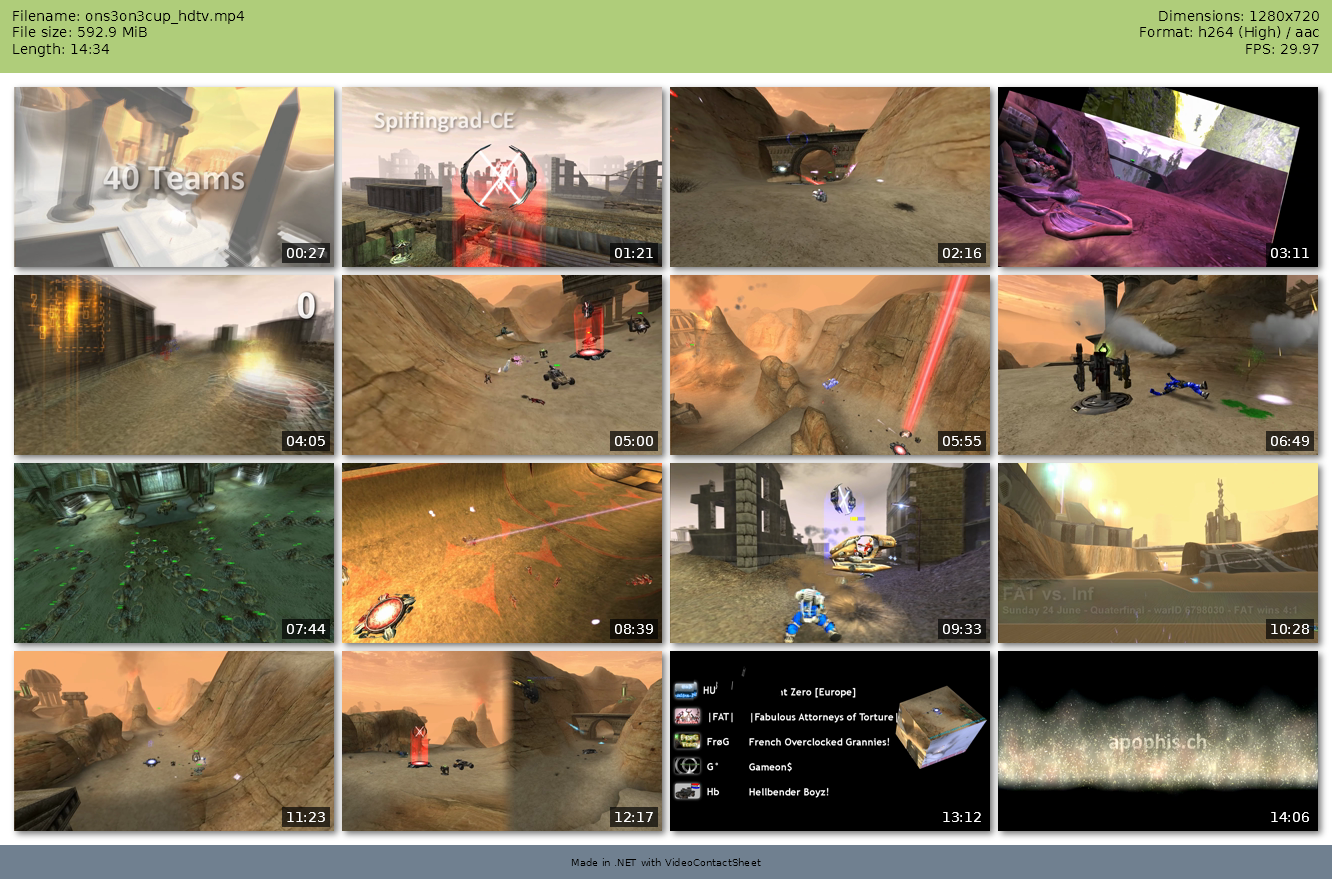
using VirtualContactSheet;
using VirtualContactSheet.VideoProcessing;

var video = new Video("ons3on3cup_hdtv.mp4");

var options = new ContactSheetOptions
{
    Columns = 4,
    Rows = 4,
    Signature = "Made in .NET with VirtualContactSheet",
};

await video.SaveContactSheetAsync("example-contact-sheet.png", options);
Or with the CLI:
vcs ons3on3cup_hdtv.mp4 -c 4 -r 4 -s "Made in .NET with VirtualContactSheet" -o example-contact-sheet.png
The same thing from a folder of photos, no ffmpeg involved:
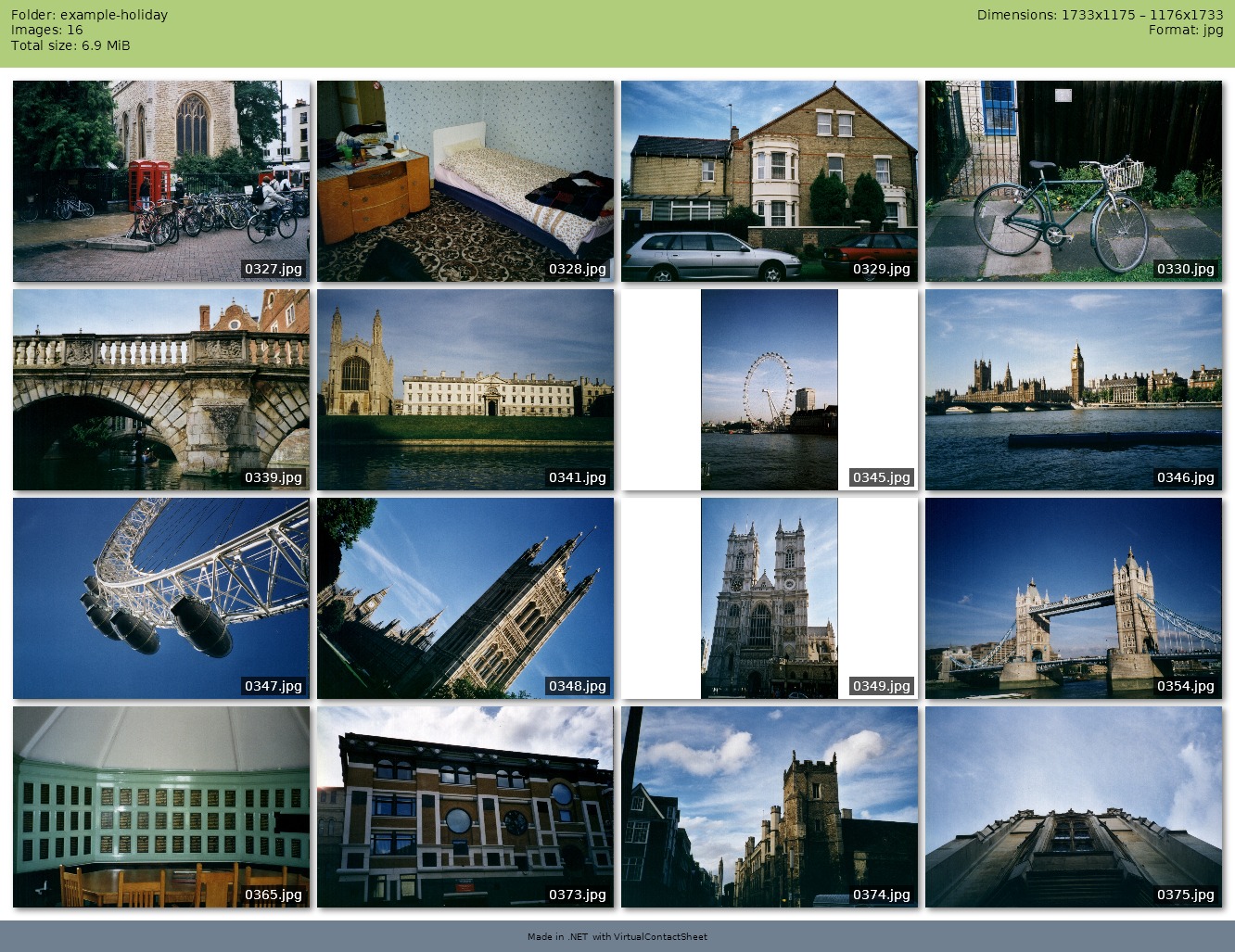
using VirtualContactSheet;
using VirtualContactSheet.ImageProcessing;

var photos = ImageCollection.FromFolder("holiday");

var options = new ContactSheetOptions
{
    Columns = 4,
    Rows = 4,
    Signature = "Made in .NET with VirtualContactSheet",
    Format = SheetFormat.Jpg,
};

await photos.SaveContactSheetAsync("example-image-contact-sheet.jpg", options);
Cells are a uniform size, so the two portrait shots are letterboxed into the landscape cell the
rest of the folder dictates — new SkiaImageLoader(ImageFit.Cover) crops them to fill instead.
Upgrading from VideoContactSheet
The project was renamed in 2.0.0, and so were the packages. VideoContactSheet stops at 1.0.1;
nothing upgrades in place.
| Was | Now |
|---|---|
VideoContactSheet |
VirtualContactSheet |
VideoContactSheet.Cli |
VirtualContactSheet.Cli |
Both CLI packages install a command called vcs, so uninstall the old tool before installing the
new one:
dotnet tool uninstall -g VideoContactSheet.Cli
dotnet tool install -g VirtualContactSheet.Cli
In library code, video types moved to their own namespace, so add one using:
using VirtualContactSheet;
using VirtualContactSheet.VideoProcessing;   // Video, VideoInfo, IFrameCapturer, ...
HeaderBuilder is now VideoHeaderBuilder, and ContactSheet.Thumbnail carries a
string? Caption instead of a TimeIndex — the Thumbnail(SKBitmap, TimeIndex, bool)
constructor still exists and formats the timestamp for you. See CHANGELOG.md.
Requirements
- .NET 10 SDK
ffmpegandffprobe— only for video; image sheets need neither- On headless Linux, you may also need
libfontconfig1for text rendering
Getting ffmpeg
The library never ships ffmpeg: it looks for the binaries on PATH, or wherever ffBinaryFolder
points. Any of these works:
| Platform | Install |
|---|---|
| Windows | winget install Gyan.FFmpeg, or pwsh tools/download-ffmpeg.ps1 for a repo-local copy |
| Debian/Ubuntu | apt install ffmpeg |
| macOS | brew install ffmpeg |
tools/download-ffmpeg.ps1 fetches the version pinned in tools/ffmpeg.json, verifies its
SHA-256, and drops it in tools/ffmpeg/win-x64/, from where the CLI build copies it next to
vcs.exe. That copy is a convenience for local development — the binaries are git-ignored, are
never published in either NuGet package, and the build works fine without them.
Namespaces
| Namespace | Contents |
|---|---|
VirtualContactSheet |
Everything shared: ContactSheet, ContactSheetOptions, TextStyle, SheetFormat, HeaderColumns, TimeIndex, CaptureException |
VirtualContactSheet.VideoProcessing |
Video, VideoInfo, IFrameCapturer / FfmpegCapturer, IVideoInfoProvider / FfprobeVideoInfoProvider, FrameAnalysis |
VirtualContactSheet.ImageProcessing |
ImageCollection, ImageInfo, IImageLoader / SkiaImageLoader, IImageInfoProvider / SkiaImageInfoProvider, ImageFit, ImageSelection |
Library usage — video
using VirtualContactSheet;
using VirtualContactSheet.VideoProcessing;

// ffmpeg/ffprobe on PATH:
var video = new Video("movie.mkv");

// — or — binaries shipped next to the exe:
var video = new Video("movie.mkv", ffBinaryFolder: AppContext.BaseDirectory);

// Metadata
var info = await video.GetInfoAsync();
Console.WriteLine($"Duration: {info.Duration}, {info.Video?.Width}x{info.Video?.Height}");

// Build a 3x3 sheet
var options = new ContactSheetOptions
{
    Columns = 3,
    Rows = 3,
    ThumbnailWidth = 320,
    Format = SheetFormat.Jpg,
    Title = "My Movie",
    SoftShadow = true,
    Timestamp = true,
};
await video.SaveContactSheetAsync("out.jpg", options);

// Single frame
var bmp = await video.CaptureFrameAsync(TimeIndex.Parse("1:22"), width: 640, evadeBlank: true);
Library usage — images
ImageCollection mirrors Video: point it at a source, reuse the same ContactSheetOptions, and
call the same SaveContactSheetAsync. No ffmpeg involved.
using VirtualContactSheet;
using VirtualContactSheet.ImageProcessing;

// Every supported image in a folder, ordered by file name:
var photos = ImageCollection.FromFolder("holiday-2026", recursive: true);

// — or — an explicit list, kept in the order given:
var photos = ImageCollection.FromFiles(["cover.jpg", "beach.png", "sunset.jpg"]);

// Metadata (dimensions/format/size per image, read from the file headers)
var info = await photos.GetInfoAsync();
Console.WriteLine($"{info.Count} images, {info.First?.Width}x{info.First?.Height}");

var options = new ContactSheetOptions
{
    Columns = 4,
    Rows = 4,
    ThumbnailWidth = 320,
    Title = "Holiday 2026",
    Format = SheetFormat.Jpg,
};

await photos.SaveContactSheetAsync("holiday.jpg", options);
How the options map to images
| Option | Meaning for an image collection |
|---|---|
Columns, Rows |
Grid capacity. More images than cells: see Selection below |
ThumbnailWidth |
Cell width; the height follows AspectRatio, then ThumbnailHeight, else the aspect ratio of the first image |
Timestamp |
Toggles the caption overlay — the file name instead of a time index |
Title, Signature, ShowHeader |
As for video; the header lists folder, image count, total size, dimensions and formats |
Interval, From, To, Highlights, blank-frame evasion |
Video-only, ignored here |
Extra knobs that live on the collection itself:
// More images than cells? Sample evenly (default) or render all of them.
photos.Selection = ImageSelection.All;

// Caption text per thumbnail; return null for none.
photos.Caption = image => Path.GetFileNameWithoutExtension(image.Path);

// Cells are uniform, so images that do not match are letterboxed (default),
// cropped, or stretched:
var cropped = ImageCollection.FromFolder("photos", loader: new SkiaImageLoader(ImageFit.Cover));
Implement IImageLoader (or IImageInfoProvider) to plug in a different decoder, exactly like
IFrameCapturer for video.
CLI
Install as a .NET global tool (requires ffmpeg/ffprobe on PATH):
dotnet tool install -g VirtualContactSheet.Cli
The vcs CLI mirrors the original script's options:
vcs video.avi
vcs -i 3m30 input.wmv -o output.jpg
vcs --from 3m --to 18m -i 2m input.avi
vcs -c 4 -r 5 --polaroid --no-shadow -T "Holiday" clip.mp4
It takes images too — pass a folder, or the image files themselves:
vcs holiday/                          # one sheet from the folder -> holiday.png
vcs holiday/ --recursive --all        # every image, subfolders included
vcs holiday/ --fit cover -c 5 -r 4    # crop to fill the cells instead of letterboxing
vcs holiday/*.jpg -o summer.jpg -f jpg
Each video and each folder produces its own sheet; loose image files are combined into a single
one. Wildcards are expanded by vcs itself, so vcs holiday/*.jpg behaves the same in cmd and
PowerShell as it does in a POSIX shell.
| Video | Images | |
|---|---|---|
--columns, --rows, --width, --height, --aspect |
✅ | ✅ |
--format, --output, --title, --signature |
✅ | ✅ |
--timestamp (caption: time index / file name) |
✅ | ✅ |
--polaroid, --shadow |
✅ | ✅ |
--interval, --from, --to, --highlight |
✅ | — |
--recursive, --fit, --all |
— | ✅ |
Using an option against the wrong kind of input is an error rather than a silent no-op, unless the
run mixes both — vcs clip.mp4 holiday/ -i 2m is fine, and the interval applies to the video.
Run vcs --help for the full list. Use --ffmpeg-folder <dir> to point at a local copy of the binaries instead of relying on PATH; image sheets never invoke ffmpeg at all.
Feature mapping vs. vcs.rb
| vcs.rb feature | Status | Notes |
|---|---|---|
| Grid (rows × columns) | ✅ | Columns, Rows |
| Interval-based capture | ✅ | Interval |
| From / To range | ✅ | From, To |
| Thumbnail width | ✅ | ThumbnailWidth |
| Formats png/jpg | ✅ | + webp |
| Title / header / signature | ✅ | metadata header auto-built from ffprobe |
| Timestamp overlay | ✅ | Timestamp |
| Drop shadow | ✅ | SoftShadow, ShadowSize |
| Polaroid frame | ✅ | Polaroid |
| Highlights | ✅ | Highlights (rendered in a band on top) |
| Blank-frame evasion | ✅ | BlankEvasion, BlankThreshold, alternatives |
| Single-frame capture | ✅ | CaptureFrameAsync |
| Video metadata (streams) | ✅ | GetInfoAsync → VideoInfo |
| Capturer: ffmpeg | ✅ | FfmpegCapturer via FFMpegCore (implement IFrameCapturer for libav/mplayer) |
| YAML profiles | ⬜ | configure via ContactSheetOptions in code instead |
Architecture
ContactSheet                  SkiaSharp grid composition + styling   (shared)
 └─ ContactSheetOptions       all grid/style/filter settings

VideoProcessing
 Video                        orchestrator (probe → capture → compose)
 ├─ IVideoInfoProvider        metadata abstraction
 │   └─ FfprobeVideoInfoProvider   FFProbe.AnalyseAsync → VideoInfo
 ├─ IFrameCapturer            frame extraction abstraction
 │   └─ FfmpegCapturer        FFMpegCore pipe → PNG → SKBitmap
 └─ TimeIndex                 flexible time parsing ("3m30", "1:22", "90")

ImageProcessing
 ImageCollection              orchestrator (probe → load/scale → compose)
 ├─ IImageInfoProvider        metadata abstraction
 │   └─ SkiaImageInfoProvider SKCodec header → ImageInfo
 ├─ IImageLoader              decode/scale abstraction
 │   └─ SkiaImageLoader       decode → EXIF straighten → fit the cell (contain/cover/stretch)
 └─ ImageSelection            how a large collection is reduced to the grid
Swap in another capturer (libav, mplayer) by implementing IFrameCapturer and passing it to the
Video constructor; the same goes for IImageLoader and ImageCollection.
Changelog
See CHANGELOG.md.
License
Mirror of a GPL-3.0 project; treat this port accordingly.
| Product | Versions Compatible and additional computed target framework versions. |
|---|---|
| .NET | net10.0 is compatible. net10.0-android was computed. net10.0-browser was computed. net10.0-ios was computed. net10.0-maccatalyst was computed. net10.0-macos was computed. net10.0-tvos was computed. net10.0-windows was computed. |
-
net10.0
- FFMpegCore (>= 5.4.0)
- SkiaSharp (>= 4.152.1)
- SkiaSharp.NativeAssets.Linux (>= 4.152.1)
NuGet packages
This package is not used by any NuGet packages.
GitHub repositories
This package is not used by any popular GitHub repositories.
| Version | Downloads | Last Updated |
|---|---|---|
| 2.0.0 | 110 | 9/24/2026 |