Umbraco.Community.SecretManager
1.0.0-beta6
dotnet add package Umbraco.Community.SecretManager --version 1.0.0-beta6
NuGet\Install-Package Umbraco.Community.SecretManager -Version 1.0.0-beta6
<PackageReference Include="Umbraco.Community.SecretManager" Version="1.0.0-beta6" />
<PackageVersion Include="Umbraco.Community.SecretManager" Version="1.0.0-beta6" />
<PackageReference Include="Umbraco.Community.SecretManager" />
paket add Umbraco.Community.SecretManager --version 1.0.0-beta6
#r "nuget: Umbraco.Community.SecretManager, 1.0.0-beta6"
#:package Umbraco.Community.SecretManager@1.0.0-beta6
#addin nuget:?package=Umbraco.Community.SecretManager&version=1.0.0-beta6&prerelease
#tool nuget:?package=Umbraco.Community.SecretManager&version=1.0.0-beta6&prerelease
SecretManager
A lightweight and flexible Azure Key Vault Secret Manager for Umbraco CMS. Receive notifications when secrets are about to expire, send alerts via webhooks, and display an overview of all secrets directly in the Umbraco backoffice.
Getting Started
Prerequisites
- An Azure Key Vault with secrets configured
- Azure credentials (e.g., Azure CLI for development, DefaultAzureCredential for production)
- Umbraco CMS 16.x
Step 1: Configure Azure Key Vault
Set up your Azure Key Vault endpoint in appsettings.json:
{
  "KeyVault": {
    "Endpoint": "https://your-keyvault-name.vault.azure.net/"
  }
}
Step 2: Create the SecretClient
In your Program.cs, configure the SecretClient to connect to Azure Key Vault:
using Azure.Identity;
using Azure.Security.KeyVault.Secrets;

var keyVaultEndpoint = builder.Configuration["KeyVault:Endpoint"];
var credential = builder.Environment.IsDevelopment()
    ? new AzureCliCredential()
    : new DefaultAzureCredential();

var secretClient = new SecretClient(new Uri(keyVaultEndpoint), credential);
Step 3: Register SecretManager
Add the SecretManager services to your Umbraco builder:
builder.CreateUmbracoBuilder()
    .AddBackOffice()
    .AddWebsite()
    .AddComposers()
    .ConfigureSecretManager(secretClient)
    .Build();
Adding the UI Dashboard
To display an overview of all secrets in the Umbraco backoffice, install the UI package and register it:
dotnet add package Umbraco.Community.SecretManager.UIBuilder
Then add the following to your configuration:
builder.CreateUmbracoBuilder()
    .AddBackOffice()
    .AddWebsite()
    .AddComposers()
    .ConfigureSecretManager(secretClient)
    .ConfigureSecretManagerUI()
    .Build();
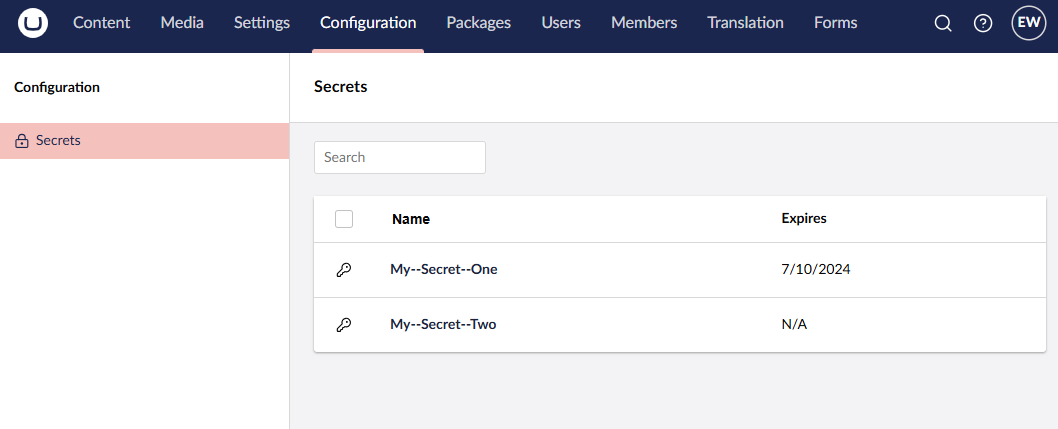
The dashboard shows secret details including Name, Expiration Date, Created On, Recovery Level, and Tags.
Configuration Options
Configure the recurring expiry check job in appsettings.json:
{
  "SecretManager": {
    "Recurring": {
      "Period": "1.00:00:00",
      "FirstRun": "0 8 * * *",
      "WarnBefore": "7.00:00:00"
    },
    "UIBuilder": {
      "DateTimeFormat": "MMMM d, yyyy",
      "Culture": "en-US"
    }
  }
}
| Option | Description | Default |
|---|---|---|
Period |
How often to check for expiring secrets | 1 day |
FirstRun |
Cron expression for scheduling the first job run (e.g., 0 8 * * * runs daily at 8 AM) |
Default delay |
WarnBefore |
Time before expiration to trigger alerts | 7 days |
Setting Up Webhooks
Configure webhooks in the Umbraco backoffice to receive notifications when secrets are about to expire.
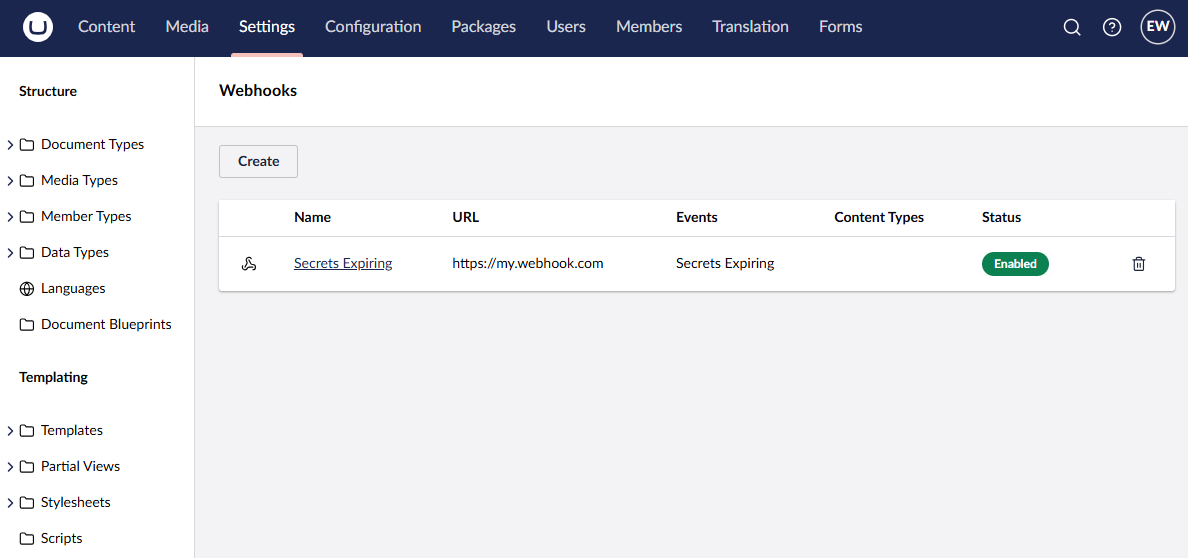
- Navigate to Settings → Webhooks.
- Create a new webhook.
- Select "Secrets Expiring" as the event.
- Enter your webhook endpoint URL.
- Save the webhook.
Custom Webhook Payload Providers
Create custom payload formats for different webhook endpoints (e.g., Microsoft Teams via Power Automate):
using Umbraco.Cms.Core.Models;
using Umbraco.Community.SecretManager.Notifications;
using Umbraco.Community.SecretManager.Webhooks;

public class TeamsSecretsExpiringProvider : WebhookPayloadProviderBase<KeyVaultSecretsExpiringNotification>
{
    protected override bool CanHandle(Uri endpoint, string eventAlias,
        KeyVaultSecretsExpiringNotification notification, IWebhook webhook)
    {
        // Matches Power Automate webhook endpoints for Teams integration
        return endpoint.Host.EndsWith("environment.api.powerplatform.com");
    }

    protected override object BuildPayload(KeyVaultSecretsExpiringNotification notification,
        Uri endpoint, string eventAlias, IWebhook webhook)
    {
        return new
        {
            type = "message",
            attachments = new[] {
                new {
                    contentType = "application/vnd.microsoft.card.adaptive",
                    content = new {
                        type = "AdaptiveCard",
                        version = "1.4",
                        body = notification.Secrets.Select(s => new {
                            type = "TextBlock",
                            text = $"{s.Name} expires: {s.ExpiresOn?.UtcDateTime:yyyy-MM-dd}"
                        }).ToArray()
                    }
                }
            }
        };
    }
}
Register the custom provider:
builder.WithCollectionBuilder<WebhookPayloadProviderCollectionBuilder>()
    .Add<TeamsSecretsExpiringProvider>();
| Product | Versions Compatible and additional computed target framework versions. |
|---|---|
| .NET | net10.0 is compatible. net10.0-android was computed. net10.0-browser was computed. net10.0-ios was computed. net10.0-maccatalyst was computed. net10.0-macos was computed. net10.0-tvos was computed. net10.0-windows was computed. |
-
net10.0
- Azure.Extensions.AspNetCore.Configuration.Secrets (>= 1.2.1)
- Azure.Identity (>= 1.12.0)
- Umbraco.Cms.Core (>= 17.0.0 && < 18.0.0)
- Umbraco.Cms.Web.Common (>= 17.0.0 && < 18.0.0)
- Umbraco.Community.SecretManager.Common (>= 1.0.0-beta6)
- Umbraco.UIBuilder.Startup (>= 17.0.0 && < 18.0.0)
NuGet packages
This package is not used by any NuGet packages.
GitHub repositories
This package is not used by any popular GitHub repositories.
| Version | Downloads | Last Updated |
|---|---|---|
| 1.0.0-beta6 | 327 | 2/4/2026 |
| 1.0.0-beta5 | 271 | 10/21/2025 |
| 1.0.0-beta4 | 181 | 10/20/2025 |
| 1.0.0-beta3 | 190 | 10/16/2025 |
| 1.0.0-beta2 | 208 | 10/15/2025 |
| 1.0.0-beta1 | 137 | 10/11/2025 |