Umbraco.Community.Cloud.HealthChecks
1.3.0
dotnet add package Umbraco.Community.Cloud.HealthChecks --version 1.3.0
NuGet\Install-Package Umbraco.Community.Cloud.HealthChecks -Version 1.3.0
<PackageReference Include="Umbraco.Community.Cloud.HealthChecks" Version="1.3.0" />
<PackageVersion Include="Umbraco.Community.Cloud.HealthChecks" Version="1.3.0" />
<PackageReference Include="Umbraco.Community.Cloud.HealthChecks" />
paket add Umbraco.Community.Cloud.HealthChecks --version 1.3.0
#r "nuget: Umbraco.Community.Cloud.HealthChecks, 1.3.0"
#:package Umbraco.Community.Cloud.HealthChecks@1.3.0
#addin nuget:?package=Umbraco.Community.Cloud.HealthChecks&version=1.3.0
#tool nuget:?package=Umbraco.Community.Cloud.HealthChecks&version=1.3.0
Umbraco Cloud Health Checks

A package that provides health checks for Umbraco Cloud environments, helping you monitor critical system resources and storage usage.
Features
Background Scanning
To prevent timeouts and performance issues, folder size health checks use a background scanning strategy:
- Scheduled Scans: Folders are scanned every 6 hours by default (configurable)
- Distributed Cache: Results are cached and shared across all servers in load-balanced environments
- No Timeouts: Health checks return instantly using cached data
- Live Fallback: If cache expires, a live scan is performed and cached for 30 minutes
- Timestamp Display: Shows "calculated X ago" so you know data freshness
This approach is especially valuable for large folders (NuGet cache, logs) where scanning can take several seconds or minutes.
Included Health Checks
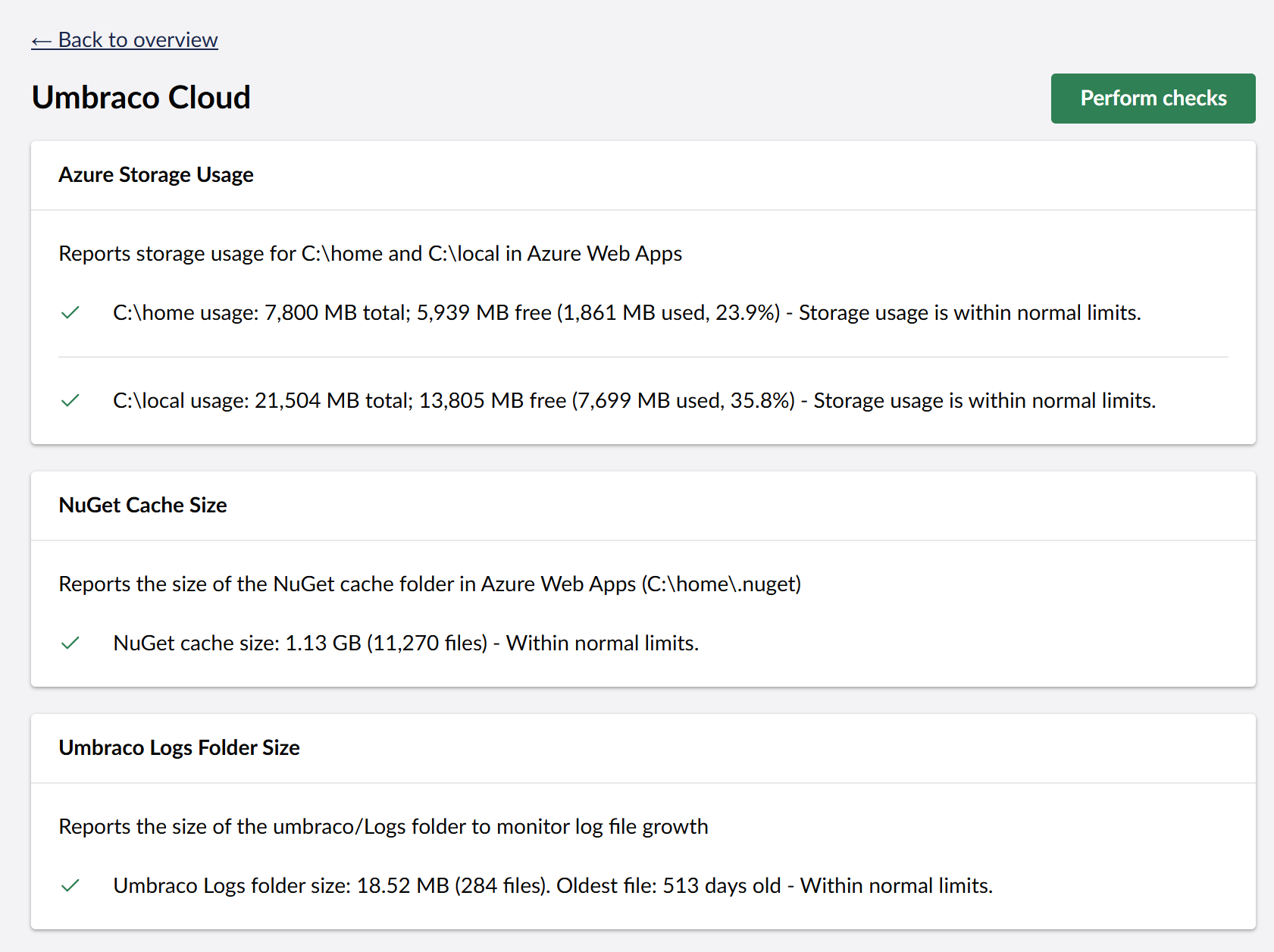
Azure Storage Usage - Monitors storage usage for
C:\homeandC:\localdirectories in Umbraco Cloud- Warning threshold at 75% usage
- Error threshold at 90% usage
- Windows-only support
- Uses Windows API for instant results (no scanning required)
NuGet Cache Size - Monitors the size of the NuGet cache directory
- Intelligent defaults: Automatically calculates thresholds based on total home directory size (50% for error, 75% of error for warning)
- Uses background scanning with distributed cache
- Displays calculation timestamp
Umbraco Logs Folder Size - Tracks the size of Umbraco log files
- Uses background scanning with distributed cache
- Displays calculation timestamp
Installation
Install via NuGet Package Manager or the .NET CLI:
dotnet add package Umbraco.Community.Cloud.HealthChecks
Or via NuGet Package Manager:
Install-Package Umbraco.Community.Cloud.HealthChecks
Usage
After installation, the health checks will automatically appear in the Umbraco backoffice under:
Settings → Health Check
The health checks are grouped under "Umbraco Cloud" for easy identification.
Configuration
All health check settings can be customized via appsettings.json. The package uses sensible defaults, but you can override them to suit your environment.
See the Configuration Guide for detailed configuration options and examples.
Quick example:
{
  "CloudHealthChecks": {
    "BackgroundScan": {
      "Enabled": true,
      "ScanIntervalHours": 6.0,
      "CacheExpirationHours": 720.0
    },
    "UmbracoLogs": {
      "WarningThresholdMb": 200,
      "ErrorThresholdMb": 1000
    }
  }
}
Background Scan Configuration
- Enabled (default:
true) - Enable/disable background scanning - ScanIntervalHours (default:
6.0) - How often to scan folders (in hours) - CacheExpirationHours (default:
720.0) - How long to cache results (in hours / 30 days)
Note: In load-balanced environments, the background job runs only on the elected SchedulingPublisher server using distributed locking to ensure only one scan occurs. All servers read from the shared distributed cache.
Requirements
- Umbraco CMS v17+
Proactive Monitoring
To get the most value from these health checks, set up automated monitoring using Umbraco's built-in notification system or third-party integrations.
Built-in Email Notifications
Umbraco includes a built-in email notification system for health checks. Configure it in Settings → Health Check to receive email alerts when issues are detected. See the official documentation for setup instructions. This allows you to:
- Get early warnings when storage reaches 75% capacity
- Receive critical alerts at 90% usage before your site runs out of space
- Monitor log file growth and aging
- Take proactive action to prevent downtime
Slack Notifications
For real-time team alerts, combine this package with the Health Check Slack Notification Method package. This sends automated Slack messages to your team channel when storage thresholds are exceeded.
Both notification methods are especially valuable in Umbraco Cloud environments where storage space is limited and can impact site availability.
Support
For issues, questions, or feature requests, please visit the GitHub repository.
Credits
Developed by Crumpled Dog and the Umbraco Community.
License
This project is licensed under the terms specified in the LICENSE file.
| Product | Versions Compatible and additional computed target framework versions. |
|---|---|
| .NET | net10.0 is compatible. net10.0-android was computed. net10.0-browser was computed. net10.0-ios was computed. net10.0-maccatalyst was computed. net10.0-macos was computed. net10.0-tvos was computed. net10.0-windows was computed. |
-
net10.0
- Umbraco.Cms.Web.Common (>= 17.0.0)
NuGet packages
This package is not used by any NuGet packages.
GitHub repositories
This package is not used by any popular GitHub repositories.