Umbraco.Community.AI.Carbon
18.0.0-beta.2
dotnet add package Umbraco.Community.AI.Carbon --version 18.0.0-beta.2
NuGet\Install-Package Umbraco.Community.AI.Carbon -Version 18.0.0-beta.2
<PackageReference Include="Umbraco.Community.AI.Carbon" Version="18.0.0-beta.2" />
<PackageVersion Include="Umbraco.Community.AI.Carbon" Version="18.0.0-beta.2" />
<PackageReference Include="Umbraco.Community.AI.Carbon" />
paket add Umbraco.Community.AI.Carbon --version 18.0.0-beta.2
#r "nuget: Umbraco.Community.AI.Carbon, 18.0.0-beta.2"
#:package Umbraco.Community.AI.Carbon@18.0.0-beta.2
#addin nuget:?package=Umbraco.Community.AI.Carbon&version=18.0.0-beta.2&prerelease
#tool nuget:?package=Umbraco.Community.AI.Carbon&version=18.0.0-beta.2&prerelease
Umbraco.Community.AI.Carbon
🧪 Beta. Available on NuGet as a prerelease. Settings, wording and public types may still change before 1.0. Feedback is welcome in GitHub issues.
Adds an estimated CO2 dashboard to Umbraco.AI. It reads the usage Umbraco.AI already records and shows the estimated energy and CO2e (carbon dioxide equivalent) of your text generation, by model, by feature and over time. Each energy and CO2e figure leads with a rounded middle estimate (≈) and shows the low-to-high range under it.
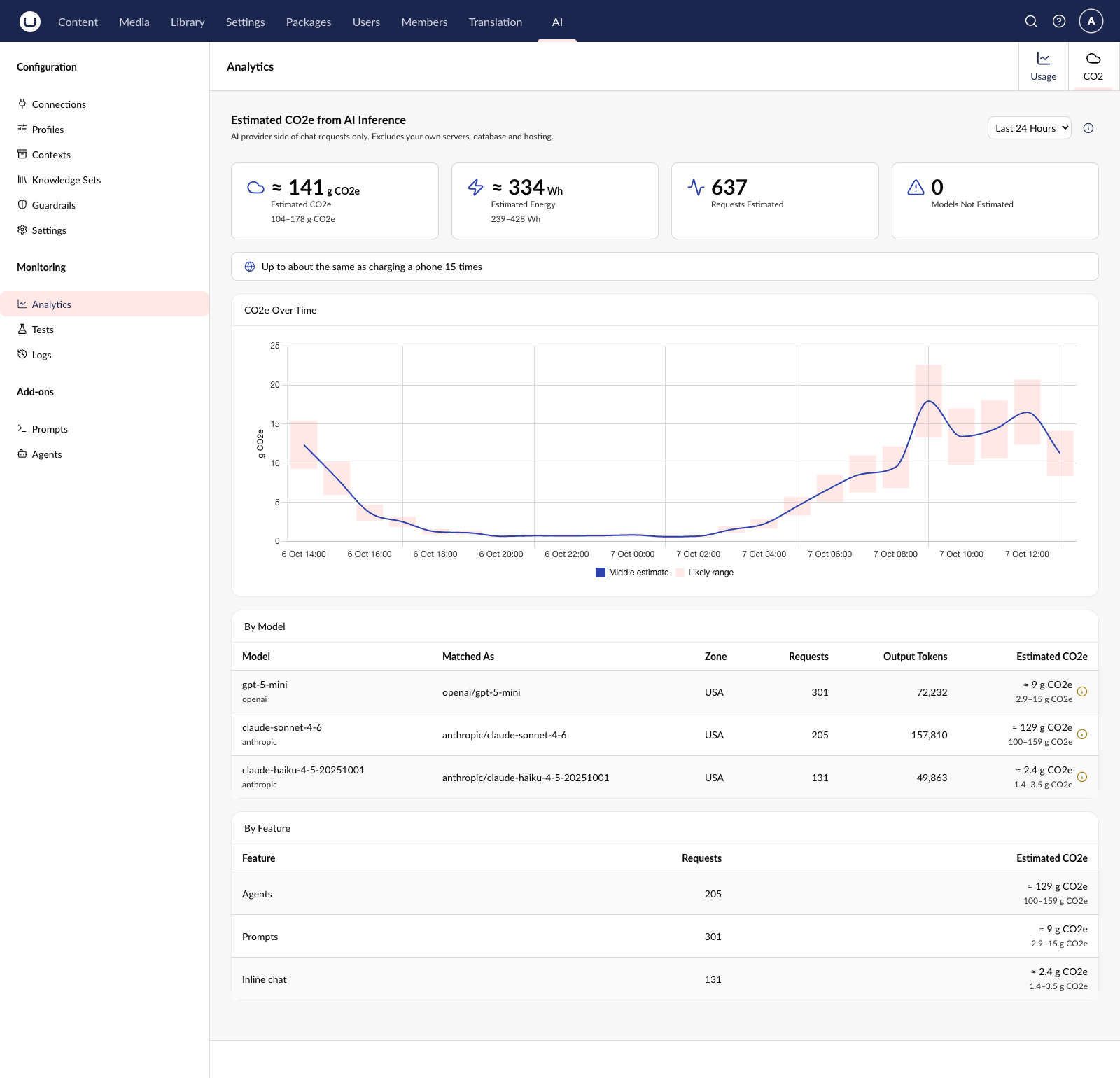
Screenshot uses sample data.
Unofficial community package. This is a personal project. It is not made, endorsed or supported by Umbraco HQ, and its figures are estimates, not Umbraco's own claims.
Requirements
- Umbraco CMS 18
- Umbraco.AI 18 (
Umbraco.AI.CoreandUmbraco.AI.Web,18.x) - Umbraco.AI usage analytics switched on. They are on by default (
Umbraco:AI:Analytics:Enabled). The "By feature" split also needsUmbraco:AI:Analytics:IncludeUsageFeatureTypeDimension, which is on by default too.
Each Umbraco major has its own version line of this package, which depends on the matching Umbraco CMS and Umbraco.AI major:
| Umbraco CMS | Umbraco.AI | Package | Branch |
|---|---|---|---|
| 18 | 18.x | 18.x | v18/dev |
| 17 (17.4.0 or later) | 17.x | 17.x | v17/dev |
This is the Umbraco CMS 18 line.
Install
dotnet add package Umbraco.Community.AI.Carbon --prerelease
NuGet picks the version line that matches your Umbraco CMS major (18.x for CMS 18, 17.x for CMS 17).
Open the AI section, then Analytics, then the CO2 tab. Anyone who can open the AI section can see it. The dashboard offers the last 24 hours, 7 days or 30 days.
What the dashboard shows
- Header: says the figures cover the AI provider side of chat requests only, not your own servers, database or hosting. The info icon opens the "How is this calculated?" panel.
- Cards: estimated CO2e, estimated energy, requests estimated, and how many models could not be estimated.
- Everyday comparison (on by default, see
ShowEquivalents): the top of the estimate as something familiar, for example "Up to about the same as charging a phone 13 times". - CO2e over time: a bar for each hour or day showing the likely range, with a line for the middle estimate. Hover a point to see its figures.
- By model: each model Umbraco.AI used, the EcoLogits model it was matched to, the electricity zone, requests, output tokens and estimated CO2e. Models that can't be estimated say so, with the reason.
- By feature: the same estimate split by agents, prompts, inline chat and other uses.
The dashboard follows the backoffice light and dark themes.
Configuration
Everything is optional. Settings live in the AICarbon section of appsettings.json:
{
  "AICarbon": {
    "ElectricityZone": "SWE",
    "ShowEquivalents": false,
    "ProviderMappings": {
      "my-company-gateway": "openai"
    },
    "ModelMappings": {
      "my-gpt-deployment": "openai/gpt-4o",
      "my.custom-claude-v1": "anthropic/claude-sonnet-4-6"
    }
  }
}
ElectricityZone: an ISO 3166-1 alpha-3 country code, such asSWE, orWORfor the world average. It is used for every estimate. When left out, each model uses its provider's default data centre location. Only set it to where your models really run, because it changes the result.ShowEquivalents:trueorfalse, on by default. Set"ShowEquivalents": falseto hide it. When on, the dashboard also shows the top of the estimate as an everyday comparison: phone charges for small amounts, then kilometres in an average car, then kilometres flown (short-haul, per passenger). The sources are named in the "How is this calculated?" panel.ProviderMappings: maps an Umbraco.AI provider id to an EcoLogits provider key, for examplemistralai. The keys areopenai,anthropic,google_genai,mistralai,huggingface_hubandcohere. The package already mapsopenai,anthropic,google,mistralandhuggingface. Your entries add to these or replace them.ModelMappings: maps an Umbraco.AI model id toecologitsProvider/modelName, where the provider is an EcoLogits provider key (the same list as above). Use it for custom deployment names and fine-tunes. Keys are not case sensitive. Leave the:Nsuffix off a key (...-v1, not...-v1:0), because .NET configuration treats:as a section separator and silently drops such keys. Lookups retry without the suffix, so the mapping still matches.
Changes to the mappings need an app restart. Setting values it cannot match to EcoLogits data (an unknown zone, provider or model) are logged as a warning at startup. Models seen in real usage that cannot be matched show as "not estimated" in the table.
How the estimate works
Using EcoLogits' method, the GPU and server energy is worked out for each model from its size (number of parameters). That is multiplied by the data centre's overhead (PUE) and the CO2e per kWh of the electricity mix, and a share of the hardware's manufacturing footprint is added. The dashboard has a "How is this calculated?" panel with the same summary.
Counted: the output tokens of text generation (chat) and the number of successful chat requests.
Not counted: input tokens, embeddings, image generation, speech, model training, the network, your own devices, and your own servers, database and hosting. Models EcoLogits does not know are listed as "not estimated".
Things to know:
- Closed models do not publish their size, so it is estimated and the range is wide.
- EcoLogits normally limits the modelled generation time to how long a request took. Umbraco.AI does not record that, so the limit is not applied. This can only make the estimate higher, not lower.
- A window of up to 93 days can use hourly points, and up to about 5 years (1,830 days) can use daily points. The dashboard only asks for 24 hours, 7 days and 30 days. Umbraco.AI keeps hourly data for 30 days by default (up to 90), so the 93-day hourly limit does not mean the data is there.
- Estimates are cached for 5 minutes on each server.
- The 30-day range (daily points) can miss today's usage if Umbraco.AI has not yet rolled the hours up into days.
Extending
Models are matched to EcoLogits data by a chain of resolvers. The first one that returns a model wins, so return null for anything you do not recognise. Add your own in a composer:
using Umbraco.Cms.Core.Composing;
using Umbraco.Cms.Core.DependencyInjection;
using Umbraco.Community.AI.Carbon.Core.EcoLogits;
using Umbraco.Community.AI.Carbon.Core.Resolution;
using Umbraco.Community.AI.Carbon.Extensions;

public class MyCarbonComposer : IComposer
{
    public void Compose(IUmbracoBuilder builder)
        => builder.AICarbonModelResolvers().Insert<MyGatewayResolver>();
}

public class MyGatewayResolver(IEcoLogitsDataRepository data) : IAICarbonModelResolver
{
    public EcoLogitsModel? Resolve(AICarbonModelResolutionContext context)
        => context.ModelId.StartsWith("gw-gpt4o-", StringComparison.OrdinalIgnoreCase)
            ? data.GetModel("openai", "gpt-4o")
            : null;
}
Insert<T>() puts your resolver before ConfiguredMappingResolver, so it beats ModelMappings in appsettings. If appsettings should win, use InsertAfter<ConfiguredMappingResolver, MyGatewayResolver>() instead. Append<T>() and Remove<T>() are available too.
To change the calculation itself, register your own with builder.Services.AddUnique<IAICarbonEstimateService, MyService>() (from Umbraco.Extensions). It replaces the built-in service and its cache.
Development
dotnet build Umbraco.Community.AI.Carbon.slnx
dotnet test Umbraco.Community.AI.Carbon.slnx
npm install               # from the repo root, never inside Client/
npm run build             # frontend into wwwroot/
npm run generate-client   # needs the demo site running
Create the demo site (gitignored, under demos/) with scripts/install-demo-site.sh or scripts/install-demo-site.ps1. It installs Umbraco.AI from NuGet and references the local package. A provider package and an API key are needed to produce real usage data.
Releasing
Package versions track the Umbraco CMS major: this line (v18/* branches) ships 18.x, the v17 line ships 17.x, under the same package ids. Each line is released from its own vN/main branch.
To cut a release:
- Set
versioninversion.jsononvN/dev(for example18.0.0-beta.1or18.0.0). Use dotted prerelease identifiers only (-beta.1, never-beta1). - Merge
vN/devintovN/main. - Create a GitHub Release with the tag
vN.x.y(for examplev18.0.0-beta.1), targetingvN/main, with hand-written release notes. The tagged commit must be onvN/main; the release workflow checks this and fails otherwise. Tick "pre-release" for prerelease versions. Publishing the release triggers.github/workflows/release.yml.
The workflow first checks that the tag matches the computed package version, the CMS major of the branch, and that the tagged commit is on vN/main. It then builds the frontend and the solution, runs the frontend and .NET tests, packs, and, in a separate publish job that has no access to the build steps, pushes to nuget.org using Trusted Publishing (OIDC). No long-lived API key is stored in the repo. Pull requests and pushes to vN/dev run the same build and tests (frontend and .NET) through .github/workflows/ci.yml, without packing or publishing.
One-time setup:
- Add a
NUGET_USERrepo secret set to your nuget.org profile name (not your email). It is not a credential. - On nuget.org, open your username menu, then Trusted Publishing, and add a policy for Repository Owner
mattbrailsford, RepositoryUmbraco.Community.AI.Carbonand Workflow Filerelease.yml. - When creating the policy, make sure its scope allows pushing new packages (see "Select Scopes" in the NuGet Trusted Publishing docs). Otherwise, push the first version of each of the four package ids by hand (
Umbraco.Community.AI.Carbon,.Core,.Weband.Web.StaticAssets), for example with an API key from your own machine. - A new policy may start as "temporarily active" for 7 days, until its first successful publish. Run the first release within that window.
Keeping EcoLogits data current
.github/workflows/ecologits-sync.yml runs every Monday (and on demand from the Actions tab, optionally with a tag input) and checks the latest EcoLogits release. If it is newer than the pinned version (DataVersion in EcoLogitsDataRepository.cs), it opens one PR per version line (v18/dev and v17/dev) on a branch like v18/chore/ecologits-x.y.z. The PR updates the embedded data files and every reference to the version, using scripts/bump-ecologits-version.sh <tag>, which you can also run by hand. The PR body says whether the upstream files we hand-ported to C# changed (with a diff). Those ports and their header tags are never updated automatically.
- The workflow needs an
ECOLOGITS_SYNC_TOKENrepo secret to open PRs: a fine-grained personal access token for this repo with Contents and Pull requests set to read and write. This repo has "Allow GitHub Actions to create and approve pull requests" turned off, so the defaultGITHUB_TOKENcannot open them. PRs opened with this token also get CI. Fine-grained tokens expire, so renew the token before it does, or the weekly run will start failing. - Alternative without a token: tick Settings > Actions > General > Workflow permissions > "Allow GitHub Actions to create and approve pull requests". PRs then open, but CI does not run on them (PRs from
GITHUB_TOKENdo not start other workflows). Push an empty commit or close and reopen the PR to trigger CI. - GitHub disables scheduled workflows in public repos after 60 days without repo activity. If the weekly run stops, re-enable it from the Actions tab.
Credits and licence
The estimates use data and formulas from EcoLogits (source), data version 0.11.2. EcoLogits is part of the CodeCarbon non-profit and was started by GenAI Impact. It is licensed under MPL-2.0. See THIRD-PARTY-NOTICES.md for which files come from it.
This package is MIT licensed. See LICENSE.
Learn more about Target Frameworks and .NET Standard.
-
net10.0
- Umbraco.Community.AI.Carbon.Web (>= 18.0.0-beta.2)
- Umbraco.Community.AI.Carbon.Web.StaticAssets (>= 18.0.0-beta.2)
NuGet packages
This package is not used by any NuGet packages.
GitHub repositories
This package is not used by any popular GitHub repositories.
| Version | Downloads | Last Updated |
|---|---|---|
| 18.0.0-beta.2 | 47 | 10/7/2026 |
| 18.0.0-beta.1 | 55 | 10/7/2026 |
| 17.0.0-beta.2 | 49 | 10/7/2026 |
| 17.0.0-beta.1 | 50 | 10/7/2026 |