Toolbelt.Blazor.ViewTransition
2.0.0
dotnet add package Toolbelt.Blazor.ViewTransition --version 2.0.0
NuGet\Install-Package Toolbelt.Blazor.ViewTransition -Version 2.0.0
<PackageReference Include="Toolbelt.Blazor.ViewTransition" Version="2.0.0" />
<PackageVersion Include="Toolbelt.Blazor.ViewTransition" Version="2.0.0" />
<PackageReference Include="Toolbelt.Blazor.ViewTransition" />
paket add Toolbelt.Blazor.ViewTransition --version 2.0.0
#r "nuget: Toolbelt.Blazor.ViewTransition, 2.0.0"
#:package Toolbelt.Blazor.ViewTransition@2.0.0
#addin nuget:?package=Toolbelt.Blazor.ViewTransition&version=2.0.0
#tool nuget:?package=Toolbelt.Blazor.ViewTransition&version=2.0.0
Blazor View Transition 
📝 Summary
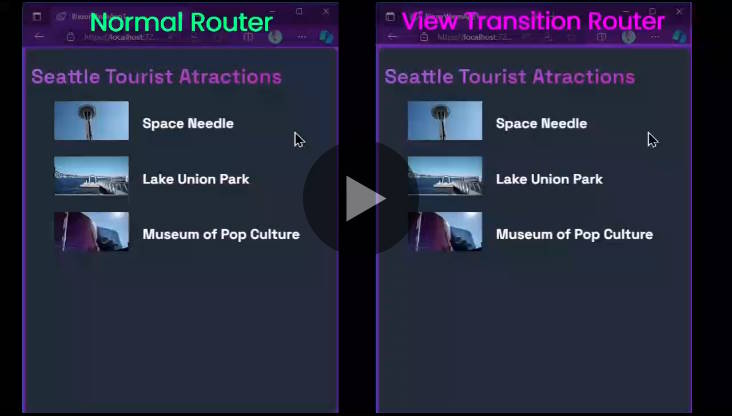
A router component and a service that makes your Blazor apps have pretty animated transition effects between pages with the View Transitions API.
🚀 Quick Start
- Add this package to your project like this.
dotnet add package Toolbelt.Blazor.ViewTransition
- Open
Toolbelt.Blazor.ViewTransitionnamespace in the_Imports.razorfile.
@* This is "_Imports.razor" *@
...
@using Toolbelt.Blazor.ViewTransition
- Replace a router component to use the
ViewTransitionRouter.
@** App.razor **@

@** Replcae the <Router> component to the <ViewTransitionRouter> **@
<ViewTransitionRouter AppAssembly="@typeof(App).Assembly">
    <Found Context="routeData">
        <RouteView RouteData="@routeData" DefaultLayout="typeof(MainLayout)" />
        <FocusOnNavigate RouteData="@routeData" Selector="[autofocus]" />
    </Found>
    <NotFound>
        <PageTitle>Not found</PageTitle>
        <LayoutView Layout="typeof(MainLayout)">
            <p role="alert">Sorry, there's nothing at this address.</p>
        </LayoutView>
    </NotFound>
</ViewTransitionRouter>
- That's all. You will see the default cross-fade transition effect when you move between pages!

🛠️ Customize the transition effect
- Specify the same
view-transition-nameCSS attribute value for elements that should be transitioned as the same individual element across pages.

- Then, you will see the elements are transitioned as the same individual element across pages!

These transition effects are implemented by web browser's "View Transion" API. For more details about View Transition API, see MDN web docs and Chrome for Developers docs.
Important
The "View Transition" API is an experimental technology when this library is released. Please check the Browser compatibility table carefully before using this in production.
🛠️ Customize the base router component
The ViewTransitionRouter component is a wrapper component of the Microsoft.AspNetCore.Components.Routing.Router component. You can customize the base router component, such as LazyAssemblyLoadableRouter, by using the TypeOfRouter parameter.
<ViewTransitionRouter ... TypeOfRouter="typeof(LazyAssemblyLoadableRouter)">
    ...
</ViewTransitionRouter>
⚙️ Use the "ViewTransition" service
You can use the IViewTransition service instead of the ViewTransitionRouter component to control the transition effect manually.
- Add the
ViewTransitionservice to your Blazor app's DI container.
// Program.cs
...
using Toolbelt.Blazor.Extensions.DependencyInjection; // 👈 Add this line.

var builder = WebAssemblyHostBuilder.CreateDefault(args);
...
builder.Services.AddViewTransition(); // 👈 Add this line.
...
- Inject the
IViewTransitionservice to your Blazor component, and surround the DOM modification code you want to apply the transition effect by calling theBeginAsync()andEndAsync()methods. The following example shows how to re-implement theViewTransitionRoutercomponent yourself.
@inject IViewTransition ViewTransition

<Router AppAssembly="@typeof(App).Assembly" OnNavigateAsync="OnNavigateAsync">
    ...
</Router>

@code
{
    private async Task OnNavigateAsync()
    {
        await this.ViewTransition.BeginAsync();
    }

    protected override async Task OnAfterRenderAsync(bool firstRender)
    {
        await this.ViewTransition.EndAsync();
    }
}
🛠️ JavaScript file cache busting
This library includes and uses a JavaScript file to access the browser's View Transition API. When you update this library to a newer version, the browser may use the cached previous version of the JavaScript file, leading to unexpected behavior. To prevent this issue, the library appends a version query string to the JavaScript file URL when loading it.
.NET 8 and 9
A version query string will always be appended to this library's JavaScript file URL regardless of the Blazor hosting model you are using.
.NET 10 or later
By default, a version query string will be appended to the JavaScript file URL that this library loads. If you want to disable appending a version query string to the JavaScript file URL, you can do so by setting the TOOLBELT_BLAZOR_VIEWTRANSITION_JSCACHEBUSTING environment variable to 0.
// Program.cs
...
// 👇 Add this line to disable appending a version query string for this library's JavaScript file.
Environment.SetEnvironmentVariable("TOOLBELT_BLAZOR_VIEWTRANSITION_JSCACHEBUSTING", "0");

var builder = WebApplication.CreateBuilder(args);
...
However, when you publish a .NET 10 Blazor WebAssembly app, a version query string will always be appended to the JavaScript file URL regardless of the TOOLBELT_BLAZOR_VIEWTRANSITION_JSCACHEBUSTING environment variable setting. The reason is that published Blazor WebAssembly standalone apps don't include import map entries for JavaScript files from NuGet packages. If you want to avoid appending a version query string to the JavaScript file URL in published Blazor WebAssembly apps, you need to set the ToolbeltBlazorViewTransitionJavaScriptCacheBusting MSBuild property to false in the project file of the Blazor WebAssembly app, like this:
<PropertyGroup>
  <ToolbeltBlazorViewTransitionJavaScriptCacheBusting>false</ToolbeltBlazorViewTransitionJavaScriptCacheBusting>
</PropertyGroup>
Why do we append a version query string to the JavaScript file URL regardless of whether the import map is available or not?
We know that .NET 9 or later allows us to use import maps to import JavaScript files with a fingerprint in their file names. Therefore, in .NET 9 or later Blazor apps, you may want to avoid appending a version query string to the JavaScript file URL that this library loads.
However, we recommend keeping the default behavior of appending a version query string to the JavaScript file URL. The reason is that published Blazor WebAssembly standalone apps don't include import map entries for JavaScript files from NuGet packages. This inconsistent behavior between development and production environments and hosting models may lead to unexpected issues that are hard to diagnose, particularly in AutoRender mode apps.
🎉 Release Note
📢 License
| Product | Versions Compatible and additional computed target framework versions. |
|---|---|
| .NET | net8.0 is compatible. net8.0-android was computed. net8.0-browser was computed. net8.0-ios was computed. net8.0-maccatalyst was computed. net8.0-macos was computed. net8.0-tvos was computed. net8.0-windows was computed. net9.0 is compatible. net9.0-android was computed. net9.0-browser was computed. net9.0-ios was computed. net9.0-maccatalyst was computed. net9.0-macos was computed. net9.0-tvos was computed. net9.0-windows was computed. net10.0 is compatible. net10.0-android was computed. net10.0-browser was computed. net10.0-ios was computed. net10.0-maccatalyst was computed. net10.0-macos was computed. net10.0-tvos was computed. net10.0-windows was computed. |
-
net10.0
- Microsoft.AspNetCore.Components.Web (>= 10.0.0)
-
net8.0
- Microsoft.AspNetCore.Components.Web (>= 8.0.0)
- Toolbelt.Blazor.GetProperty.Script (>= 1.3.0)
-
net9.0
- Microsoft.AspNetCore.Components.Web (>= 9.0.0)
- Toolbelt.Blazor.GetProperty.Script (>= 1.3.0)
NuGet packages (1)
Showing the top 1 NuGet packages that depend on Toolbelt.Blazor.ViewTransition:
| Package | Downloads |
|---|---|
|
VaultForce.SharedClient
shared resources |
GitHub repositories
This package is not used by any popular GitHub repositories.
v.2.0.0
- Update: Added support for .NET 10, and dropped support for .NET 7 or earlier.
- Improve: Removed the dependency on the Toolbelt.Blazor.GetProperty.Script NuGet package for .NET 10 or later projects.
- Improve: Better support for controlling JavaScript caching strategies on .NET 10 or later projects.
To see all the change logs, please visit the following URL.
- https://github.com/jsakamoto/Toolbelt.Blazor.ViewTransition/blob/main/RELEASE-NOTES.txt