Toolbelt.Blazor.I18nText
14.1.1
dotnet add package Toolbelt.Blazor.I18nText --version 14.1.1
NuGet\Install-Package Toolbelt.Blazor.I18nText -Version 14.1.1
<PackageReference Include="Toolbelt.Blazor.I18nText" Version="14.1.1" />
<PackageVersion Include="Toolbelt.Blazor.I18nText" Version="14.1.1" />
<PackageReference Include="Toolbelt.Blazor.I18nText" />
paket add Toolbelt.Blazor.I18nText --version 14.1.1
#r "nuget: Toolbelt.Blazor.I18nText, 14.1.1"
#:package Toolbelt.Blazor.I18nText@14.1.1
#addin nuget:?package=Toolbelt.Blazor.I18nText&version=14.1.1
#tool nuget:?package=Toolbelt.Blazor.I18nText&version=14.1.1
Blazor Internationalization(I18n) Text 


📝 Summary
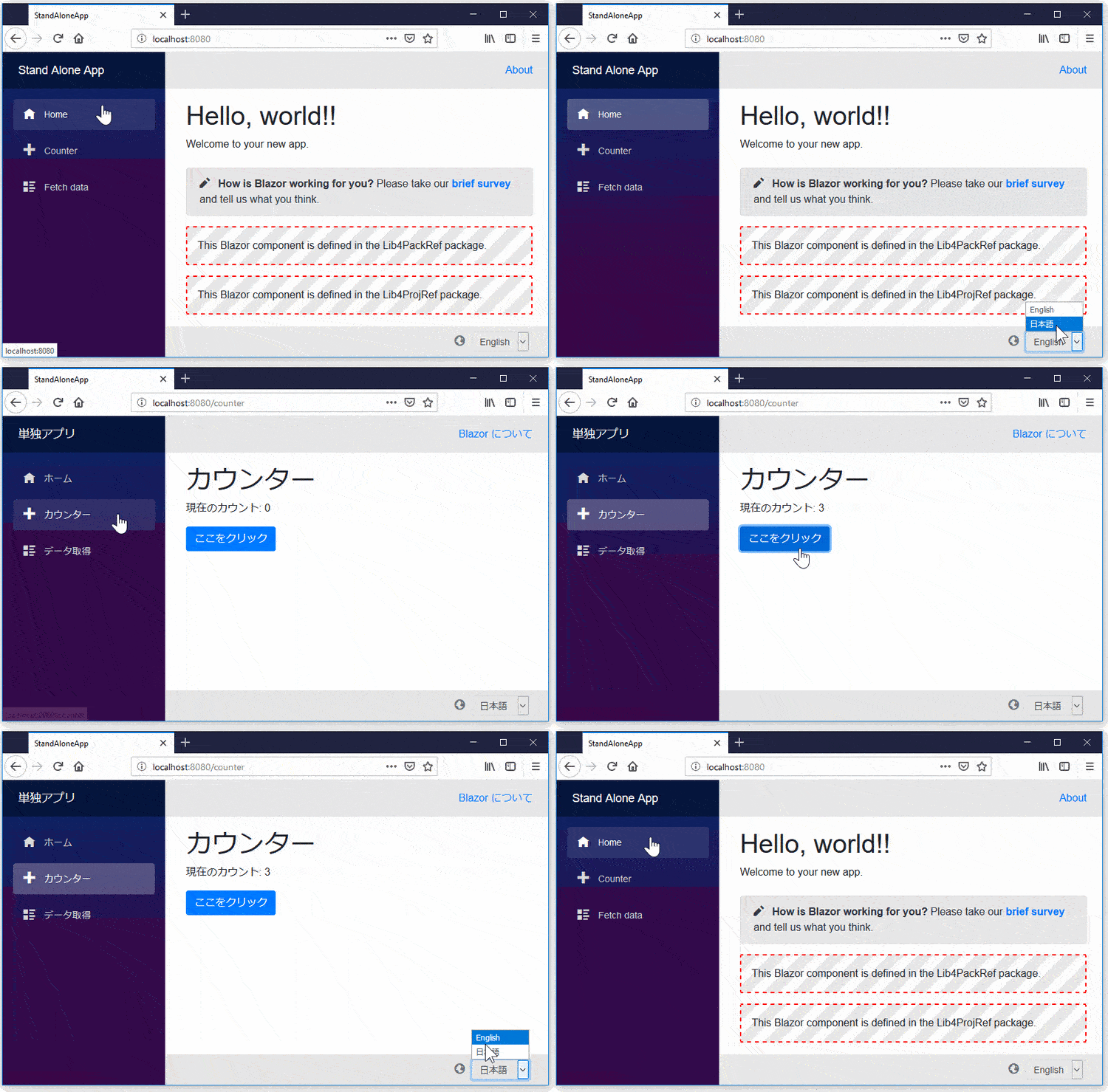
This package is another way to localize text in your Blazor Web App!
🎁 Features
- All of the render modes (SSR, Server, WebAssembly, and Auto) are supported.
- In Blazor Wasm, it works even on a static web host. (The ASP.NET Core host isn't required)
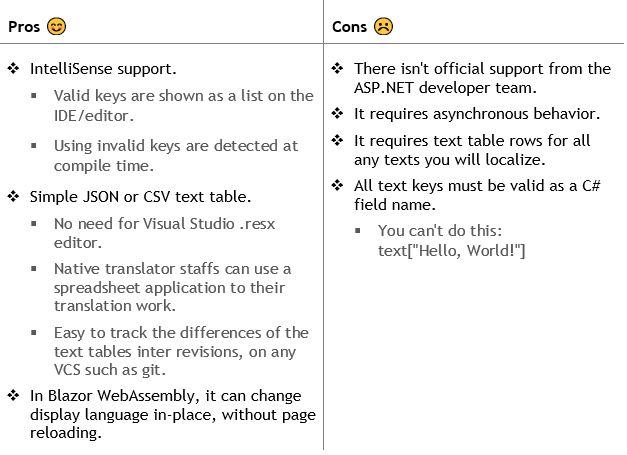
- Only needs a plain text editor - no need for .resx files
- Static Typing - IntelliSense, Code Hint, etc.
- It supports Blazor components libraries. You can create NuGet packages of your libraries that are localized with "Blazor I18nText".
📢 Notice
Blazor WebAssembly has started localization support officially since v.3.2 preview 4. It is based on .NET Standard IStringLocalizer and satellite assemblies with .resx.
However, I will continue to develop and maintain this package, because this package still has some advantages over the .NET standard implementation.
Supported .NET versions
.NET 8.0, 9.0, 10.0 or later versions.
🚀 Quick Start
Step 1 - Add Package
Add Toolbelt.Blazor.I18nText NuGet package to your Blazor app project as shown below
dotnet add package Toolbelt.Blazor.I18nText
Step 2 - Create localized text source files as JSON or CSV
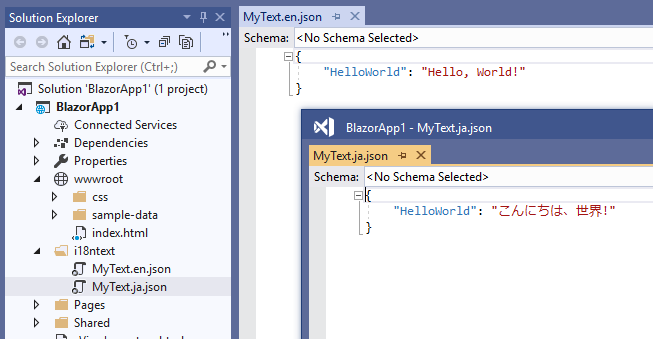
Add localized text source files for each language in an i18ntext folder under the project folder.
The localized text source files must be simple key-value only JSON files, as shown in the example below:
{
  "Key1": "Localized text 1",
  "Key2": "Localized text 2",
  ...
}
or, an only 2-column CSV file without a header row as shown in the example below.
Key1,Localized text 1
Key2,Localized text 2
The encoding of the CSV and JSON files must be UTF-8.
The naming rule for the localized text source files must follow this format:
<Text Table Name>.<Language Code>.{json|csv}
For example, the JSON-formatted localized text source file for the English language of the MyText Text Table class must be named MyText.en.json.
Step 3 - Build the project whenever localized text source files are created or updated.
Basically, after creating or updating those localized text source files, you may have to build your Blazor app project.
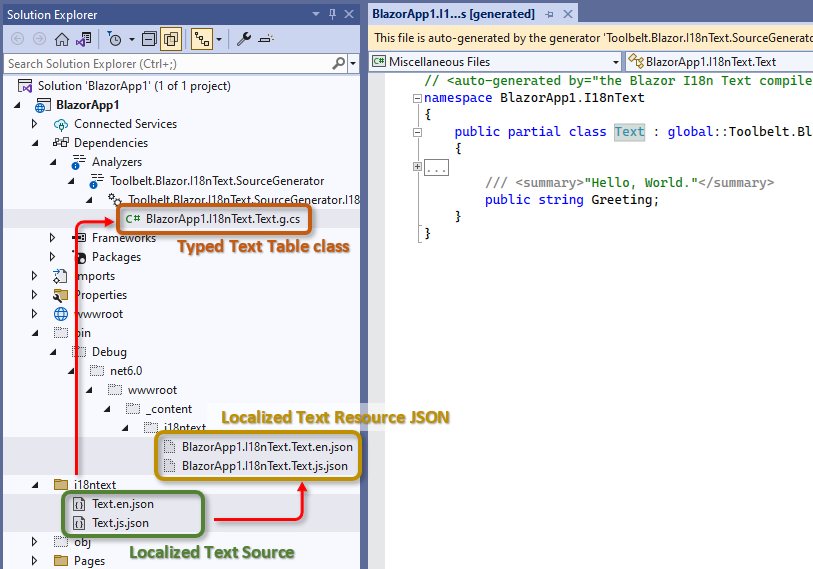
After that, "Typed Text Table class" C# source code will be generated by the C# "source generator" feature.
And also, "Localized Text Resource JSON" files will be generated in the output folder.
For Visual Studio IDE users
In Visual Studio IDE, the source generator works automatically in the background. Therefore, Visual Studio IDE users usually do not need to explicitly build the project.
Localized text source files (.json or .csv) are automatically recompiled into "Typed Text Table class" and "Localized Text Resource JSON" files whenever they are updated.
For dotnet CLI users
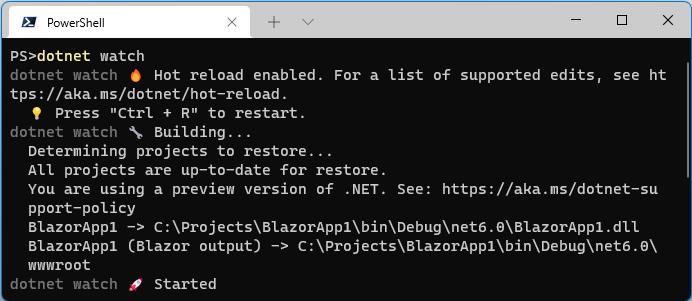
When developing with dotnet CLI and you want to automatically recompile localized text source files whenever they change, you can use the dotnet watch command.
$ dotnet watch
After entering that dotnet CLI command, the command window will remain in execution mode and watch for changes to the localized text source files.
When the dotnet CLI detects changes to the localized text source files, it will recompile them into "Typed Text Table class" and "Localized Text Resource JSON" files.
Step 4 - Configure your app to use the I18nText service
Edit the "Program.cs" file to register the "I18nText" service, like this:
// in your Program.cs
using Toolbelt.Blazor.Extensions.DependencyInjection; // 👈 Add this, and...
...
var builder = WebApplication.CreateDefault(args);
...

// 👇 Add the following code to register the I18nText service.
builder.Services.AddI18nText(
    options => options.PersistenceLevel = PersistanceLevel.Cookie);
...
If your Blazor app has SSR areas, we strongly recommend using the PersistanceLevel.Cookie option to persist the language settings, because it is the only way to maintain the language settings in SSR areas. If your Blazor app doesn't have any SSR areas, you can use other options, such as PersistanceLevel.Session.
If your Blazor app has SSR areas, or the Server-side Pre-rendering is enabled, or the I18n Text options are configured to use cookies to persist language settings, you have to add the following code to configure the RequestLocalization middleware, and use the RequestLocalization middleware, like this.
// in your Program.cs

...
// 👇 Add the following code to configure
//     the RequestLocalization middleware, and...
builder.Services.Configure<RequestLocalizationOptions>(options =>
{
    // This is an example.
    // You should configure the supported cultures as you like.
    var supportedCultures = new[] { "en", "ja" };
    options.DefaultRequestCulture = new("en");
    options.AddSupportedCultures(supportedCultures);
    options.AddSupportedUICultures(supportedCultures);
});

...
var app = builder.Build();
...

// 👇 Add the following code to use the RequestLocalization middleware.
app.UseRequestLocalization();
...
Step 5 - Get the "Text Table" object in your Blazor component
Open your Blazor component file (.razor) inside any editor, and do the following:
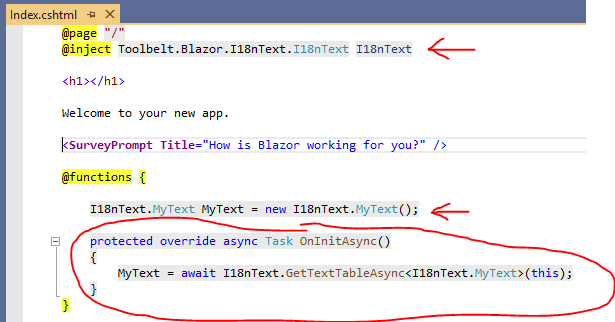
- Inject
Toolbelt.Blazor.I18nText.I18nTextservice into the component.
@inject Toolbelt.Blazor.I18nText.I18nText I18nText
- Add a field of the Text Table class generated from localized text source files, and assign the default instance.
@code {
  private I18nText.MyText MyText = new();
  ...
The namespace of the Text Table class is <default namespace of your Blazor project> + "I18nText".
- Override
OnInitiallizedAsync()method of the Blazor component, and assign a Text Table object that's a return value ofGetTextTableAsync<T>()method ofI18nTextservice instance to the Text Table field.
...
protected override async Task OnInitializedAsync()
{
  MyText = await I18nText.GetTextTableAsync<I18nText.MyText>(this);
  ...
Step 6 - Use the Text Table
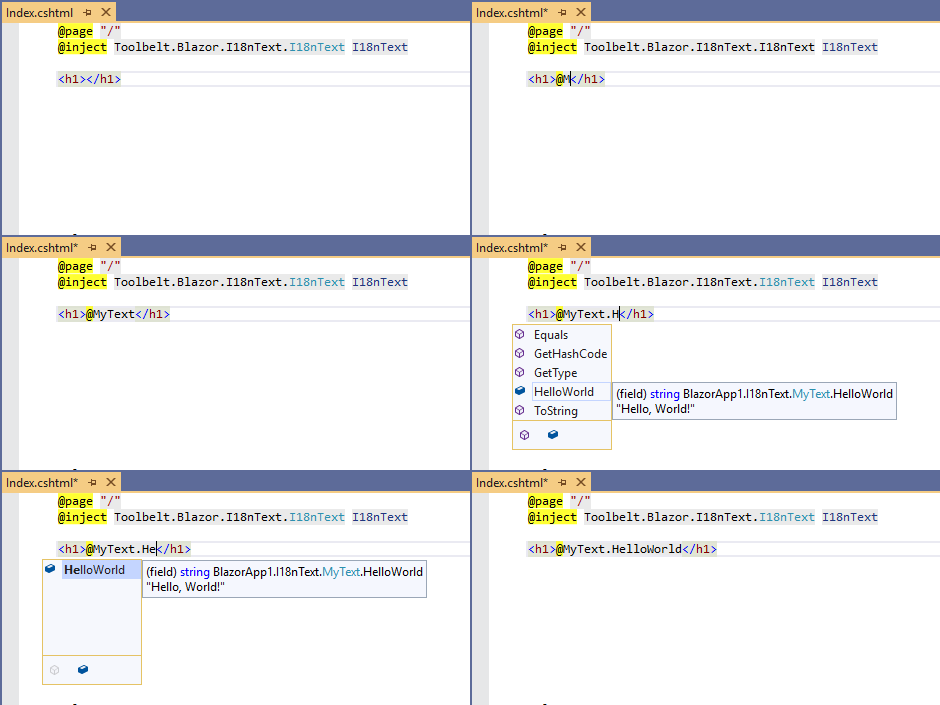
After doing these steps, you can reference a field of the Text Table object to get localized text.
If you are using Visual Studio in Windows OS or Visual Studio Code with the C# extension, you will get "IntelliSense" and "Document comment" support.
Text Table object allows you to get localized text by key string dynamically, with indexer syntax, like this.
<h1>@MyText["HelloWorld"]</h1>
If you make some mistakes that typo of key string, it will just return the key string as is without any runtime exceptions.
Step 7 - Run it!
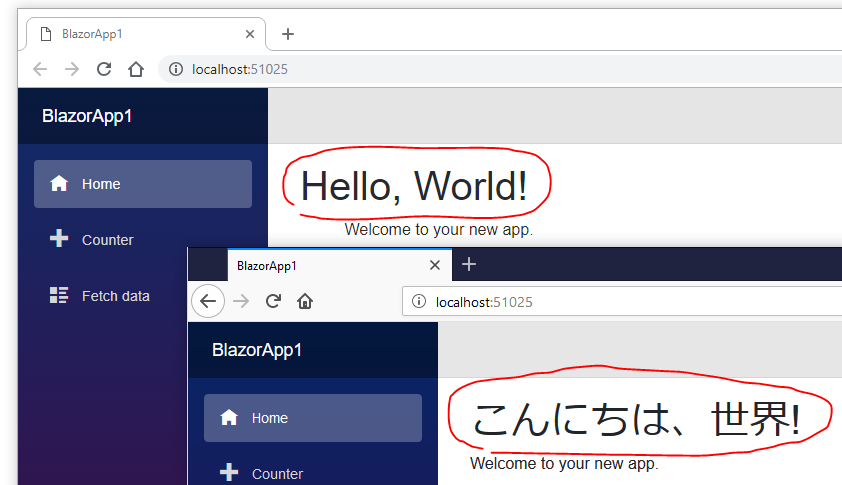
Build and run your Blazor app.
The I18nText service detects the language settings of the Web browser, and reads the localized text resource JSON which is most suitable for the language detected.
📌 Limitations
The following features are not supported in this version of I18Text library.
- Integration with ASP.NET Core localization (
IStringLocalizer<T>support) - Localize validation message
- Plural form support
- Text formatting by placeholder.
- Integration with
System.Globalization.Culture.CurrentUICulture.
The following features will not be supported forever, because these features are not the scope of this library, we think.
- Formatting of date, time, currency. (These features will be provided by
System.Globalization.Culture.)
⚙️ Configuration
🛠️ API Reference
Please see also "API Reference" on GitHub.
🛠️ JavaScript file cache busting
This library includes and uses a JavaScript file to do some small work. When you update this library to a newer version, the browser may use the cached previous version of the JavaScript file, leading to unexpected behavior. To prevent this issue, the library appends a version query string to the JavaScript file URL when loading it.
.NET 8 and 9
A version query string will always be appended to the i18n text library's JavaScript file URL regardless of the Blazor hosting model you are using.
.NET 10 or later
By default, a version query string will be appended to the JavaScript file URL that this library loads. If you want to disable appending a version query string to the JavaScript file URL, you can do so by setting the TOOLBELT_BLAZOR_I18NTEXT_JSCACHEBUSTING environment variable to 0.
// Program.cs
...
using Toolbelt.Blazor.Extensions.DependencyInjection;

// 👇 Add this line to disable appending a version query string for the i18n text library's JavaScript file.
Environment.SetEnvironmentVariable("TOOLBELT_BLAZOR_I18NTEXT_JSCACHEBUSTING", "0");

var builder = WebApplication.CreateBuilder(args);
...
However, when you publish a .NET 10 Blazor WebAssembly app, a version query string will always be appended to the JavaScript file URL regardless of the TOOLBELT_BLAZOR_I18NTEXT_JSCACHEBUSTING environment variable setting. The reason is that published Blazor WebAssembly standalone apps don't include import map entries for JavaScript files from NuGet packages. If you want to avoid appending a version query string to the JavaScript file URL in published Blazor WebAssembly apps, you need to set the ToolbeltBlazorI18nTextJavaScriptCacheBusting MSBuild property to false in the project file of the Blazor WebAssembly app, like this:
<PropertyGroup>
  <ToolbeltBlazorI18nTextJavaScriptCacheBusting>false</ToolbeltBlazorI18nTextJavaScriptCacheBusting>
</PropertyGroup>
Why do we append a version query string to the JavaScript file URL regardless of whether the import map is available or not?
We know that .NET 9 or later allows us to use import maps to import JavaScript files with a fingerprint in their file names. Therefore, in .NET 9 or later Blazor apps, you may want to avoid appending a version query string to the JavaScript file URL that i18n text library loads.
However, we recommend keeping the default behavior of appending a version query string to the JavaScript file URL. The reason is that published Blazor WebAssembly standalone apps don't include import map entries for JavaScript files from NuGet packages. This inconsistent behavior between development and production environments and hosting models may lead to unexpected issues that are hard to diagnose, particularly in AutoRender mode apps.
🎉 Release Notes
Release notes are here.
📢 Licence & Third Party Notice
| Product | Versions Compatible and additional computed target framework versions. |
|---|---|
| .NET | net8.0 is compatible. net8.0-android was computed. net8.0-browser was computed. net8.0-ios was computed. net8.0-maccatalyst was computed. net8.0-macos was computed. net8.0-tvos was computed. net8.0-windows was computed. net9.0 is compatible. net9.0-android was computed. net9.0-browser was computed. net9.0-ios was computed. net9.0-maccatalyst was computed. net9.0-macos was computed. net9.0-tvos was computed. net9.0-windows was computed. net10.0 is compatible. net10.0-android was computed. net10.0-browser was computed. net10.0-ios was computed. net10.0-maccatalyst was computed. net10.0-macos was computed. net10.0-tvos was computed. net10.0-windows was computed. |
-
net10.0
- Microsoft.AspNetCore.Components (>= 10.0.0)
- Microsoft.AspNetCore.Components.Web (>= 10.0.0)
- Microsoft.Extensions.Http (>= 10.0.0)
- Toolbelt.Blazor.I18nText.SourceGenerator (>= 14.1.1)
-
net8.0
- Microsoft.AspNetCore.Components (>= 8.0.0)
- Microsoft.AspNetCore.Components.Web (>= 8.0.0)
- Microsoft.Extensions.Http (>= 8.0.0)
- Toolbelt.Blazor.GetProperty.Script (>= 1.2.0)
- Toolbelt.Blazor.I18nText.SourceGenerator (>= 14.1.1)
-
net9.0
- Microsoft.AspNetCore.Components (>= 9.0.0)
- Microsoft.AspNetCore.Components.Web (>= 9.0.0)
- Microsoft.Extensions.Http (>= 9.0.0)
- Toolbelt.Blazor.GetProperty.Script (>= 1.2.0)
- Toolbelt.Blazor.I18nText.SourceGenerator (>= 14.1.1)
NuGet packages (2)
Showing the top 2 NuGet packages that depend on Toolbelt.Blazor.I18nText:
| Package | Downloads |
|---|---|
|
Densen.Extensions.BootstrapBlazor
Densen Blazor组件库以及BootstrapBlazor服务扩展包 |
|
|
Toolbelt.Blazor.I18nText.StringLocalizerSupport
This NuGet package allows you to localize your Blazor app even validation messages based on .NET Core localization infrastructure such as "IStringLocalizer". |
GitHub repositories (2)
Showing the top 2 popular GitHub repositories that depend on Toolbelt.Blazor.I18nText:
| Repository | Stars |
|---|---|
|
csharpfritz/csharp_with_csharpfritz
Show notes, slides, and samples from the CSharp with CSharpFritz show
|
|
|
densen2014/Blazor100
Blazor入门100天
|
| Version | Downloads | Last Updated | |
|---|---|---|---|
| 14.1.1 | 39,389 | 1/1/2026 | |
| 14.0.1 | 9,130 | 5/22/2025 | |
| 14.0.0 | 3,635 | 2/8/2025 | |
| 14.0.0-preview.4 | 206 | 2/2/2025 | |
| 13.0.0 | 35,403 | 8/3/2024 | |
| 12.0.2 | 63,431 | 1/30/2023 | |
| 12.0.1 | 893 | 1/27/2023 | |
| 12.0.0 | 16,377 | 8/28/2022 | |
| 12.0.0-preview.1.10 | 1,801 | 3/27/2022 | |
| 11.1.4 | 9,910 | 3/23/2022 | |
| 11.1.3 | 3,060 | 2/5/2022 | |
| 11.1.2 | 1,099 | 1/30/2022 | |
| 11.1.1 | 705 | 1/27/2022 | |
| 11.1.0 | 723 | 1/26/2022 | |
| 11.0.0 | 5,106 | 11/11/2021 | |
| 11.0.0-preview.2 | 767 | 10/9/2021 | |
| 11.0.0-preview.1 | 583 | 8/21/2021 | |
| 10.0.0-preview.1 | 696 | 8/16/2021 | |
| 9.4.1 | 4,693 | 8/14/2021 |
v.14.1.1
- Update: Added support for .NET 10, and dropped support for .NET 6.
- Improve: Removed the dependency on the Toolbelt.Blazor.GetProperty.Script NuGet package for .NET 10 or later projects.
- Improve: Better support for controlling JavaScript caching strategies on .NET 10 or later projects.
To see all the change logs, please visit the following URL.
- https://github.com/jsakamoto/Toolbelt.Blazor.I18nText/blob/master/RELEASE-NOTES.txt