TheBuilder.BlurPlaceholder
0.2.1
dotnet add package TheBuilder.BlurPlaceholder --version 0.2.1
NuGet\Install-Package TheBuilder.BlurPlaceholder -Version 0.2.1
<PackageReference Include="TheBuilder.BlurPlaceholder" Version="0.2.1" />
<PackageVersion Include="TheBuilder.BlurPlaceholder" Version="0.2.1" />
<PackageReference Include="TheBuilder.BlurPlaceholder" />
paket add TheBuilder.BlurPlaceholder --version 0.2.1
#r "nuget: TheBuilder.BlurPlaceholder, 0.2.1"
#:package TheBuilder.BlurPlaceholder@0.2.1
#addin nuget:?package=TheBuilder.BlurPlaceholder&version=0.2.1
#tool nuget:?package=TheBuilder.BlurPlaceholder&version=0.2.1
<p align="center"> <img src="https://raw.githubusercontent.com/thebuilder/blur-placeholder/refs/heads/main/apps/docs/public/logo-mark.svg" width="112" height="112" alt="Blur Placeholder logo" /> </p>
<h1 align="center">Blur Placeholder for Umbraco</h1>
<p align="center"> Generate compact WebP, BlurHash, or ThumbHash placeholders once in Umbraco<br /> and deliver one simple string to your frontend. </p>




Blur Placeholder adds a generated, read-only blurPlaceholder property to Umbraco's default Image media type. The value is generated when the image is saved and stored with the media item, so a public request never triggers image processing.
What it does
- Generates on save. Placeholder work happens when the media item changes, never during a public request.
- Stores one string. Every result is a self-describing
blurPlaceholdervalue, never a JSON envelope. - Backfills existing media. A fingerprinted background pass processes the images already in the library and resumes if it is interrupted.
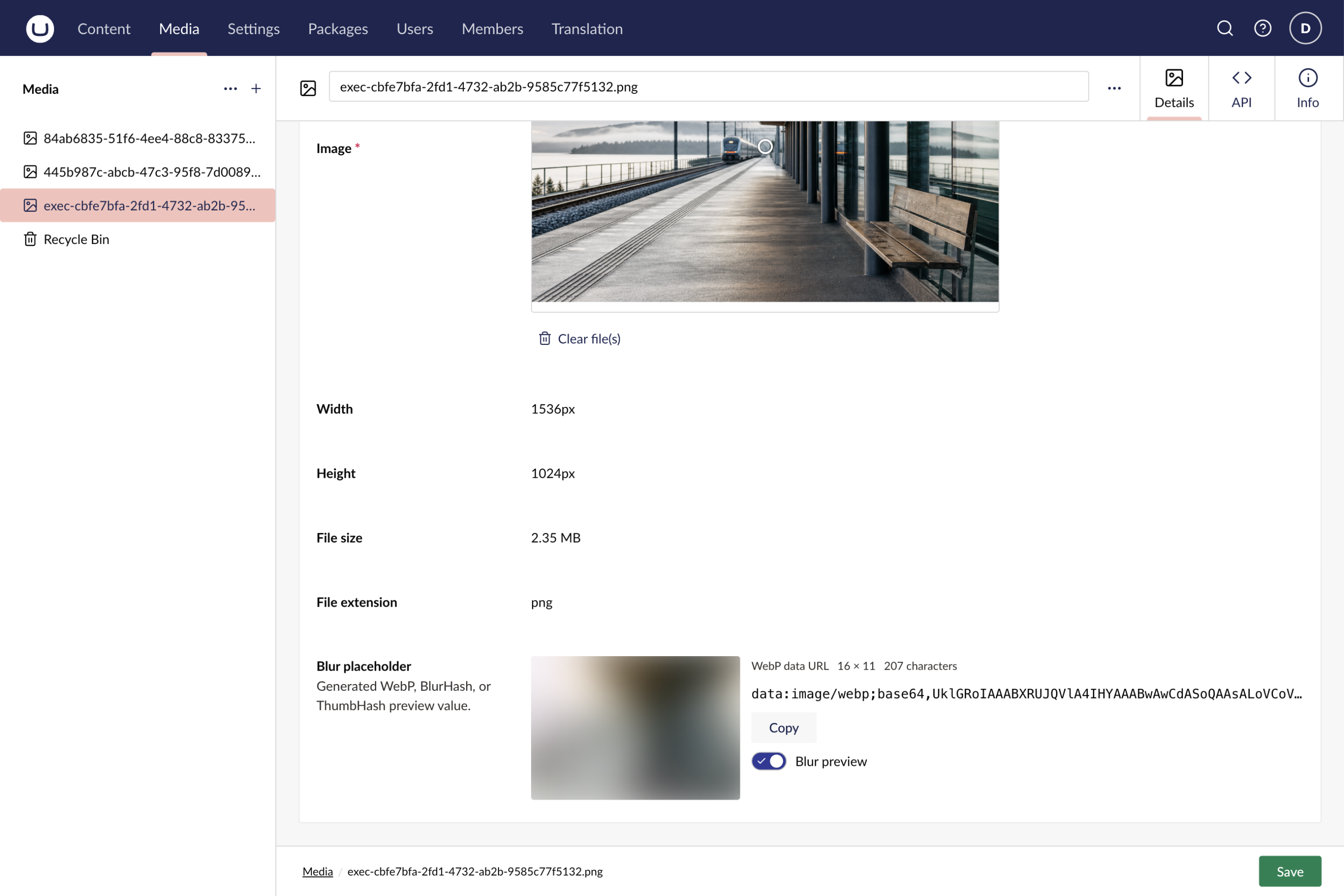
- Shows its work. The read-only backoffice property previews the result and reports its representation and stored size.
Output formats
| Algorithm | Stored value | Best when |
|---|---|---|
| WebP | Browser-ready data:image/webp;base64,… |
You want the simplest frontend integration with no decoder. This is the default. |
| BlurHash | Native blurhash:… string, or a decoded WebP data URL |
You want a compact, configurable hash and can decode it on the application server. |
| ThumbHash | Base64-encoded thumbhash:… bytes, or a decoded WebP data URL |
Aspect ratio, average color, and transparency matter. |
Native values carry a blurhash: or thumbhash: prefix, so a consumer never has to guess which decoder to use.
Install
Blur Placeholder supports Umbraco CMS 17.1 through 18.x on .NET 10. Add it to the Umbraco web project:
dotnet add package TheBuilder.BlurPlaceholder
Nothing else is required: the package generates placeholders from the media already in your library and calls no external service.
The package registers its services and backoffice extension automatically. Then:
- Restart the Umbraco application. The first startup installs the string data type and adds
blurPlaceholderto the default Image media type. - Upload or replace an Image media item and save it.
- Check the read-only Blur placeholder property on that media item for the generated preview.
- Request
blurPlaceholderthrough the Delivery API wherever your frontend needs it.
With BackfillExisting left on, a background pass also processes the images already in the library.
Configure
Configuration comes from the BlurPlaceholder section in appsettings.json. Every value below is the default, so you can omit the section entirely when the default tiny WebP output is what you want.
{
  "BlurPlaceholder": {
    "Enabled": true,
    "Algorithm": "Webp",
    "DecodeToDataUrl": true,
    "BackfillExisting": true,
    "RetryInterval": "12:00:00",
    "Webp": {
      "MaximumDimension": 16,
      "Quality": 60
    },
    "BlurHash": {
      "MaximumDimension": 32,
      "ComponentsX": 4,
      "ComponentsY": 3
    },
    "ThumbHash": {
      "MaximumDimension": 100
    },
    "DecodedDataUrl": {
      "WebpQuality": 60
    }
  }
}
Settings reference
| Setting | Default | Description |
|---|---|---|
Enabled |
true |
Enables save-time generation and maintenance. Disabling it preserves existing values. |
Algorithm |
Webp |
Selects Webp, BlurHash, or ThumbHash. |
DecodeToDataUrl |
true |
Converts native hashes to browser-ready WebP data URLs before storage. WebP output is always a data URL. |
BackfillExisting |
true |
Processes existing images once for each output-settings fingerprint. |
RetryInterval |
12:00:00 |
Sets how often maintenance scans for missing placeholders and retries transient failures. Minimum one minute. |
Webp.MaximumDimension |
16 |
Longest edge of direct WebP output. Accepts 16 to 64. |
Webp.Quality |
60 |
Direct lossy WebP quality. Accepts 1 to 100. |
BlurHash.MaximumDimension |
32 |
Longest input edge passed to BlurHash. Accepts 16 to 100. |
BlurHash.ComponentsX |
4 |
Horizontal BlurHash detail. Accepts 1 to 9. |
BlurHash.ComponentsY |
3 |
Vertical BlurHash detail. Accepts 1 to 9. |
ThumbHash.MaximumDimension |
100 |
Longest input edge passed to ThumbHash. Accepts 1 to 100. |
DecodedDataUrl.WebpQuality |
60 |
WebP quality after decoding BlurHash or ThumbHash. Accepts 1 to 100. |
An invalid value fails application startup and names the configuration key and its accepted range.
Settings that change the generated bytes feed the backfill fingerprint. Changing one permits a single new pass over existing images rather than starting a recurring media-library scan.
What you see in the backoffice
The read-only Blur placeholder property appears after the standard image fields and shows the generated preview, its representation, dimensions, and stored string.
Before an image has been saved, the property says its placeholder will be generated on save. Generation failures are logged and transient failures retried, without blocking the media save.
Delivery API
Enable the Delivery API and its media endpoints in the host application's appsettings.json:
{
  "Umbraco": {
    "CMS": {
      "DeliveryApi": {
        "Enabled": true,
        "PublicAccess": true,
        "Media": {
          "Enabled": true,
          "PublicAccess": true
        }
      }
    }
  }
}
Then request blurPlaceholder by name, which keeps the extra payload opt-in:
GET /umbraco/delivery/api/v2/media/item/{mediaId}?expand=properties[$all]&fields=properties[blurPlaceholder]
The response carries the generated string in the media item's properties object:
{
  "path": "/station-platform.png/",
  "createDate": "2026-08-10T08:46:31.004237Z",
  "updateDate": "2026-08-10T08:46:31.004237Z",
  "id": "d55605e1-c63a-42cd-86a6-a99adca2a565",
  "name": "station-platform.png",
  "mediaType": "Image",
  "url": "/media/n1hbay0t/station-platform.png",
  "extension": "png",
  "width": 1536,
  "height": 1024,
  "bytes": 2468341,
  "properties": {
    "blurPlaceholder": "data:image/webp;base64,UklGRoIAAABXRUJQVlA4IHYAAABwAwCdASoQAAsALoVCoVClJSUlBQCESzgE6AxZblsod8ldbAAA/vs0YnnRmszUoA9/XeE6xi8oqvuYhNTIbmf34VbF388vudNZmZ7B4pF4N5Kwiixxuf2/w1XnA/yuEyJteMig85jSjuP1fcG9JRe+aOBYEAAA"
  },
  "focalPoint": {
    "left": 0.5,
    "top": 0.5
  },
  "crops": []
}
With the default configuration, blurPlaceholder is ready to pass to an image component as a blur data URL. Native BlurHash and ThumbHash values can instead be decoded on the application server; the Delivery API guide has Next.js and Nuxt server-component examples.
Documentation
- Overview: compare the output formats and their measured payloads.
- Quickstart: install, configure, and verify the package.
- Delivery API: request and consume the property, including native-hash decoding.
- Operations: backfills, retries, schema ownership, and troubleshooting.
- License and attribution: package licensing and bundled third-party notices.
Contributing
Contributions are welcome. See CONTRIBUTING.md for the repository layout, local development setup, and how to submit a pull request. NuGet publishing is documented in docs/releasing.md. GitHub Releases are the authoritative changelog and are surfaced in the documentation changelog.
The runnable sample host lives in samples/TheBuilder.BlurPlaceholder.Example.
| Product | Versions Compatible and additional computed target framework versions. |
|---|---|
| .NET | net10.0 is compatible. net10.0-android was computed. net10.0-browser was computed. net10.0-ios was computed. net10.0-maccatalyst was computed. net10.0-macos was computed. net10.0-tvos was computed. net10.0-windows was computed. |
-
net10.0
- Blurhash.ImageSharp (>= 4.0.1)
- MailKit (>= 4.17.0)
- MessagePack (>= 3.1.8)
- Microsoft.OpenApi (>= 2.11.0)
- MimeKit (>= 4.17.0)
- SixLabors.ImageSharp (>= 3.1.12)
- System.Security.Cryptography.Xml (>= 10.0.10)
- Umbraco.Cms.Api.Common (>= 17.1.0 && < 19.0.0)
- Umbraco.Cms.Api.Management (>= 17.1.0 && < 19.0.0)
- Umbraco.Cms.Web.Common (>= 17.1.0 && < 19.0.0)
- Umbraco.Cms.Web.Website (>= 17.1.0 && < 19.0.0)
NuGet packages
This package is not used by any NuGet packages.
GitHub repositories
This package is not used by any popular GitHub repositories.