Telerik.UI.for.Maui
14.1.0
Prefix Reserved
dotnet add package Telerik.UI.for.Maui --version 14.1.0
NuGet\Install-Package Telerik.UI.for.Maui -Version 14.1.0
<PackageReference Include="Telerik.UI.for.Maui" Version="14.1.0" />
<PackageVersion Include="Telerik.UI.for.Maui" Version="14.1.0" />
<PackageReference Include="Telerik.UI.for.Maui" />
paket add Telerik.UI.for.Maui --version 14.1.0
#r "nuget: Telerik.UI.for.Maui, 14.1.0"
#:package Telerik.UI.for.Maui@14.1.0
#addin nuget:?package=Telerik.UI.for.Maui&version=14.1.0
#tool nuget:?package=Telerik.UI.for.Maui&version=14.1.0
Telerik UI for .NET MAUI
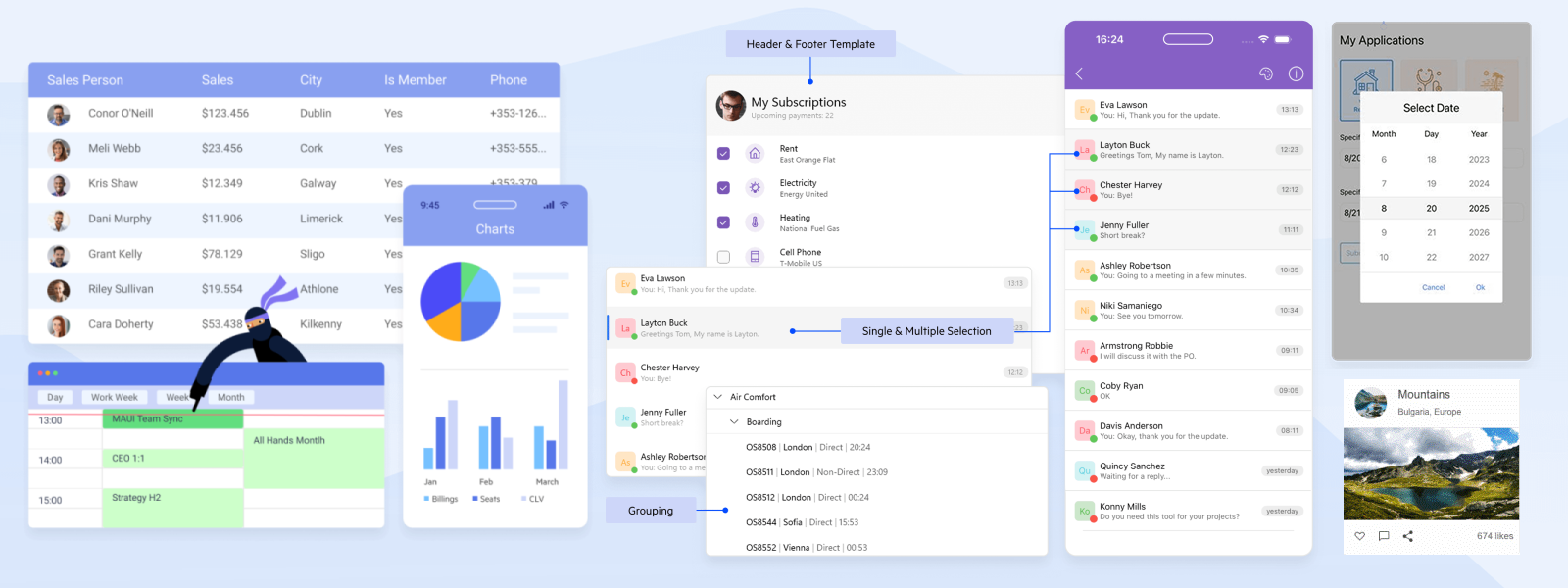
.NET MAUI Controls for Cross-Platform Mobile and Desktop Apps
Deliver native apps for every platform in half the time with 70+ customizable UI components, an AI Coding Assistant and unmatched productivity tools. Designed for speed, scalability and cross-platform excellence.
Supports Visual Studio 2026, .NET 9 and .NET 10.
Get Started in Mere Minutes
Install via the .NET CLI:
dotnet add package Telerik.UI.for.Maui
Or search for Telerik.UI.for.Maui in the Visual Studio NuGet Package Manager.
In your MauiProgram.cs, register the Telerik MAUI controls using the UseTelerik() extension method:
using Telerik.Maui.Controls;

public static class MauiProgram
{
    public static MauiApp CreateMauiApp()
    {
        var builder = MauiApp.CreateBuilder();
        builder
            .UseMauiApp<App>()
            .UseTelerik();

        return builder.Build();
    }
}
Add xmlns:telerik="http://schemas.telerik.com/2022/xaml/maui" to your ContentPage and use any Telerik control:
<ContentPage xmlns="http://schemas.microsoft.com/dotnet/2021/maui"
             xmlns:x="http://schemas.microsoft.com/winfx/2009/xaml"
             xmlns:telerik="http://schemas.telerik.com/2022/xaml/maui"
             x:Class="MyApp.MainPage">

    <telerik:RadDataGrid ItemsSource="{Binding Items}" />

</ContentPage>
For the full setup guide, see the getting started instructions for Visual Studio or VS Code.
Most Popular Components
Data Management and Visualization
- Data Grid: High-performance rendering and smooth scrolling, inline editing and full CRUD support, sorting, filtering, grouping, searching and summaries, paging and different selection modes, frozen columns, and drag & drop, smart AI capabilities
- CollectionView: Vertical, horizontal, and grid layouts, UI virtualization for large collections, sorting, filtering, grouping, selection, and swipe gestures, item templates
- TreeDataGrid: Expandable parent-child rows, sorting, filtering, and grouping support, inline editing and summaries, column customization and UI templating
- Charts: 20+ chart types, including Bar, Line, Pie, Area, Scatter, and more, real-time updates and animations, zooming, panning, and tooltips, fully customizable appearance
AI Interface and Smart Components
- Smart Grid: AI Smart Assistant for automating various data operations such as sorting, grouping, filtering, and manipulating columns
- Smart Chat: Interactive AI conversation capabilities
- AI Prompt: Set of predefined commands, three views – Input, Output, and Commands, plus an option to add custom views, localization
Editors
- Editor: Text selection and prediction, multiline text input, validation and accessibility, read-only state
- AutoComplete: Filtering, token support, different suggest modes, remote search, custom templates and styling
- DatePicker: Spinner format for standard or custom date formats, picker mode, date only support, custom templates
- More components: ComboBox, ImageEditor, TimePicker, RangeSlider, etc.
Scheduling
- Scheduler: Day, week, multi-day, and month views, recurring appointments and time zone support, drag-and-drop rescheduling, custom appointment templates and themes
- Calendar: Different display and selection modes, blackout dates, flexible date navigation, custom templates
Explore all components and features in the documentation
IDE-Integrated AI Coding Assistant
The AI Coding Assistant is specifically trained on the Telerik UI for .NET MAUI component library to ensure developers get production-quality code when working in their favorite IDE. It automates repetitive tasks, finds answers to questions from the API documentation and other knowledge repositories, and troubleshoots problems related to the component library.
Learn more about the Telerik UI for .NET MAUI AI Coding Assistant
Why Choose Telerik UI for .NET MAUI?
- Faster Cross-Platform Development: Build once, run everywhere with fully native UI components that deliver a consistent, polished experience across Android, iOS, Windows, and macOS.
- Ready-to-Use 70+ Components: Speed up development with 70+ fully featured, customizable components saving you months of UI work while ensuring a modern, high-performance app.
- MVVM and Productivity Tools: Stay focused on app logic with built-in MVVM support, seamless Visual Studio integration, and productivity-enhancing tools that streamline your workflow.
Trusted Enterprise-Grade Support
Get answers to your questions directly from the developers who build Telerik UI for .NET MAUI. Build confidently with components backed by rigorous testing, scalable architecture, comprehensive documentation, and expert support.
- Contact Support
- Community Forums — Real-world questions, practical answers and developer-to-developer knowledge to help you troubleshoot faster and learn from shared experience
- Feedback Portal — Share your feedback or request new features and components
- Blog — Expert-written articles and tutorials for developers
- Discord Community
- Samples Source Code on GitHub
- API Reference
- Release History
License and Copyright
Copyright 2021-2026 Progress Software Corporation and/or its subsidiaries or affiliates. All Rights Reserved.
Packaged distributions of Progress Telerik UI for .NET MAUI obtained from NuGet are made available pursuant to the Progress Telerik UI for .NET MAUI EULA at https://www.telerik.com/purchase/license-agreements, unless you have entered into a separate MSA with the licensor.
| Product | Versions Compatible and additional computed target framework versions. |
|---|---|
| .NET | net9.0 is compatible. net9.0-android was computed. net9.0-android34.0 is compatible. net9.0-browser was computed. net9.0-ios was computed. net9.0-ios17.2 is compatible. net9.0-maccatalyst was computed. net9.0-maccatalyst17.2 is compatible. net9.0-macos was computed. net9.0-tvos was computed. net9.0-windows was computed. net9.0-windows10.0.19041 is compatible. net10.0 is compatible. net10.0-android was computed. net10.0-android34.0 is compatible. net10.0-browser was computed. net10.0-ios was computed. net10.0-ios17.2 is compatible. net10.0-maccatalyst was computed. net10.0-maccatalyst17.2 is compatible. net10.0-macos was computed. net10.0-tvos was computed. net10.0-windows was computed. net10.0-windows10.0.19041 is compatible. |
-
net10.0
- SkiaSharp.Views.Maui.Controls (>= 3.119.1)
- Telerik.Documents.Fixed (>= 2026.2.707)
- Telerik.Licensing (>= 1.8.2 && < 2.0.0)
-
net10.0-android34.0
- SkiaSharp.Views.Maui.Controls (>= 3.119.1)
- Telerik.Documents.Fixed (>= 2026.2.707)
- Telerik.Licensing (>= 1.8.2 && < 2.0.0)
-
net10.0-ios17.2
- SkiaSharp.Views.Maui.Controls (>= 3.119.1)
- Telerik.Documents.Fixed (>= 2026.2.707)
- Telerik.Licensing (>= 1.8.2 && < 2.0.0)
-
net10.0-maccatalyst17.2
- SkiaSharp.Views.Maui.Controls (>= 3.119.1)
- Telerik.Documents.Fixed (>= 2026.2.707)
- Telerik.Licensing (>= 1.8.2 && < 2.0.0)
-
net10.0-windows10.0.19041
- SkiaSharp.Views.Maui.Controls (>= 3.119.1)
- Telerik.Documents.Fixed (>= 2026.2.707)
- Telerik.Licensing (>= 1.8.2 && < 2.0.0)
-
net9.0
- SkiaSharp.Views.Maui.Controls (>= 3.119.1)
- Telerik.Documents.Fixed (>= 2026.2.707)
- Telerik.Licensing (>= 1.8.2 && < 2.0.0)
-
net9.0-android34.0
- SkiaSharp.Views.Maui.Controls (>= 3.119.1)
- Telerik.Documents.Fixed (>= 2026.2.707)
- Telerik.Licensing (>= 1.8.2 && < 2.0.0)
-
net9.0-ios17.2
- SkiaSharp.Views.Maui.Controls (>= 3.119.1)
- Telerik.Documents.Fixed (>= 2026.2.707)
- Telerik.Licensing (>= 1.8.2 && < 2.0.0)
-
net9.0-maccatalyst17.2
- SkiaSharp.Views.Maui.Controls (>= 3.119.1)
- Telerik.Documents.Fixed (>= 2026.2.707)
- Telerik.Licensing (>= 1.8.2 && < 2.0.0)
-
net9.0-windows10.0.19041
- SkiaSharp.Views.Maui.Controls (>= 3.119.1)
- Telerik.Documents.Fixed (>= 2026.2.707)
- Telerik.Licensing (>= 1.8.2 && < 2.0.0)
NuGet packages
This package is not used by any NuGet packages.
GitHub repositories (1)
Showing the top 1 popular GitHub repositories that depend on Telerik.UI.for.Maui:
| Repository | Stars |
|---|---|
|
LanceMcCarthy/DevOpsExamples
A repo to show you how to use a private NuGet feed to restore packages in Azure DevOps, GitHub Actions, GitLab CI and AppCenter.
|