Syncfusion.Maui.TreeMap
35.1.41
Prefix Reserved
dotnet add package Syncfusion.Maui.TreeMap --version 35.1.41
NuGet\Install-Package Syncfusion.Maui.TreeMap -Version 35.1.41
<PackageReference Include="Syncfusion.Maui.TreeMap" Version="35.1.41" />
<PackageVersion Include="Syncfusion.Maui.TreeMap" Version="35.1.41" />
<PackageReference Include="Syncfusion.Maui.TreeMap" />
paket add Syncfusion.Maui.TreeMap --version 35.1.41
#r "nuget: Syncfusion.Maui.TreeMap, 35.1.41"
#:package Syncfusion.Maui.TreeMap@35.1.41
#addin nuget:?package=Syncfusion.Maui.TreeMap&version=35.1.41
#tool nuget:?package=Syncfusion.Maui.TreeMap&version=35.1.41
Syncfusion .NET MAUI TreeMap (SfTreeMap)
The Syncfusion .NET MAUI TreeMap is a powerful hierarchical data visualization component for displaying multi-level data as nested rectangles. Build rich, interactive treemap applications for Android, iOS, macOS, and Windows from a single codebase. With support for multiple layout algorithms, drill-down navigation, color mapping, and customizable templates, you can create sophisticated hierarchical visualizations with ease.
Documentation · Getting Started · API Reference · Demos on GitHub · Product Page · Release Notes
Key features
Hierarchical Data Visualization
- Multi-Level Hierarchy - Display hierarchical data across multiple levels with nested rectangles
- Intuitive Layout - Rectangle sizes represent data values; colors represent categories or metrics
- Data Binding - Automatic binding to
IEnumerablecollections andObservableCollection<T> - Space-efficient - Optimal use of available space with organized, treemap-style layout
Layout Algorithms
- Squarified - Produces more compact, square-like rectangles
- Slice-and-Dice - Alternates horizontal and vertical slicing for clear hierarchies
- Slice-and-Dice-Vertical - Vertical-first slicing algorithm variant
Interaction & Navigation
- Drill-Down Navigation - Interactive drill-down and drill-up for exploring data levels
- Tap to drill - Tap rectangles to navigate deeper into hierarchy
- Breadcrumb navigation - Visual feedback of current navigation level
- Selection - Built-in selection and highlighting of items
Customization
- Color Mapping - Apply colors based on data values or categories
- Custom Templates - Support for custom item templates and layouts
- Theme support - Multiple built-in themes with full customization
- Data Labels - Display text labels with customizable styling
- Legend Support - Display legend with interactive items
Advanced Features
- Tooltips - Interactive tooltips for displaying detailed information
- Animation Support - Smooth animations for drill-down transitions and data updates
- Virtual items - Efficient rendering of large hierarchies
- Dynamic updates - Real-time data changes with smooth transitions
Performance
- Optimized rendering - Efficient layout calculations and rendering
- Large dataset support - Responsive handling of deep hierarchies
- Hardware acceleration - Smooth animations and interactions
- Memory efficient - Smart memory management for large datasets
More
- Export to Image - Export treemaps as PNG/JPG files
- Right-to-left (RTL) support and localization
- Accessibility support - Inclusive applications for all users
- Responsive design - Adaptive layouts for various screen sizes
Supported platforms
| Platform | Target framework |
|---|---|
| Android | net9.0-android, net10.0-android |
| iOS | net9.0-ios, net10.0-ios |
| macOS (Mac Catalyst) | net9.0-maccatalyst, net10.0-maccatalyst |
| Windows | net9.0-windows10.0.19041, net10.0-windows10.0.19041 |
Minimum OS versions follow the .NET MAUI supported platforms.
Installation
.NET CLI
dotnet add package Syncfusion.Maui.TreeMap
Package Manager Console
Install-Package Syncfusion.Maui.TreeMap
Getting started
1. Register the Syncfusion core handler
In MauiProgram.cs, call ConfigureSyncfusionCore():
using Syncfusion.Maui.Core.Hosting;

public static class MauiProgram
{
    public static MauiApp CreateMauiApp()
    {
        var builder = MauiApp.CreateBuilder();
        builder
            .UseMauiApp<App>()
            .ConfigureSyncfusionCore();

        return builder.Build();
    }
}
2. Create a model and a ViewModel
using System.Collections.ObjectModel;

public class TreeMapData
{
    public string Name { get; set; }
    public double Value { get; set; }
    public ObservableCollection<TreeMapData> Children { get; set; }
}

public class TreeMapViewModel
{
    public ObservableCollection<TreeMapData> HierarchyCollection { get; set; }

    public TreeMapViewModel()
    {
        HierarchyCollection = new ObservableCollection<TreeMapData>
        {
            new TreeMapData
            {
                Name = "Global",
                Value = 100,
                Children = new ObservableCollection<TreeMapData>
                {
                    new TreeMapData { Name = "North America", Value = 30 },
                    new TreeMapData { Name = "Europe", Value = 25 },
                    new TreeMapData { Name = "Asia", Value = 45 }
                }
            }
        };
    }
}
3. Add SfTreeMap to your page
<ContentPage xmlns="http://schemas.microsoft.com/dotnet/2021/maui"
             xmlns:x="http://schemas.microsoft.com/winfx/2009/xaml"
             xmlns:syncfusion="clr-namespace:Syncfusion.Maui.TreeMap;assembly=Syncfusion.Maui.TreeMap"
             xmlns:local="clr-namespace:YourAppNamespace"
             x:Class="YourAppNamespace.MainPage">

    <ContentPage.BindingContext>
        <local:TreeMapViewModel />
    </ContentPage.BindingContext>

    <syncfusion:SfTreeMap ItemsSource="{Binding HierarchyCollection}"
                          LayoutType="Squarified">
    </syncfusion:SfTreeMap>

</ContentPage>
Run the app to see your treemap in action. For more features and detailed examples, see the TreeMap documentation.
TreeMap Documentation
The Syncfusion® .NET MAUI TreeMap control visually represents hierarchical data using nested rectangles that are sized and colored according to the underlying values. Perfect for displaying organizational hierarchies, file systems, portfolio analytics, and complex data structures with an intuitive, space-efficient interface.
Features Overview · Docs · Getting Started
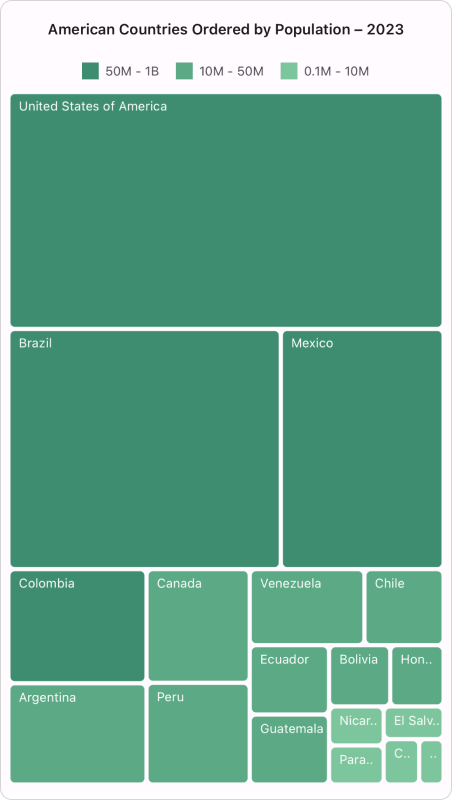
Layout Types
Squarified
Produces compact, square-like rectangles for optimal visualization of hierarchical data.
Slice-and-Dice
Alternates horizontal and vertical slicing for clear hierarchical representation.
Slice-and-Dice-Vertical
Vertical-first slicing algorithm variant for specialized layouts.
Dependencies
Installing this package also installs the following packages:
Microsoft.Maui.ControlsSyncfusion.Maui.Core
System Requirements
Using this package with an AI coding agent
Before generating Syncfusion code, ask your AI coding agent to run the Syncfusion setup using the following prompt:
Set up this project for Syncfusion before generating code. Fetch and follow the official instructions at https://ai.syncfusion.com, then report the detected platform, installed skill pack, MCP status, and any required licensing action.
The setup detects your project's platform and loads the appropriate Syncfusion skill pack. No Syncfusion account or MCP key is required to install or read Syncfusion agent skills.
Platform reference: https://ai.syncfusion.com/maui/llms.txt
Support and feedback
- Support tickets: Syncfusion Support Portal
- Community forums: .NET MAUI Forums
- Feature requests and bug reports: Feedback Portal
- Samples: Syncfusion .NET MAUI demos on GitHub
License
This is a commercial product and requires a paid license for possession or use. Syncfusion’s licensed software, including this component, is subject to the terms and conditions of Syncfusion's EULA. You can purchase a license here or start a free 30-day trial here.
About Syncfusion
Founded in 2001 and headquartered in Research Triangle Park, N.C., Syncfusion has more than 26,000+ customers and more than 1 million users, including large financial institutions, Fortune 500 companies, and global IT consultancies.
Today, we provide 1600+ components and frameworks for web (Blazor, ASP.NET Core, ASP.NET MVC, ASP.NET WebForms, JavaScript, Angular, React, Vue, and Flutter), mobile (.NET MAUI, Xamarin, Flutter, UWP, and JavaScript), and desktop development (WinForms, WPF, WinUI, Flutter and UWP). We provide ready-to-deploy enterprise software for dashboards, reports, data integration, and big data processing. Many customers have saved millions in licensing fees by deploying our software.
sales@syncfusion.com | www.syncfusion.com | Toll Free: 1-888-9 DOTNET
| Product | Versions Compatible and additional computed target framework versions. |
|---|---|
| .NET | net9.0 is compatible. net9.0-android was computed. net9.0-android35.0 is compatible. net9.0-browser was computed. net9.0-ios was computed. net9.0-ios18.0 is compatible. net9.0-maccatalyst was computed. net9.0-maccatalyst18.0 is compatible. net9.0-macos was computed. net9.0-tvos was computed. net9.0-windows was computed. net9.0-windows10.0.19041 is compatible. net10.0 is compatible. net10.0-android was computed. net10.0-android36.0 is compatible. net10.0-browser was computed. net10.0-ios was computed. net10.0-ios26.0 is compatible. net10.0-maccatalyst was computed. net10.0-maccatalyst26.0 is compatible. net10.0-macos was computed. net10.0-tvos was computed. net10.0-windows was computed. net10.0-windows10.0.19041 is compatible. |
-
net10.0
- Microsoft.Maui.Controls (>= 10.0.0)
- Syncfusion.Maui.Core (>= 35.1.41)
-
net10.0-android36.0
- Microsoft.Maui.Controls (>= 10.0.0)
- Syncfusion.Maui.Core (>= 35.1.41)
-
net10.0-ios26.0
- Microsoft.Maui.Controls (>= 10.0.0)
- Syncfusion.Maui.Core (>= 35.1.41)
-
net10.0-maccatalyst26.0
- Microsoft.Maui.Controls (>= 10.0.0)
- Syncfusion.Maui.Core (>= 35.1.41)
-
net10.0-windows10.0.19041
- Microsoft.Maui.Controls (>= 10.0.0)
- Syncfusion.Maui.Core (>= 35.1.41)
-
net9.0
- Microsoft.Maui.Controls (>= 9.0.111)
- Syncfusion.Maui.Core (>= 35.1.41)
-
net9.0-android35.0
- Microsoft.Maui.Controls (>= 9.0.111)
- Syncfusion.Maui.Core (>= 35.1.41)
-
net9.0-ios18.0
- Microsoft.Maui.Controls (>= 9.0.111)
- Syncfusion.Maui.Core (>= 35.1.41)
-
net9.0-maccatalyst18.0
- Microsoft.Maui.Controls (>= 9.0.111)
- Syncfusion.Maui.Core (>= 35.1.41)
-
net9.0-windows10.0.19041
- Microsoft.Maui.Controls (>= 9.0.111)
- Syncfusion.Maui.Core (>= 35.1.41)
NuGet packages (2)
Showing the top 2 NuGet packages that depend on Syncfusion.Maui.TreeMap:
| Package | Downloads |
|---|---|
|
SharedMauiXamlStylesLibrary.Syncfusion
A collection of predefined Control styles for MAUI and Syncfusion. |
|
|
Syncfusion.Maui.A2UI
This package provides the functionality to utilize the features of Syncfusion® .Net Maui A2UI controls and more. |
GitHub repositories (1)
Showing the top 1 popular GitHub repositories that depend on Syncfusion.Maui.TreeMap:
| Repository | Stars |
|---|---|
|
syncfusion/maui-demos
This repository contains the Syncfusion .NET MAUI control’s samples and the guide to use them
|
| Version | Downloads | Last Updated |
|---|---|---|
| 35.1.41 | 55 | 10/20/2026 |
| 35.1.40 | 153 | 10/13/2026 |
| 35.1.39 | 227 | 10/6/2026 |
| 35.1.37 | 234 | 9/29/2026 |
| 34.2.9 | 157 | 9/21/2026 |
| 34.2.8 | 180 | 9/14/2026 |
| 34.2.7 | 144 | 9/8/2026 |
| 34.2.6 | 212 | 8/31/2026 |
| 34.2.5 | 175 | 8/25/2026 |
| 34.2.4 | 204 | 8/17/2026 |
| 34.2.3 | 202 | 8/11/2026 |
| 34.2.2 | 224 | 8/5/2026 |
| 34.1.33 | 202 | 7/27/2026 |
| 34.1.32 | 172 | 7/21/2026 |
| 34.1.31 | 222 | 7/14/2026 |
| 34.1.30 | 177 | 7/9/2026 |
| 34.1.29 | 253 | 7/6/2026 |
| 33.2.15 | 300 | 6/23/2026 |
| 33.2.13 | 291 | 6/16/2026 |
| 33.2.12 | 202 | 6/9/2026 |