Syncfusion.Maui.TabView
35.1.41
Prefix Reserved
dotnet add package Syncfusion.Maui.TabView --version 35.1.41
NuGet\Install-Package Syncfusion.Maui.TabView -Version 35.1.41
<PackageReference Include="Syncfusion.Maui.TabView" Version="35.1.41" />
<PackageVersion Include="Syncfusion.Maui.TabView" Version="35.1.41" />
<PackageReference Include="Syncfusion.Maui.TabView" />
paket add Syncfusion.Maui.TabView --version 35.1.41
#r "nuget: Syncfusion.Maui.TabView, 35.1.41"
#:package Syncfusion.Maui.TabView@35.1.41
#addin nuget:?package=Syncfusion.Maui.TabView&version=35.1.41
#tool nuget:?package=Syncfusion.Maui.TabView&version=35.1.41
Syncfusion .NET MAUI Tab View (SfTabView)
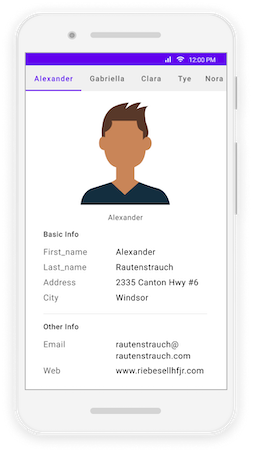
The Syncfusion .NET MAUI Tab View provides a simple and intuitive interface for tab navigation, where users can explore and switch between different tabs. Build rich, tabbed interfaces for Android, iOS, macOS, and Windows from a single codebase.
Documentation · Getting Started · API Reference · Demos on GitHub · Product Page · Release Notes
Using this package with an AI coding agent
Before generating Syncfusion code, ask your AI coding agent to run the Syncfusion setup using the following prompt:
Set up this project for Syncfusion before generating code. Fetch and follow the official instructions at https://ai.syncfusion.com, then report the detected platform, installed skill pack, MCP status, and any required licensing action.The setup detects your project’s platform and loads the appropriate Syncfusion skill pack. No Syncfusion account or MCP key is required to install or read Syncfusion agent skills.
Platform reference: https://ai.syncfusion.com/maui/llms.txt
Key features
Tabs and layout
- Place the tab bar at the top, bottom, left, or right of the content region with
TabBarPlacement. - Display the tab headers as text, image, or both using
HeaderDisplayMode. - Position the header image above, below, to the left, or to the right of the header text with
ImagePosition. - Size the tab headers equally across the available space (
Default) or to fit their content (SizeToContent) usingTabWidthMode. - Fully customize tab headers and content by setting
HeaderItemTemplateandContentItemTemplate. - Add any view as tab content - each
SfTabItemaccepts arbitraryContent.
Selection and interaction
- Switch tabs by tapping a header or swiping the content region.
- Restrict or cancel selection changes in advance with the
SelectionChangingevent, and get notified after the switch with theSelectionChangedevent. - Handle single taps on tab headers separately with the
TabItemTappedevent. - Select a tab programmatically with the
SelectedIndexproperty. - Animated content transition with a configurable
ContentTransitionDuration.
Look and feel
- Place the selection indicator above, below, on either side of, or filling the tab header using
IndicatorPlacement. - Control the indicator width - fixed regardless of tab width, or matching the header text or image - with
IndicatorWidthMode. - Customize indicator background, corner radius, and stroke thickness.
- Show textual notifications, such as item counts or alerts, using
BadgeTextandBadgeSettingson each tab. - Customizable tab header padding, fonts, text color, and tab bar background.
- Show scroll buttons to navigate through overflowing tabs with
IsScrollButtonEnabled. - Built-in material visual style and full styling support with light and dark themes.
Performance
- Load tab content on demand with virtualization (
EnableVirtualization) to keep even many tabs fast and memory-efficient.
Supported platforms
| Platform | Target framework |
|---|---|
| Android | net9.0-android, net10.0-android |
| iOS | net9.0-ios, net10.0-ios |
| macOS (Mac Catalyst) | net9.0-maccatalyst, net10.0-maccatalyst |
| Windows | net9.0-windows10.0.19041, net10.0-windows10.0.19041 |
Minimum OS versions follow the .NET MAUI supported platforms.
Installation
.NET CLI
dotnet add package Syncfusion.Maui.TabView
Package Manager Console
Install-Package Syncfusion.Maui.TabView
Getting started
1. Register the Syncfusion core handler
In MauiProgram.cs, call ConfigureSyncfusionCore():
using Syncfusion.Maui.Core.Hosting;

public static class MauiProgram
{
    public static MauiApp CreateMauiApp()
    {
        var builder = MauiApp.CreateBuilder();
        builder
            .UseMauiApp<App>()
            .ConfigureSyncfusionCore();

        return builder.Build();
    }
}
2. Add SfTabView to your page
Add the namespace and declare an SfTabView with a few SfTabItems:
<ContentPage xmlns="http://schemas.microsoft.com/dotnet/2021/maui"
             xmlns:x="http://schemas.microsoft.com/winfx/2009/xaml"
             xmlns:syncfusion="clr-namespace:Syncfusion.Maui.TabView;assembly=Syncfusion.Maui.TabView"
             x:Class="YourAppNamespace.MainPage">

    <syncfusion:SfTabView>
        <syncfusion:SfTabView.Items>
            <syncfusion:SfTabItem Header="Home">
                <syncfusion:SfTabItem.Content>
                    <Label Text="Home content"
                           HorizontalOptions="Center"
                           VerticalOptions="Center" />
                </syncfusion:SfTabItem.Content>
            </syncfusion:SfTabItem>
            <syncfusion:SfTabItem Header="Favorites">
                <syncfusion:SfTabItem.Content>
                    <Label Text="Favorites content"
                           HorizontalOptions="Center"
                           VerticalOptions="Center" />
                </syncfusion:SfTabItem.Content>
            </syncfusion:SfTabItem>
            <syncfusion:SfTabItem Header="Settings">
                <syncfusion:SfTabItem.Content>
                    <Label Text="Settings content"
                           HorizontalOptions="Center"
                           VerticalOptions="Center" />
                </syncfusion:SfTabItem.Content>
            </syncfusion:SfTabItem>
        </syncfusion:SfTabView.Items>
    </syncfusion:SfTabView>

</ContentPage>
Run the app and switch tabs by tapping the headers or swiping the content.
Common scenarios
Add tabs with text and images
<syncfusion:SfTabView HeaderDisplayMode="Default">
    <syncfusion:SfTabView.Items>
        <syncfusion:SfTabItem Header="Chats"
                              ImageSource="chats.png"
                              ImagePosition="Top" />
        <syncfusion:SfTabItem Header="Status"
                              ImageSource="status.png"
                              ImagePosition="Top" />
        <syncfusion:SfTabItem Header="Calls"
                              ImageSource="calls.png"
                              ImagePosition="Top" />
    </syncfusion:SfTabView.Items>
</syncfusion:SfTabView>
Customize the tab bar and selection indicator
<syncfusion:SfTabView TabBarPlacement="Bottom"
                      TabWidthMode="SizeToContent"
                      IndicatorPlacement="Top"
                      IndicatorBackground="#6750A4"
                      IndicatorCornerRadius="4"
                      TabBarBackground="#F7F2FB">
Handle selection changes
<syncfusion:SfTabView SelectionChanging="OnSelectionChanging"
                       SelectionChanged="OnSelectionChanged" />
private void OnSelectionChanging(object? sender, SelectionChangingEventArgs e)
{
    // Cancel selection if needed.
    e.Cancel = e.NewIndex == 2;
}

private void OnSelectionChanged(object? sender, TabSelectionChangedEventArgs e)
{
    Console.WriteLine($"Selected index changed to {e.Index}");
}
For more features, see the Tab View documentation.
Dependencies
Installing this package also installs the following packages:
Microsoft.Maui.ControlsSyncfusion.Maui.Core
License
This is a commercial product and requires a paid license for possession or use. Syncfusion’s licensed software, including this component, is subject to the terms and conditions of Syncfusion's EULA. You can purchase a license here or start a free 30-day trial here.
Register your license key
Register the key in App.xaml.cs before the app is built:
Syncfusion.Licensing.SyncfusionLicenseProvider.RegisterLicense("YOUR_LICENSE_KEY");
For details, see Licensing overview.
Support and feedback
- Support tickets: Syncfusion Support Portal
- Community forums: .NET MAUI Forums
- Feature requests and bug reports: Feedback Portal
- Samples: Syncfusion .NET MAUI demos on GitHub
About Syncfusion
Founded in 2001 and headquartered in Research Triangle Park, N.C., Syncfusion has more than 26,000+ customers and more than 1 million users, including large financial institutions, Fortune 500 companies, and global IT consultancies.
Today, we provide 1600+ components and frameworks for web (Blazor, ASP.NET Core, ASP.NET MVC, ASP.NET WebForms, JavaScript, Angular, React, Vue, and Flutter), mobile (.NET MAUI, Xamarin, Flutter, UWP, and JavaScript), and desktop development (WinForms, WPF, WinUI, Flutter and UWP). We provide ready-to-deploy enterprise software for dashboards, reports, data integration, and big data processing. Many customers have saved millions in licensing fees by deploying our software.
sales@syncfusion.com | www.syncfusion.com | Toll Free: 1-888-9 DOTNET
| Product | Versions Compatible and additional computed target framework versions. |
|---|---|
| .NET | net9.0 is compatible. net9.0-android was computed. net9.0-android35.0 is compatible. net9.0-browser was computed. net9.0-ios was computed. net9.0-ios18.0 is compatible. net9.0-maccatalyst was computed. net9.0-maccatalyst18.0 is compatible. net9.0-macos was computed. net9.0-tvos was computed. net9.0-windows was computed. net9.0-windows10.0.19041 is compatible. net10.0 is compatible. net10.0-android was computed. net10.0-android36.0 is compatible. net10.0-browser was computed. net10.0-ios was computed. net10.0-ios26.0 is compatible. net10.0-maccatalyst was computed. net10.0-maccatalyst26.0 is compatible. net10.0-macos was computed. net10.0-tvos was computed. net10.0-windows was computed. net10.0-windows10.0.19041 is compatible. |
-
net10.0
- Microsoft.Maui.Controls (>= 10.0.0)
- Syncfusion.Maui.Core (>= 35.1.41)
-
net10.0-android36.0
- Microsoft.Maui.Controls (>= 10.0.0)
- Syncfusion.Maui.Core (>= 35.1.41)
-
net10.0-ios26.0
- Microsoft.Maui.Controls (>= 10.0.0)
- Syncfusion.Maui.Core (>= 35.1.41)
-
net10.0-maccatalyst26.0
- Microsoft.Maui.Controls (>= 10.0.0)
- Syncfusion.Maui.Core (>= 35.1.41)
-
net10.0-windows10.0.19041
- Microsoft.Maui.Controls (>= 10.0.0)
- Syncfusion.Maui.Core (>= 35.1.41)
-
net9.0
- Microsoft.Maui.Controls (>= 9.0.111)
- Syncfusion.Maui.Core (>= 35.1.41)
-
net9.0-android35.0
- Microsoft.Maui.Controls (>= 9.0.111)
- Syncfusion.Maui.Core (>= 35.1.41)
-
net9.0-ios18.0
- Microsoft.Maui.Controls (>= 9.0.111)
- Syncfusion.Maui.Core (>= 35.1.41)
-
net9.0-maccatalyst18.0
- Microsoft.Maui.Controls (>= 9.0.111)
- Syncfusion.Maui.Core (>= 35.1.41)
-
net9.0-windows10.0.19041
- Microsoft.Maui.Controls (>= 9.0.111)
- Syncfusion.Maui.Core (>= 35.1.41)
NuGet packages (5)
Showing the top 5 NuGet packages that depend on Syncfusion.Maui.TabView:
| Package | Downloads |
|---|---|
|
Syncfusion.Maui.PdfViewer
This package contains the Syncfusion® PDF Viewer component to view PDF files in .NET MAUI applications. |
|
|
SharedMauiXamlStylesLibrary.Syncfusion
A collection of predefined Control styles for MAUI and Syncfusion. |
|
|
ItEnterprise.Maui.UIKit
ItEnterprise library for UI controls |
|
|
ItEnterprise.Maui.Common
ItEnterprise application core library |
|
|
Syncfusion.Maui.A2UI
This package provides the functionality to utilize the features of Syncfusion® .Net Maui A2UI controls and more. |
GitHub repositories (3)
Showing the top 3 popular GitHub repositories that depend on Syncfusion.Maui.TabView:
| Repository | Stars |
|---|---|
|
unoplatform/Uno.Samples
A collection of code samples for the Uno Platform
|
|
|
syncfusion/maui-demos
This repository contains the Syncfusion .NET MAUI control’s samples and the guide to use them
|
|
|
Strypper/mauisland
MAUIsland 🏝️ is the number 1 controls gallery for .NET MAUI
|
| Version | Downloads | Last Updated |
|---|---|---|
| 35.1.41 | 199 | 10/20/2026 |
| 35.1.40 | 1,204 | 10/13/2026 |
| 35.1.39 | 1,277 | 10/6/2026 |
| 35.1.37 | 2,281 | 9/29/2026 |
| 34.2.9 | 3,435 | 9/21/2026 |
| 34.2.8 | 2,054 | 9/14/2026 |
| 34.2.7 | 1,865 | 9/8/2026 |
| 34.2.6 | 1,947 | 8/31/2026 |
| 34.2.5 | 2,823 | 8/25/2026 |
| 34.2.4 | 4,042 | 8/17/2026 |
| 34.2.3 | 2,482 | 8/11/2026 |
| 34.2.2 | 2,534 | 8/5/2026 |
| 34.1.33 | 4,037 | 7/27/2026 |
| 34.1.32 | 3,759 | 7/21/2026 |
| 34.1.31 | 3,002 | 7/14/2026 |
| 34.1.30 | 1,223 | 7/9/2026 |
| 34.1.29 | 2,165 | 7/6/2026 |
| 33.2.15 | 5,477 | 6/23/2026 |
| 33.2.13 | 2,289 | 6/16/2026 |
| 33.2.12 | 6,626 | 6/9/2026 |