Syncfusion.Maui.Calendar
35.1.42
Prefix Reserved
dotnet add package Syncfusion.Maui.Calendar --version 35.1.42
NuGet\Install-Package Syncfusion.Maui.Calendar -Version 35.1.42
<PackageReference Include="Syncfusion.Maui.Calendar" Version="35.1.42" />
<PackageVersion Include="Syncfusion.Maui.Calendar" Version="35.1.42" />
<PackageReference Include="Syncfusion.Maui.Calendar" />
paket add Syncfusion.Maui.Calendar --version 35.1.42
#r "nuget: Syncfusion.Maui.Calendar, 35.1.42"
#:package Syncfusion.Maui.Calendar@35.1.42
#addin nuget:?package=Syncfusion.Maui.Calendar&version=35.1.42
#tool nuget:?package=Syncfusion.Maui.Calendar&version=35.1.42
Syncfusion .NET MAUI Calendar (SfCalendar)
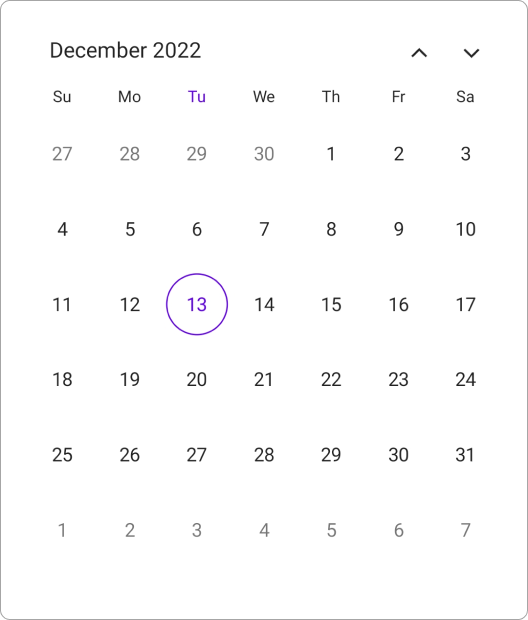
The Syncfusion .NET MAUI Calendar is a feature-rich calendar control for date navigation and selection. Choose from multiple calendar views, select single dates or date ranges, restrict unavailable dates, and localize content for different languages and cultures. Build modern calendar applications for Android, iOS, macOS, and Windows from a single codebase.
Documentation · Getting Started · API Reference · Demos on GitHub · Product Page · Release Notes
Using this package with an AI coding agent
Before generating Syncfusion code, ask your AI coding agent to run the Syncfusion setup using the following prompt:
Set up this project for Syncfusion before generating code. Fetch and follow the official instructions at https://ai.syncfusion.com, then report the detected platform, installed skill pack, MCP status, and any required licensing action.The setup detects your project’s platform and loads the appropriate Syncfusion skill pack. No Syncfusion account or MCP key is required to install or read Syncfusion agent skills.
Platform reference: https://ai.syncfusion.com/maui/llms.txt
Key features
Views
- Display dates using Month, Year, Decade, and Century views.
- Navigate seamlessly between calendar views to browse dates at different levels.
- Configure whether the calendar stays in a single view or allows navigation across views.
- Display dates using different calendar systems and identifiers.
Selection
- Select a single date, multiple dates, date range, or multiple ranges.
- Programmatically select and update dates.
- Highlight today, selected dates, and special dates with custom appearance settings.
- Customize selection visuals to match application requirements.
Navigation and restrictions
- Navigate between dates using swipe gestures and programmatic navigation.
- Restrict navigation and selection using minimum and maximum date ranges.
- Prevent interaction with specific dates using SelectableDayPredicate.
Appearance and customization
- Customize calendar cells, headers, and footers.
- Style weekdays, weekends, today, blackout dates, and selected dates.
- Customize text, colors, shapes, templates and template selectors.
- Present the calendar in a dialog mode for a focused date selection experience.
Events and interactions
- Respond to date selection and navigation actions through built-in events.
- Track changes to the visible date range and calendar view.
- Integrate calendar interactions with application workflows.
Themes and visual effects
- Customize the calendar's appearance using themes.
- Enable Liquid Glass effects on supported platforms.
Globalization and accessibility
- Localize calendar content for different languages and cultures.
- Adapt date presentation to regional preferences with multiple calendar identifiers.
- Create localized experiences with both right-to-left (RTL) and left-to-right (LTR) layouts.
- Make calendar interactions more accessible with keyboard navigation and screen reader support.
Supported platforms
| Platform | Target framework |
|---|---|
| Android | net9.0-android, net10.0-android |
| iOS | net9.0-ios, net10.0-ios |
| macOS (Mac Catalyst) | net9.0-maccatalyst, net10.0-maccatalyst |
| Windows | net9.0-windows10.0.19041, net10.0-windows10.0.19041 |
Minimum OS versions follow the .NET MAUI supported platforms.
Installation
.NET CLI
dotnet add package Syncfusion.Maui.Scheduler
Package Manager Console
Install-Package Syncfusion.Maui.Scheduler
Getting started
1. Register the Syncfusion core handler
In MauiProgram.cs, call ConfigureSyncfusionCore():
using Syncfusion.Maui.Core.Hosting;

public static class MauiProgram
{
    public static MauiApp CreateMauiApp()
    {
        var builder = MauiApp.CreateBuilder();
        builder
            .UseMauiApp<App>()
            .ConfigureSyncfusionCore();

        return builder.Build();
    }
}
2. Add SfCalendar to your page
<ContentPage xmlns="http://schemas.microsoft.com/dotnet/2021/maui"
             xmlns:x="http://schemas.microsoft.com/winfx/2009/xaml"
             xmlns:calendar="clr-namespace:Syncfusion.Maui.Calendar;assembly=Syncfusion.Maui.Calendar"
             xmlns:local="clr-namespace:YourAppNamespace"
             x:Class="YourAppNamespace.MainPage">

    <calendar:SfCalendar />

</ContentPage>
3. Configure the calendar view
<calendar:SfCalendar View="Month" />
Run the app. The calendar opens in Month view and displays the current month.
Common scenarios
Select multiple dates
<calendar:SfCalendar SelectionMode="Multiple" />
Select a date range
<calendar:SfCalendar SelectionMode="Range" />
Display dates in a Year view
<calendar:SfCalendar View="Year" />
Restrict available dates
    <calendar:SfCalendar MinimumDate="2026/01/01"
                         MaximumDate="2026/12/31" />
Disable specific dates
    <calendar:SfCalendar x:Name="calendar"
                         View="Month">
    </calendar:SfCalendar>
using Syncfusion.Maui.Calendar;
. . .

this.calendar.SelectableDayPredicate = (date) =>
{
    if (date.Date == DateTime.Now.AddDays(1).Date ||
        date.Date == DateTime.Now.AddDays(3).Date ||
        date.Date == DateTime.Now.AddDays(5).Date ||
        date.Date == DateTime.Now.AddDays(7).Date ||
        date.Date == DateTime.Now.AddDays(9).Date)
    {
        return false;
    }

    return true;
};
Use a different calendar system
<calendar:SfCalendar Identifier="Hijri" />
Use dialog mode for date selection
    <Grid>
        <calendar:SfCalendar x:Name="calendar"
                             Mode="Dialog" />
        <Button Text="Open Calendar"
                x:Name="calendarButton"
                Clicked="Button_Clicked"
                HorizontalOptions="Center"
                VerticalOptions="Center"
                HeightRequest="50"
                WidthRequest="150">
        </Button>
    </Grid>
using Syncfusion.Maui.Calendar;
. . .

private void Button_Clicked(object sender, System.EventArgs e)
{
    this.calendar.IsOpen = true;
}
For more features, see the Calendar documentation.
Dependencies
Installing this package also installs the following packages:
Microsoft.Maui.ControlsSyncfusion.Maui.CoreSyncfusion.Maui.Popup
Licensing
This is a commercial product and requires a paid license for possession or use. Syncfusion’s licensed software, including this component, is subject to the terms and conditions of Syncfusion's EULA. You can purchase a license here or start a free 30-day trial here.
Register your license key
Register the key in MauiProgram.cs before the app is built:
Syncfusion.Licensing.SyncfusionLicenseProvider.RegisterLicense("YOUR_LICENSE_KEY");
Support and feedback
- Support tickets: Syncfusion Support Portal
- Community forums: .NET MAUI Forums
- Feature requests and bug reports: Feedback Portal
- Samples: Syncfusion .NET MAUI demos on GitHub
About Syncfusion
Founded in 2001 and headquartered in Research Triangle Park, N.C., Syncfusion has more than 26,000+ customers and more than 1 million users, including large financial institutions, Fortune 500 companies, and global IT consultancies.
Today, we provide 1600+ components and frameworks for web (Blazor, ASP.NET Core, ASP.NET MVC, ASP.NET WebForms, JavaScript, Angular, React, Vue, and Flutter), mobile (.NET MAUI, Xamarin, Flutter, UWP, and JavaScript), and desktop development (WinForms, WPF, WinUI, Flutter and UWP). We provide ready-to-deploy enterprise software for dashboards, reports, data integration, and big data processing. Many customers have saved millions in licensing fees by deploying our software.
sales@syncfusion.com | www.syncfusion.com | Toll Free: 1-888-9 DOTNET
| Product | Versions Compatible and additional computed target framework versions. |
|---|---|
| .NET | net9.0 is compatible. net9.0-android was computed. net9.0-android35.0 is compatible. net9.0-browser was computed. net9.0-ios was computed. net9.0-ios18.0 is compatible. net9.0-maccatalyst was computed. net9.0-maccatalyst18.0 is compatible. net9.0-macos was computed. net9.0-tvos was computed. net9.0-windows was computed. net9.0-windows10.0.19041 is compatible. net10.0 is compatible. net10.0-android was computed. net10.0-android36.0 is compatible. net10.0-browser was computed. net10.0-ios was computed. net10.0-ios26.0 is compatible. net10.0-maccatalyst was computed. net10.0-maccatalyst26.0 is compatible. net10.0-macos was computed. net10.0-tvos was computed. net10.0-windows was computed. net10.0-windows10.0.19041 is compatible. |
-
net10.0
- Microsoft.Maui.Controls (>= 10.0.0)
- Syncfusion.Maui.Core (>= 35.1.42)
- Syncfusion.Maui.Popup (>= 35.1.42)
-
net10.0-android36.0
- Microsoft.Maui.Controls (>= 10.0.0)
- Syncfusion.Maui.Core (>= 35.1.42)
- Syncfusion.Maui.Popup (>= 35.1.42)
-
net10.0-ios26.0
- Microsoft.Maui.Controls (>= 10.0.0)
- Syncfusion.Maui.Core (>= 35.1.42)
- Syncfusion.Maui.Popup (>= 35.1.42)
-
net10.0-maccatalyst26.0
- Microsoft.Maui.Controls (>= 10.0.0)
- Syncfusion.Maui.Core (>= 35.1.42)
- Syncfusion.Maui.Popup (>= 35.1.42)
-
net10.0-windows10.0.19041
- Microsoft.Maui.Controls (>= 10.0.0)
- Syncfusion.Maui.Core (>= 35.1.42)
- Syncfusion.Maui.Popup (>= 35.1.42)
-
net9.0
- Microsoft.Maui.Controls (>= 9.0.111)
- Syncfusion.Maui.Core (>= 35.1.42)
- Syncfusion.Maui.Popup (>= 35.1.42)
-
net9.0-android35.0
- Microsoft.Maui.Controls (>= 9.0.111)
- Syncfusion.Maui.Core (>= 35.1.42)
- Syncfusion.Maui.Popup (>= 35.1.42)
-
net9.0-ios18.0
- Microsoft.Maui.Controls (>= 9.0.111)
- Syncfusion.Maui.Core (>= 35.1.42)
- Syncfusion.Maui.Popup (>= 35.1.42)
-
net9.0-maccatalyst18.0
- Microsoft.Maui.Controls (>= 9.0.111)
- Syncfusion.Maui.Core (>= 35.1.42)
- Syncfusion.Maui.Popup (>= 35.1.42)
-
net9.0-windows10.0.19041
- Microsoft.Maui.Controls (>= 9.0.111)
- Syncfusion.Maui.Core (>= 35.1.42)
- Syncfusion.Maui.Popup (>= 35.1.42)
NuGet packages (8)
Showing the top 5 NuGet packages that depend on Syncfusion.Maui.Calendar:
| Package | Downloads |
|---|---|
|
Syncfusion.Maui.Scheduler
This package provides the functionality to utilize the features of Syncfusion® Maui Scheduler control and more. |
|
|
Syncfusion.Maui.Chat
This package provides the functionality to utilize the features of Syncfusion® Maui Chat control and more. |
|
|
VertiGIS.Mobile
Create VertiGIS Mobile apps for Android, iOS, and UWP. Extend your apps with custom components, operations and services. |
|
|
SharedMauiXamlStylesLibrary.Syncfusion
A collection of predefined Control styles for MAUI and Syncfusion. |
|
|
Cyber.FrameworkNet8_FutaHaSon
Phiên bản FTHS khách hàng phát triển trên nền tảng .Net Maui |
GitHub repositories (2)
Showing the top 2 popular GitHub repositories that depend on Syncfusion.Maui.Calendar:
| Repository | Stars |
|---|---|
|
syncfusion/maui-demos
This repository contains the Syncfusion .NET MAUI control’s samples and the guide to use them
|
|
|
Strypper/mauisland
MAUIsland 🏝️ is the number 1 controls gallery for .NET MAUI
|
| Version | Downloads | Last Updated |
|---|---|---|
| 35.1.42 | 0 | 10/27/2026 |
| 35.1.41 | 1,045 | 10/20/2026 |
| 35.1.40 | 1,101 | 10/13/2026 |
| 35.1.39 | 1,293 | 10/6/2026 |
| 35.1.37 | 2,613 | 9/29/2026 |
| 34.2.9 | 1,976 | 9/21/2026 |
| 34.2.8 | 2,974 | 9/14/2026 |
| 34.2.7 | 1,086 | 9/8/2026 |
| 34.2.6 | 1,509 | 8/31/2026 |
| 34.2.5 | 1,409 | 8/25/2026 |
| 34.2.4 | 2,130 | 8/17/2026 |
| 34.2.3 | 1,675 | 8/11/2026 |
| 34.2.2 | 1,303 | 8/5/2026 |
| 34.1.33 | 1,791 | 7/27/2026 |
| 34.1.32 | 4,957 | 7/21/2026 |
| 34.1.31 | 4,309 | 7/14/2026 |
| 34.1.30 | 939 | 7/9/2026 |
| 34.1.29 | 845 | 7/6/2026 |
| 33.2.15 | 2,481 | 6/23/2026 |
| 33.2.13 | 1,634 | 6/16/2026 |