Syncfusion.Blazor.StockChart
33.1.45
Prefix Reserved
dotnet add package Syncfusion.Blazor.StockChart --version 33.1.45
NuGet\Install-Package Syncfusion.Blazor.StockChart -Version 33.1.45
<PackageReference Include="Syncfusion.Blazor.StockChart" Version="33.1.45" />
<PackageVersion Include="Syncfusion.Blazor.StockChart" Version="33.1.45" />
<PackageReference Include="Syncfusion.Blazor.StockChart" />
paket add Syncfusion.Blazor.StockChart --version 33.1.45
#r "nuget: Syncfusion.Blazor.StockChart, 33.1.45"
#:package Syncfusion.Blazor.StockChart@33.1.45
#addin nuget:?package=Syncfusion.Blazor.StockChart&version=33.1.45
#tool nuget:?package=Syncfusion.Blazor.StockChart&version=33.1.45
Syncfusion® Blazor Stock Chart Component
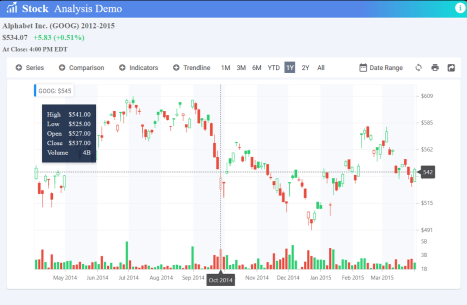
The Blazor Stock Chart Component is a comprehensive financial charting solution for Blazor applications. It enables interactive visualization of stock prices and time-series data using candlestick, OHLC, and other chart types, with built-in support for zooming, panning, technical indicators, and real-time data binding.
Key Features
- Multiple Financial Chart Types - Visualize market data using candlestick, OHLC (Open‑High‑Low‑Close), HiLo, line, and bar‑style charts, with support for multiple series.
- Range Selector & Period Selector - Interactively select and zoom into specific time periods using built‑in range and period selection tools for time‑based data navigation.
- Technical Indicators & Trendlines - Analyze market movement with built‑in indicators such as EMA, SMA, MACD, RSI, Stochastic, Momentum, ATR, and Bollinger Bands, plus multiple trendline options for forecasting.
- Rich Interactive Features - Enhance data exploration with smooth zooming, panning, crosshair, trackball, tooltips, and the ability to toggle series visibility.
- Data Binding & Real‑Time Updates - Connect to local or remote data sources including Web APIs, OData, and Entity Framework, enabling real‑time updates and efficient data handling.
- Stock Events Visualization - Mark important market events (e.g., highs, lows, opens, closes, quarter/annual transitions) directly on the chart for better historical interpretation.
- Highly Customizable UI - Customize axes, themes (Fluent, Tailwind, Bootstrap, Material, Fabric, etc.), gridlines, legends, series styles, and more to match your app’s design.
- Exporting & Sharing Options - Export stock charts into image formats or document formats such as Excel, CSV, PDF, and more for reporting and analysis.
- Responsive Design - Optimized for desktops, tablets, and mobile devices, automatically adapting to various resolutions and container sizes.
- Globalization, Localization & Accessibility - Supports cultural formats (currency, dates, numbers), RTL languages, full keyboard navigation, screen readers, and WAI‑ARIA compliance.
System Requirements
- .NET 8.0 or later (Blazor Web App, Blazor Server, Blazor WebAssembly and Blazor Hybrid)
- See full requirements: System Requirements
Installation
.NET CLI
dotnet add package Syncfusion.Blazor.StockChart
NuGet Package Manager
Install-Package Syncfusion.Blazor.StockChart
Add Stylesheet and Script References
- For Blazor Server App / Blazor Web App, add these to
Components/App.razororApp.razor. - For Blazor WebAssembly App: add these to
wwwroot/index.html.
<link href="_content/Syncfusion.Blazor.Themes/bootstrap5.css" rel="stylesheet" />
<script src="_content/Syncfusion.Blazor.Core/scripts/syncfusion-blazor.min.js" type="text/javascript"></script>
Quick Start
- Register the Syncfusion® Blazor services in
Program.cs:
using Syncfusion.Blazor;

builder.Services.AddSyncfusionBlazor();
- Add the Blazor Stock Chart component in a Razor page:
<SfStockChart Title="AAPL Historical">
    <StockChartSeriesCollection>
        <StockChartSeries DataSource="@StockDetails" Type="Syncfusion.Blazor.Charts.ChartSeriesType.Candle" XName="Date" YName="Close" High="High" Low="Low" Open="Open" Close="Close" Volume="Volume"></StockChartSeries>
    </StockChartSeriesCollection>
</SfStockChart>

@code {
    public class ChartData
    {
        public DateTime Date { get; set; }
        public Double Open { get; set; }
        public Double Low { get; set; }
        public Double Close { get; set; }
        public Double High { get; set; }
        public Double Volume { get; set; }
    }

    public List<ChartData> StockDetails = new List<ChartData>
    {
        new ChartData { Date = new DateTime(2012, 04, 02), Open= 85.9757, High = 90.6657,Low = 85.7685, Close = 90.5257,Volume = 660187068},
        new ChartData { Date = new DateTime(2012, 04, 09), Open= 89.4471, High = 92,Low = 86.2157, Close = 86.4614,Volume = 912634864},
        new ChartData { Date = new DateTime(2012, 04, 16), Open= 87.1514, High = 88.6071,Low = 81.4885, Close = 81.8543,Volume = 1221746066},
        new ChartData { Date = new DateTime(2012, 04, 23), Open= 81.5157, High = 88.2857,Low = 79.2857, Close = 86.1428,Volume = 965935749},
        new ChartData { Date = new DateTime(2012, 04, 30), Open= 85.4, High =  85.4857,Low = 80.7385, Close = 80.75,Volume = 615249365},
        new ChartData { Date = new DateTime(2012, 05, 07), Open= 80.2143, High = 82.2685,Low = 79.8185, Close = 80.9585,Volume = 541742692},
        new ChartData { Date = new DateTime(2012, 05, 14), Open= 80.3671, High = 81.0728,Low = 74.5971, Close = 75.7685,Volume = 708126233},
        new ChartData { Date = new DateTime(2012, 05, 21), Open= 76.3571, High = 82.3571,Low = 76.2928, Close = 80.3271,Volume = 682076215},
        new ChartData { Date = new DateTime(2012, 05, 28), Open= 81.5571, High = 83.0714,Low = 80.0743, Close = 80.1414,Volume = 480059584}
   };
}
Documentation
- Getting Started with Blazor Web App
- Getting Started with Blazor WebAssembly App
- Feature Overview
- Live Demos
- Video Tutorials
- API Reference
Support
License
This is a commercial product and requires a paid license for possession or use. Review the Syncfusion® EULA.
About Syncfusion®
Syncfusion® provides 1600+ UI components and frameworks for web, mobile, and desktop development across multiple platforms:
- Web: Blazor | ASP.NET Core | ASP.NET MVC | JavaScript | Angular | React | Vue
Desktop: WinForms | WPF | WinUI
Learn more at www.syncfusion.com.
sales@syncfusion.com | Toll Free: 1-888-9-DOTNET
| Product | Versions Compatible and additional computed target framework versions. |
|---|---|
| .NET | net8.0 is compatible. net8.0-android was computed. net8.0-browser was computed. net8.0-ios was computed. net8.0-maccatalyst was computed. net8.0-macos was computed. net8.0-tvos was computed. net8.0-windows was computed. net9.0 is compatible. net9.0-android was computed. net9.0-browser was computed. net9.0-ios was computed. net9.0-maccatalyst was computed. net9.0-macos was computed. net9.0-tvos was computed. net9.0-windows was computed. net10.0 is compatible. net10.0-android was computed. net10.0-browser was computed. net10.0-ios was computed. net10.0-maccatalyst was computed. net10.0-macos was computed. net10.0-tvos was computed. net10.0-windows was computed. |
-
net10.0
- Syncfusion.Blazor.RangeNavigator (>= 33.1.45)
-
net8.0
- Syncfusion.Blazor.RangeNavigator (>= 33.1.45)
-
net9.0
- Syncfusion.Blazor.RangeNavigator (>= 33.1.45)
NuGet packages (1)
Showing the top 1 NuGet packages that depend on Syncfusion.Blazor.StockChart:
| Package | Downloads |
|---|---|
|
Jakar.Extensions.Blazor.Syncfusion
Extensions to aid in development. |
GitHub repositories
This package is not used by any popular GitHub repositories.
| Version | Downloads | Last Updated |
|---|---|---|
| 33.1.45 | 126 | 3/23/2026 |
| 33.1.44 | 223 | 3/16/2026 |
| 32.2.9 | 177 | 3/9/2026 |
| 32.2.8 | 169 | 3/2/2026 |
| 32.2.7 | 162 | 2/23/2026 |
| 32.2.5 | 150 | 2/16/2026 |
| 32.2.4 | 141 | 2/10/2026 |
| 32.2.3 | 431 | 2/5/2026 |
| 32.1.25 | 167 | 1/26/2026 |
| 32.1.24 | 367 | 1/19/2026 |
| 32.1.23 | 136 | 1/13/2026 |
| 32.1.22 | 540 | 1/5/2026 |
| 32.1.21 | 203 | 12/29/2025 |
| 32.1.20 | 239 | 12/23/2025 |
| 32.1.19 | 555 | 12/16/2025 |
| 31.2.18 | 533 | 12/8/2025 |
| 31.2.16 | 732 | 12/1/2025 |
| 31.2.15 | 245 | 11/25/2025 |
| 31.2.12 | 493 | 11/18/2025 |
| 31.2.10 | 333 | 11/12/2025 |