Syncfusion.Blazor.SmithChart
33.1.47
Prefix Reserved
dotnet add package Syncfusion.Blazor.SmithChart --version 33.1.47
NuGet\Install-Package Syncfusion.Blazor.SmithChart -Version 33.1.47
<PackageReference Include="Syncfusion.Blazor.SmithChart" Version="33.1.47" />
<PackageVersion Include="Syncfusion.Blazor.SmithChart" Version="33.1.47" />
<PackageReference Include="Syncfusion.Blazor.SmithChart" />
paket add Syncfusion.Blazor.SmithChart --version 33.1.47
#r "nuget: Syncfusion.Blazor.SmithChart, 33.1.47"
#:package Syncfusion.Blazor.SmithChart@33.1.47
#addin nuget:?package=Syncfusion.Blazor.SmithChart&version=33.1.47
#tool nuget:?package=Syncfusion.Blazor.SmithChart&version=33.1.47
Syncfusion® Blazor Smith Chart Component
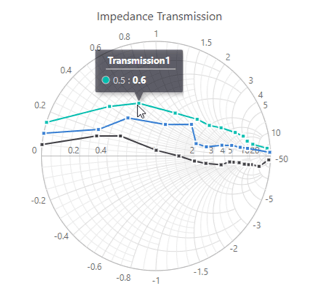
The Syncfusion® Blazor Smith Chart Component visualizes complex impedance and transmission line parameters used in RF engineering and high-frequency circuit analysis. Provides interactive impedance mapping, markers, legends, and customizable series for electrical network analysis.
Key Features
- Impedance & Admittance Visualization - Plot and analyze high‑frequency circuit parameters such as impedance, admittance, and reflection coefficients with support for both impedance and admittance rendering types.
- Customizable Axes & Gridlines - Includes a horizontal resistance axis and radial reactance axis, both fully customizable. Add major and minor gridlines and style them to improve clarity and match your application’s theme.
- Interactive Markers & Data Labels - Highlight specific data points using markers with customizable shapes, sizes, borders, and opacity. Data labels can be added, styled, positioned, and automatically arranged to prevent overlap.
- Legends & Tooltips - Built‑in legends with fully configurable position, layout, border, and text options. Enable tooltips to show detailed point information with support for custom templates.
- Series Customization - Plot multiple series in a single chart and customize each with unique colors, widths, opacity settings, and animations for improved visual clarity.
- Titles & Annotations - Add chart titles and subtitles with alignment, styling, trimming, and max‑width support for a polished presentation.
- Export & Print Support - Export the Smith Chart to PNG, JPEG, SVG, or PDF formats, with orientation options to suit reporting and documentation needs.
- Responsive Layout - Fully responsive design that automatically adapts to different screen sizes across desktops, tablets, and mobile devices.
- Accessibility & Globalization - Keyboard‑friendly, screen‑reader compatible, WAI‑ARIA compliant, and supports right‑to‑left (RTL) languages for global audiences.
System Requirements
- .NET 8.0 or later (Blazor Web App, Blazor Server, Blazor WebAssembly and Blazor Hybrid)
- See full requirements: System Requirements
Installation
.NET CLI
dotnet add package Syncfusion.Blazor.SmithChart
NuGet Package Manager
Install-Package Syncfusion.Blazor.SmithChart
Add Script References
- For Blazor Server App / Blazor Web App, add these to
Components/App.razororApp.razor. - For Blazor WebAssembly App: add these to
wwwroot/index.html.
<script src="_content/Syncfusion.Blazor.Core/scripts/syncfusion-blazor.min.js" type="text/javascript"></script>
Quick Start
- Register the Syncfusion® Blazor services in
Program.cs:
using Syncfusion.Blazor;

builder.Services.AddSyncfusionBlazor();
- Add the Blazor Smith Chart component in a Razor page:
<SfSmithChart>
    <SmithChartSeriesCollection>
        <SmithChartSeries Name="Transmission1"
                          Reactance="Reactance"
                          Resistance="Resistance"
                          DataSource="@FirstTransmissionSeries">
        </SmithChartSeries>
        <SmithChartSeries Name="Transmission2"
                          Points="@SecondTransmissionSeries">
        </SmithChartSeries>
    </SmithChartSeriesCollection>
</SfSmithChart>

@code {
    public class SmithDataSource
    {
        public double Resistance { get; set; }
        public double Reactance { get; set; }
    };
    public List<SmithDataSource> FirstTransmissionSeries = new List<SmithDataSource> {
        new SmithDataSource { Resistance= 10, Reactance= 25 },
        new SmithDataSource { Resistance= 8, Reactance= 6 },
        new SmithDataSource { Resistance= 6, Reactance= 4.5 },
        new SmithDataSource { Resistance= 4.5, Reactance= 2 },
        new SmithDataSource { Resistance= 3.5, Reactance= 1.6 },
        new SmithDataSource { Resistance= 2.5, Reactance= 1.3 },
        new SmithDataSource { Resistance= 2, Reactance= 1.2 },
        new SmithDataSource { Resistance= 1.5, Reactance= 1 },
        new SmithDataSource { Resistance= 1, Reactance= 0.8 },
        new SmithDataSource { Resistance= 0.5, Reactance= 0.4 },
        new SmithDataSource { Resistance= 0.3, Reactance= 0.2 },
        new SmithDataSource { Resistance= 0.001, Reactance= 0.15 }
    };
    public List<SmithChartPoint> SecondTransmissionSeries = new List<SmithChartPoint> {
        new SmithChartPoint { Resistance= 20, Reactance= -50 },
        new SmithChartPoint { Resistance= 10, Reactance= -10 },
        new SmithChartPoint { Resistance= 9, Reactance= -4.5 },
        new SmithChartPoint { Resistance= 8, Reactance= -3.5 },
        new SmithChartPoint { Resistance= 7, Reactance= -2.5 },
        new SmithChartPoint { Resistance= 6, Reactance= -1.5 },
        new SmithChartPoint { Resistance= 5, Reactance= -1 },
        new SmithChartPoint { Resistance= 4.5, Reactance= -0.5 },
        new SmithChartPoint { Resistance= 2, Reactance= 0.5 },
        new SmithChartPoint { Resistance= 1.5, Reactance= 0.4 },
        new SmithChartPoint { Resistance= 1, Reactance= 0.4 },
        new SmithChartPoint { Resistance= 0.5, Reactance= 0.2 },
        new SmithChartPoint { Resistance= 0.3, Reactance= 0.1 },
        new SmithChartPoint { Resistance= 0.001, Reactance= 0.05 }
    };
}
Documentation
- Getting Started with Blazor Web App
- Getting Started with Blazor WebAssembly App
- Feature Overview
- API Reference
- Live Demos
- Video Tutorials
Support
License
This is a commercial product and requires a paid license for possession or use. Review the Syncfusion® EULA.
About Syncfusion®
Syncfusion® provides 1600+ UI components and frameworks for web, mobile, and desktop development across multiple platforms:
Web: Blazor | ASP.NET Core | ASP.NET MVC | JavaScript | Angular | React | Vue
Desktop: WinForms | WPF | WinUI
Learn more at www.syncfusion.com.
sales@syncfusion.com | Toll Free: 1-888-9-DOTNET
| Product | Versions Compatible and additional computed target framework versions. |
|---|---|
| .NET | net8.0 is compatible. net8.0-android was computed. net8.0-browser was computed. net8.0-ios was computed. net8.0-maccatalyst was computed. net8.0-macos was computed. net8.0-tvos was computed. net8.0-windows was computed. net9.0 is compatible. net9.0-android was computed. net9.0-browser was computed. net9.0-ios was computed. net9.0-maccatalyst was computed. net9.0-macos was computed. net9.0-tvos was computed. net9.0-windows was computed. net10.0 is compatible. net10.0-android was computed. net10.0-browser was computed. net10.0-ios was computed. net10.0-maccatalyst was computed. net10.0-macos was computed. net10.0-tvos was computed. net10.0-windows was computed. |
-
net10.0
- Syncfusion.Blazor.Core (>= 33.1.47)
- Syncfusion.Blazor.Data (>= 33.1.47)
- Syncfusion.Blazor.DataVizCommon (>= 33.1.47)
- Syncfusion.PdfExport.Net.Core (>= 33.1.47)
-
net8.0
- Syncfusion.Blazor.Core (>= 33.1.47)
- Syncfusion.Blazor.Data (>= 33.1.47)
- Syncfusion.Blazor.DataVizCommon (>= 33.1.47)
- Syncfusion.PdfExport.Net.Core (>= 33.1.47)
-
net9.0
- Syncfusion.Blazor.Core (>= 33.1.47)
- Syncfusion.Blazor.Data (>= 33.1.47)
- Syncfusion.Blazor.DataVizCommon (>= 33.1.47)
- Syncfusion.PdfExport.Net.Core (>= 33.1.47)
NuGet packages (1)
Showing the top 1 NuGet packages that depend on Syncfusion.Blazor.SmithChart:
| Package | Downloads |
|---|---|
|
Jakar.Extensions.Blazor.Syncfusion
Extensions to aid in development. |
GitHub repositories
This package is not used by any popular GitHub repositories.
| Version | Downloads | Last Updated |
|---|---|---|
| 33.1.47 | 0 | 4/6/2026 |
| 33.1.46 | 114 | 3/30/2026 |
| 33.1.45 | 143 | 3/23/2026 |
| 33.1.44 | 261 | 3/16/2026 |
| 32.2.9 | 171 | 3/9/2026 |
| 32.2.8 | 157 | 3/2/2026 |
| 32.2.7 | 154 | 2/23/2026 |
| 32.2.5 | 143 | 2/16/2026 |
| 32.2.4 | 113 | 2/10/2026 |
| 32.2.3 | 459 | 2/5/2026 |
| 32.1.25 | 167 | 1/26/2026 |
| 32.1.24 | 119 | 1/19/2026 |
| 32.1.23 | 137 | 1/13/2026 |
| 32.1.22 | 550 | 1/5/2026 |
| 32.1.21 | 204 | 12/29/2025 |
| 32.1.20 | 236 | 12/23/2025 |
| 32.1.19 | 552 | 12/16/2025 |
| 31.2.18 | 685 | 12/8/2025 |
| 31.2.16 | 780 | 12/1/2025 |
| 31.2.15 | 240 | 11/25/2025 |