Syncfusion.Blazor.Ribbon
35.1.37
Prefix Reserved
dotnet add package Syncfusion.Blazor.Ribbon --version 35.1.37
NuGet\Install-Package Syncfusion.Blazor.Ribbon -Version 35.1.37
<PackageReference Include="Syncfusion.Blazor.Ribbon" Version="35.1.37" />
<PackageVersion Include="Syncfusion.Blazor.Ribbon" Version="35.1.37" />
<PackageReference Include="Syncfusion.Blazor.Ribbon" />
paket add Syncfusion.Blazor.Ribbon --version 35.1.37
#r "nuget: Syncfusion.Blazor.Ribbon, 35.1.37"
#:package Syncfusion.Blazor.Ribbon@35.1.37
#addin nuget:?package=Syncfusion.Blazor.Ribbon&version=35.1.37
#tool nuget:?package=Syncfusion.Blazor.Ribbon&version=35.1.37
Syncfusion Blazor Ribbon Component
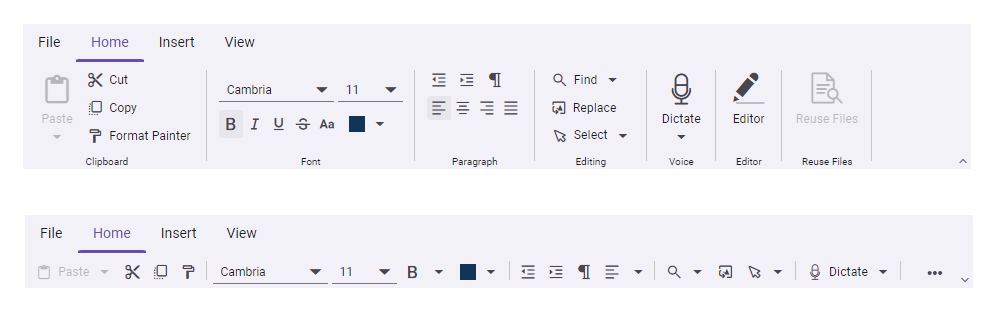
The Syncfusion Blazor Ribbon Component provides a Microsoft Office-style ribbon interface for organizing and presenting application commands. It delivers a structured, intuitive UI with customizable tabs, groups, and buttons for improved user experience and efficient command access in Blazor applications.
Using this package with an AI coding agent
Before generating Syncfusion code, ask your AI coding agent to run the Syncfusion setup using the following prompt:
Set up this project for Syncfusion before generating code. Fetch and follow the official instructions at https://ai.syncfusion.com, then report the detected platform, installed skill pack, MCP status, and any required licensing action.The setup detects your project's platform and loads the appropriate Syncfusion skill pack. No Syncfusion account or MCP key is required to install or read Syncfusion agent skills.
Platform reference: https://ai.syncfusion.com/blazor/llms.txt
Key fatures
- Customizable Tabs and Groups – Organize commands into logical tabs and groups
- Rich Button Types – Regular buttons, split buttons, and dropdown menus
- Icons and Labels – Support for icons and custom labels on ribbon items
- Responsive Design – Adapts to different screen sizes and orientations
- Keyboard Navigation – Full keyboard support for accessibility
- Template Support – Custom templates for ribbon items and content
- Command Binding – Easy binding to application commands and events
System Requirements
- .NET 8.0 or later (Blazor Server, Blazor Web App, Blazor WebAssembly and Blazor Hybrid)
- See full requirements: System Requirements
Installation
Install the Ribbon package and the themes package, which provides the stylesheets referenced below:
dotnet add package Syncfusion.Blazor.Ribbon
dotnet add package Syncfusion.Blazor.Themes
Add stylesheet and script references
- For Blazor Server App / Blazor Web App, add these to
Components/App.razororApp.razorfile. - For Blazor WebAssembly App, add these to
wwwroot/index.htmlfile.
<link href="_content/Syncfusion.Blazor.Themes/fluent2.css" rel="stylesheet" />
<script src="_content/Syncfusion.Blazor.Core/scripts/syncfusion-blazor.min.js" type="text/javascript"></script>
Quick start
- Register the Syncfusion Blazor services in the
Program.csfile.
using Syncfusion.Blazor;

builder.Services.AddSyncfusionBlazor();
- Add Blazor Ribbon component to your Razor page.
<SfRibbon>
    <RibbonTabs>
        <RibbonTab HeaderText="Home"></RibbonTab>
    </RibbonTabs>
</SfRibbon>
Documentation
- Getting Started with Blazor Web App
- Getting Started with Blazor WebAssembly App
- API Reference
- Feature Overview
- Live Demos
Support
License
This is a commercial product and requires a paid license for possession or use. Review the Syncfusion EULA.
About Syncfusion
Syncfusion provides 1600+ UI components and frameworks for web, mobile, and desktop development across multiple platforms:
Web: Blazor | ASP.NET Core | ASP.NET MVC | JavaScript | Angular | React | Vue
Mobile: Flutter | UWP | JavaScript
Learn more at www.syncfusion.com.
sales@syncfusion.com | Toll Free: 1-888-9-DOTNET
| Product | Versions Compatible and additional computed target framework versions. |
|---|---|
| .NET | net8.0 is compatible. net8.0-android was computed. net8.0-browser was computed. net8.0-ios was computed. net8.0-maccatalyst was computed. net8.0-macos was computed. net8.0-tvos was computed. net8.0-windows was computed. net9.0 is compatible. net9.0-android was computed. net9.0-browser was computed. net9.0-ios was computed. net9.0-maccatalyst was computed. net9.0-macos was computed. net9.0-tvos was computed. net9.0-windows was computed. net10.0 is compatible. net10.0-android was computed. net10.0-browser was computed. net10.0-ios was computed. net10.0-maccatalyst was computed. net10.0-macos was computed. net10.0-tvos was computed. net10.0-windows was computed. |
-
net10.0
- Newtonsoft.Json (>= 13.0.2)
- Syncfusion.Blazor.Buttons (>= 35.1.37)
- Syncfusion.Blazor.Core (>= 35.1.37)
- Syncfusion.Blazor.DropDowns (>= 35.1.37)
- Syncfusion.Blazor.Inputs (>= 35.1.37)
- Syncfusion.Blazor.Navigations (>= 35.1.37)
- Syncfusion.Blazor.Popups (>= 35.1.37)
- Syncfusion.Blazor.SplitButtons (>= 35.1.37)
-
net8.0
- Newtonsoft.Json (>= 13.0.2)
- Syncfusion.Blazor.Buttons (>= 35.1.37)
- Syncfusion.Blazor.Core (>= 35.1.37)
- Syncfusion.Blazor.DropDowns (>= 35.1.37)
- Syncfusion.Blazor.Inputs (>= 35.1.37)
- Syncfusion.Blazor.Navigations (>= 35.1.37)
- Syncfusion.Blazor.Popups (>= 35.1.37)
- Syncfusion.Blazor.SplitButtons (>= 35.1.37)
-
net9.0
- Newtonsoft.Json (>= 13.0.2)
- Syncfusion.Blazor.Buttons (>= 35.1.37)
- Syncfusion.Blazor.Core (>= 35.1.37)
- Syncfusion.Blazor.DropDowns (>= 35.1.37)
- Syncfusion.Blazor.Inputs (>= 35.1.37)
- Syncfusion.Blazor.Navigations (>= 35.1.37)
- Syncfusion.Blazor.Popups (>= 35.1.37)
- Syncfusion.Blazor.SplitButtons (>= 35.1.37)
NuGet packages (1)
Showing the top 1 NuGet packages that depend on Syncfusion.Blazor.Ribbon:
| Package | Downloads |
|---|---|
|
Syncfusion.Blazor.Spreadsheet
This package provides the functionality to utilize the features of Syncfusion® Blazor SpreadSheet component and more. |
GitHub repositories
This package is not used by any popular GitHub repositories.
| Version | Downloads | Last Updated |
|---|---|---|
| 35.1.37 | 290 | 9/29/2026 |
| 34.2.9 | 688 | 9/21/2026 |
| 34.2.8 | 591 | 9/14/2026 |
| 34.2.7 | 997 | 9/8/2026 |
| 34.2.6 | 673 | 8/31/2026 |
| 34.2.5 | 1,444 | 8/25/2026 |
| 34.2.4 | 1,090 | 8/17/2026 |
| 34.2.3 | 1,940 | 8/11/2026 |
| 34.2.2 | 1,806 | 8/5/2026 |
| 34.1.33 | 3,921 | 7/27/2026 |
| 34.1.32 | 1,575 | 7/21/2026 |
| 34.1.31 | 781 | 7/14/2026 |
| 34.1.30 | 400 | 7/9/2026 |
| 34.1.29 | 839 | 7/6/2026 |
| 33.2.15 | 2,490 | 6/23/2026 |
| 33.2.13 | 1,129 | 6/16/2026 |
| 33.2.12 | 6,498 | 6/9/2026 |
| 33.2.10 | 517 | 6/2/2026 |
| 33.2.8 | 927 | 5/26/2026 |
| 33.2.7 | 582 | 5/19/2026 |