Syncfusion.Blazor.Calendars
33.1.46
Prefix Reserved
dotnet add package Syncfusion.Blazor.Calendars --version 33.1.46
NuGet\Install-Package Syncfusion.Blazor.Calendars -Version 33.1.46
<PackageReference Include="Syncfusion.Blazor.Calendars" Version="33.1.46" />
<PackageVersion Include="Syncfusion.Blazor.Calendars" Version="33.1.46" />
<PackageReference Include="Syncfusion.Blazor.Calendars" />
paket add Syncfusion.Blazor.Calendars --version 33.1.46
#r "nuget: Syncfusion.Blazor.Calendars, 33.1.46"
#:package Syncfusion.Blazor.Calendars@33.1.46
#addin nuget:?package=Syncfusion.Blazor.Calendars&version=33.1.46
#tool nuget:?package=Syncfusion.Blazor.Calendars&version=33.1.46
Syncfusion® Blazor Calendar Components
A comprehensive suite of Blazor date and time picker components for calendar selection, date range picking, and time input. Includes Calendar, DatePicker, DateRangePicker, DateTime Picker, and TimePicker components.
Supported Components
This package includes the following components:
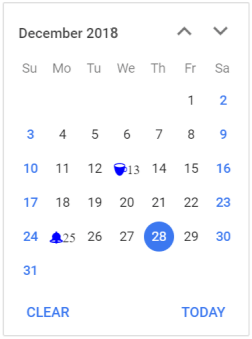
Blazor Calendar Component
The Blazor Calendar Component displays an interactive calendar with support for month, year, and decade views for quick date navigation.
Key Features:
- Multiple View Modes: Month, year, and decade views for flexible date navigation
- Date Restriction: Minimum/maximum dates and disabled date ranges for validation
- Range Selection: Highlight date ranges with custom styling
- Week Numbers: Display ISO week numbers in calendar grid
- Custom Formats: Flexible date formatting and localization support
- Range Navigation: Efficiently navigate through large date ranges
- Weekend Highlighting: Visual distinction for weekends vs. weekdays
- Accessibility: Full keyboard navigation and ARIA support for screen readers
Documentation:
- Getting Started with Blazor Web App
- Getting Started with Blazor WebAssembly App
- Feature Overview
- Live Demos
- API Reference
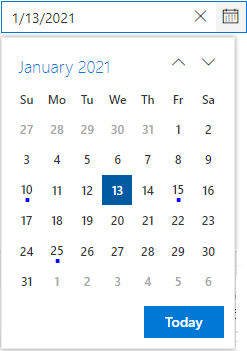
Blazor DatePicker Component
The Blazor DatePicker Component is a lightweight, mobile-friendly component for date selection with text input and calendar popup.
Key Features:
- Text Input with Popup: Type or select dates from interactive calendar popup
- Multiple View Modes: Month, year, and decade views for quick date navigation
- Date Validation: Minimum/maximum dates and disabled date ranges support
- Format Customization: Multiple date format options with localization
- Placeholder Support: Custom placeholder text for better UX
- Input Masking: Supports masked input to enforce consistent and error‑free date/time entry.
- Keyboard Navigation: Arrow keys, Enter, and Tab support for hands-free input
- Mobile Optimization: Touch-friendly interface for mobile and tablet devices
- Accessibility: ARIA labels and screen reader compatibility
Documentation:
- Getting Started with Blazor Web App
- Getting Started with Blazor WebAssembly App
- Feature Overview
- Live Demos
- API Reference
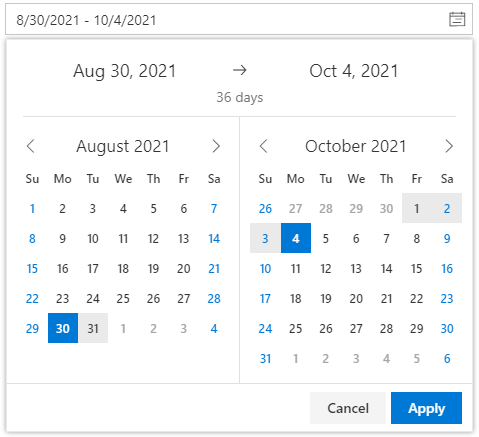
Blazor DateRangePicker Component
The Blazor DateRangePicker Component allows users to select start and end dates as a continuous range from dual calendars or text input.
Key Features:
- Dual Calendar Display: Side-by-side calendars for intuitive range selection
- Text Input Support: Enter or select dates directly in input fields
- Range Highlight: Visual highlighting of selected date range
- Predefined Ranges: Quick-select options for common ranges (Last 7 days, etc.)
- Date Validation: Enforce minimum/maximum dates and disabled ranges
- Single Calendar Mode: Option to display one calendar for compact layouts
- Format Flexibility: Custom date formatting with localization support
- Accessibility: Full keyboard navigation and screen reader support
- Input Masking: Supports masked input to enforce consistent and error‑free date/time entry.
Documentation:
- Getting Started with Blazor Web App
- Getting Started with Blazor WebAssembly App
- Feature Overview
- Live Demos
- API Reference
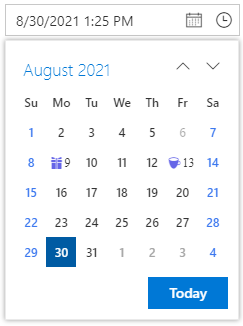
Blazor DateTime Picker Component
The Blazor DateTime Picker Component combines the date and time selection in a single component with calendar popup and time dropdown.
Key Features:
- Combined Selection: Interactive calendar popup for date selection and time picker popup for time selection
- Multiple View Modes: Month, year, and decade views for date navigation
- Time Dropdown: Configurable time intervals (15 min, 30 min, 1 hour, etc.)
- Date/Time Validation: Enforce minimum/maximum datetime ranges
- Format Customization: Custom date-time formatting with localization
- Masked Input: Guided text input with format masking
- Accessibility: Complete keyboard navigation and ARIA support
- Input Masking: Supports masked input to enforce consistent and error‑free date/time entry.
Documentation:
- Getting Started with Blazor Web App
- Getting Started with Blazor WebAssembly App
- Feature Overview
- Live Demos
- API Reference
Blazor TimePicker Component
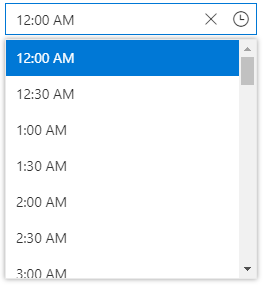
The Blazor TimePicker Component is a lightweight component for time selection with text input and dropdown time list.
Key Features:
- Time Dropdown List: Select from predefined time intervals in dropdown
- Text Input Support: Type time directly with format validation
- Interval Control: Configurable time intervals (15 min, 30 min, 1 hour, etc.)
- Format Flexibility: Support for 12-hour and 24-hour time formats
- Time Validation: Enforce minimum/maximum time constraints
- Cascading Support: Coordinate with other time pickers for range selection
- Keyboard Navigation: Arrow keys, Enter, and Tab support for efficient input
- Accessibility: Full ARIA support and screen reader compatibility
- Input Masking: Supports masked input to enforce consistent and error‑free date/time entry.
Documentation:
- Getting Started with Blazor Web App
- Getting Started with Blazor WebAssembly App
- Feature Overview
- Live Demos
- API Reference
System Requirements
- .NET 8.0 or later (Blazor Web App, Blazor Server, Blazor WebAssembly and Blazor Hybrid)
- See full requirements: System Requirements
Installation
.NET CLI
dotnet add package Syncfusion.Blazor.Calendars
NuGet Package Manager
Install-Package Syncfusion.Blazor.Calendars
Add stylesheet and script references
- For Blazor Server App / Blazor Web App, add these to
Components/App.razororApp.razor. - For Blazor WebAssembly App: add these to
wwwroot/index.html.
<link href="_content/Syncfusion.Blazor.Themes/bootstrap5.css" rel="stylesheet" />
<script src="_content/Syncfusion.Blazor.Core/scripts/syncfusion-blazor.min.js" type="text/javascript"></script>
Quick Start
Register the Syncfusion® Blazor services in Program.cs:
using Syncfusion.Blazor;

builder.Services.AddSyncfusionBlazor();
Calendar
<SfCalendar TValue="DateTime" Min='@MinDate' Value='@DateValue' Max='@MaxDate'></SfCalendar>

@code{
    public DateTime MinDate {get;set;} = new DateTime(DateTime.Now.Year, DateTime.Now.Month, 05);
    public DateTime MaxDate {get;set;} = new DateTime(DateTime.Now.Year, DateTime.Now.Month, 27);
    public DateTime DateValue {get;set;} = new DateTime(DateTime.Now.Year, DateTime.Now.Month, 15);
}
DatePicker
<SfDatePicker TValue="DateTime?" Value='@DateValue' Min='@MinDate' Max='@MaxDate'></SfDatePicker>

@code {
    public DateTime? DateValue {get;set;} = new DateTime(DateTime.Now.Year,DateTime.Now.Month,10);
    public DateTime MinDate {get;set;} = new DateTime(DateTime.Now.Year,DateTime.Now.Month,05);
    public DateTime MaxDate {get;set;} = new DateTime(DateTime.Now.Year, DateTime.Now.Month, 27);
}
DateRangePicker
<SfDateRangePicker TValue="DateTime?" Placeholder="Choose a Range" Min="@MinDate" Max="@MaxDate"></SfDateRangePicker>

@code {
    public DateTime MinDate {get;set;} = new DateTime(2017, 01, 05);
    public DateTime MaxDate {get;set;} = new DateTime(2017, 12, 20);
}
DateTimePicker
<SfDateTimePicker TValue="DateTime?" Value="@DateValue" Min="@MinDate" Max="@MaxDate"></SfDateTimePicker>

@code{
    public DateTime? DateValue {get;set;} = new DateTime(DateTime.Now.Year,DateTime.Now.Month,10);
    public DateTime MinDate {get;set;} = new DateTime(DateTime.Now.Year,DateTime.Now.Month,05);
    public DateTime MaxDate {get;set;} = new DateTime(DateTime.Now.Year, DateTime.Now.Month, 27);
}
TimePicker
<SfTimePicker TValue="DateTime?" Value="@TimeValue" Step=60 Format="HH:mm"></SfTimePicker>

@code {
    public DateTime TimeValue { get; set; } = DateTime.Now;
}
Support
License
This is a commercial product and requires a paid license for possession or use. Review the Syncfusion® EULA.
About Syncfusion®
Syncfusion® provides 1600+ UI components and frameworks for web, mobile, and desktop development across multiple platforms:
Web: Blazor | ASP.NET Core | ASP.NET MVC | JavaScript | Angular | React | Vue
Desktop: WinForms | WPF | WinUI
Learn more at www.syncfusion.com.
sales@syncfusion.com | Toll Free: 1-888-9-DOTNET
| Product | Versions Compatible and additional computed target framework versions. |
|---|---|
| .NET | net8.0 is compatible. net8.0-android was computed. net8.0-browser was computed. net8.0-ios was computed. net8.0-maccatalyst was computed. net8.0-macos was computed. net8.0-tvos was computed. net8.0-windows was computed. net9.0 is compatible. net9.0-android was computed. net9.0-browser was computed. net9.0-ios was computed. net9.0-maccatalyst was computed. net9.0-macos was computed. net9.0-tvos was computed. net9.0-windows was computed. net10.0 is compatible. net10.0-android was computed. net10.0-browser was computed. net10.0-ios was computed. net10.0-maccatalyst was computed. net10.0-macos was computed. net10.0-tvos was computed. net10.0-windows was computed. |
-
net10.0
- Syncfusion.Blazor.Buttons (>= 33.1.46)
- Syncfusion.Blazor.Core (>= 33.1.46)
- Syncfusion.Blazor.Inputs (>= 33.1.46)
- Syncfusion.Blazor.Lists (>= 33.1.46)
-
net8.0
- Syncfusion.Blazor.Buttons (>= 33.1.46)
- Syncfusion.Blazor.Core (>= 33.1.46)
- Syncfusion.Blazor.Inputs (>= 33.1.46)
- Syncfusion.Blazor.Lists (>= 33.1.46)
-
net9.0
- Syncfusion.Blazor.Buttons (>= 33.1.46)
- Syncfusion.Blazor.Core (>= 33.1.46)
- Syncfusion.Blazor.Inputs (>= 33.1.46)
- Syncfusion.Blazor.Lists (>= 33.1.46)
NuGet packages (19)
Showing the top 5 NuGet packages that depend on Syncfusion.Blazor.Calendars:
| Package | Downloads |
|---|---|
|
Syncfusion.Blazor.Grid
Syncfusion® Blazor DataGrid component for rendering high-performance, feature-rich tabular UI in .NET Blazor applications. Includes virtualization, paging, sorting, filtering, grouping, editing, templates, and export (Excel/PDF). |
|
|
Syncfusion.Blazor.InPlaceEditor
Provides a Syncfusion® Blazor In-Place Editor component for inline and popup editing scenarios. Supports multiple input types including TextBox, Dropdown, DatePicker, and Rich Text Editor. Optimized for seamless integration in both Blazor Server and Blazor WebAssembly applications. |
|
|
Syncfusion.Blazor.Schedule
Syncfusion® Blazor Scheduler component for managing appointments and calendars in .NET Blazor apps. Supports multiple views, recurrence, time zones, resource grouping, drag-and-drop, and export. |
|
|
Syncfusion.Blazor.WordProcessor
This package provides the functionality to utilize the features of Syncfusion® Blazor Word Processor (Document Editor) component and more. |
|
|
Syncfusion.Blazor.QueryBuilder
Syncfusion® Blazor Query Builder component enables users to build, validate, and execute complex database queries with a visual interface. Features include customizable columns, operators, filtering rules, and SQL/LINQ query generation for intuitive data filtering and query construction in Blazor applications. |
GitHub repositories
This package is not used by any popular GitHub repositories.
| Version | Downloads | Last Updated |
|---|---|---|
| 33.1.46 | 208 | 3/30/2026 |
| 33.1.45 | 2,983 | 3/23/2026 |
| 33.1.44 | 6,438 | 3/16/2026 |
| 32.2.9 | 6,523 | 3/9/2026 |
| 32.2.8 | 7,407 | 3/2/2026 |
| 32.2.7 | 9,849 | 2/23/2026 |
| 32.2.5 | 7,170 | 2/16/2026 |
| 32.2.4 | 7,160 | 2/10/2026 |
| 32.2.3 | 11,157 | 2/5/2026 |
| 32.1.25 | 11,005 | 1/26/2026 |
| 32.1.24 | 8,800 | 1/19/2026 |
| 32.1.23 | 10,347 | 1/13/2026 |
| 32.1.22 | 7,303 | 1/5/2026 |
| 32.1.21 | 7,033 | 12/29/2025 |
| 32.1.20 | 3,782 | 12/23/2025 |
| 32.1.19 | 13,737 | 12/16/2025 |
| 31.2.18 | 13,477 | 12/8/2025 |
| 31.2.16 | 13,143 | 12/1/2025 |
| 31.2.15 | 9,255 | 11/25/2025 |
| 31.2.12 | 9,923 | 11/18/2025 |