Syncfusion.Blazor.BulletChart
35.1.40
Prefix Reserved
dotnet add package Syncfusion.Blazor.BulletChart --version 35.1.40
NuGet\Install-Package Syncfusion.Blazor.BulletChart -Version 35.1.40
<PackageReference Include="Syncfusion.Blazor.BulletChart" Version="35.1.40" />
<PackageVersion Include="Syncfusion.Blazor.BulletChart" Version="35.1.40" />
<PackageReference Include="Syncfusion.Blazor.BulletChart" />
paket add Syncfusion.Blazor.BulletChart --version 35.1.40
#r "nuget: Syncfusion.Blazor.BulletChart, 35.1.40"
#:package Syncfusion.Blazor.BulletChart@35.1.40
#addin nuget:?package=Syncfusion.Blazor.BulletChart&version=35.1.40
#tool nuget:?package=Syncfusion.Blazor.BulletChart&version=35.1.40
Syncfusion Blazor Bullet Chart Component
The Blazor Bullet Chart Component is a lightweight charting component that compares performance measures against targets and displays them across multiple ranges. Ideal for KPI dashboards and performance evaluation scenarios.
Using this package with an AI coding agent
Before generating Syncfusion code, ask your AI coding agent to run the Syncfusion setup using the following prompt:
Set up this project for Syncfusion before generating code. Fetch and follow the official instructions at https://ai.syncfusion.com, then report the detected platform, installed skill pack, MCP status, and any required licensing action.The setup detects your project's platform and loads the appropriate Syncfusion skill pack. No Syncfusion account or MCP key is required to install or read Syncfusion agent skills.
Platform reference: https://ai.syncfusion.com/blazor/llms.txt
Key Features
- Comparative Performance Visualization – Visually compare performance metrics against target values
- Multiple Ranges – Display performance across multiple qualitative ranges (e.g., poor, satisfactory, good) with customizable colors and opacity
- Multiple Scales – Support for multiple scales and axes for detailed analysis
- Data Labels – Show actual values on the chart with customizable styling (color, font, opacity)
- Tooltip Support – Interactive tooltips to display detailed information on hover
- Axis Customization – Customize axis labels, ticks, and scale properties for enhanced readability
- Flexible Orientation – Support for both horizontal and vertical orientations
- Customizable Appearance – Extensive styling options including themes, colors, and dimensions
- Responsive Design – Adaptive layout that works seamlessly across different screen sizes and devices
- Accessibility Compliant – WCAG 2.2, Section 508, ADA compliant with keyboard navigation and screen reader support
- Print Support – Built-in print functionality (Ctrl + P)
- Export Functionality – Export charts to images and PDF formats
- Built-in Themes – Customizable themes and styling options
- RTL Support – Right-to-left rendering for internationalization
System Requirements
- .NET 8.0 or later (Blazor Web App, Blazor Server, Blazor WebAssembly and Blazor Hybrid)
- See full requirements: system requirements
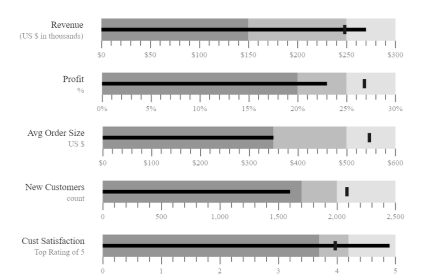
Installation
Install the BulletChart package, which provides the scripts referenced below:
dotnet add package Syncfusion.Blazor.BulletChart
Add Script References
- For Blazor Server App / Blazor Web App, add these to
Components/App.razororApp.razor. - For Blazor WebAssembly App: add these to
wwwroot/index.html.
<script src="_content/Syncfusion.Blazor.Core/scripts/syncfusion-blazor.min.js" type="text/javascript"></script>
Quick Start
- Register the Syncfusion Blazor services in
Program.cs:
using Syncfusion.Blazor;

builder.Services.AddSyncfusionBlazor();
- Add the Blazor BulletChart component in a Razor page:
<SfBulletChart DataSource="@BulletChartData" ValueField="FieldValue" TargetField="TargetValue" Minimum="0" Maximum="300" Interval="50" Title="Revenue">
    <BulletChartTooltip TValue="ChartData" Enable="true"></BulletChartTooltip>
    <BulletChartRangeCollection>
        <BulletChartRange End=150> </BulletChartRange>
        <BulletChartRange End=250></BulletChartRange>
        <BulletChartRange End=300></BulletChartRange>
    </BulletChartRangeCollection>
</SfBulletChart>

@code{
    public class ChartData
    {
        public double FieldValue { get; set; }
        public double TargetValue { get; set; }
    }
    public List<ChartData> BulletChartData = new List<ChartData>
    {
        new ChartData { FieldValue = 270, TargetValue = 250 }
    };
}
Documentation
- Getting Started with Blazor Web App
- Getting Started with Blazor WASM App
- API Reference
- Feature Overview
- Live Demos
Support
License
This is a commercial product and requires a paid license for possession or use. Review the Syncfusion EULA.
About Syncfusion
Syncfusion provides 1600+ UI components and frameworks for web, mobile, and desktop development across multiple platforms:
Web: Blazor | ASP.NET Core | ASP.NET MVC | JavaScript | Angular | React | Vue
Desktop: WinForms | WPF | WinUI
Learn more at www.syncfusion.com.
sales@syncfusion.com | Toll Free: 1-888-9-DOTNET
| Product | Versions Compatible and additional computed target framework versions. |
|---|---|
| .NET | net8.0 is compatible. net8.0-android was computed. net8.0-browser was computed. net8.0-ios was computed. net8.0-maccatalyst was computed. net8.0-macos was computed. net8.0-tvos was computed. net8.0-windows was computed. net9.0 is compatible. net9.0-android was computed. net9.0-browser was computed. net9.0-ios was computed. net9.0-maccatalyst was computed. net9.0-macos was computed. net9.0-tvos was computed. net9.0-windows was computed. net10.0 is compatible. net10.0-android was computed. net10.0-browser was computed. net10.0-ios was computed. net10.0-maccatalyst was computed. net10.0-macos was computed. net10.0-tvos was computed. net10.0-windows was computed. |
-
net10.0
- Syncfusion.Blazor.Core (>= 35.1.40)
- Syncfusion.Blazor.Data (>= 35.1.40)
- Syncfusion.Blazor.DataVizCommon (>= 35.1.40)
- Syncfusion.PdfExport.Net.Core (>= 35.1.40)
-
net8.0
- Syncfusion.Blazor.Core (>= 35.1.40)
- Syncfusion.Blazor.Data (>= 35.1.40)
- Syncfusion.Blazor.DataVizCommon (>= 35.1.40)
- Syncfusion.PdfExport.Net.Core (>= 35.1.40)
-
net9.0
- Syncfusion.Blazor.Core (>= 35.1.40)
- Syncfusion.Blazor.Data (>= 35.1.40)
- Syncfusion.Blazor.DataVizCommon (>= 35.1.40)
- Syncfusion.PdfExport.Net.Core (>= 35.1.40)
NuGet packages (1)
Showing the top 1 NuGet packages that depend on Syncfusion.Blazor.BulletChart:
| Package | Downloads |
|---|---|
|
Jakar.Extensions.Blazor.Syncfusion
Extensions to aid in development. |
GitHub repositories
This package is not used by any popular GitHub repositories.
| Version | Downloads | Last Updated |
|---|---|---|
| 35.1.40 | 0 | 10/13/2026 |
| 35.1.39 | 147 | 10/6/2026 |
| 35.1.37 | 222 | 9/29/2026 |
| 34.2.9 | 165 | 9/21/2026 |
| 34.2.8 | 168 | 9/14/2026 |
| 34.2.7 | 346 | 9/8/2026 |
| 34.2.6 | 177 | 8/31/2026 |
| 34.2.5 | 187 | 8/25/2026 |
| 34.2.4 | 256 | 8/17/2026 |
| 34.2.3 | 179 | 8/11/2026 |
| 34.2.2 | 967 | 8/5/2026 |
| 34.1.33 | 183 | 7/27/2026 |
| 34.1.32 | 248 | 7/21/2026 |
| 34.1.31 | 195 | 7/14/2026 |
| 34.1.30 | 193 | 7/9/2026 |
| 34.1.29 | 626 | 7/6/2026 |
| 33.2.15 | 702 | 6/23/2026 |
| 33.2.13 | 223 | 6/16/2026 |
| 33.2.12 | 205 | 6/9/2026 |
| 33.2.10 | 232 | 6/2/2026 |