Stellar.FastDB
2.1.0
dotnet add package Stellar.FastDB --version 2.1.0
NuGet\Install-Package Stellar.FastDB -Version 2.1.0
<PackageReference Include="Stellar.FastDB" Version="2.1.0" />
<PackageVersion Include="Stellar.FastDB" Version="2.1.0" />
<PackageReference Include="Stellar.FastDB" />
paket add Stellar.FastDB --version 2.1.0
#r "nuget: Stellar.FastDB, 2.1.0"
#:package Stellar.FastDB@2.1.0
#addin nuget:?package=Stellar.FastDB&version=2.1.0
#tool nuget:?package=Stellar.FastDB&version=2.1.0
FastDB - High-Performance Embedded Storage for C# (.NET)
Stellar.FastDB is an exceptionally fast document store for C# that is 100x faster than similar products. Designed for optimal performance and high concurrency, it excels in embedded workflows that demand efficiency.
Key Features
- Serverless, embedded document storage.
- Simple, thread-safe API that closely resembles a .NET dictionary, with async/await support.
- Written entirely in C#, targeting .NET 8, 9 and 10.
- Delivered as a single, compact DLL (about 80 KB).
- Supports multiple concurrent readers and writers. Writers that arrive together share one disk write.
- Automatic background compaction reclaims space without stopping writes.
- Fast loading: records are decoded on all cores.
- Schema-less NoSQL storage that adapts to changes.
- Optimized storage footprint with configurable storage formats (JSON, MessagePack).
- LZ4 compression and AES encryption.
- Supports querying with LINQ.
- Ensures end-to-end type safety for data integrity.
- Accommodates composite keys for complex data structuring.
- Open source and free for both personal and commercial use.
- Install from NuGet: Install-Package Stellar.FastDB
TL;DR
It's essentially a ConcurrentDictionary with built-in persistence.
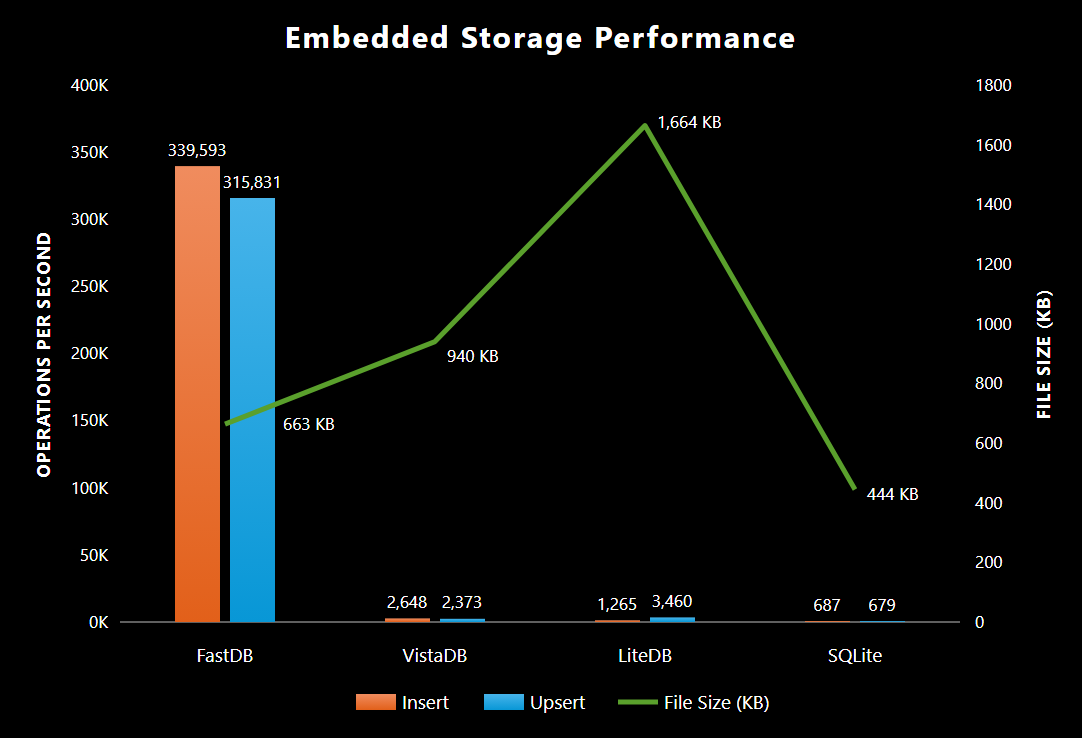
Benchmarks
A detailed list of benchmarks, along with a reproducible project, is available.
FastDB 2.0
Measured on an AMD Ryzen 9 7950X with Windows 11 and .NET 10, using BenchmarkDotNet (1 warmup, 3 iterations).
| Method | Op/s | File Size |
|---|---|---|
| Insert 10,000 | 339,593 | 663 KB |
| Delete 10,000 | 356,389 | 0 KB |
| Upsert 10,000 | 315,831 | 614 KB |
| Bulk Insert 10,000 | 2,686,343 | 614 KB |
| Query 10,000 | 8,733,116 | 663 KB |
Compared with other embedded databases
Insert
| Method | Product | Op/s | File Size |
|---|---|---|---|
| Insert 10,000 | <ins>FastDB</ins> | 339,593 | 663 KB |
| Insert 10,000 | VistaDB | 2,648 | 940 KB |
| Insert 10,000 | LiteDB | 1,265 | 1,664 KB |
| Insert 10,000 | SQLite | 687 | 444 KB |
Delete
| Method | Product | Op/s | File Size |
|---|---|---|---|
| Delete 10,000 | <ins>FastDB</ins> | 356,389 | 0 KB |
| Delete 10,000 | VistaDB | 5,503 | N/A |
| Delete 10,000 | LiteDB | 1,206 | 24 KB |
| Delete 10,000 | SQLite | 697 | 8 KB |
Upsert
| Method | Product | Op/s | File Size |
|---|---|---|---|
| Upsert 10,000 | <ins>FastDB</ins> | 315,831 | 614 KB |
| Upsert 10,000 | LiteDB | 3,460 | 1,664 KB |
| Upsert 10,000 | VistaDB | 2,372 | 940 KB |
| Upsert 10,000 | SQLite | 679 | 444 KB |
Bulk Insert
| Method | Product | Op/s | File Size |
|---|---|---|---|
| Bulk 10,000 | <ins>FastDB</ins> | 2,686,343 | 614 KB |
| Bulk 10,000 | SQLite | 303,470 | 444 KB |
| Bulk 10,000 | LiteDB | 55,231 | 1,664 KB |
| Bulk 10,000 | VistaDB | 2,706 | 952 KB |
Query
| Method | Product | Op/s | File Size |
|---|---|---|---|
| Query 10,000 | <ins>FastDB</ins> | 8,733,116 | 663 KB |
| Query 10,000 | SQLite | 1,892,530 | 444 KB |
| Query 10,000 | VistaDB | 574,299 | 940 KB |
| Query 10,000 | LiteDB | 404,380 | 1,664 KB |
Common Questions
Why was Stellar.FastDB created?
As a game developer, I need a high-concurrency storage solution for player-managed game servers. Requiring players to install local databases isn't practical. However, most available storage options are either too slow or struggle with concurrent reads and writes. These limitations make them unsuitable for game servers, which require high-volume reads and writes without performance issues.
Should I use Stellar.FastDB?
Use Stellar.FastDB if you need:
- Embedded, durable storage suitable for applications like game servers and desktop apps.
- Thread safety with robust support for high concurrency.
- High throughput for both reading and writing data.
- A minimal data storage footprint.
Do not use this database if you need to:
- Share connections between processes.
- Store all data in a single file. Each collection is stored in its own file.
How to use Stellar.FastDB
- Stellar.FastDB's APIs are designed to be intuitive and closely resemble .NET collections. If you are familiar with using a Dictionary, you'll find the transition to FastDB seamless!
- By default, a write returns once it has reached the operating system, so it survives a crash of your process. See Durability for the other modes.
- To get started with Stellar.FastDB, install it from NuGet. Search for 'Stellar.FastDB' or use the package manager command 'Install-Package Stellar.FastDB'.
Durability
The Durability option decides when a write returns and which failures a write survives.
| Mode | A write returns once | Survives a process crash | Survives a power loss |
|---|---|---|---|
Flushed (default) |
it has reached the operating system | Yes | No |
Synced |
it has been flushed to disk | Yes | Yes |
Buffered |
it is queued in memory | No | No |
Synced is the slowest mode for a single writer, since every write waits for the disk; concurrent writers share each flush.
Buffered is the fastest mode. A background thread writes the queue to the file; Flush() or FlushAsync() waits for it. MaxBufferedBytes (256 MB by default) caps the queue, and writes wait when it is full.
When a write fails (for example, a full disk), the change stays in memory but isn't written to the file. The call throws an IOException, or returns false if StorageFailureBehavior is ReturnFalse. In Buffered mode, the next Flush() throws instead.
After a crash, earlier writes are intact: every block carries a checksum, and a partly written block is discarded on open.
FastDBOptions options = new FastDBOptions()
{
   Durability = DurabilityMode.Synced,
};
FastDB fastDB = new FastDB(options);
Code Samples
Getting Started
Below is a basic example demonstrating how to interact with Stellar.FastDB. This includes creating a database instance, storing customer data, updating it, retrieving it, and properly closing the database connection:
// create a class
public class Customer
{
    public int Id { get; set; }
    public string Name { get; set; }
    public DateTime DOB { get; set; }
    public string Phone { get; set; }
    public bool IsActive { get; set; }
}

// create database
FastDB fastDB = new FastDB();

// create a collection (key, value)
var customers = fastDB.GetCollection<int, Customer>();

// create your new customer instance
var customer = new Customer
{
   Id = 1,
   Name = "John Wick",
   Phone = "555-555-5555",
   DOB = new DateTime(2000, 1, 1),
   IsActive = true,
};

// add customer
customers.Add(customer.Id, customer);

// update customer
customer.Name = "John Wick's Dog";
customers.Update(customer.Id, customer);

// read customer
if (customers.TryGet(1, out Customer found))
    Console.WriteLine(found.Name);

// use LINQ to query
var matches = customers.Where(a => a.Name.StartsWith("John") && a.Phone != null);

// close database
fastDB.Close();
Async
// each write can be awaited
await customers.AddAsync(customer.Id, customer);

// a bulk add writes all of its records together
await customers.AddBulkAsync(newCustomers.ToDictionary(a => a.Id, a => a));

await fastDB.CloseAsync();
Encryption
FastDBOptions options = new FastDBOptions()
{
   IsEncryptionEnabled = true,
   EncryptionPassword = "open-sesame",
};
FastDB fastDB = new FastDB(options);
Compression
Compression applies to the MessagePack serializers, which are the default.
FastDBOptions options = new FastDBOptions()
{
   IsCompressionEnabled = true,
};
FastDB fastDB = new FastDB(options);
Compaction
Every update and removal leaves the old record behind in the file. Background compaction reclaims that space while you write, and finishes the job once writes pause for CompactionIdleDelay (250 ms by default). CompactionEffort sets how hard it works while writes are coming in: Off, Low, Balanced, High or Maximum. The default, Balanced, keeps a file at about twice the size of its live data under steady writing. Off turns background compaction off, and Maximum compacts as fast as possible.
FastDBOptions options = new FastDBOptions()
{
   CompactionEffort = CompactionEffort.Balanced,
};
FastDB fastDB = new FastDB(options);

// or compact everything now
fastDB.Compact();
Large Records
Encryption and compression cost more as records grow. Buffered writes return without waiting for the disk, which recovers much of that cost.
FastDBOptions options = new FastDBOptions()
{
   Durability = DurabilityMode.Buffered,
   IsEncryptionEnabled = true,
   EncryptionPassword = "open-sesame",
   IsCompressionEnabled = true,
};
FastDB fastDB = new FastDB(options);
FastDB 2.0, 10,000 records of about 2 KB each:
| Method | Op/s | File Size |
|---|---|---|
| Large | 155,679 | 20,106 KB |
| Large Encrypted | 127,716 | 20,214 KB |
| Large Encrypted Compressed | 89,838 | 14,902 KB |
| Large Encrypted Compressed Buffered | 121,830 | 14,899 KB |
Optional Serialization Contracts
To achieve the smallest possible storage footprint, Stellar.FastDB supports serialization contracts using MessagePack. By adding MessagePack attributes to your data models (as shown in the example below), you can instruct the serializer to package the data more efficiently. Note that this feature is disabled by default and is not used in most benchmarks.
// create a class
public class Customer
{
    [Key(0)]
    public int Id { get; set; }
    [Key(1)]
    public string Name { get; set; }
    [Key(2)]
    public DateTime DOB { get; set; }
    [Key(3)]
    public string Phone { get; set; }
    [Key(4)]
    public bool IsActive { get; set; }
}

FastDBOptions options = new FastDBOptions()
{
   Serializer = SerializerType.MessagePack_Contract,
};
FastDB fastDB = new FastDB(options);

// create a collection (key, value)
var customers = fastDB.GetCollection<int, Customer>();

// add customer
customers.Add(customer.Id, customer);

// close database
fastDB.Close();
FastDB 2.0, 10,000 records:
| Serializer | Op/s | File Size |
|---|---|---|
| Default 10,000 | 325,095 | 663 KB |
| Contract 10,000 | 324,891 | 379 KB |
Options
Pass a FastDBOptions to new FastDB(options) to apply it to every collection, or to GetCollection to apply it to one collection.
Where data is stored
| Option | Default | Description |
|---|---|---|
BaseDirectory |
The current directory | The directory that holds the database's directory. |
DatabaseName |
"Fast_DB" |
The name of the database's directory. DirectoryPath (read-only) combines the two. |
FileExtension |
"db" |
The extension of each collection's file. |
GeneratedFileNameCreationFunction |
None | Changes the file name of a collection opened without a name, which is otherwise named after its value type. |
IsMemoryOnlyEnabled |
false |
Keeps collections in memory only; nothing is written to disk. |
IsReadOnlyEnabled |
false |
Opens collections read-only; writes throw. |
Serialization
| Option | Default | Description |
|---|---|---|
Serializer |
MessagePack_Contractless |
MessagePack_Contractless, MessagePack_Contract or SystemTextJson_JSON. |
MessagePackOptions |
None | Custom MessagePack options, such as a resolver. |
JsonSerializerOptions |
None | Custom System.Text.Json options. By default, read-only properties are ignored. |
Writing
| Option | Default | Description |
|---|---|---|
Durability |
Flushed |
When a write returns: Flushed, Synced or Buffered. See Durability. |
MaxBufferedBytes |
256 MB | In Buffered mode, how much data may wait to be written. When it's full, writes wait until it drains. |
ParallelBulkThreshold |
1,000 | How many records a bulk add needs before records are serialized on all cores. |
ParallelBulkChunkSize |
250 | The fewest records each core serializes in such a bulk add. |
Compaction
| Option | Default | Description |
|---|---|---|
CompactionEffort |
Balanced |
How hard background compaction works while writes are coming in: Off, Low, Balanced, High or Maximum. Balanced keeps a file at about twice the size of its live data under steady writing. Off turns background compaction off; Compact() still works. |
CompactionIdleDelay |
250 ms | How long writes must pause before background compaction finishes regardless of effort, shrinking the file to about the size of its live data. |
Loading
| Option | Default | Description |
|---|---|---|
LoadBatchSize |
4,096 | How many records are deserialized together when a collection opens. Batches are deserialized on all cores and applied in file order. |
Encryption and compression
| Option | Default | Description |
|---|---|---|
IsEncryptionEnabled |
false |
Encrypts each record with AES. Requires EncryptionPassword. |
EncryptionPassword |
None | The password the encryption key is derived from. |
EncryptionAlgorithm |
SHA256 |
The hash algorithm used to derive the encryption key from the password. |
IsCompressionEnabled |
false |
Compresses each record with LZ4. Applies to the MessagePack serializers only. |
Error handling
Each of these is Exception (the default) or ReturnFalse. The duplicate-key options can also be Upsert, which replaces the existing record.
| Option | Default | When it applies |
|---|---|---|
AddDuplicateKeyBehavior |
Exception |
Add is given a key that already exists. |
BulkAddDuplicateKeyBehavior |
Exception |
A bulk add is given a key that already exists. With ReturnFalse, nothing from the bulk add is added. |
UpdateKeyNotFoundBehavior |
Exception |
Update is given a key that doesn't exist. |
RemoveKeyNotFoundBehavior |
Exception |
Remove is given a key that doesn't exist. |
StorageFailureBehavior |
Exception |
A write to the file fails. The change stays in memory. |
SerializationFailureBehavior |
Exception |
A record can't be serialized. Nothing is changed. |
DeserializationFailureBehavior |
Exception |
A record in the file can't be deserialized when a collection opens. With ReturnFalse, loading carries on: a key whose latest value can't be read is left out until it's written again, though Remove still removes it. If not even a record's key can be read, the collection isn't compacted, and Compact() throws, until it's cleared or opened with types that can read it. |
Contact
You can reach me on the Stellar Conquest Discord (stonstad) or on X (stonstad).
| Product | Versions Compatible and additional computed target framework versions. |
|---|---|
| .NET | net8.0 is compatible. net8.0-android was computed. net8.0-browser was computed. net8.0-ios was computed. net8.0-maccatalyst was computed. net8.0-macos was computed. net8.0-tvos was computed. net8.0-windows was computed. net9.0 is compatible. net9.0-android was computed. net9.0-browser was computed. net9.0-ios was computed. net9.0-maccatalyst was computed. net9.0-macos was computed. net9.0-tvos was computed. net9.0-windows was computed. net10.0 is compatible. net10.0-android was computed. net10.0-browser was computed. net10.0-ios was computed. net10.0-maccatalyst was computed. net10.0-macos was computed. net10.0-tvos was computed. net10.0-windows was computed. |
-
net10.0
- MessagePack (>= 3.1.12)
- System.IO.Hashing (>= 10.0.10)
-
net8.0
- MessagePack (>= 3.1.12)
- System.IO.Hashing (>= 10.0.10)
-
net9.0
- MessagePack (>= 3.1.12)
- System.IO.Hashing (>= 10.0.10)
NuGet packages (2)
Showing the top 2 NuGet packages that depend on Stellar.FastDB:
| Package | Downloads |
|---|---|
|
GoLive.Saturn.Data.Stellar
An experimental Rapid Prototype Development Framework in c#/.net core. |
|
|
Serilog.Sinks.FastDB
A Serilog sink for Stellar.FastDB, an embeddable key-value store. |
GitHub repositories
This package is not used by any popular GitHub repositories.
| Version | Downloads | Last Updated |
|---|---|---|
| 2.1.0 | 44 | 10/18/2026 |
| 2.0.0 | 57 | 10/16/2026 |
| 1.1.1 | 636 | 12/22/2025 |
| 1.1.0 | 315 | 12/17/2025 |
| 1.0.8 | 364 | 9/9/2025 |
| 1.0.7 | 252 | 7/7/2025 |
| 1.0.6 | 373 | 11/13/2024 |
| 1.0.5 | 241 | 6/16/2024 |
| 1.0.4.1 | 216 | 6/13/2024 |
| 1.0.4 | 260 | 6/13/2024 |
| 1.0.3 | 225 | 6/13/2024 |
| 1.0.2.1 | 251 | 4/24/2024 |
| 1.0.2 | 236 | 4/24/2024 |
| 1.0.1 | 229 | 4/23/2024 |
| 1.0.0 | 223 | 4/22/2024 |