SplatDev.Umbraco.Plugins.Yaml2Schema
1.1.5
dotnet add package SplatDev.Umbraco.Plugins.Yaml2Schema --version 1.1.5
NuGet\Install-Package SplatDev.Umbraco.Plugins.Yaml2Schema -Version 1.1.5
<PackageReference Include="SplatDev.Umbraco.Plugins.Yaml2Schema" Version="1.1.5" />
<PackageVersion Include="SplatDev.Umbraco.Plugins.Yaml2Schema" Version="1.1.5" />
<PackageReference Include="SplatDev.Umbraco.Plugins.Yaml2Schema" />
paket add SplatDev.Umbraco.Plugins.Yaml2Schema --version 1.1.5
#r "nuget: SplatDev.Umbraco.Plugins.Yaml2Schema, 1.1.5"
#:package SplatDev.Umbraco.Plugins.Yaml2Schema@1.1.5
#addin nuget:?package=SplatDev.Umbraco.Plugins.Yaml2Schema&version=1.1.5
#tool nuget:?package=SplatDev.Umbraco.Plugins.Yaml2Schema&version=1.1.5
Yaml2Schema
Import YAML document type definitions into Umbraco — creates and updates content types, media types, member types, and data types from YAML files.
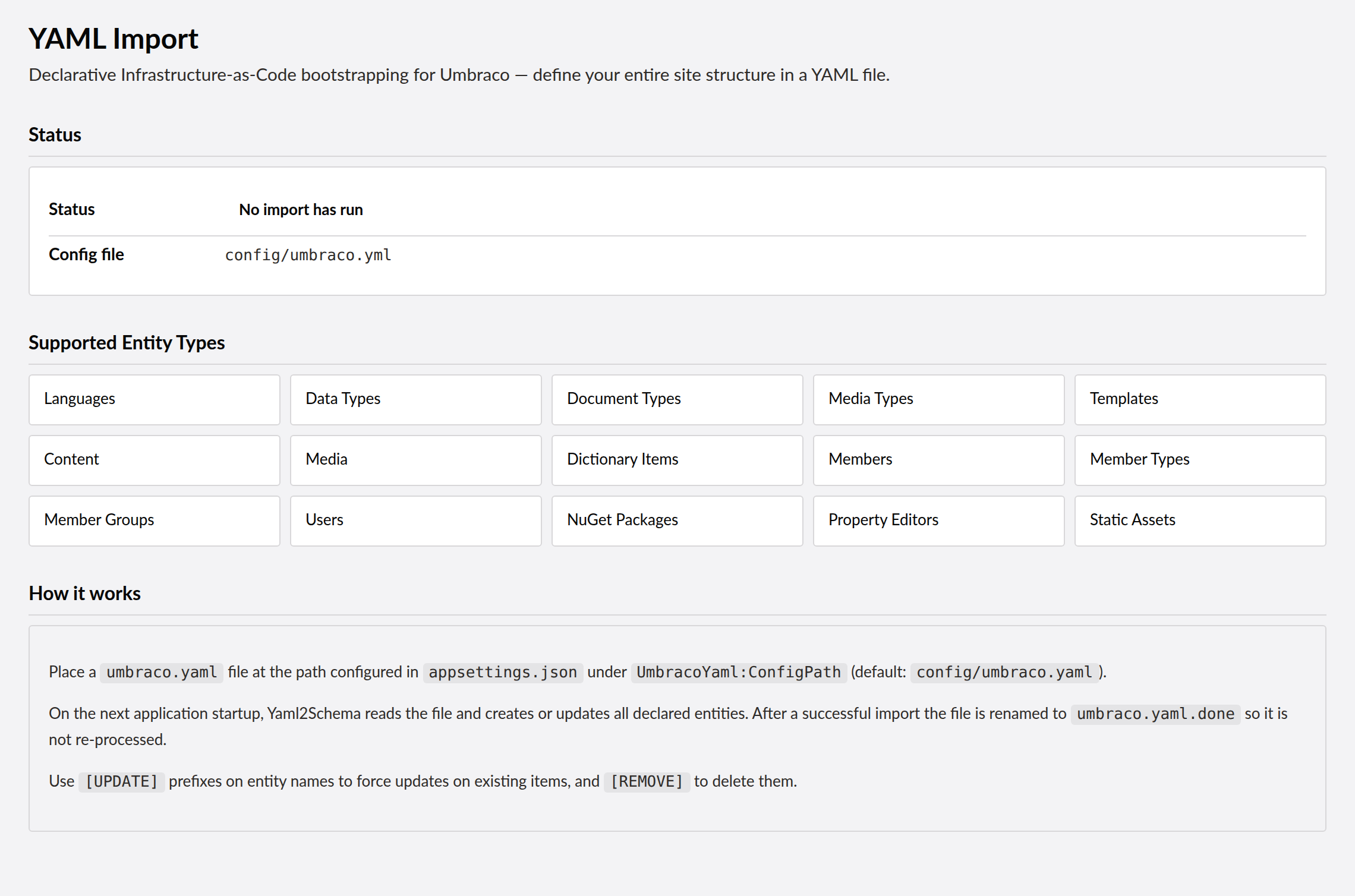

Compatibility
| Umbraco | .NET | Package Version |
|---|---|---|
| 13.x | 8.0 | 1.1.5 |
| 17.x | 10.0 | 1.1.5 |
Installation
dotnet add package SplatDev.Umbraco.Plugins.Yaml2Schema
Quick Start
No registration call is needed. The package ships Umbraco composers, so the AddComposers() already in the default Program.cs picks the plugin up as soon as the package is referenced.
Configuration
Add to appsettings.json:
{
  "UmbracoYaml2Schema": {
    "YamlPath": "umbraco.yml",
    "RunOnStartup": false,
    "OverwriteExisting": false
  }
}
| Key | Type | Default | Description |
|---|---|---|---|
YamlPath |
string | umbraco.yml |
Path to the YAML definition file |
RunOnStartup |
bool | false | Import schemas automatically on application startup |
OverwriteExisting |
bool | false | Overwrite existing content types that match by alias |
Usage
Place a YAML file (typically exported with Schema2Yaml) at the configured path. Use the Yaml2Schema dashboard in the Umbraco backoffice to review and import the definitions. If RunOnStartup is enabled, imports trigger automatically when the application starts.
# Example YAML structure (abbreviated)
documentTypes:
  - alias: article
    name: Article
    properties:
      - alias: title
        name: Title
        dataType: Umbraco.TextBox
Known Limitations
- When
OverwriteExistingis false, matching content types are skipped — no merge or partial update support - Startup imports block application startup until complete, which may impact boot time for large schemas
- YAML format must match the structure produced by
Schema2Yaml; hand-written YAML files may fail validation
Changelog
1.1.5 — 2026-08-27
The package icon is now the house-style one with an import glyph. The previous image was shared byte-for-byte with Schema2Yaml, so the two packages were indistinguishable on a search page.
1.1.4 — 2026-08-26
The NuGet listing now shows its screenshots. The images were in the repository but nothing referenced them, because the script that wires them looked only one directory deep and this plugin is nested under SplatDev.Umbraco.Plugins.Yaml.
1.1.3 — 2026-08-25
Documentation only, no code change. The README's Quick Start told you to call a registration method that does not exist in this package — following it produced a compile error on the first build. There is nothing to register: the package ships Umbraco composers and the AddComposers() already in the default Program.cs finds it. The Compatibility table also now shows the version actually being shipped instead of the one it was written at.
1.1.2 — 2026-08-24
Removes a dashboard screenshot that showed an error toast. It was captured against a site where this plugin's API was unreachable, so it advertised a broken dashboard. No screenshot is better than a misleading one; a replacement will be taken against a working install.
1.1.1 — 2026-08-24
Package metadata only: the listing now carries an icon and search tags, and the project and repository links point at the organisation that actually hosts this code. No code changes.
1.1.0 — 2026-08-23
The Umbraco Marketplace listing now carries this plugin's dashboard screenshot. The listing keeps its own screenshot list rather than reading the README, and this one was empty, so the entry showed no images at all.
1.0.42 — 2026-08-22
- The Status panel shows real state. The dashboard has always called
GET /umbraco/api/Yaml2Schema/Status, but no controller existed, so the call 404'd on every load and the panel fell back to hardcoded text describing the plugin in general — it claimed an import runs on startup whether or not a YAML file was present, and never showed that one had. The endpoint now reports the configured path, whether an import is pending, and when the last one completed.
1.0.41 — 2026-08-22
- The backoffice dashboard now appears. Its assets lived under
wwwroot/App_Plugins/, which is not a path Umbraco or the static-file middleware ever serves from — every request for the manifest and the bundle returned 404, so the dashboard was unreachable on any install. - The plugin now embeds its
App_Pluginsin the assembly, serves them from there, and registers its own package manifest, matching every other plugin in this repo. It no longer depends on abuildTransitivecopy step that silently does nothing when it fails. - Added the
Umbraco.Cms.Web.Commonreference the Umbraco 17 target was missing.
License
MIT © SplatDev
| Product | Versions Compatible and additional computed target framework versions. |
|---|---|
| .NET | net8.0 is compatible. net8.0-android was computed. net8.0-browser was computed. net8.0-ios was computed. net8.0-maccatalyst was computed. net8.0-macos was computed. net8.0-tvos was computed. net8.0-windows was computed. net9.0 was computed. net9.0-android was computed. net9.0-browser was computed. net9.0-ios was computed. net9.0-maccatalyst was computed. net9.0-macos was computed. net9.0-tvos was computed. net9.0-windows was computed. net10.0 is compatible. net10.0-android was computed. net10.0-browser was computed. net10.0-ios was computed. net10.0-maccatalyst was computed. net10.0-macos was computed. net10.0-tvos was computed. net10.0-windows was computed. |
-
net10.0
- Microsoft.Extensions.FileProviders.Embedded (>= 10.0.6)
- Umbraco.Cms.Core (>= 17.3.4)
- Umbraco.Cms.Web.Common (>= 17.3.4)
- YamlDotNet (>= 15.1.0)
-
net8.0
- Umbraco.Cms.Core (>= 13.12.0)
- YamlDotNet (>= 15.1.0)
NuGet packages (9)
Showing the top 5 NuGet packages that depend on SplatDev.Umbraco.Plugins.Yaml2Schema:
| Package | Downloads |
|---|---|
|
SplatDev.Umbraco.Themes.Base
Umbraco Base Theme - Foundation theme with reusable components: navigation, footer, sidebar, responsive grid. Required by all other UmbracoCms themes. |
|
|
SplatDev.Umbraco.Themes.Conference
Conference/event theme for Umbraco - schedule, speakers, venue, registration, countdown |
|
|
SplatDev.Umbraco.Themes.Corporate
Professional corporate theme for Umbraco - home, about, services, team, contact pages |
|
|
SplatDev.Umbraco.Themes.Hotel
Hotel/hospitality theme for Umbraco - rooms, booking, gallery, amenities, reviews, location map |
|
|
SplatDev.Umbraco.Themes.Blog
Blog theme for Umbraco - post layout, author bio, comment section, categories sidebar, archive page |
GitHub repositories
This package is not used by any popular GitHub repositories.
v1.0.38: Fix auth token — revert _getToken() to getLatestToken() (getOpenApiConfiguration() has no .token, causing 401 on every API call). v1.0.37: Add umbraco-marketplace.json, dashboard, WCAG UI/UX fixes.