SplatDev.Umbraco.Plugins.Payments.PagSeguro
2.2.2
dotnet add package SplatDev.Umbraco.Plugins.Payments.PagSeguro --version 2.2.2
NuGet\Install-Package SplatDev.Umbraco.Plugins.Payments.PagSeguro -Version 2.2.2
<PackageReference Include="SplatDev.Umbraco.Plugins.Payments.PagSeguro" Version="2.2.2" />
<PackageVersion Include="SplatDev.Umbraco.Plugins.Payments.PagSeguro" Version="2.2.2" />
<PackageReference Include="SplatDev.Umbraco.Plugins.Payments.PagSeguro" />
paket add SplatDev.Umbraco.Plugins.Payments.PagSeguro --version 2.2.2
#r "nuget: SplatDev.Umbraco.Plugins.Payments.PagSeguro, 2.2.2"
#:package SplatDev.Umbraco.Plugins.Payments.PagSeguro@2.2.2
#addin nuget:?package=SplatDev.Umbraco.Plugins.Payments.PagSeguro&version=2.2.2
#tool nuget:?package=SplatDev.Umbraco.Plugins.Payments.PagSeguro&version=2.2.2
Payments.PagSeguro
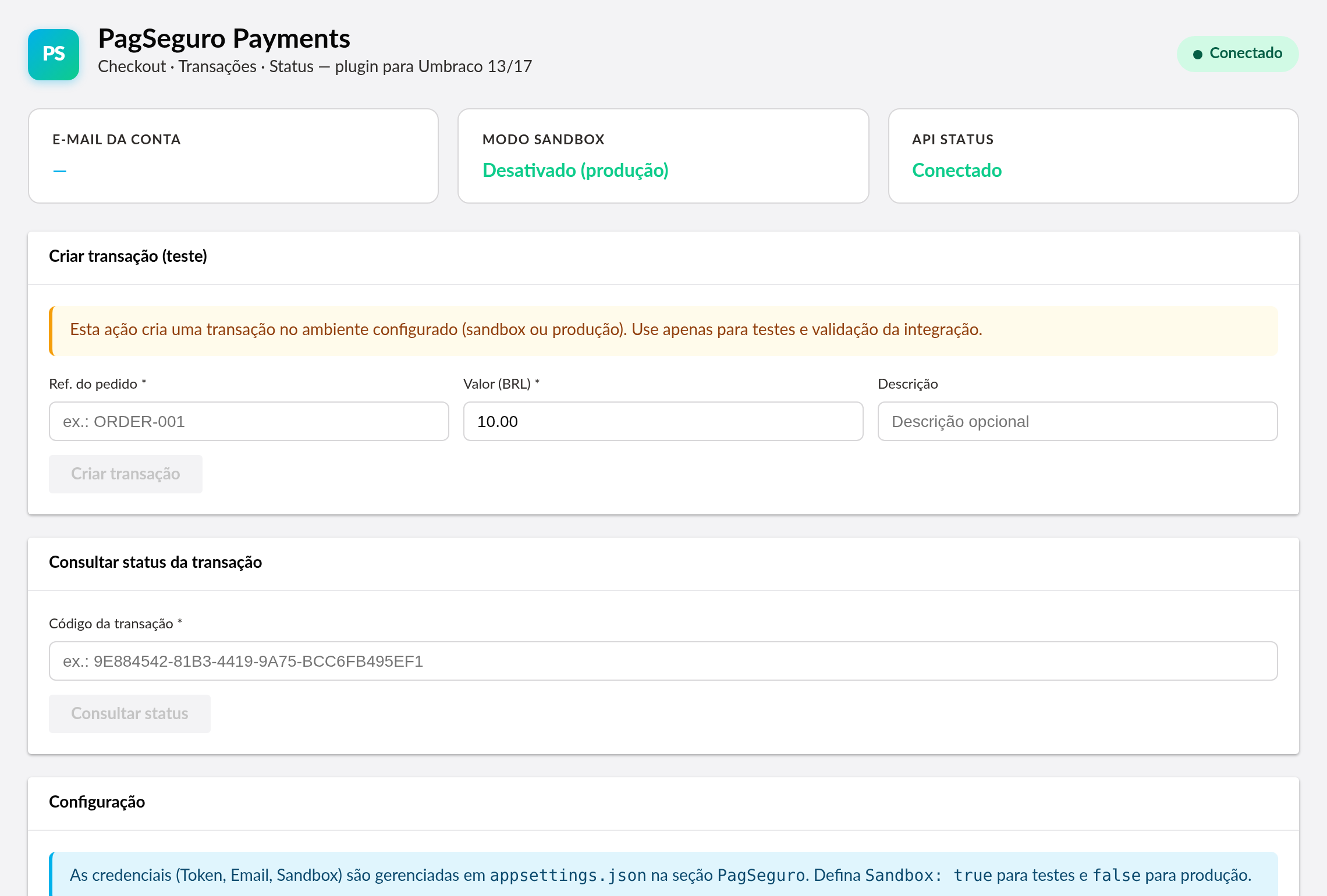
PagSeguro payment integration for Umbraco — create checkout sessions, track transactions, and manage payment status from a backoffice dashboard.

Compatibility
| Umbraco | .NET | Package Version |
|---|---|---|
| 13.x | 8.0 | 2.2.2 |
| 17.x | 10.0 | 2.2.2 |
Installation
dotnet add package SplatDev.Umbraco.Plugins.Payments.PagSeguro
Quick Start
The plugin auto-registers via PagSeguroComposer, which sets up the EF Core DbContext, HttpClient, and IPagSeguroService.
Configuration
Add to appsettings.json:
{
  "PagSeguro": {
    "Email": "your-email@example.com",
    "Token": "your-api-token",
    "Sandbox": true
  },
  "ConnectionStrings": {
    "umbracoDbDSN": "Server=localhost;Database=umbraco;Trusted_Connection=True;"
  }
}
Set Sandbox: true for testing, false for production.
API Endpoints
| Method | Route | Description |
|---|---|---|
| GET | /umbraco/api/pagseguro/GetConfig |
Returns public config (email, sandbox mode) |
| POST | /umbraco/api/pagseguro/CreateTransaction |
Initiate a payment transaction |
| GET | /umbraco/api/pagseguro/GetTransactionStatus?code= |
Query transaction status |
Usage
// Create a transaction
const response = await fetch('/umbraco/api/pagseguro/CreateTransaction', {
    method: 'POST',
    body: JSON.stringify({
        reference: 'ORDER-001',
        amount: 99.90,
        description: 'Product purchase'
    }),
    headers: { 'Content-Type': 'application/json' }
});
const { paymentUrl } = await response.json();
window.location.href = paymentUrl;
Known Limitations
- No built-in checkout UI or front-end integration — API-only payment initiation
- The
Tokenconfig value is never exposed to the frontend (only Email and Sandbox are returned byGetConfig) - No webhook/IPN handling in the Umbraco plugin layer; depends on the parent
SplatDev.Payments.PagSegurolibrary - Lower-level API calls are delegated to the
SplatDev.Payments.PagSegurolibrary
Changelog
2.2.2 — 2026-08-26
Fixes a duplicate registration on sites that still have a physical App_Plugins folder for this plugin, left behind by an older release that copied content into the site. Umbraco registered those extensions twice - once from its own scan of the folder, once from this package's embedded manifest - and logged "Extension with alias ... is already registered". The embedded manifest now yields to the physical copy.
2.2.1 — 2026-08-24
Package metadata only: the listing now carries an icon and search tags, and the project and repository links point at the organisation that actually hosts this code. No code changes.
2.2.0 — 2026-08-23
The Umbraco Marketplace listing now carries this plugin's screenshots. The listing keeps its own screenshot list rather than reading the README, and this one was empty — so the entry showed no images at all.
2.1.7 — 2026-08-22
- The dashboard renders. It threw while loading — Lit's
csstag rejects an interpolated plain string, and the brand colours were interpolated as strings — so the custom element was never defined and the panel came up empty on every install. - The status no longer claims a connection it has not made. It read "Conectado" whenever the plugin's own config endpoint answered, which it does with nothing configured at all, so an untouched install reported a live production connection. It now reports whether credentials are present: "Configurado" or "Não configurado".
- An install with no credentials says so up front, instead of letting the first transaction fail at PagSeguro.
2.1.6 — 2026-08-21
- A failed request now says so in the dashboard. Previously the dashboard kept its previous (usually empty) state, so a refused or failed call looked identical to having no data.
2.1.5 — 2026-08-21
- Dashboard now sends the backoffice token with its API calls. On Umbraco 17 those calls were arriving unauthenticated and coming back 401, which the dashboard rendered as an empty state rather than an error.
- A failed request now raises a notification instead of leaving the dashboard looking like there is simply no data.
- The plugin's tables are created on startup. They were never created before, so anything touching them failed on a fresh install.
- Runs on SQLite as well as SQL Server. It previously assumed SQL Server and failed with "Keyword not supported: 'cache'" on the database Umbraco's installer offers by default.
License
MIT © SplatDev
| Product | Versions Compatible and additional computed target framework versions. |
|---|---|
| .NET | net8.0 is compatible. net8.0-android was computed. net8.0-browser was computed. net8.0-ios was computed. net8.0-maccatalyst was computed. net8.0-macos was computed. net8.0-tvos was computed. net8.0-windows was computed. net9.0 was computed. net9.0-android was computed. net9.0-browser was computed. net9.0-ios was computed. net9.0-maccatalyst was computed. net9.0-macos was computed. net9.0-tvos was computed. net9.0-windows was computed. net10.0 is compatible. net10.0-android was computed. net10.0-browser was computed. net10.0-ios was computed. net10.0-maccatalyst was computed. net10.0-macos was computed. net10.0-tvos was computed. net10.0-windows was computed. |
-
net10.0
- Microsoft.EntityFrameworkCore.Design (>= 10.0.7)
- Microsoft.EntityFrameworkCore.Sqlite (>= 10.0.7)
- Microsoft.EntityFrameworkCore.SqlServer (>= 10.0.7)
- Microsoft.Extensions.FileProviders.Embedded (>= 10.0.6)
- Umbraco.Cms.Core (>= 17.3.4)
- Umbraco.Cms.Web.Common (>= 17.3.4)
-
net8.0
- Microsoft.EntityFrameworkCore.Design (>= 8.0.20)
- Microsoft.EntityFrameworkCore.Sqlite (>= 8.0.20)
- Microsoft.EntityFrameworkCore.SqlServer (>= 8.0.20)
- Umbraco.Cms.Core (>= 13.12.0)
- Umbraco.Cms.Web.Common (>= 13.12.0)
NuGet packages
This package is not used by any NuGet packages.
GitHub repositories
This package is not used by any popular GitHub repositories.
| Version | Downloads | Last Updated |
|---|---|---|
| 2.2.2 | 118 | 8/27/2026 |