SplatDev.Umbraco.Plugins.Exif
1.2.4
See the version list below for details.
dotnet add package SplatDev.Umbraco.Plugins.Exif --version 1.2.4
NuGet\Install-Package SplatDev.Umbraco.Plugins.Exif -Version 1.2.4
<PackageReference Include="SplatDev.Umbraco.Plugins.Exif" Version="1.2.4" />
<PackageVersion Include="SplatDev.Umbraco.Plugins.Exif" Version="1.2.4" />
<PackageReference Include="SplatDev.Umbraco.Plugins.Exif" />
paket add SplatDev.Umbraco.Plugins.Exif --version 1.2.4
#r "nuget: SplatDev.Umbraco.Plugins.Exif, 1.2.4"
#:package SplatDev.Umbraco.Plugins.Exif@1.2.4
#addin nuget:?package=SplatDev.Umbraco.Plugins.Exif&version=1.2.4
#tool nuget:?package=SplatDev.Umbraco.Plugins.Exif&version=1.2.4
Exif
EXIF metadata extractor for Umbraco media — reads camera, GPS, and image EXIF data using MetadataExtractor.

Compatibility
| Umbraco | .NET | Package Version | Dashboard |
|---|---|---|---|
| 13.x | 8.0 | 1.0.0 | AngularJS |
| 17.x | 10.0 | 1.0.1 | Lit (Bellissima) |
Installation
dotnet add package SplatDev.Umbraco.Plugins.Exif
Quick Start
Register in Program.cs:
builder.CreateUmbracoBuilder()
    .AddBackOffice()
    .AddWebsite()
    .AddExif()   // <-- add this
    .Build();
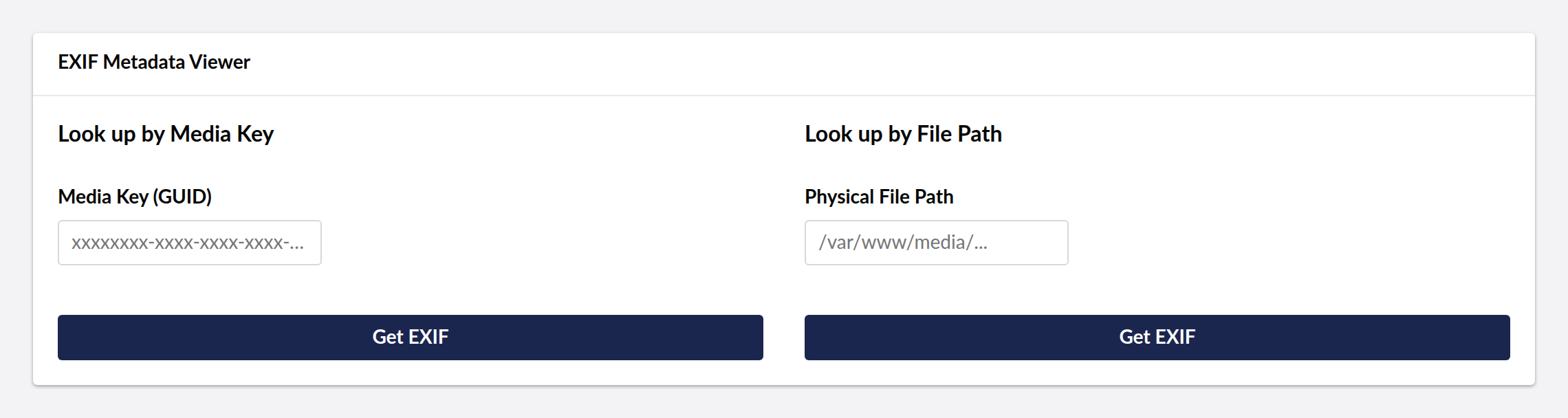
The EXIF Viewer dashboard appears under the Settings section in the Umbraco backoffice. You can look up EXIF metadata by:
- Media Key (GUID) — the Umbraco media item GUID
- Physical File Path — absolute path to the media file on disk
U17 Bellissima Dashboard (Lit)
The U17 dashboard is built as a Lit Web Component using Vite and TypeScript.
Development
cd client
npm install  # or pnpm install
npm run dev  # watch mode during development
npm run build  # production build
The build output is placed at App_Plugins/Exif/dist/exif-dashboard.element.js and registered in umbraco-package.json.
Architecture
client/— Vite + TypeScript + Lit sourceclient/src/exif-dashboard.element.ts— Lit element wrapping the EXIF lookup UIControllers/ExifApiController.cs— Back-end API returning EXIF metadataServices/— EXIF extraction service (MetadataExtractor)
Changelog
1.2.4 — 2026-08-24
Package metadata only: the listing now carries an icon and search tags, and the project and repository links point at the organisation that actually hosts this code. No code changes.
1.2.3 — 2026-08-22
- You pick the image from the media library instead of pasting a GUID. The field asked for a media key, which the backoffice never shows you. The picker is filtered to images, since EXIF is image metadata.
- Reading by file path is now confined to the site. The path came from the query string and was passed straight to the file system, so a signed-in backoffice user could name anything the site process could reach — another site's media on a shared host, a backup directory — and learn from the response whether it existed. Reads are now limited to the site's own web and content roots, with
..resolved before the check rather than after.
1.2.2 — 2026-08-21
- Dashboard now sends the backoffice token with its API calls. On Umbraco 17 those calls were arriving unauthenticated and coming back 401, which the dashboard rendered as an empty state rather than an error.
- A failed request now raises a notification instead of leaving the dashboard looking like there is simply no data.
License
MIT © SplatDev
| Product | Versions Compatible and additional computed target framework versions. |
|---|---|
| .NET | net8.0 is compatible. net8.0-android was computed. net8.0-browser was computed. net8.0-ios was computed. net8.0-maccatalyst was computed. net8.0-macos was computed. net8.0-tvos was computed. net8.0-windows was computed. net9.0 was computed. net9.0-android was computed. net9.0-browser was computed. net9.0-ios was computed. net9.0-maccatalyst was computed. net9.0-macos was computed. net9.0-tvos was computed. net9.0-windows was computed. net10.0 is compatible. net10.0-android was computed. net10.0-browser was computed. net10.0-ios was computed. net10.0-maccatalyst was computed. net10.0-macos was computed. net10.0-tvos was computed. net10.0-windows was computed. |
-
net10.0
- MetadataExtractor (>= 2.8.1)
- Microsoft.Extensions.FileProviders.Embedded (>= 10.0.6)
- Umbraco.Cms.Core (>= 17.3.4)
- Umbraco.Cms.Web.Common (>= 17.3.4)
-
net8.0
- MetadataExtractor (>= 2.8.1)
- Umbraco.Cms.Core (>= 13.12.0)
- Umbraco.Cms.Web.Common (>= 13.12.0)
NuGet packages
This package is not used by any NuGet packages.
GitHub repositories
This package is not used by any popular GitHub repositories.
| Version | Downloads | Last Updated |
|---|---|---|
| 1.3.1 | 0 | 8/27/2026 |