SplatDev.Umbraco.Plugins.Backups
3.3.1
See the version list below for details.
dotnet add package SplatDev.Umbraco.Plugins.Backups --version 3.3.1
NuGet\Install-Package SplatDev.Umbraco.Plugins.Backups -Version 3.3.1
<PackageReference Include="SplatDev.Umbraco.Plugins.Backups" Version="3.3.1" />
<PackageVersion Include="SplatDev.Umbraco.Plugins.Backups" Version="3.3.1" />
<PackageReference Include="SplatDev.Umbraco.Plugins.Backups" />
paket add SplatDev.Umbraco.Plugins.Backups --version 3.3.1
#r "nuget: SplatDev.Umbraco.Plugins.Backups, 3.3.1"
#:package SplatDev.Umbraco.Plugins.Backups@3.3.1
#addin nuget:?package=SplatDev.Umbraco.Plugins.Backups&version=3.3.1
#tool nuget:?package=SplatDev.Umbraco.Plugins.Backups&version=3.3.1
SplatDev.Umbraco.Plugins.Backups
A comprehensive backup plugin for Umbraco that lets you create, schedule, and restore backups directly from the backoffice. Supports multiple cloud storage providers.


Compatibility
| Umbraco Version | .NET Target | Package Version |
|---|---|---|
| Umbraco 13.x | net8.0 | 3.1.x |
| Umbraco 17.x | net10.0 | 3.1.x |
Features
- Create full or partial backups from the Umbraco backoffice
- Schedule automatic backups via CRON expressions
- Restore from any stored backup
- 10+ cloud storage providers out of the box:
- Azure Blob Storage
- Amazon S3
- Dropbox
- Google Drive
- OneDrive
- Box
- Mega
- Seafile
- SFTP
- Local file system
- Backup retention policies (keep N most recent backups)
- Email notifications on backup success/failure
Installation
dotnet add package SplatDev.Umbraco.Plugins.Backups
Or via the Package Manager Console:
Install-Package SplatDev.Umbraco.Plugins.Backups
Quick Start
Add to your Program.cs (or Startup.cs):
builder.CreateUmbracoBuilder()
    .AddBackOffice()
    .AddWebsite()
    .AddBackups()  // Add this line
    .Build();
Then configure in appsettings.json:
{
  "SplatDev": {
    "Backups": {
      "Enabled": true,
      "RetentionDays": 30,
      "CloudProviders": [
        {
          "ProviderType": "AzureBlob",
          "Enabled": true,
          "Settings": {
            "ConnectionString": "DefaultEndpointsProtocol=https;...",
            "ContainerName": "umbraco-backups"
          }
        }
      ]
    }
  }
}
Configuration
Azure Blob Storage
{
  "ProviderType": "AzureBlob",
  "Enabled": true,
  "Settings": {
    "ConnectionString": "<your-connection-string>",
    "ContainerName": "umbraco-backups"
  }
}
Amazon S3
{
  "ProviderType": "S3",
  "Enabled": true,
  "Settings": {
    "AccessKey": "<access-key>",
    "SecretKey": "<secret-key>",
    "BucketName": "umbraco-backups",
    "Region": "us-east-1"
  }
}
SFTP
{
  "ProviderType": "SFTP",
  "Enabled": true,
  "Settings": {
    "Host": "sftp.example.com",
    "Port": "22",
    "Username": "backupuser",
    "Password": "<password>",
    "FolderPath": "/backups"
  }
}
Dropbox
{
  "ProviderType": "Dropbox",
  "Enabled": true,
  "Settings": {
    "AccessToken": "<access-token>",
    "FolderPath": "/Backups"
  }
}
Mega
{
  "ProviderType": "Mega",
  "Enabled": true,
  "Settings": {
    "Email": "your@email.com",
    "Password": "<password>",
    "FolderPath": "Backups"
  }
}
Backoffice
After installation, navigate to Settings → Backups in the Umbraco backoffice to:
- Run backups on demand
- Configure scheduled backups
- View backup history
- Restore from a backup
- Test cloud provider connections
License
MIT — see LICENSE for details.
Contributing
Issues and PRs welcome at github.com/SplatDev-Ltda/SplatDev.Umbraco.Plugins.\n\n## Changelog\n\n### 3.3.1 — 2026-08-21
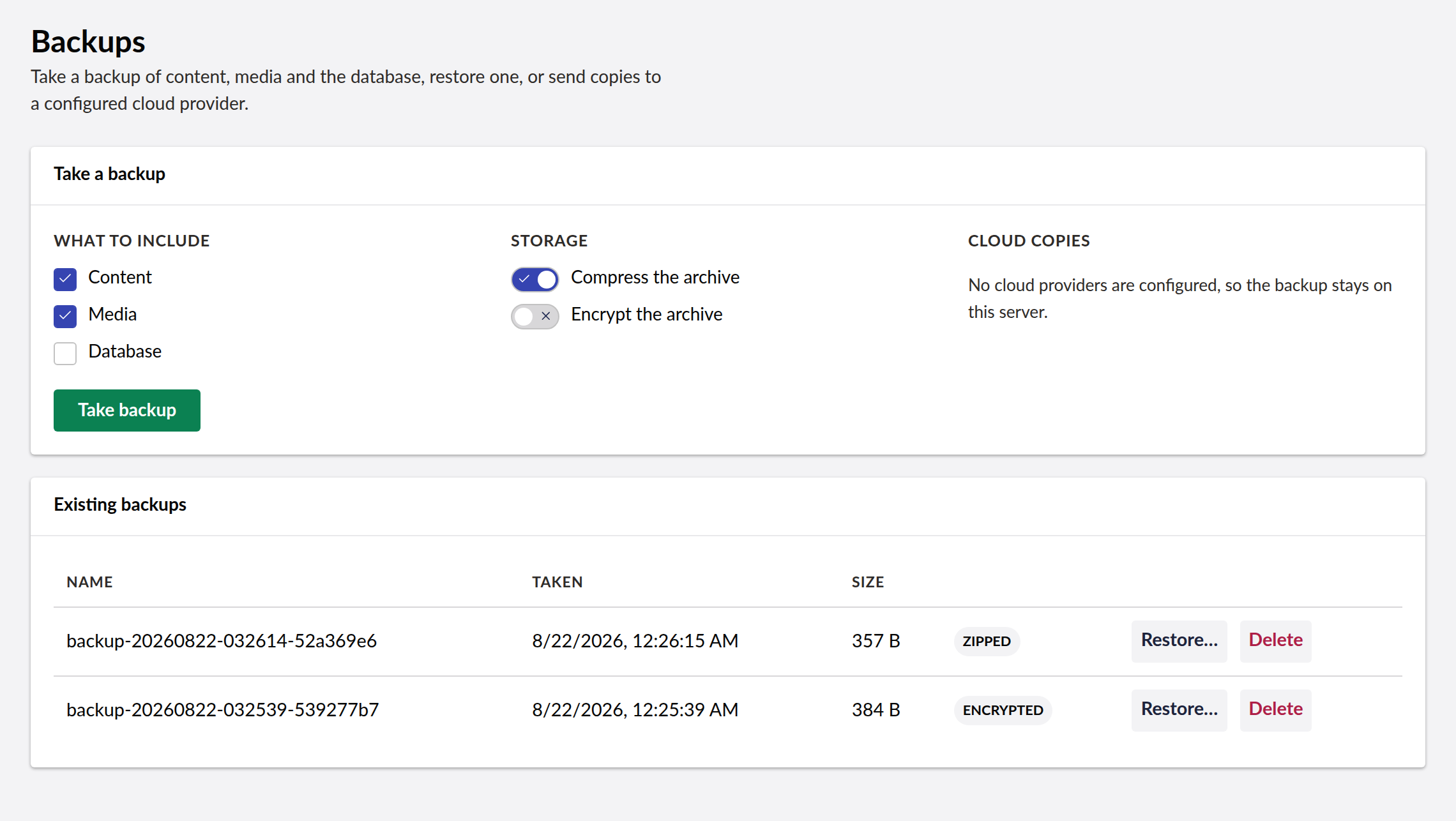
- The dashboard can now take a backup. It previously made no requests at all — it showed a hardcoded "Active" badge and a Save button that set a flag for three seconds and wrote nothing — while the API underneath supported all of this the whole time.
- Choose what to include (content, media, database), whether to compress, whether to encrypt and with which key, which cloud providers to copy to, and whether to keep a local copy.
- Restore from any listed backup, choosing scope, whether to overwrite existing items, and supplying the decryption key when the archive is encrypted.
- Delete backups, and test a cloud provider's credentials before relying on it.
- Four endpoints moved: CreateAdvanced, Restore, GetCloudProviders and TestProvider had action-level route templates that appended to the controller prefix, so they lived at URLs like /umbraco/api/backups/GetCloudProviders/providers. They now sit at /umbraco/api/backups/<Action> with the rest. No shipped UI called them, so nothing that worked before stops working.
| Product | Versions Compatible and additional computed target framework versions. |
|---|---|
| .NET | net8.0 is compatible. net8.0-android was computed. net8.0-browser was computed. net8.0-ios was computed. net8.0-maccatalyst was computed. net8.0-macos was computed. net8.0-tvos was computed. net8.0-windows was computed. net9.0 was computed. net9.0-android was computed. net9.0-browser was computed. net9.0-ios was computed. net9.0-maccatalyst was computed. net9.0-macos was computed. net9.0-tvos was computed. net9.0-windows was computed. net10.0 is compatible. net10.0-android was computed. net10.0-browser was computed. net10.0-ios was computed. net10.0-maccatalyst was computed. net10.0-macos was computed. net10.0-tvos was computed. net10.0-windows was computed. |
-
net10.0
- AWSSDK.S3 (>= 3.7.303)
- Azure.Storage.Blobs (>= 12.23.0)
- Dropbox.Api (>= 5.5.0)
- MegaApiClient (>= 1.10.5)
- Microsoft.Extensions.FileProviders.Embedded (>= 10.0.6)
- SSH.NET (>= 2025.1.0)
- Umbraco.Cms.Core (>= 17.3.4)
- Umbraco.Cms.Web.Common (>= 17.3.4)
-
net8.0
- AWSSDK.S3 (>= 3.7.303)
- Azure.Storage.Blobs (>= 12.22.0)
- Dropbox.Api (>= 5.5.0)
- MegaApiClient (>= 1.10.5)
- SSH.NET (>= 2025.1.0)
- Umbraco.Cms.Core (>= 13.12.0)
- Umbraco.Cms.Web.Common (>= 13.12.0)
NuGet packages
This package is not used by any NuGet packages.
GitHub repositories
This package is not used by any popular GitHub repositories.
| Version | Downloads | Last Updated |
|---|---|---|
| 3.3.4 | 0 | 8/25/2026 |