SimdSkia.Avalonia
0.1.12
dotnet add package SimdSkia.Avalonia --version 0.1.12
NuGet\Install-Package SimdSkia.Avalonia -Version 0.1.12
<PackageReference Include="SimdSkia.Avalonia" Version="0.1.12" />
<PackageVersion Include="SimdSkia.Avalonia" Version="0.1.12" />
<PackageReference Include="SimdSkia.Avalonia" />
paket add SimdSkia.Avalonia --version 0.1.12
#r "nuget: SimdSkia.Avalonia, 0.1.12"
#:package SimdSkia.Avalonia@0.1.12
#addin nuget:?package=SimdSkia.Avalonia&version=0.1.12
#tool nuget:?package=SimdSkia.Avalonia&version=0.1.12
SimdSkia.Avalonia
用 C# 绘制图片,或为 Avalonia 应用更换渲染后端。
SimdSkia 是一个 .NET 2D 渲染引擎,绘图无需加载 Google Skia 原生库。在控制台或服务端,可以用 SKCanvas 画图并输出 PNG。在 Avalonia 项目里,可以通过调整包引用和启动代码来切换后端,继续使用原有的 XAML 和视图模型。
简体中文 · English · .NET 10 · 正式版 0.1.12 · MIT
0.1.12 新增 macOS Metal 呈现,修复 CJK 字体和 TTC 字形发现,并减少 CPU 阴影与路径光栅化开销。发行说明与实测
按用途开始
| 你要做什么 | 安装哪个包 | 从哪里开始 |
|---|---|---|
| 在 .NET 程序里画图、生成 PNG | SimdSkia | 运行绘图示例 |
| 为 Windows、Linux 或 macOS 上的 Avalonia 应用切换后端 | SimdSkia.Avalonia.Desktop | 迁移现有项目 · 运行窗口示例 |
| 为 Avalonia Android 应用接入 CPU 渲染 | SimdSkia.Avalonia.Android | 配置 Android 启动项目 |
| 将现有 PDF 的页面转成图片 | SimdSkia.Pdf | 读取和渲染 PDF |
同一个项目直接引用多个 SimdSkia.* 包时,请统一版本。
生成 PNG
只需安装 SimdSkia。这个示例会在位图上画出圆角矩形和圆形,再保存为 PNG。
dotnet new console --framework net10.0 -o SimdSkiaDemo
cd SimdSkiaDemo
dotnet add package SimdSkia --version 0.1.12
将 Program.cs 替换为以下代码。SkiaSharp 是 SimdSkia 兼容层提供的命名空间。
using SkiaSharp;

using var bitmap = new SKBitmap(320, 180);
using var canvas = new SKCanvas(bitmap);
canvas.Clear(SKColors.White);

using var paint = new SKPaint { Color = new SKColor(62, 90, 220), IsAntialias = true };
canvas.DrawRoundRect(SKRect.Create(24, 24, 272, 132), 24, 24, paint);
paint.Color = SKColors.White;
canvas.DrawCircle(160, 90, 32, paint);

using var png = bitmap.Encode(SKEncodedImageFormat.Png, 100)
    ?? throw new InvalidOperationException("PNG encoding failed.");
using var output = File.Create("hello-simdskia.png");
png.SaveTo(output);
运行 dotnet run 后,当前目录会生成 hello-simdskia.png。
逐帧写入 GIF 动画
0.1.5 新增了 GifAnimationWriter。把每次绘制得到的 SKBitmap 直接写入动画,可重用同一张位图。
using SimdSkia.Imaging;
using SkiaSharp;

using var output = File.Create("captcha.gif");
using var gif = new GifAnimationWriter(output, 220, 72, loopCount: 3);
using var frame = new SKBitmap(220, 72);
using var canvas = new SKCanvas(frame);
using var paint = new SKPaint { Color = SKColors.Black, IsAntialias = true };
for (int i = 0; i < 4; i++)
{
    canvas.Clear(SKColors.Transparent);
    canvas.DrawCircle(24 + 24 * i, 36, 12, paint);
    gif.AddFrame(frame, TimeSpan.FromMilliseconds(100));
}
gif.Complete();
loopCount 是总播放次数(0 无限循环,1 只播一次)。默认在每帧显示完后恢复背景,也可指定保留或恢复上一画面。GIF 只有二值透明度。若希望跨播放器保持透明背景,让首帧也包含透明像素;若要保留半透明文字的边缘,可先把文字画在不透明背景上。
选择中文字体
选用含所需中文字形、使用 glyf 轮廓的静态 TrueType 字体,例如测试使用的 站酷小薇体。思源黑体的 CFF 版(如 SourceHanSansCN-Regular.otf)目前不支持;扩展名本身不能判断轮廓格式。
从 0.1.5 开始,TrueType 字形的微调指令执行失败时,会使用未微调的轮廓继续绘制。已用 actionj.ttf 验证。本版使用 Sdcb.SimdCodecs 2.0.0。
Avalonia 桌面
迁移现有项目
- 在启动项目中运行
dotnet add package SimdSkia.Avalonia.Desktop --version 0.1.12,并将 Avalonia 系列包统一为同一个版本。下方示例使用12.1.6。 - 移除直接引用的
Avalonia.Desktop、Avalonia.Skia和Avalonia.Fonts.Inter(如有)。同时检查第三方控件是否依赖原版 Skia 后端或ISkiaSharpApiLeaseFeature。 - 添加
using SimdSkia.Avalonia;,把启动链中的.UsePlatformDetect()替换为.UseSimdSkiaDesktop()。如果原来调用了.WithInterFont(),也一并移除。
运行桌面窗口示例
在空目录创建 Demo.csproj。
<Project Sdk="Microsoft.NET.Sdk">
  <PropertyGroup>
    <OutputType>WinExe</OutputType>
    <TargetFramework>net10.0</TargetFramework>
    <ImplicitUsings>enable</ImplicitUsings>
  </PropertyGroup>
  <ItemGroup>
    <PackageReference Include="SimdSkia.Avalonia.Desktop" Version="0.1.12" />
    <PackageReference Include="Avalonia" Version="[12.1.6]" />
    <PackageReference Include="Avalonia.Themes.Fluent" Version="[12.1.6]" />
  </ItemGroup>
</Project>
在同一目录创建 Program.cs。
using Avalonia;
using Avalonia.Controls;
using Avalonia.Controls.ApplicationLifetimes;
using Avalonia.Themes.Fluent;
using SimdSkia.Avalonia;

internal static class Program
{
    [STAThread]
    public static void Main(string[] args) => AppBuilder.Configure<App>()
        .UseSimdSkiaDesktop()
        .StartWithClassicDesktopLifetime(args);
}

public sealed class App : Application
{
    public override void Initialize() => Styles.Add(new FluentTheme());

    public override void OnFrameworkInitializationCompleted()
    {
        if (ApplicationLifetime is IClassicDesktopStyleApplicationLifetime desktop)
        {
            desktop.MainWindow = new Window
            {
                Title = "Hello SimdSkia",
                Width = 480,
                Height = 240,
                Content = new TextBlock { Text = "Hello, Avalonia!", Margin = new Thickness(24) }
            };
        }

        base.OnFrameworkInitializationCompleted();
    }
}
dotnet restore
dotnet run
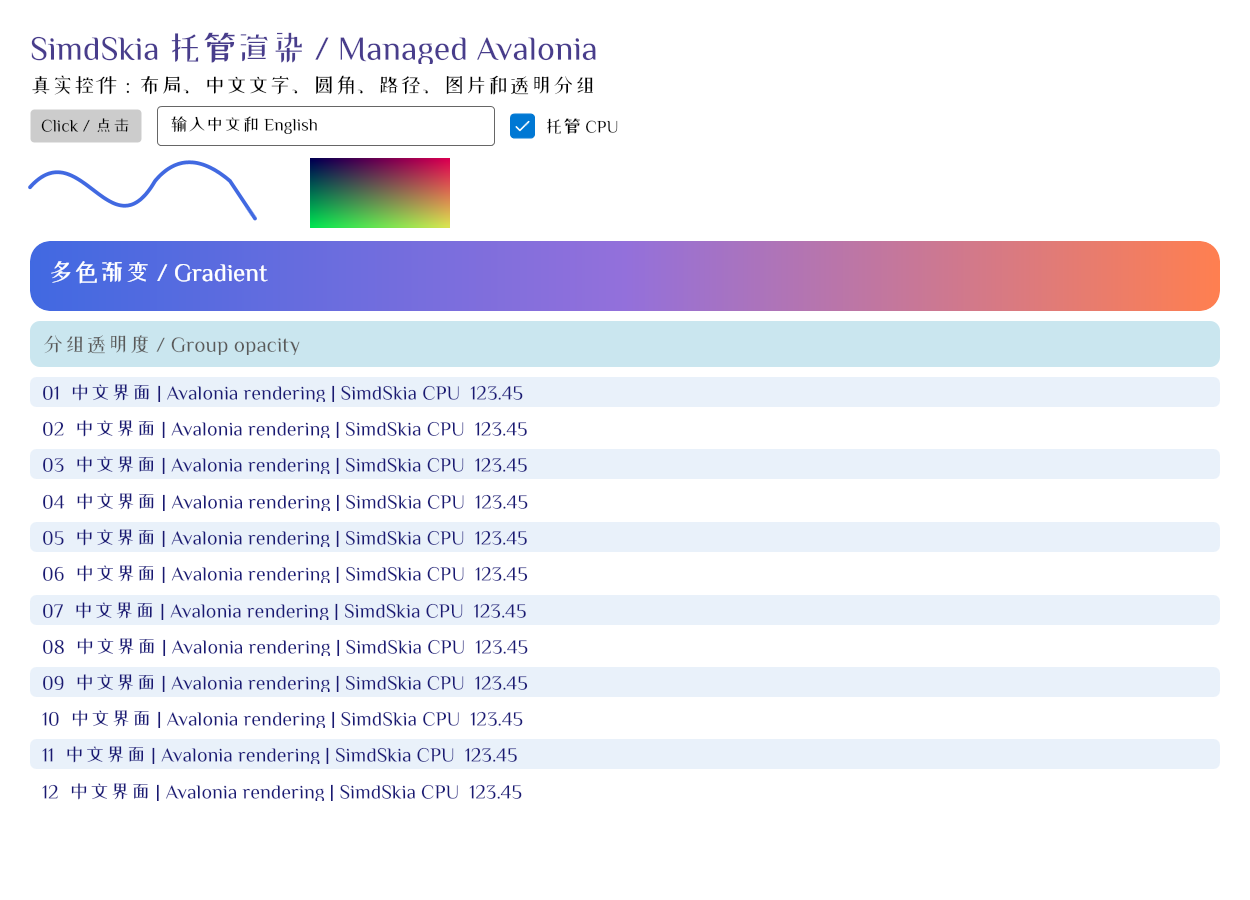
下图来自 Avalonia 控件示例的 Direct2D 验证,包含输入框、渐变、曲线和中英文文字。使用中文时,需要安装含相应字形的受支持静态 TrueType 字体,或通过 FontFiles 指定字体。控件示例源码 · 截图与测试记录
桌面平台与渲染后端
| 平台 | .UseSimdSkiaDesktop() 的默认行为 |
|---|---|
| Windows | 优先使用 Direct2D 和原生交换链,可回退到 CPU |
| Linux | 在 X11 或 XWayland 下优先使用硬件 Vulkan,可回退到 CPU |
| macOS | 优先使用 Metal:经 Avalonia 原生宿主的 CAMetalLayer 直接呈现,图层与阴影在 GPU 上处理,可回退到 CPU |
可用 .UseSimdSkiaDesktop(options => options.UseCpu()) 显式选用 CPU。基础适配器 .UseSimdSkia() 与离屏位图使用 CPU。桌面支持从 Avalonia 12.1.0 起选择版本。匹配不到随包宿主时使用随包最新宿主,实际兼容性取决于 Avalonia 的接口。平台行为与回退 · macOS Metal · Avalonia 版本验证
桌面应用可用目标平台的 Native AOT 工具链发布。例如在 Windows x64 上运行 dotnet publish -c Release -r win-x64 -p:PublishAot=true。Linux x64 和 macOS ARM64 分别使用 linux-x64 和 osx-arm64。0.1.2 的 AOT 体积对照与复现步骤
Avalonia Android
在目标为 net10.0-android36.0 的启动项目中安装 SimdSkia.Avalonia.Android,统一使用 Avalonia 12.1.5 或更高版本,并在 CreateAppBuilder() 中调用 .UseSimdSkiaAndroid()。从官方模板迁移时,移除直接引用的 Avalonia.Android,并按示例配置 Activity 的 AppCompat 主题和字体。Android 接入步骤与示例
Android 当前使用 CPU/SIMD 渲染。发布记录分别列出了 Android 16 ARM64 源码真机验证,以及 NuGet 包消费端的 Release 和 Mono AOT 构建验证。iOS 窗口呈现仍待实现。真机报告 · 包验收
兼容性与性能
- 2026-11-10 第二轮源码优化。 运行时效果耗时下降约 86%,图集约 27%,网格约 14%。固定字体 AOT 示例的私有内存下降约 15.6 MiB,整页耗时、系统字体场景及原版画质分别评估。本轮为工作区源码优化。性能、CPU 与内存对照 · 测试与剩余差距
- 2026-11-10 源码优化复测。 CPU、Vulkan、Direct2D、真实 AOT 窗口和长期图片内存共完成 294 个性能工作进程,另执行 82 个有效回归命令。报告逐项列出耗时、CPU、分配、内存与原版画质差异。性能报告与图表 · 完整测试记录
- 渲染实现。 CPU 光栅化支持 SIMD 加速,字体处理、基础文字排版和图像编解码也由 C# 实现。架构 · 第三方依赖
- SkiaSharp 源码兼容。 以 SkiaSharp
3.119.4为基线,签名审计匹配了 3,235 项中的 3,230 项。迁移时应重新编译依赖SK*类型的代码,并检查原生句柄、像素输出和自定义控件的行为。兼容层与原版SkiaSharp.dll的程序集标识不同。API 审计 · 兼容性报告 - 文档处理。
SKDocument.CreatePdf可导出多页栅格 PDF。需要读取和渲染 PDF 页面时,另装基于 PdfPig 0.1.16 的SimdSkia.Pdf,其读取能力限于文档列出的子集。PDF 使用说明 · 文档示例 - 渲染差异。 部分 JPEG、文字和曲线场景仍与原版有差异。CPU 与 GPU 的耗时和内存占用取决于后端和场景,报告分别记录了 GPU 提交和实际完成的耗时。画质与测试 · 性能与内存
从源码运行示例
在仓库根目录使用 .NET SDK 10.0.403 或 global.json 允许的兼容版本。
dotnet run --project examples/Rectangle -c Release
dotnet run --project examples/CrossPlatform -c Release -- --controls
第一个示例逐像素验证矩形并写出 artifacts/rectangle.ppm,第二个示例打开 Avalonia 控件窗口。公共 API 示例 · 更新日志
欢迎在 GitHub Issues 反馈问题。若能附上包版本、系统、渲染后端和最小复现,会更容易定位。
致谢
- @239573049 贡献了 macOS Metal 窗口呈现、GPU 图层和阴影,并补充了反向填充与严格回退的回归测试。PR #4
| Product | Versions Compatible and additional computed target framework versions. |
|---|---|
| .NET | net10.0 is compatible. net10.0-android was computed. net10.0-browser was computed. net10.0-ios was computed. net10.0-maccatalyst was computed. net10.0-macos was computed. net10.0-tvos was computed. net10.0-windows was computed. |
-
net10.0
- Avalonia (>= 12.1.0)
- Clipper2 (= 2.0.0)
- SimdSkia.Core (>= 0.1.12)
- SimdSkia.Cpu (>= 0.1.12)
- SimdSkia.Imaging (>= 0.1.12)
- SimdSkia.Text (>= 0.1.12)
NuGet packages (3)
Showing the top 3 NuGet packages that depend on SimdSkia.Avalonia:
| Package | Downloads |
|---|---|
|
SimdSkia.Avalonia.Desktop
Windows, Linux X11 and macOS window hosts with GPU-preferred rendering and diagnosed CPU fallback. macOS prefers Metal through the CAMetalLayer of the official MIT Avalonia native window bridge. |
|
|
SimdSkia.Avalonia.Gpu
Managed C# 2D rendering components. Version 0.1 supports the documented subset; SkiaSharp source and rendering equivalence remain incomplete. No Google Skia rendering dependency. |
|
|
SimdSkia.Avalonia.Android
Android Activity, input and framebuffer presentation for SimdSkia managed CPU/SIMD rendering. Avalonia 12.1.5 or later, Android API 23+. |
GitHub repositories
This package is not used by any popular GitHub repositories.
| Version | Downloads | Last Updated |
|---|---|---|
| 0.1.12 | 51 | 11/20/2026 |
| 0.1.10 | 62 | 11/19/2026 |
| 0.1.9 | 50 | 11/19/2026 |
| 0.1.8 | 59 | 11/18/2026 |
| 0.1.6 | 73 | 11/18/2026 |
| 0.1.5 | 107 | 11/17/2026 |
| 0.1.4 | 116 | 11/9/2026 |
| 0.1.3 | 122 | 11/7/2026 |
| 0.1.2 | 121 | 11/7/2026 |
| 0.1.2-preview.3 | 72 | 11/6/2026 |
| 0.1.1 | 119 | 11/4/2026 |
| 0.1.0 | 118 | 11/4/2026 |
| 0.1.0-preview.10 | 88 | 11/1/2026 |
| 0.1.0-preview.9 | 80 | 10/27/2026 |
| 0.1.0-preview.8 | 81 | 10/27/2026 |
| 0.1.0-preview.7 | 76 | 10/26/2026 |
| 0.1.0-preview.6 | 74 | 10/22/2026 |
| 0.1.0-preview.5 | 77 | 10/22/2026 |
| 0.1.0-preview.4 | 84 | 10/21/2026 |
| 0.1.0-preview.3 | 75 | 10/21/2026 |
0.1.12 正式版。macOS Metal 呈现、CJK 字体回退和 TTC 字形修复,以及 CPU 阴影和光栅化优化。详见 CHANGELOG.md。