Shos.UndoRedoList
1.0.8
dotnet add package Shos.UndoRedoList --version 1.0.8
NuGet\Install-Package Shos.UndoRedoList -Version 1.0.8
<PackageReference Include="Shos.UndoRedoList" Version="1.0.8" />
<PackageVersion Include="Shos.UndoRedoList" Version="1.0.8" />
<PackageReference Include="Shos.UndoRedoList" />
paket add Shos.UndoRedoList --version 1.0.8
#r "nuget: Shos.UndoRedoList, 1.0.8"
#:package Shos.UndoRedoList@1.0.8
#addin nuget:?package=Shos.UndoRedoList&version=1.0.8
#tool nuget:?package=Shos.UndoRedoList&version=1.0.8
Shos.UndoRedoList


English | 日本語
A List<T> and an ObservableCollection<T> with undo/redo support for .NET.
Replace your list with UndoRedoList<T> (or your ObservableCollection<T> with UndoRedoObservableCollection<T>), and every Add, Insert, Remove, RemoveAt, Clear and indexer assignment can be undone and redone.
var list = new UndoRedoList<string> { "apple", "banana" };
list[0] = "avocado";   // avocado, banana
list.Undo();           // apple, banana
list.Redo();           // avocado, banana
Features
- Drop-in replacement: implements
IList<T>, so existing code keeps working. - Undo/redo for every change: covers add, insert, remove, clear, and replacing an element via the indexer.
- Grouped actions: several changes inside an
ActionScopeare undone and redone as one step. - Untracked changes: changes inside a
DisabledUndoScopeare not recorded (e.g. loading initial data). - Bounded history: the number of undo steps is limited (default: 100), so memory use doesn't grow without limit.
- WPF / MVVM friendly:
UndoRedoObservableCollection<T>raisesCollectionChanged, so you can bind it toItemsSourcedirectly. - Thread-safe version:
SynchronizedUndoRedoList<T>can be used from multiple threads. - Nullable-aware: the API is annotated for nullable reference types.
- No dependencies: a small library that depends only on the .NET base class library.
Supported frameworks
| Package version | Target frameworks |
|---|---|
| 1.0.8 | .NET 8.0, .NET 10.0 |
| 1.0.7 | .NET 8.0, .NET 10.0 |
| 1.0.6 | .NET 8.0, .NET 10.0 |
| 1.0.5 | .NET 8.0 |
Installation
Install Shos.UndoRedoList from NuGet.
dotnet add package Shos.UndoRedoList
Or, in the Package Manager Console of Visual Studio:
PM> Install-Package Shos.UndoRedoList
Or, in your project file:
<PackageReference Include="Shos.UndoRedoList" Version="1.0.8" />
All types are in the Shos.Collections namespace.
using Shos.Collections;
Quick start
using Shos.Collections;

var list = new UndoRedoList<string>();

list.Add("apple");
list.Add("banana");
list[0] = "avocado";
list.RemoveAt(1);
// list: avocado

list.Undo();   // list: avocado, banana   (RemoveAt is undone)
list.Undo();   // list: apple, banana     (list[0] = ... is undone)
list.Redo();   // list: avocado, banana   (list[0] = ... is redone)

Console.WriteLine(list.CanUndo); // True
Console.WriteLine(list.CanRedo); // True
Undo() and Redo() return false (and do nothing) when there is nothing to undo or redo. Use CanUndo / CanRedo to enable or disable your Undo/Redo buttons.
Usage
Undo several changes at once: ActionScope
All the changes made inside an ActionScope are recorded as one undo step.
var numbers = new UndoRedoList<int> { 1, 2, 3 };

using (new UndoRedoList<int>.ActionScope(numbers)) {
    numbers.Add(4);
    numbers.RemoveAt(0);
    numbers[0] = 20;
}
// numbers: 20, 3, 4

numbers.Undo();
// numbers: 1, 2, 3   (all three changes are undone at once)
ActionScopecan't be nested. Starting a secondActionScopeon the same list while one is active throwsInvalidOperationException.
Make changes that can't be undone: DisabledUndoScope
Changes made inside a DisabledUndoScope are not recorded. This is useful for loading initial data.
var items = new UndoRedoList<string>();

using (new UndoRedoList<string>.DisabledUndoScope(items)) {
    items.Add("loaded 1");
    items.Add("loaded 2");
}

Console.WriteLine(items.CanUndo); // False
You can also set the UndoEnabled property directly.
Note: Recorded actions remember the indexes of the elements they changed. If you make untracked changes after some changes have been recorded, call
ClearUndo()afterwards. Otherwise, the next undo may be applied to the wrong position.
Limit the number of undo steps
Pass maximumUndoTimes to the constructor (default: 100, minimum: 2). When the limit is exceeded, the oldest step is discarded.
var list = new UndoRedoList<int>(maximumUndoTimes: 3);
for (var i = 1; i <= 5; i++)
    list.Add(i);

// Only the last 3 additions can be undone.
while (list.Undo())
    ;
// list: 1, 2
Clear the undo/redo history
list.ClearUndo(); // CanUndo and CanRedo become false. The elements are not changed.
Redo history is discarded by a new change
Like most editors, making a new change after undoing discards the steps that could be redone.
var list = new UndoRedoList<int> { 1, 2 };
list.Undo();      // list: 1        CanRedo: True
list.Add(3);      // list: 1, 3     CanRedo: False ("Add(2)" can no longer be redone)
WPF / MVVM: UndoRedoObservableCollection<T>
UndoRedoObservableCollection<T> raises CollectionChanged for every change, including those made by Undo() and Redo(). Bind it to ItemsSource just like an ObservableCollection<T>.
CanUndo and CanRedo are already up to date when CollectionChanged is raised, so you can refresh your commands there.
using Prism.Commands; // Any MVVM library works (e.g. CommunityToolkit.Mvvm).
using Shos.Collections;

public class MainViewModel
{
    public UndoRedoObservableCollection<string> Items { get; } = new();

    public DelegateCommand UndoCommand { get; }
    public DelegateCommand RedoCommand { get; }

    public MainViewModel()
    {
        UndoCommand = new DelegateCommand(() => Items.Undo(), () => Items.CanUndo);
        RedoCommand = new DelegateCommand(() => Items.Redo(), () => Items.CanRedo);

        Items.CollectionChanged += (_, _) => {
            UndoCommand.RaiseCanExecuteChanged();
            RedoCommand.RaiseCanExecuteChanged();
        };
    }
}
<ListBox ItemsSource="{Binding Items}" />
<Button Content="Undo" Command="{Binding UndoCommand}" />
<Button Content="Redo" Command="{Binding RedoCommand}" />
CollectionChanged is not raised by ClearUndo() or by changing UndoEnabled. Refresh your commands yourself after calling them.
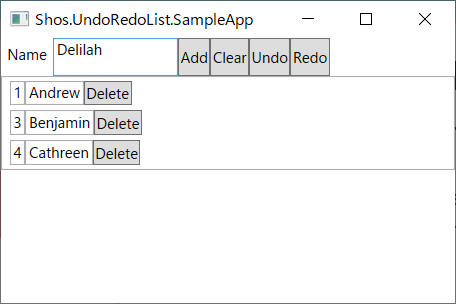
See Shos.UndoRedoList.SampleApp for a complete WPF sample.
Use another IList<T> as the inner list: UndoRedoList<TElement, TList>
UndoRedoList<T> uses List<T> internally. To use another collection, specify it as TList. It must implement IList<TElement> and have a parameterless constructor.
var list = new UndoRedoList<int, ObservableCollection<int>>();
list.Add(1);

ObservableCollection<int> inner = list.List; // Read the inner collection.
Use from multiple threads: SynchronizedUndoRedoList<T>
UndoRedoList<T> is not thread-safe. To use the list from multiple threads, use SynchronizedUndoRedoList<T> instead. Every member is synchronized with one lock (SyncRoot).
var list = new SynchronizedUndoRedoList<int>();
Parallel.For(0, 100, i => list.Add(i)); // OK
Values such as Count and CanUndo may be out of date as soon as you read them, so don't "check then act":
// NG: another thread may change the list between the check and the action.
if (list.CanUndo)
    list.Undo();
if (list.Count > 0)
    list.RemoveAt(0);

// OK: use the return value.
var undone = list.Undo();

// OK: do several operations atomically with ExecuteAsOneAction (they are undone as one step).
var removed = list.ExecuteAsOneAction(items => {
    if (items.Count == 0)
        return false;
    items.RemoveAt(0);
    return true;
});
Use ExecuteAsOneAction instead of ActionScope, and ExecuteWithoutUndo instead of DisabledUndoScope:
list.ExecuteAsOneAction(items => {   // Undone as one step.
    items.Add(1);
    items.Add(2);
});
list.ExecuteWithoutUndo(items => items.Add(3)); // Not recorded.
The delegate runs while holding the lock. Keep it short, don't keep items after it returns, don't call ExecuteAsOneAction from it, and don't await in it.
Enumerating (foreach) returns a snapshot taken when enumeration starts, so other threads can change the list while you enumerate it. ToArray() also returns a copy.
API
Types
| Type | Description |
|---|---|
UndoRedoList<TElement> |
A List<TElement> that supports undo/redo. |
UndoRedoObservableCollection<TElement> |
An ObservableCollection<TElement> that supports undo/redo. Implements INotifyCollectionChanged. |
UndoRedoList<TElement, TList> |
The base class. Adds undo/redo to any TList : IList<TElement>, new(). |
UndoRedoList<TElement, TList>.ActionScope |
IDisposable. Groups the changes made in the scope into one undo step. |
UndoRedoList<TElement, TList>.DisabledUndoScope |
IDisposable. Changes made in the scope are not recorded. |
SynchronizedUndoRedoList<TElement> |
A thread-safe UndoRedoList<TElement>. |
SynchronizedUndoRedoList<TElement, TList> |
A thread-safe UndoRedoList<TElement, TList>. |
Members of UndoRedoList<TElement, TList>
In addition to the IList<TElement> members:
| Member | Description |
|---|---|
UndoRedoList(int maximumUndoTimes = 100) |
Constructor. maximumUndoTimes is the maximum number of undo steps (2 or more). |
bool Undo() |
Undoes the last change. Returns false if there is nothing to undo. |
bool Redo() |
Redoes the last undone change. Returns false if there is nothing to redo. |
bool CanUndo |
Whether Undo() can be performed. |
bool CanRedo |
Whether Redo() can be performed. |
bool UndoEnabled |
When false, changes are not recorded. Default: true. |
void ClearUndo() |
Clears the undo/redo history. |
void BeginActions() / void EndActions() |
Low-level versions of ActionScope. Prefer ActionScope. |
TList List |
The inner collection. Read only from it. See Notes. |
Members of SynchronizedUndoRedoList<TElement, TList>
In addition to the IList<TElement> members, Undo(), Redo(), CanUndo, CanRedo and ClearUndo():
| Member | Description |
|---|---|
SynchronizedUndoRedoList(int maximumUndoTimes = 100) |
Constructor. maximumUndoTimes is the maximum number of undo steps (2 or more). |
object SyncRoot |
The lock object. Lock it to do several operations atomically. |
bool UndoEnabled |
Read only. Use ExecuteWithoutUndo to make changes that are not recorded. |
void ExecuteAsOneAction(Action<IList<TElement>>) |
Runs the action while holding the lock. Its changes are undone as one step. |
TResult ExecuteAsOneAction<TResult>(Func<IList<TElement>, TResult>) |
Same as above, and returns the result. |
void ExecuteWithoutUndo(Action<IList<TElement>>) |
Runs the action while holding the lock. Its changes are not recorded. |
TElement[] ToArray() |
Returns a copy of the elements. |
GetEnumerator() |
Enumerates a snapshot of the elements. |
Notes
- Only changes to the collection are recorded. Changes to the properties of an element (e.g.
list[0].Name = "x") are not recorded. To make such a change undoable, replace the element:list[0] = newItem. - Don't modify
Listdirectly. Changes made through the inner collection are not recorded and make the history inconsistent. Clear()on an empty list is not recorded.UndoRedoList<T>andUndoRedoObservableCollection<T>are not thread-safe. Use them from one thread (e.g. the UI thread), or useSynchronizedUndoRedoList<T>.- If an exception is thrown inside an
ActionScope, the changes made before the exception are recorded as one undo step.
How it works
Each change is recorded as an action that knows how to undo and redo itself (add ⇔ remove, replace ⇔ replace back). Actions are stored in a ring buffer of size maximumUndoTimes, so the history uses a fixed amount of memory, and the oldest actions are overwritten when it is full.
The class diagrams of the public types (members of IList<T> are omitted):
Collections
classDiagram
class IList["IList<TElement>"] {
<<interface>>
}
class INotifyCollectionChanged {
<<interface>>
}
class IDisposable {
<<interface>>
}
class UndoRedoList2["UndoRedoList<TElement, TList>"] {
+bool CanUndo
+bool CanRedo
+bool UndoEnabled
+TList List
+UndoRedoList(int maximumUndoTimes = 100)
+Undo() bool
+Redo() bool
+ClearUndo() void
+BeginActions() void
+EndActions() void
}
class ActionScope["UndoRedoList<TElement, TList>.ActionScope"] {
+ActionScope(UndoRedoList<TElement, TList> list)
+Dispose() void
}
class DisabledUndoScope["UndoRedoList<TElement, TList>.DisabledUndoScope"] {
+DisabledUndoScope(UndoRedoList<TElement, TList> list)
+Dispose() void
}
class UndoRedoList1["UndoRedoList<TElement>"] {
+UndoRedoList(int maximumUndoTimes = 100)
}
class UndoRedoObservableCollection["UndoRedoObservableCollection<TElement>"] {
+event NotifyCollectionChangedEventHandler? CollectionChanged
+UndoRedoObservableCollection(int maximumUndoTimes = 100)
}
class SynchronizedUndoRedoList2["SynchronizedUndoRedoList<TElement, TList>"] {
+object SyncRoot
+bool CanUndo
+bool CanRedo
+bool UndoEnabled
+SynchronizedUndoRedoList(int maximumUndoTimes = 100)
+Undo() bool
+Redo() bool
+ClearUndo() void
+ExecuteAsOneAction(Action<IList<TElement>> action) void
+ExecuteAsOneAction<TResult>(Func<IList<TElement>, TResult> function) TResult
+ExecuteWithoutUndo(Action<IList<TElement>> action) void
+ToArray() TElement[]
}
class SynchronizedUndoRedoList1["SynchronizedUndoRedoList<TElement>"] {
+SynchronizedUndoRedoList(int maximumUndoTimes = 100)
}
IList <|.. UndoRedoList2
IList <|.. SynchronizedUndoRedoList2
UndoRedoList2 <|-- UndoRedoList1
UndoRedoList2 <|-- UndoRedoObservableCollection
INotifyCollectionChanged <|.. UndoRedoObservableCollection
SynchronizedUndoRedoList2 <|-- SynchronizedUndoRedoList1
IDisposable <|.. ActionScope
IDisposable <|.. DisabledUndoScope
ActionScope ..> UndoRedoList2
DisabledUndoScope ..> UndoRedoList2
Supporting types
classDiagram
class IEnumerable["IEnumerable<TElement>"] {
<<interface>>
}
class IEquatable["IEquatable<ModuloArithmetic>"] {
<<interface>>
}
class RingBuffer["RingBuffer<TElement>"] {
+int Count
+ModuloArithmetic TopIndex
+ModuloArithmetic BottomIndex
+TElement this[ModuloArithmetic index]
+RingBuffer(int size = 100)
+Add(TElement element) void
+Clear() void
+RemoveAfter(ModuloArithmetic index) void
+Remove() bool
}
class UndoRedoRingBuffer["UndoRedoRingBuffer<TElement>"] {
+ModuloArithmetic CurrentIndex
+TElement Current
+bool CanGoBackward
+bool CanGoForward
+UndoRedoRingBuffer(int size = 100)
+Add(TElement element) void
+Clear() void
+GoBackward() bool
+GoForward() bool
}
class ModuloArithmetic {
<<struct>>
+int DefaultDivisor$
+int Value
+int Divisor
+bool IsValid
+ModuloArithmetic Previous
+ModuloArithmetic Next
+ModuloArithmetic InvalidItem
+ModuloArithmetic(int divisor = 100, bool isValid = true)
+Equals(ModuloArithmetic item) bool
+MovePrevious() void
+MoveNext() void
+operator ++(ModuloArithmetic item)$ ModuloArithmetic
+operator --(ModuloArithmetic item)$ ModuloArithmetic
+operator -(ModuloArithmetic item1, ModuloArithmetic item2)$ int
+operator ==(ModuloArithmetic item1, ModuloArithmetic item2)$ bool
+operator !=(ModuloArithmetic item1, ModuloArithmetic item2)$ bool
}
class EnumerableExtensions {
<<static>>
+ForEach<TElement>(IEnumerable<TElement> this, Action<TElement> action)$ void
+ReverseForEach<TElement>(IEnumerable<TElement> this, Action<TElement> action)$ void
}
IEnumerable <|.. RingBuffer
RingBuffer <|-- UndoRedoRingBuffer
IEquatable <|.. ModuloArithmetic
RingBuffer --> ModuloArithmetic
Repository structure
| Project | Description |
|---|---|
| Shos.UndoRedoList | The library. |
| Shos.UndoRedoList.Tests | Unit tests (MSTest). |
| Shos.UndoRedoList.SampleApp | A WPF sample app using UndoRedoObservableCollection<T>. |
| Shos.UndoRedoList.PerformanceTests | A console app that runs many operations. |
To build and test (requires the .NET 10 SDK, plus the .NET 8 runtime to run the tests for .NET 8.0):
dotnet build
dotnet test Shos.UndoRedoList.Tests
Release notes
1.0.8
- Changed: the API is now annotated for nullable reference types (e.g.
UndoRedoObservableCollection<T>.CollectionChangedisNotifyCollectionChangedEventHandler?). - Changed:
Insertwith an invalid index now throwsArgumentOutOfRangeExceptionwith the standard .NET message, which includes the actual value. - Rewrote the source code in C# 12 (file-scoped namespaces, primary constructors, collection expressions, etc.). The public API is unchanged.
- Replaced the PlantUML class diagram images with Mermaid class diagrams of the public types in the README.
1.0.7
- Added
SynchronizedUndoRedoList<T>, a thread-safe version.
1.0.6
- Added support for .NET 10.0 (targets .NET 8.0 and .NET 10.0).
- Fixed: after undoing all changes, a new change didn't discard the undone changes, so they could still be undone/redone and corrupted the list.
- Fixed: after the undo history reached
maximumUndoTimes, undoing all changes and then redoing redid the wrong change. - Fixed: a change that failed with an exception (e.g.
Insertwith an invalid index) was recorded in the history. - Fixed:
CanUndo/CanRedowere out of date inCollectionChangedhandlers duringUndo(). - Fixed:
ModuloArithmetic.Equals(object)threw an exception fornullor other types. - Changed:
Clear()on an empty list is no longer recorded. - Changed: invalid sizes now throw
ArgumentOutOfRangeExceptionwith the parameter name. - The NuGet package now includes XML documentation (IntelliSense).
1.0.5 and earlier
See the commit history.
Related articles
Author info
Fujio Kojima: a software developer in Japan
- Microsoft MVP for Development Tools - Visual C# (Jul. 2005 - Dec. 2014)
- Microsoft MVP for .NET (Jan. 2015 - Oct. 2015)
- Microsoft MVP for Visual Studio and Development Technologies (Nov. 2015 - Jun. 2018)
- Microsoft MVP for Developer Technologies (Nov. 2018 - Jun. 2025)
- MVP Profile
- Blog (Japanese)
- Web Site (Japanese)
License
This library is under the MIT License.
| Product | Versions Compatible and additional computed target framework versions. |
|---|---|
| .NET | net8.0 is compatible. net8.0-android was computed. net8.0-browser was computed. net8.0-ios was computed. net8.0-maccatalyst was computed. net8.0-macos was computed. net8.0-tvos was computed. net8.0-windows was computed. net9.0 was computed. net9.0-android was computed. net9.0-browser was computed. net9.0-ios was computed. net9.0-maccatalyst was computed. net9.0-macos was computed. net9.0-tvos was computed. net9.0-windows was computed. net10.0 is compatible. net10.0-android was computed. net10.0-browser was computed. net10.0-ios was computed. net10.0-maccatalyst was computed. net10.0-macos was computed. net10.0-tvos was computed. net10.0-windows was computed. |
-
net10.0
- No dependencies.
-
net8.0
- No dependencies.
NuGet packages
This package is not used by any NuGet packages.
GitHub repositories
This package is not used by any popular GitHub repositories.