Serilog.Sinks.Console.Themes
4.0.1
dotnet add package Serilog.Sinks.Console.Themes --version 4.0.1
NuGet\Install-Package Serilog.Sinks.Console.Themes -Version 4.0.1
<PackageReference Include="Serilog.Sinks.Console.Themes" Version="4.0.1" />
<PackageVersion Include="Serilog.Sinks.Console.Themes" Version="4.0.1" />
<PackageReference Include="Serilog.Sinks.Console.Themes" />
paket add Serilog.Sinks.Console.Themes --version 4.0.1
#r "nuget: Serilog.Sinks.Console.Themes, 4.0.1"
#:package Serilog.Sinks.Console.Themes@4.0.1
#addin nuget:?package=Serilog.Sinks.Console.Themes&version=4.0.1
#tool nuget:?package=Serilog.Sinks.Console.Themes&version=4.0.1












Serilog.Sinks.Console.Themes
A small companion library for Serilog.Sinks.Console that defines 24-bit true-color console themes (38;2 / 48;2 escape sequences). Log output uses a fixed palette based on System.Drawing.KnownColor so you can tune colors in one place without hand-editing escape sequences.
Target frameworks: net6.0, net7.0, net8.0, net9.0, net10.0
Features
CustomConsoleTheme— cachedDark/Lightpresets, palette constants (DarkColors/LightColors), andUseTheme<T>()for aConsoleTheme.CustomTemplateTheme.Dark/LightandCustomTemplateTheme.UseTheme<T>()—TemplateThemepresets parallel toCustomConsoleTheme(requiresSerilog.Expressions).ThemeStyle— fluent foreground, background, and SGR modes (FormatTypeEnum) for theme strings (24-bit fragments viaTrueColorConverter).BaseTheme,DarkTheme,LightTheme,ThemeStyleConverter— template strings and conversion fromConsoleThemestyles toTemplateThemeforExpressionTemplate.TrueColorConverter— low-levelKnownColor/ConsoleColor/Color→38;2/48;2fragments, plus bold combinations for emphasis.
Prefer static web colors from KnownColor (for example GhostWhite, CadetBlue). OS-reserved KnownColor names (such as ActiveCaption) are rejected by TrueColorConverter when resolved from KnownColor because they are not portable.
Install NuGet package
Install the Serilog.Sinks.Console.Themes NuGet package into your .NET project:
Install-Package Serilog.Sinks.Console.Themes
or
dotnet add package Serilog.Sinks.Console.Themes
Quick start
In your application:
using Serilog;
using Serilog.Sinks.Console.Themes;

Log.Logger = new LoggerConfiguration()
    .WriteTo.Console(theme: CustomConsoleTheme.Dark)
    .CreateLogger();

Log.Information("Hello, themed console");
Use CustomConsoleTheme.Light for a light background.
To configure the logger from appsettings.json, add a reference to Serilog.Settings.Configuration and wire ReadFrom.Configuration (for example via UseSerilog in ASP.NET Core, or ReadFrom.Configuration(configuration) when building the logger).
theme is resolved from a static property using Namespace.Type::MemberName, AssemblyName. For built-in presets use Serilog.Sinks.Console.Themes.CustomConsoleTheme::Dark, Serilog.Sinks.Console.Themes (or ::Light) — same names as in code, and distinct from Serilog’s AnsiConsoleTheme::… strings.
Preview (screenshot helper)
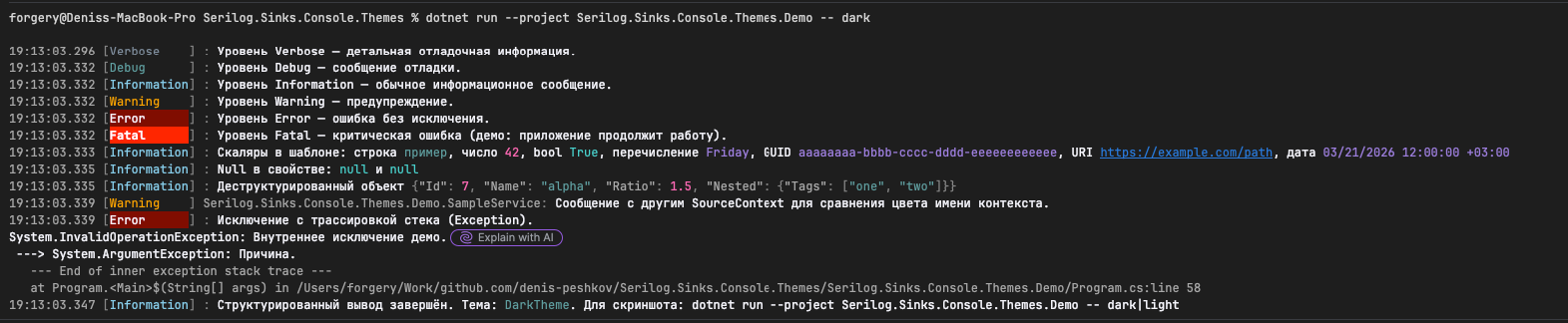
The Serilog.Sinks.Console.Themes.Demo project lets you compare themes in a terminal that supports 24-bit color. The demo prints every log level (Verbose through Fatal), structured scalars (string, number, boolean, enum, GUID, URI, date/time), null properties, a destructured object ({@...}), a line with a custom SourceContext, and an error with inner exception and stack trace — so you can see how each theme tints the timestamp/level band, message text, property names, scalar kinds, and error vs. fatal highlighting.
dotnet run --project Serilog.Sinks.Console.Themes.Demo -- dark
dotnet run --project Serilog.Sinks.Console.Themes.Demo -- light
dotnet run --project Serilog.Sinks.Console.Themes.Demo -- custom
dotnet run --project Serilog.Sinks.Console.Themes.Demo -- sixteen
dotnet run --project Serilog.Sinks.Console.Themes.Demo -- code
dotnet run --project Serilog.Sinks.Console.Themes.Demo --
The last line passes no theme token after -- (same as an empty first argument). Together with any unrecognized token, that selects ConsoleTheme.None — plain console output without ANSI theme styling.
custom runs the sample MyBrandTheme class (CustomConsoleTheme.UseTheme<MyBrandTheme>()) from the Demo project. sixteen and code use built-in themes from Serilog (AnsiConsoleTheme.Sixteen and AnsiConsoleTheme.Code in assembly Serilog.Sinks.Console) for side-by-side comparison with this library’s themes.
Screenshots
Captures below use the same demo commands.
CustomConsoleTheme.Dark — tuned for dark terminal backgrounds:
CustomConsoleTheme.Light — tuned for light terminal backgrounds (same sample as above):

You can combine a theme with your own outputTemplate as usual for the console sink.
This library (CustomConsoleTheme.Dark)
List the theme assembly in Using so configuration can load the type:
{
  "Serilog": {
    "Using": [
      "Serilog.Sinks.Console",
      "Serilog.Sinks.Console.Themes"
    ],
    "MinimumLevel": {
      "Default": "Information"
    },
    "WriteTo": [
      {
        "Name": "Console",
        "Args": {
          "restrictedToMinimumLevel": "Verbose",
          "theme": "Serilog.Sinks.Console.Themes.CustomConsoleTheme::Dark, Serilog.Sinks.Console.Themes",
          "outputTemplate": "{Timestamp:HH:mm:ss.fff zzz} CorrelationId:[{CorrelationId}] [{Level:u3}] [{SourceContext}] {Message:lj}{NewLine}{Exception}"
        }
      }
    ]
  }
}
The outputTemplate uses {CorrelationId} only if you add that property to the log context (for example with an enricher or LogContext.PushProperty); otherwise remove or replace that segment.
Custom template (CustomConsoleTheme.UseTheme<T>())
Serilog.Settings.Configuration resolves theme from a static member (Type::Member, Assembly). It cannot call the generic method UseTheme<T>() directly, so in your app define a static property (or field) that returns CustomConsoleTheme.UseTheme<YourTemplate>():
using System.Drawing;
using Serilog.Sinks.Console.Themes;
using Serilog.Sinks.SystemConsole.Themes;

namespace MyApp.Logging;

/// <summary>Example: tweak the built-in dark theme by subclassing <see cref="DarkTheme"/>.</summary>
public sealed class BrandDarkTheme : DarkTheme
{
    protected override string Text => ThemeStyle.Foreground(Color.Gold);
}

public static class LoggingThemes
{
    public static ConsoleTheme BrandDark { get; } = CustomConsoleTheme.UseTheme<BrandDarkTheme>();
}
Then reference that member from JSON. Include your application assembly in Using (assembly name is usually the project name, e.g. MyApp):
{
  "Serilog": {
    "Using": [
      "Serilog.Sinks.Console",
      "Serilog.Sinks.Console.Themes",
      "MyApp"
    ],
    "MinimumLevel": {
      "Default": "Information"
    },
    "WriteTo": [
      {
        "Name": "Console",
        "Args": {
          "restrictedToMinimumLevel": "Verbose",
          "theme": "MyApp.Logging.LoggingThemes::BrandDark, MyApp",
          "outputTemplate": "{Timestamp:HH:mm:ss.fff zzz} [{Level:u3}] {SourceContext:l}: {Message:lj}{NewLine}{Exception}"
        }
      }
    ]
  }
}
The template type must be public with a parameterless constructor (the same constraint as UseTheme<T>()). Subclass DarkTheme, LightTheme, or BaseTheme as needed.
Themes defined in Serilog.Sinks.Console
Serilog ships additional ready-made themes; the theme string must use Serilog’s type names exactly (see Serilog.Sinks.Console):
{
  "Serilog": {
    "Using": [ "Serilog.Sinks.Console" ],
    "MinimumLevel": {
      "Default": "Information"
    },
    "WriteTo": [
      {
        "Name": "Console",
        "Args": {
          "restrictedToMinimumLevel": "Verbose",
          "theme": "Serilog.Sinks.SystemConsole.Themes.AnsiConsoleTheme::Sixteen, Serilog.Sinks.Console",
          "outputTemplate": "{Timestamp:HH:mm:ss.fff zzz} [{Level:u3}] {Message:lj}{NewLine}{Exception}"
        }
      }
    ]
  }
}
Other static members on Serilog’s theme type (for example Code, Grayscale, Literate) use the same Type::Member, Serilog.Sinks.Console pattern.
Custom theme (extend a base template)
- Subclass
BaseTheme, or subclassDarkTheme/LightThemeand override only the members you need. - Use
ThemeStyle(orTrueColorConverter) for escape fragments. - Register the theme:
Log.Logger = new LoggerConfiguration()
    .WriteTo.Console(theme: CustomConsoleTheme.UseTheme<MyBrandTheme>())
    .CreateLogger();
public sealed class MyBrandTheme : DarkTheme
{
    protected override string Text
        => ThemeStyle.Foreground(Color.Magenta);

    protected override string LevelDebug
        => ThemeStyle.Background(Color.CadetBlue).FormatType(FormatTypeEnum.BoldMode);

    protected override string Name
        => ThemeStyle.Style(Color.Salmon, Color.Azure);

    protected override string LevelError
        => ThemeStyle.Bold().Italic().Strikethrough().Foreground(Color.Red);
}
For appsettings.json, use the same static member pattern as in Custom template (CustomConsoleTheme.UseTheme<T>()) above (expose CustomConsoleTheme.UseTheme<MyBrandTheme>() on your type, then TypeFullName::MemberName, AssemblyName in JSON).
Example (static property + appsettings.json)
In your application, declare for example (namespace + class must match the theme type in JSON — here MyApp.LoggingThemes):
using Serilog.Sinks.Console.Themes;
using Serilog.Sinks.SystemConsole.Themes;

namespace MyApp;

public static class LoggingThemes
{
    public static ConsoleTheme FromTemplate { get; } =
        CustomConsoleTheme.UseTheme<MyBrandTheme>();
}
In appsettings.json:
{
  "Serilog": {
    "Using": [
      "Serilog.Sinks.Console",
      "Serilog.Sinks.Console.Themes",
      "MyApp"
    ],
    "MinimumLevel": {
      "Default": "Information"
    },
    "WriteTo": [
      {
        "Name": "Console",
        "Args": {
          "restrictedToMinimumLevel": "Verbose",
          "theme": "MyApp.LoggingThemes::FromTemplate, MyApp",
          "outputTemplate": "{Timestamp:HH:mm:ss.fff zzz} [{Level:u3}] {Message:lj}{NewLine}{Exception}"
        }
      }
    ]
  }
}
Also add the MyApp assembly to the Using array.
Expressions with ExpressionTemplate and TemplateTheme
The ExpressionTemplate type, TemplateTheme, and the Serilog.Templates APIs live in the Serilog.Expressions package — this repo extends that stack with 24-bit true-color TemplateTheme presets (CustomTemplateTheme, ThemeStyleConverter, and template helpers built on BaseTheme).
When you format the console with Serilog.Expressions instead of outputTemplate, pass a TemplateTheme into ExpressionTemplate (or TryParse). The same palettes are available as CustomConsoleTheme.Dark / Light (console) and CustomTemplateTheme.Dark / Light (template):
using Serilog;
using Serilog.Sinks.Console;
using Serilog.Sinks.Console.Themes;
using Serilog.Templates;

var formatter = new ExpressionTemplate(
    "{@t:HH:mm:ss} [{@l:u3}] {@m}\n",
    formatProvider: null,
    nameResolver: null,
    theme: CustomTemplateTheme.Dark,
    applyThemeWhenOutputIsRedirected: true,
    encoder: null);

Log.Logger = new LoggerConfiguration()
    .WriteTo.Console(formatter)
    .CreateLogger();
Optional parameters
The ExpressionTemplate constructor (and the full TryParse overload) take several arguments besides the template text and theme:
formatProvider—IFormatProviderfor culture-specific formatting of values in the template (dates, numbers).nulluses default formatting (typically the current culture).nameResolver— Resolves custom function names in the template.nullmeans only built-in functions; pass aNameResolverwhen you register app-specific template functions.applyThemeWhenOutputIsRedirected— Whenfalse, Serilog may omit theme ANSI sequences if the console output is redirected (file, pipe, some test hosts), so logs stay plain text. Whentrue, the theme is applied anyway—useful when the consumer still expects ANSI escapes.encoder— OptionalTemplateOutputEncoderfor transforming or sanitizing substituted output.nullapplies no extra encoding.
Reference Serilog.Expressions (already pulled transitively when you use ExpressionTemplate). Override colors on a BaseTheme subclass and call CustomTemplateTheme.UseTheme<T>() or ToTemplateTheme() the same way you would use CustomConsoleTheme.UseTheme<T>() for a ConsoleTheme.
Terminal support
True-color themes need a terminal that supports 24-bit color. On older or restricted hosts, output may be approximated or escape codes may be shown literally.
Release notes
See ReleaseNotes.md.
Contributing
- Fork the repository.
- Create a feature branch (
git checkout -b feature/your-change). - Commit your changes with a clear message.
- Push the branch and open a pull request.
License
This project is licensed under the MIT License — see the LICENSE file for details.
| Product | Versions Compatible and additional computed target framework versions. |
|---|---|
| .NET | net6.0 is compatible. net6.0-android was computed. net6.0-ios was computed. net6.0-maccatalyst was computed. net6.0-macos was computed. net6.0-tvos was computed. net6.0-windows was computed. net7.0 is compatible. net7.0-android was computed. net7.0-ios was computed. net7.0-maccatalyst was computed. net7.0-macos was computed. net7.0-tvos was computed. net7.0-windows was computed. net8.0 is compatible. net8.0-android was computed. net8.0-browser was computed. net8.0-ios was computed. net8.0-maccatalyst was computed. net8.0-macos was computed. net8.0-tvos was computed. net8.0-windows was computed. net9.0 is compatible. net9.0-android was computed. net9.0-browser was computed. net9.0-ios was computed. net9.0-maccatalyst was computed. net9.0-macos was computed. net9.0-tvos was computed. net9.0-windows was computed. net10.0 is compatible. net10.0-android was computed. net10.0-browser was computed. net10.0-ios was computed. net10.0-maccatalyst was computed. net10.0-macos was computed. net10.0-tvos was computed. net10.0-windows was computed. |
-
- Serilog.Expressions (>= 5.0.0)
- Serilog.Sinks.Console (>= 6.1.1)
NuGet packages
This package is not used by any NuGet packages.
GitHub repositories
This package is not used by any popular GitHub repositories.
| Version | Downloads | Last Updated |
|---|---|---|
| 4.0.1 | 62 | 3/24/2026 |
| 4.0.1-preview.10 | 23 | 3/24/2026 |
| 4.0.1-preview.8 | 28 | 3/24/2026 |
| 4.0.1-preview.6 | 23 | 3/24/2026 |
| 4.0.1-preview.5 | 31 | 3/24/2026 |
| 4.0.1-preview.4 | 28 | 3/24/2026 |
| 4.0.1-preview.3 | 28 | 3/24/2026 |
| 4.0.1-preview.2 | 29 | 3/24/2026 |
| 4.0.0 | 94 | 3/24/2026 |
| 4.0.0-preview.49 | 31 | 3/24/2026 |
| 4.0.0-preview.48 | 32 | 3/24/2026 |
| 3.1.0-preview.47 | 30 | 3/24/2026 |
| 3.1.0-preview.46 | 28 | 3/24/2026 |
| 3.1.0-preview.45 | 29 | 3/23/2026 |
| 3.1.0-preview.42 | 33 | 3/23/2026 |
| 3.1.0-preview.41 | 27 | 3/23/2026 |
| 3.1.0-preview.40 | 27 | 3/23/2026 |
| 3.1.0-preview.39 | 34 | 3/23/2026 |
| 3.1.0-preview.38 | 32 | 3/23/2026 |
| 3.1.0-preview.37 | 31 | 3/23/2026 |
Add support for Serilog ExpressionTemplate and TemplateTheme