QuickData.Numbers.FSharp
0.2.1
dotnet add package QuickData.Numbers.FSharp --version 0.2.1
NuGet\Install-Package QuickData.Numbers.FSharp -Version 0.2.1
<PackageReference Include="QuickData.Numbers.FSharp" Version="0.2.1" />
<PackageVersion Include="QuickData.Numbers.FSharp" Version="0.2.1" />
<PackageReference Include="QuickData.Numbers.FSharp" />
paket add QuickData.Numbers.FSharp --version 0.2.1
#r "nuget: QuickData.Numbers.FSharp, 0.2.1"
#:package QuickData.Numbers.FSharp@0.2.1
#addin nuget:?package=QuickData.Numbers.FSharp&version=0.2.1
#tool nuget:?package=QuickData.Numbers.FSharp&version=0.2.1
QuickData.Numbers.FSharp
Contents
- Overview
- Normal Sequences
- Variance Sequences
- Boolean Sequences
- Combining Sequences with code examples
- Discriminated Union Identity Values
- Dependencies
- Usage
You can visit the QuickData.FSharp GitHub repository to report issues, ask questions, or make suggestions. You can also read about the changes across different versions in the release notes there.
Overview
This QuickData.Numbers.FSharp package contains the QuickData.Numbers.FSharp namespace for F# developers
which provides some types, modules, and their related functions for building and manipulating sequences
of various (usually numerical) types.
All of the sequences generated by the functions in this package are standard F# sequences, and all of the internal processing is done exclusively with standard F# sequences, so they give you all of the benefits of, and follow the same rules as, standard F# sequences.
See the
QuickData.Core.FSharpdocumentation for more information about the Normal and Variance types.
The modules provided are:
Normal.Seq: Create and manipulate sequences of Normal;Variance.Seq: Create and manipulate sequences of Variance;Boolean.Seq: Create and manipulate sequences of bool.
The types provided are:
BellShape: The different shapes which is used with theNormal.Seq.bellfunction;BellPosition: The different positions which is used with theNormal.Seq.bellfunction;NormalEquation: Equations which are used with various functions;GradientSegment: Segments which make up a gradient pattern;GradientPattern: A way to generate values from a number of equations together;GradientOrientation: A modifier for the gradient producing functions;NaturalVarianceDegree: The degrees to which theVariance.Seq.naturalfunction will create a sequence of (close to) naturally changing values.
Note: You can use IntelliSense in your code editor to get more information about each type, module, and function.
Normal Sequences
The Normal.Seq module provides functions for working with sequences of Normal.
Normal Sequence Conversion
A number of functions are available for the conversion of sequences from and to Normals, Variances, floats and booleans.
For example, fromFloats creates a new sequence of Normal from a sequence of float, and toVariances creates
a new sequence of Variance from a sequence of Normal.
The denormalise function creates a new sequence of float, via a calculation, from a sequence of Normal.
See the QuickData.Core.FSharp documentation for more information about the Normal type and the denormalisation process.
Normal Sequence Conversion Code Examples
// Conversion.
let normals = seq { 0.5 ; 0.2 ; 0.6 } |> Normal.Seq.fromfloats
let floats = normals |> Normal.Seq.toFloats
let booleans = normals |> Normal.Seq.toBooleans

// Denormalisation.
let values =
    normals
    |> Normal.Seq.denormalise (DenormalisationRange.fromFloats 0 100) // -> seq { 50.0 ; 20.0 ; 60.0 }
Normal Sequence Building
A number of functions are available for the building of a sequence of Normal, including:
random: Values generated via a random number generator;randomised: Randomly chosen values from another sequence (with some convenience functions);repeated: An endlessly repeated value (with some convenience functions);byEquation: Values are calculated via an equation (see NormalEquations);gradient: Values are calculated via a gradient pattern (see Gradients);linearBounce: Values rise from 0.0 to (nearly always) +1.0 then back down to 0.0;cycled: Endlessly cycled values from another sequence (with some convenience functions);tombola: Endlessly shuffled values from another sequence (with some convenience functions);bell: Values whose 'shape' resembles a bell curve (see Bell Shapes and Positions).
Note: The functions which require a count parameter will produce a sequence of finite length.
Normal Sequence Building Code Examples
let rng = System.Random.Shared // Any random number generator.
let random = Normal.Seq.random rng
let smoothCurve = Normal.Seq.byEquation NormalEquation.QuarterPipe 100
let minAndMax = Normal.Seq.alternatingMinimumMaximum
let cycled = seq { Normal.oneFifth ; Normal.fourFifths } |> Normal.Seq.cycled
let tombola = seq { Normal.oneThird ; Normal.oneHalf ; Normal.twoThirds } |> Normal.Seq.tombola rng
Normal Equations
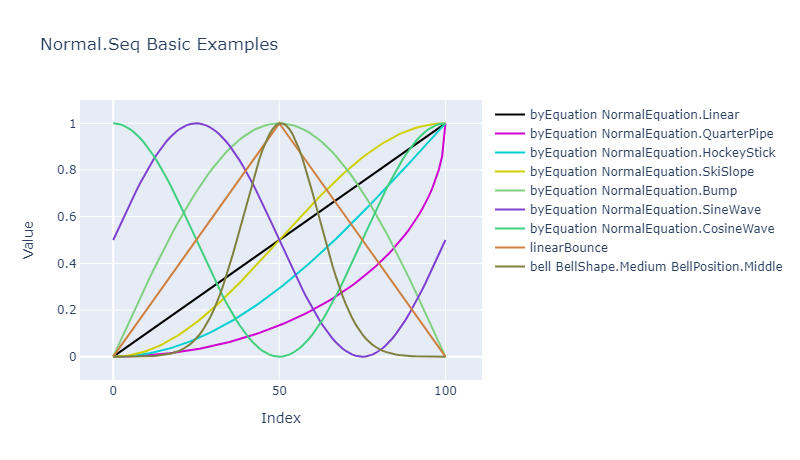
The Normal.Seq.byEquation function (and variants, see below) produces a sequence of Normal according to a given equation.
The NormalEquation module provides the NormalEquation discriminated union type which contains
lots of cases, each of which relates to an equation which can be used by the byEquation function
(and others) to create various shapes of curves.
Various functions are available for use with this DU, including:
displayName: Returns a string containing the name of equation, which can be used for display purposes.toInt: Returns the identity value which relates to the equation (see below);fromInt: Returns the equation which relates to the identity value (see below).
Some equations have names which suggest what the curve will look like, such as HockeyStick, but a lot of them
are functions named with an 'Ease' prefix, such as EaseSineIn, and these names can be more difficult to interpret.
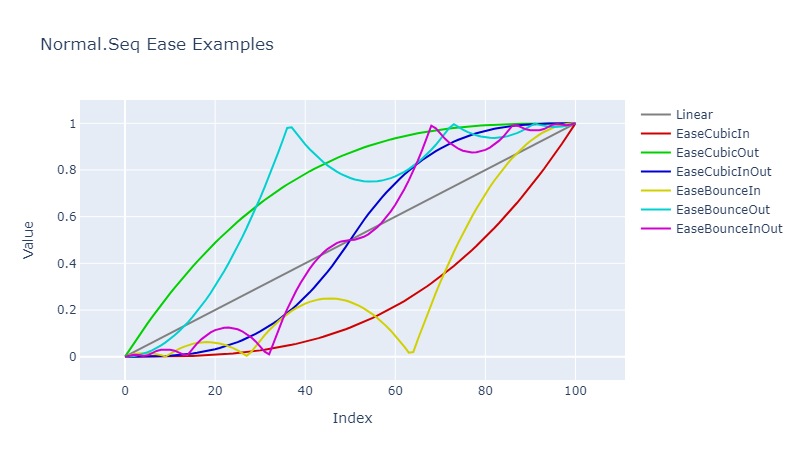
In these cases, the word after 'Ease' (usually) gives an indication of the 'strength' of the curve, and then the name will have either 'In', 'Out', or 'InOut' at the end.
'In' equations start curving across the X-axis first before curving up the Y-axis. 'Out' equations start curving up the Y-axis first before curving across the X-axis. 'InOut' equations are a litle bit of both where the curve will travel across the X-axis first, then up the Y-axis and through the centre of the shape and then curving across the X-axis again later.
The 'Ease' equations are very similar to easing gradients used in animation.
The 'EaseBounce' equations are difficult to explain but the shape of a 'Bounce' curve looks a little bit like the path which a rubber ball might take when bounced across your point of view (kind of).
The Normal.Seq.byEquation function will raise an exception if the internal calculations produce an error. This hasn't
been seen in testing but it could be a possibility in some circumstances. If you don't want an exception to be
raised then there are three alternative functions, each of which returns a different thing instead of
raising an exception, and these are:
Normal.Seq.FailSafe.byEquation: Returns an empty sequence instead of raising an exception;Normal.Seq.Option.byEquation: ReturnsNoneinstead of raising an exception, otherwiseSomeseq;Normal.Seq.Result.byEquation: ReturnsError InternalCalculationErrorinstead of raising an exception, otherwiseOkseq.
Normal Equations Code Examples
let hockeyStick = Normal.Seq.byEquation NormalEquation.HockeyStick 300 // -> Normal seq (Length = 300)
let quarterPipe = Normal.Seq.byEquation NormalEquation.QuarterPipe 150 // -> Normal seq (Length = 150)
let result = Normal.Seq.Result.byEquation NormalEquation.QuarterPipe 100 // -> Result<seq<Normal>,InternalCalculationError> (Length = 100)
Gradients
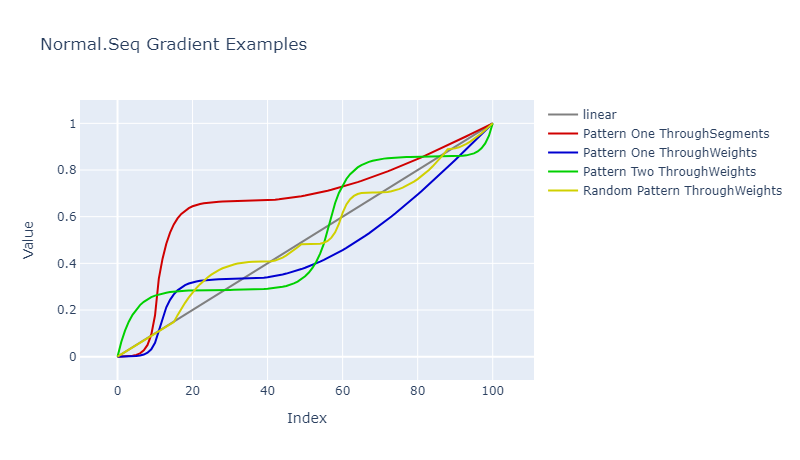
The Normal.Seq.gradient function (and variants, see below) takes a GradientPattern, which is made from a sequence of one
or more GradientSegments, and produces a sequence of Normal.
The GradientSegment module provides functions for working with gradient segments.
These are:
fromEquation: Returns a new gradient segment which contains aNormalEquationcase (see above) with the default weight of one;fromEquationAndWeight: Returns a new gradient segment which contains aNormalEquationcase (see above) and a weight;fromEquationAndWeightTuple: Similar tofromEquationAndWeightbut the input is a tuple, for ease of creating segments from a collection.
Note: The weight will be clamped to the range of 1 to 9 (inclusive). Any given weight which is less than 1 will be inferred to be 1 and any given weight of greater than 9 will be inferred to be 9.
The weight of an individual segment in a gradient pattern determines how many values will be generated for that segment relative to the total weights for the pattern. For example, with a count of 120 and segment weights of 2, 1, and 3 (in that order), the total weight will be 6 (= 2 + 1 + 3), and the first segment will have 40 values (= 120 / 6 * 2), the second segment will have 20 values (= 120 / 6 * 1), and the third segment will have 60 values (= 120 / 6 * 3). Thus: 40 + 20 + 60 = 120.
let quarterPipeOne = GradientSegment.fromEquation NormalEquation.QuarterPipe
let linearTwo = GradientSegment.fromEquationAndWeight NormalEquation.Linear 2
let hockeyStickThree = GradientSegment.fromEquationAndWeightTuple (NormalEquation.HockeyStick, 3)
Note: A gradient segment cannot be modified once it has been created.
The GradientPattern module provides functions for working with gradient patterns, which are made from gradient segments.
These are:
fromSingleSegment: Returns a new gradient pattern which contains only one segment;append: Returns a new gradient pattern which contains the segment(s) from the original and the new segment;fromSegments: Returns a new gradient pattern which contains the segments from a collection.
Note: A gradient pattern can only be appended to and segments cannot be removed or modified. However, any pattern can be appended to, no matter how many segments it already contains.
To create the values from a pattern you need to specify a GradientOrientation case and a count.
The GradientOrientation discriminated union contains two cases:
SpreadThroughWeights: The values in the gradient are spread through the gradient by their relative weights (this is the normal way to do it);SpreadThroughSegments: The values in the gradient are spread through the gradient by segment.
It is normally recommended that SpreadThroughWeights is used, but some experimentation with SpreadThroughSegments might give some interesting results.
let fiftyByWeights = Normal.Seq.gradient pattern GradientOrientation.SpreadThroughWeights 50 // -> Normal seq (Length = 50)
let sixtyBySegments = Normal.Seq.gradient pattern GradientOrientation.SpreadThroughSegments 60 // -> Normal seq (Length = 60)
Note: If the count is very low - e.g. equal to or less than double the total pattern weight - then a linear equation will be used to generate the values.
Note: If the pattern only contains one segment, no matter what the weight is, then the pattern behaves the same as if you used
Normal.Seq.byEquationwith the equation provided in that segment.
Note: If the total weight of the pattern is higher than the count then the 'shape' of the values generated can be 'bottom-heavy'. This should normally only happen with very low counts.
Note: Not all equations produce values which start at 0.0 and/or finish at +1.0, and using those equations might give an unusual (but possibly interesting) gradient.
The Normal.Seq.gradient function will raise an exception if the internal calculations produce an error. This hasn't
been seen in testing but it could be a possibility in some circumstances. If you don't want an exception to be
raised then there are three alternative functions, each of which returns a different thing instead of
raising an exception, and these are:
Normal.Seq.FailSafe.gradient: Returns an empty sequence instead of raising an exception;Normal.Seq.Option.gradient: ReturnsNoneinstead of raising an exception, otherwiseSomeseq;Normal.Seq.Result.gradient: ReturnsError InternalCalculationErrorinstead of raising an exception, otherwiseOkseq.
Gradients Code Examples
// A verbose way to create a pattern.
let verbosePattern =
    GradientPattern.fromSingleSegment (GradientSegment.fromEquationAndWeight NormalEquation.EaseExpoIn 1)
    |> GradientPattern.append (GradientSegment.fromEquationAndWeight NormalEquation.EaseExpoOut 2)
    |> GradientPattern.append (GradientSegment.fromEquationAndWeight NormalEquation.HockeyStick 6)

// A nicer way to create the same pattern.
let nicerPattern =
    seq {
        NormalEquation.EaseExpoIn, 1
        NormalEquation.EaseExpoOut, 2
        NormalEquation.HockeyStick, 6
    }
    |> Seq.map GradientSegment.fromEquationAndWeightTuple
    |> GradientPattern.fromSegments

// Generating the gradient values.
let values = Normal.Seq.gradient nicerPattern SpreadThroughWeights 100 // -> Normal seq (Length = 100)
Bell Shapes and Positions
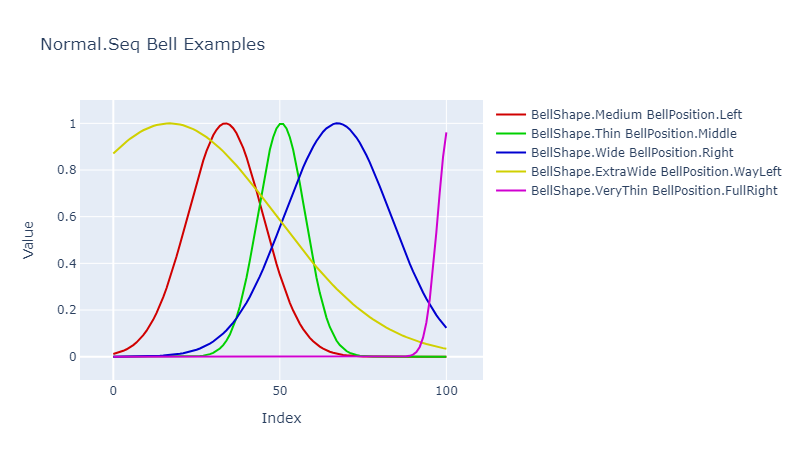
The Normal.Seq.bell function (and variants, see below) is modified by two parameters which describe how the shape of the curve is 'drawn'.
The first parameter is the shape which determines the width of the bell - from very thin to extra wide - and the second parameter defines its position along the X-axis - from full left to full right.
The cases for these parameters are in the BellShape and BellPosition discriminated unions.
Various functions are available for use with these DUs, including:
displayName: Returns a string containing the name of the shape/position, which can be used for display purposes.hexColourString: Returns a string containing the hex colour related to the shape/position, which can be used in some graphing APIs.toInt: Returns the identity value which relates to the shape/position (see below);fromInt: Returns the shape/position which relates to the identity value (see below).
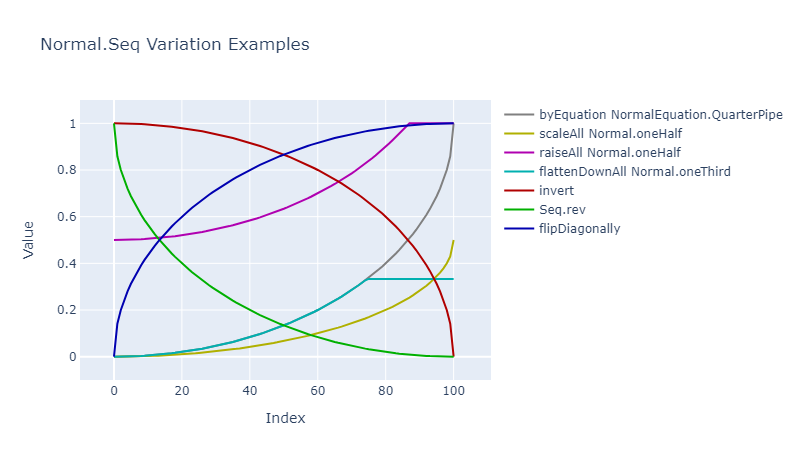
Normal Sequence Variations
A number of functions are available for the variation of a sequence of Normal.
These include:
- raising and lowering the values by a certain amount, e.g.
raise,lowerAll, etc.; - scaling by a given magnitude, e.g.
scaleandscaleAll; - flattening the values in different ways, e.g.
flattenDown,flattenUpAll, etc.; - inverting values, e.g.
invert; - adding Variances, e.g.
addVariances.
Normal Sequence Variation Code Examples
let originals = Normal.Seq.byEquation NormalEquation.SineWave 50
let scaledByHalf = originals |> Normal.Seq.scaleAll Normal.oneHalf
let flattenedDown = originals |> Normal.Seq.flattenDownAll Normal.oneThird
let reversed = originals |> Seq.rev // Note: Just Seq, not Normal.Seq
let inverted = originals |> Normal.Seq.invert
Variance Sequences
The Variance.Seq module provides functions for working with sequences of Variance.
Variance Sequence Conversion
A number of functions are available for the conversion of sequences from and to Normals, Variances, and floats.
For example, fromFloats creates a new sequence of Variance from a sequence of float, and toNormals creates
a new sequence of Normal from a sequence of Variance.
The expand function creates a new sequence of float, via a calculation, from a sequence of Variance.
See the QuickData.Core.FSharp documentation for more information about the Variance type and the expansion process.
Variance Sequence Conversion Code Examples
// Conversion.
let variances = seq { -0.8 ; 0.0 ; 0.6 } |> Variance.Seq.fromfloats
let normals = variances |> Variance.Seq.toNormals
let normalsSpread = variances |> Variance.Seq.toNormalsSpread

// Expansion.
let values =
    variances
    |> Variance.Seq.expand (ExpansionRange.fromFloats -100.0 100.0) // -> seq { -80.0 ; 0.0 ; 60.0 }
Variance Sequence Building
A number of functions are available for the building of a sequence of Variance, including:
random: Values generated via a random number generator;semiRandom: Values generated via a random number generator - when scaled down they look a bit more natural than a randomly generated sequence;natural: Values which look like natural noise;
Note: The functions which require a count parameter will produce a sequence of finite length.
The natural function will raise an exception if the internal calculations produce an error. This hasn't
been seen in testing but it could be a possibility in some circumstances. If you don't want an exception to
be raised then there are three alternative functions, each of which returns a different thing instead of
raising an exception, and these are:
Variance.Seq.FailSafe.natural: Returns an empty sequence instead of raising an exception;Variance.Seq.Option.natural: ReturnsNoneinstead of raising an exception, otherwiseSomeseq;Variance.Seq.Result.natural: ReturnsError InternalCalculationErrorinstead of raising an exception, otherwiseOkseq.
Variance Sequence Building Code Examples
let rng = System.Random.Shared // Any random number generator.
let random = Variance.Seq.random rng
let semiRandom = Variance.Seq.semiRandom rng
let noise = Variance.Seq.natural rng NaturalVarianceDegree.Medium 100
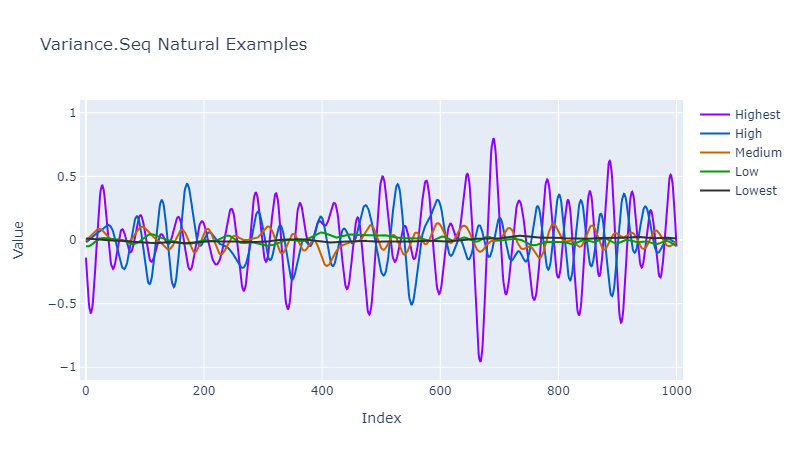
Natural Variance Degree
The natural function is modified by a parameter which describes the shape of the curve.
This parameter determines the 'strength' of noise by which values can vary on the Y-axis, from Lowest to Highest.
The cases for this parameter are in the NaturalVarianceDegree discriminated union.
Various functions are available for use with this discriminated union, including:
displayName: Returns a string containing the name of the degree, which can be used for display purposes;colourName: Returns a string containing the name of the (approximate) 'noise colour' related to the degree, which can be used for display purposes;hexColourString: Returns a string containing the hex colour related to the degree, which can be used in some graphing APIs;toInt: Returns the integer identity value which relates to the degree (see below);fromInt: Returns the degree which relates to the integer identity value (see below).
Variance Sequence Variations
A number of functions are available for the variation of a sequence of Variance.
These include:
- scaling by a given magnitude, e.g.
scaleandscaleAll; - inverting values, e.g.
invert; - adding Variances together, e.g.
add.
Variance Sequence Variation Code Examples
let rng = System.Random.Shared // Any random number generator.
let originals = Variance.Seq.natural rng NaturalVarianceDegree.Medium 100
let scaledByHalf = originals |> Variance.Seq.scaleAll Normal.oneHalf
let reversed = originals |> Seq.rev // Note: Just Seq, not Normal.Seq
let inverted = originals |> Variance.Seq.invert
Boolean Sequences
The Boolean.Seq module provides functions for working with sequences of bool.
Boolean Sequence Conversion
You can convert a sequence of bool to a sequence of Normal via functions in the Normal.Seq module.
Boolean Sequence Building
A number of functions are available for the building of a sequence of bool:
random: True and false values generated via a random number generator;repeatedTrue: The value true repeated endlessly;repeatedFalse: The value false repeated endlessly;alternatingTrueFalse: True, then false, repeated endlessly;alternatingFalseTrue: False, then true, repeated endlessly;tombola: True and false shuffled endlessly.
Note: All generated boolean sequences are of infinite length.
Boolean Sequence Variations
There is one function which varies a sequence of bool, which is
not: For each element in the sequence, if the input element is true then the output element is false, otherwise the output element is true.
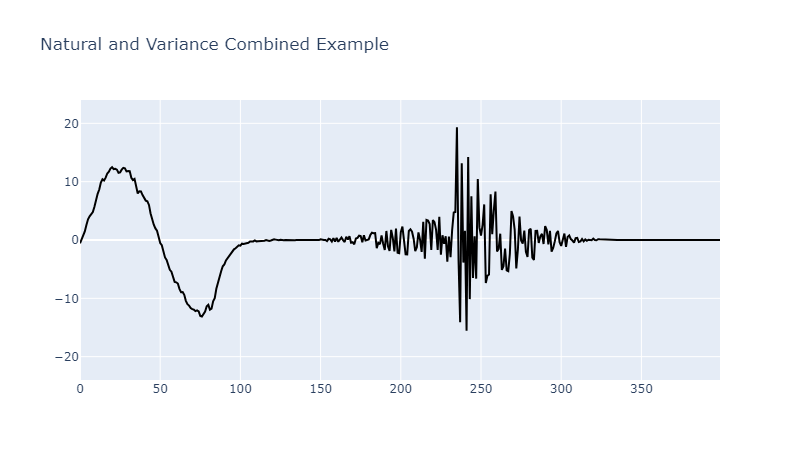
Combining Sequences
The generated sequences can either be used individually or they can be combined in various ways to acheive something more interesting.
For example, the following code produces a long sequence where a signal is oscillating nicely - with a bit of noise - but then fades out to no signal (still with a bit of noise), and then ramps up randomly a little, and then has a big random burst which fades out, and then the signal falls to a flat zero.
// Randomly-chosen seed - try different seed values for different sequences.
let rng = System.Random 56370

// This sequence truncates the below oscillating sequence early by being shorter.
let oscillatorNoise =
    Variance.Seq.natural rng NaturalVarianceDegree.Low 85

let nicelyOscillatingButNoisySignal =
    Normal.Seq.byEquation NormalEquation.SineWave 100
    |> Variance.Seq.fromNormalsSpread
    |> Variance.Seq.scaleAll Normal.oneHalf
    |> Variance.Seq.add oscillatorNoise

let fadeOut =
    Normal.Seq.byEquation NormalEquation.QuarterPipe 100
    |> Seq.rev

// This sequence has the same length as the sequence which it will modify.
let signalDropOffNoise =
    Variance.Seq.natural rng NaturalVarianceDegree.Low 50
    |> Variance.Seq.scaleAll Normal.oneHalf
    |> Variance.Seq.scale fadeOut

let signalDropOff =
    Normal.Seq.byEquation NormalEquation.EaseExpoIn 50
    |> Seq.rev
    |> Variance.Seq.fromNormals
    |> Variance.Seq.scaleAll Normal.oneThird
    |> Variance.Seq.invert
    |> Variance.Seq.add signalDropOffNoise

let fadeIn =
    Normal.Seq.byEquation NormalEquation.HockeyStick 100

// The length of the fadeIn sequence truncates this infinite semiRandom sequence.
let noisySignalIncreasingSlowly =
    Variance.Seq.semiRandom rng
    |> Variance.Seq.scaleAll Normal.oneFifth
    |> Variance.Seq.scale fadeIn

// The length of the fadeOut sequence truncates this infinite random sequence.
let burstOfNoiseFadingOutSignal =
    Variance.Seq.random rng
    |> Variance.Seq.scale fadeOut

// This sequence is truncated as required when the fullSequence is enumerated.
let lossOfSignal =
    Normal.Seq.repeatedOneHalf
    |> Variance.Seq.fromNormalsSpread

// Join the relevant sequences together in order.
let fullSequence =
    seq {
        yield! nicelyOscillatingButNoisySignal
        yield! signalDropOff
        yield! noisySignalIncreasingSlowly
        yield! burstOfNoiseFadingOutSignal
        yield! lossOfSignal }

// Create the expansion range with the required magnitudes.
let signalRange = ExpansionRange.fromFloats -24.0 +24.0

let numberOfValues = 401

let xAxisValues = seq { 0..(numberOfValues - 1) }

// Expand the sequence to the necessary range.
let yAxisValues = fullSequence |> Variance.Seq.expand signalRange
Discriminated Union Identity Values
Where a discriminated union exists to specify a parameter for a function, there often will be two
functions related to that discriminated union which return an integer identity value from the union
case - toInt - or return a union case from an integer identity value - fromInt.
These can be useful if you need to store a value in a data structure which does not cater for discriminated unions, e.g. in a file, in JSON, etc.
The toInt function will always return a valid identity value.
Where a fromInt function exists there often will be different versions available:
fromInt: Return a case, or raise an exception if the identity value was not valid;FailSafe.fromInt: Return a case, or a default value if the identity value was not valid;Option.fromInt: ReturnsNoneinstead of raising an exception, otherwiseSomecase;Result.fromInt: ReturnsError InvalidArgumentErrorinstead of raising an exception, otherwiseOkcase.
Note: All valid identity values are in the range 100 to 999 (inclusive). Any value which has fewer, or more, than three digits can be immediately identified as being invalid, but not all three-digit values are valid. While identity values are unique within a discriminated union, some identity values may be shared by cases in different discriminated unions but no functional equality or relationship between the two should be inferred. Identity values will not change unless specifically mentioned in the release notes.
The defaultCase value (where available) contains the default case for that discriminated union.
The allCases value (where available) contains a list of all of the cases for the discriminated union.
Discriminated Union Identity Value Examples
let good = NaturalVarianceDegree.fromInt 200 // -> Lowest
let bad = NaturalVarianceDegree.fromInt 123 // Raises an exception

let goodFailSafe = NaturalVarianceDegree.FailSafe.fromInt 300 // -> Low
let badFailSafe = NaturalVarianceDegree.FailSafe.fromInt 123 // -> Medium (default)

let goodOption = NaturalVarianceDegree.Option.fromInt 400 // -> Some Medium
let badOption = NaturalVarianceDegree.Option.fromInt 123 // None

let goodResult = NaturalVarianceDegree.Result.fromInt 500 // -> Ok High
let badResult = NaturalVarianceDegree.Result.fromInt 123 // -> Error (InvalidArgumentError ("identity", "123"))
Dependencies
This package is dependent upon FSharp.Core which you will be using anyway, and the QuickData.Core.FSharp package
which will normally be automatically installed if you install this package.
Usage
The types and functions in this package have been designed to be used only with F#.
However, they may also be usable with C# but this has not been tested, so use them with C# at your own risk.
| Product | Versions Compatible and additional computed target framework versions. |
|---|---|
| .NET | net8.0 is compatible. net8.0-android was computed. net8.0-browser was computed. net8.0-ios was computed. net8.0-maccatalyst was computed. net8.0-macos was computed. net8.0-tvos was computed. net8.0-windows was computed. net9.0 was computed. net9.0-android was computed. net9.0-browser was computed. net9.0-ios was computed. net9.0-maccatalyst was computed. net9.0-macos was computed. net9.0-tvos was computed. net9.0-windows was computed. net10.0 was computed. net10.0-android was computed. net10.0-browser was computed. net10.0-ios was computed. net10.0-maccatalyst was computed. net10.0-macos was computed. net10.0-tvos was computed. net10.0-windows was computed. |
-
net8.0
- FSharp.Core (>= 9.0.303)
- QuickData.Core.FSharp (>= 0.2.1)
NuGet packages
This package is not used by any NuGet packages.
GitHub repositories
This package is not used by any popular GitHub repositories.
See the Project URL repo for the release notes.