Pignone.Data.Consistency.Dashboard
8.1.8
dotnet add package Pignone.Data.Consistency.Dashboard --version 8.1.8
NuGet\Install-Package Pignone.Data.Consistency.Dashboard -Version 8.1.8
<PackageReference Include="Pignone.Data.Consistency.Dashboard" Version="8.1.8" />
<PackageVersion Include="Pignone.Data.Consistency.Dashboard" Version="8.1.8" />
<PackageReference Include="Pignone.Data.Consistency.Dashboard" />
paket add Pignone.Data.Consistency.Dashboard --version 8.1.8
#r "nuget: Pignone.Data.Consistency.Dashboard, 8.1.8"
#:package Pignone.Data.Consistency.Dashboard@8.1.8
#addin nuget:?package=Pignone.Data.Consistency.Dashboard&version=8.1.8
#tool nuget:?package=Pignone.Data.Consistency.Dashboard&version=8.1.8
Pignone.Data.Consistency.Dashboard
NuGet package providing a dashboard to visualize existing data inconsistencies in your database.
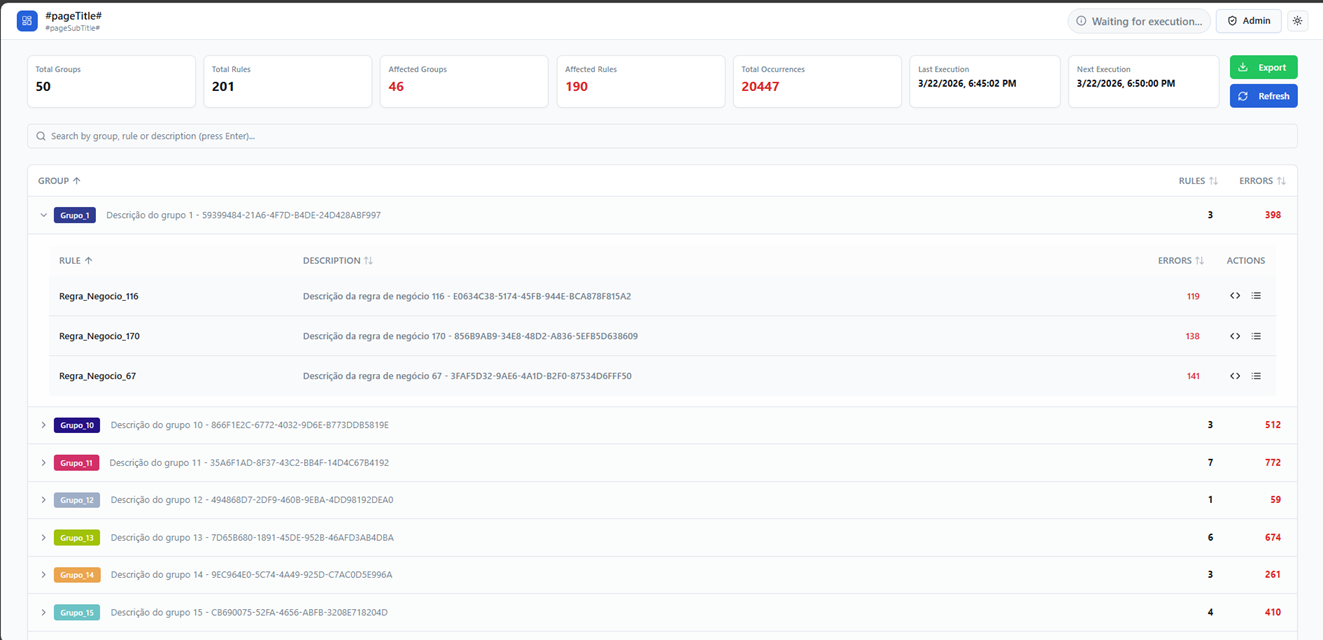
Pignone.Data.Consistency.Dashboard is a .NET 8 library that allows you to monitor your data integrity through a modern visual panel and a highly configurable rule execution engine.
Table of Contents
- Features
- Installation
- Quick Start
- Detailed Configuration
- Webhooks
- Excel Export
- Dashboard Evolution & Dynamic Reports
- MCP (Model Context Protocol)
- Translator
- Usage
- Tips
- Donations
- Contact
Features
- Integrated Dashboard: Full web interface (React) embedded within the package.
- Rules Engine: Periodic execution of SQL queries to validate data consistency.
- Multi-Tenant/Connections: Support for multiple database connections for monitoring.
- Notification System: Webhook integration for real-time alerts.
- Hybrid Authentication: Support for Local JWT or OAuth2 (External Identity Provider).
- Excel Export: Export summaries and occurrences to
.xlsxfiles for offline analysis. - Evolution Chart: Visualize data inconsistency trends over time.
- Dynamic Reports: Download custom management reports directly from the sidebar.
- Flexible Storage: Store configurations and results in SQL Server or In-Memory (for testing).
Installation
Via CLI:
dotnet add package Pignone.Data.Consistency.Dashboard
Or via PackageReference in your .csproj:
<PackageReference Include="Pignone.Data.Consistency.Dashboard" Version="*" />
Quick Start
In your Program.cs file, add the service and the middleware:
var builder = WebApplication.CreateBuilder(args);

builder.Services.AddDashboard()
.WithInMemoryStorage();

var app = builder.Build();

app.UseDashboard();

app.Run();
Detailed Configuration
Security (Authentication)
You can choose between local authentication (JWT) or an external provider (OAuth2).
options.Security = new() {
    AuthType = AuthenticationType.LocalJwt, // or AuthenticationType.OAuth2
    Username = "admin",
    Password = "YourSecurePassword",
    JwtSecretKey = "your-secret-key-at-least-32-characters-long",
    JwtExpirationMinutes = 60,
    RefreshTokenExpirationDays = 7, // newly documented property
    // OAuth2 configuration (optional if using LocalJwt)
    OAuth2 = new() {
        Authority = "https://your-identity-server",
        ClientId = "dashboard-client-id"
    }
};
Storage Provider
Defines where the Dashboard will save its settings, rules, and occurrences.
The following databases are available for storage: SQL Server, MySQL, PostgreSQL, and Oracle.
Installation
Via CLI:
dotnet add package Pignone.Data.Consistency.Dashboard.Data.SqlServer
Or via PackageReference in your .csproj:
<PackageReference Include="Pignone.Data.Consistency.Dashboard.Data.SqlServer" Version="*" />
Example:
builder.Services.AddDashboard()
.WithSqlServerStorage(connectionString); -- This line configures SQL Server as the storage provider
Scheduling
Configures how often the rules engine will run.
options.Schedule = new() {
    Enabled = true,
    CronExpression = "0 */1 * * *" // Runs every hour
};
Log Engine (Cleanup)
Keeps your database clean by removing old occurrences and logs.
options.Log = new() {
    EnabledPurge = true,
    KeepLastDays = 30, // Keeps logs from the last 30 days
    CronExpression = "0 0 * * *" // Runs daily at midnight
};
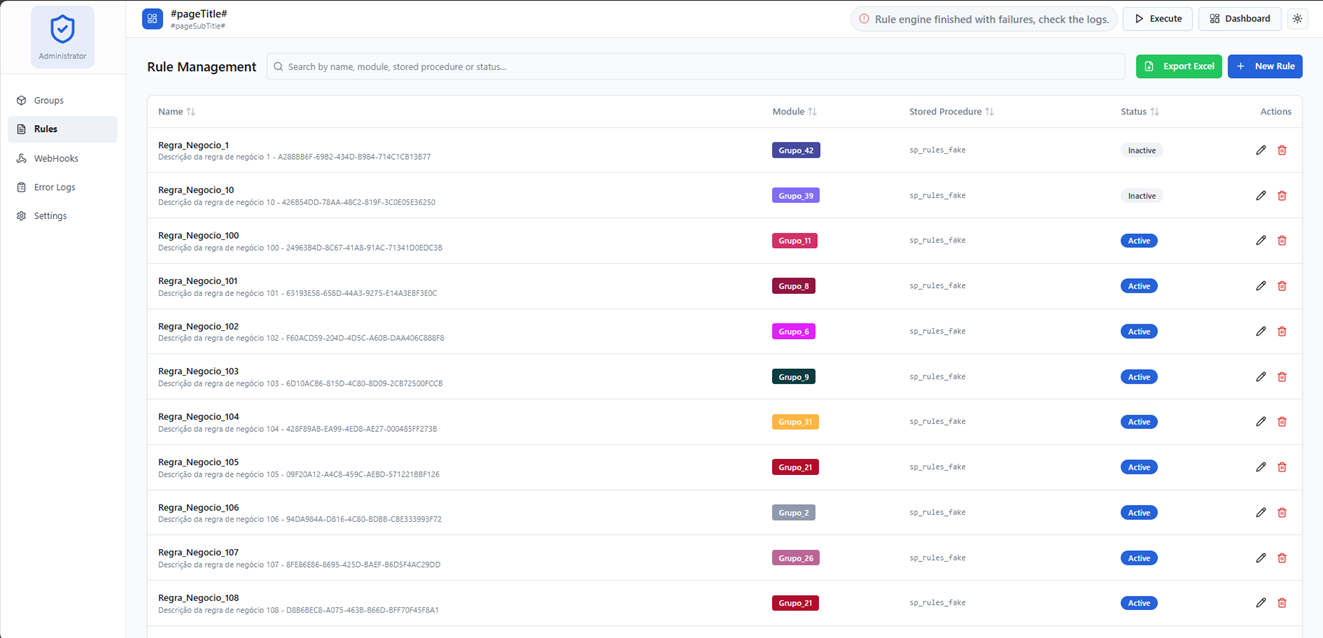
Rules
The rules are based on stored procedures created in the database where data inconsistencies will be checked. These procedures must return a list of records with only two fields:
IdentifierType: The type of the identifier (e.g., "OrderId", "UserId", etc.)
Identifier: The value of the identifier that is inconsistent (e.g., "12345")
Rule Entity Details
The Rule entity includes additional fields:
- Criticality – Severity level (Low, Medium, High). These levels are visually represented in the dashboard with specific color badges (Red for High, Amber for Medium, Blue for Low), helping prioritize fixes.
- CommandTimeout – SQL command timeout in seconds (default 30).
- Active – Boolean indicating if the rule is enabled.
- MarkdownContent – Optional markdown description of the rule to provide context and solution steps. These fields are exposed via the UI and MCP tools.
Example:
CREATE OR ALTER PROCEDURE sp_rule_example
AS
BEGIN
    SELECT 'OrderId' AS IdentifierType, '12345' AS Identifier UNION ALL
    SELECT 'UserId' AS IdentifierType, '67890' AS Identifier UNION ALL
    SELECT 'ProductId' AS IdentifierType, '54321' AS Identifier
END
};
In the rules section, it's possible to create a readme file with instructions about the problem, the solution to be implemented to resolve the inconsistency, and other relevant information.
# 🧩 Generic Business Rule

## 📖 Description

This rule defines a **data retention policy** responsible for automatically removing records older than a specified period (e.g., 30 days), based on a date property (e.g., `DataLog`).
It ensures that the system maintains only relevant and recent data, preventing unnecessary data accumulation.

---

## 🎯 Objective

- Maintain a clean and efficient database
- Improve query performance
- Reduce storage costs
- Ensure compliance with data lifecycle policies

---

## ⚠️ Problem

Over time, systems that continuously generate data (logs, events, transactions, etc.) tend to accumulate a large volume of records.

This can lead to:

- 📉 Performance degradation in queries
- 💾 Excessive storage consumption
- 🐌 Slower backups and maintenance operations
- 🔍 Difficulty in managing and analyzing relevant data
Connections
Connections to the databases are configured through the appsetting file in the ConnectionString section.
Connections to the following databases can be included: SQL Server, MySQL, PostgreSQL, and Oracle.
Provider identification is performed automatically internally within the package.
{
  "ConnectionStrings": {
    "Product": "Server=localhost,1433;Database=Product;User Id=sa;Password=12345;TrustServerCertificate=True;",
    "Accounting": "Server=localhost,1433;Database=Accounting;User Id=sa;Password=12345;TrustServerCertificate=True;"
    ...
  },
  ...
}
The Dashboard allows you to configure POST notifications to external URLs whenever a rule fails or finds inconsistencies.
- Active Status: You can enable or disable webhooks individually to control notifications.
- Excel Export: Export your webhook configuration list to Excel for management and auditing.
Use following tags in the body of the request to receive dynamic information about the rule and the inconsistencies found:
[[totalOccurrences]] - Total number of inconsistencies found in the execution of the rule.
[[rulesAfectedCount]] - Total number of rules that found inconsistencies in the execution.
[[groupAfectedCount]] - Total number of groups that found inconsistencies in the execution.
[[lastExecutionDate]] - Date and time of the last execution of the rule.
Example:
 {
  "lastExecutionDate" : "[[lastExecutionDate]]",
  "message": "The following data rule inconsistencies were found.",
  "Occurrences" : [[totalOccurrences]],
  "Rules Afecteds" : [[rulesAfectedCount]],
  "Group Afecteds" : [[groupAfectedCount]]
 }
Excel Export
The Dashboard offers a robust export system to Excel (.xlsx), facilitating data manipulation and reporting outside the system.
- Consistency Summary: From the main dashboard, you can export a complete summary of all groups and rules with their respective error counts.
- Detailed Occurrences: The export includes a secondary sheet with each specific identifier (ID) and its type for every rule that found inconsistencies.
- WebHooks List: Export your notification configurations to audit and share settings.
To export, look for the "Excel" or "Export" buttons with the green background in the Dashboard header or specific management pages.
Dashboard Evolution & Dynamic Reports <a name="evolution-reports"></a>
Evolution Chart
Located in the "Evolution" tab of the main dashboard, this chart visualizes the history of data inconsistencies. It helps teams identify:
- Trends: If errors are increasing or decreasing over time.
- Outliers: Specific dates with an unusual amount of consistency failures.
- Improvements: Real-time feedback on stabilization efforts.
Dynamic Reports
The "Management Reports" section in the sidebar provides a dynamic list of reports provided directly by the backend implementation of interface IReportGenerator.
- Extensibility: The list of available reports is fetched dynamically from the API.
- Easy Access: Generate and download complex reports with a single click after confirming details in the report dialog.
MCP (Model Context Protocol)
The Model Context Protocol (MCP) is an integrated feature that allows Artificial Intelligence models (LLMs) to programmatically interact with the dashboard's consistency data. It exposes secure tools that AI can call to read the current state of validations.
🚀 How to Enable
MCP is configured in the appsettings.json file or via DashboardSettings during project initialization.
var builder = WebApplication.CreateBuilder(args);

var connectionString = builder.Configuration.GetConnectionString("DefaultConnection") ?? throw new InvalidOperationException("Connection string 'Dashboard' not found.");

builder.Services.AddDashboard()
.WithSqlServerStorage(connectionString)
.WithModelContextProtocol(); -- This line enables the MCP feature

var app = builder.Build();

app.UseDashboard();
app.UseDashboardMCP(); -- This line enables the MCP endpoints

app.Run();
When enabled, the MCP server is exposed by default at the endpoint: /mcp.
🛠️ Available Tools
The following tools are available for AI models:
1. GetConsistencySummary
Provides a high-level statistical summary of the last consistency analysis execution.
- Returned Data: Total groups, total rules, total affected items, and total occurrences found.
2. ListAffectedRules
Lists all rules that currently have detected inconsistencies.
- Returned Data: Rule ID, Rule Name, and the amount of errors found for each.
3. GetRuleOccurrences
Returns the specific identifiers of inconsistent data for a given rule.
- Arguments:
ruleId(int) - Returned Data: List of identifiers (e.g., record IDs, codes) and the identifier type.
4. ListAffectedGroups
Lists all groups that currently have detected inconsistencies.
- Returned Data: Group ID, Group Name, and affected rules per group.
5. GetRuleDetails
Returns detailed information about a rule by its ID.
- Arguments:
ruleId(int) - Returned Data: Full rule metadata (name, description, stored procedure, etc.).
6. GetGroupDetails
Returns detailed information about a group by its ID.
- Arguments:
groupId(int) - Returned Data: Group metadata (name, description, etc.).
7. ListRules
Returns a list of all rules with full metadata.
8. ListGroups
Returns a list of all groups with basic metadata.
Translator
You can translate the dashboard by implementing the IDashboardTranslator interface. This interface provides a set of variables that represent the messages, labels, warnings, etc. used by the dashboard.
A Portuguese translation already exists; simply install:
Via CLI:
dotnet add package Pignone.Data.Consistency.Dashboard.Translator.ptBR
Or via PackageReference in your .csproj:
<PackageReference Include="Pignone.Data.Consistency.Dashboard.Translator.ptBR" Version="*" />
The package and use it.
...

builder.Services
.AddDashboard()
.WithLocalization<BrazilianDashboardTranslator>(); -- This line configures the dashboard to use the Brazilian Portuguese translation

...
Usage
After starting the application, access the /dashboard route (or the configured route) to manage:
- Connections: Configure the databases you want to monitor.
- Groups: Organize your rules by categories.
- Rules: Define SQL queries that validate your data. If the query returns any records, it is considered an inconsistency.
- Occurrences: View the history of inconsistencies found.
You can use this SeedFake.sql to perform a load with multiple groups, rules, and webhooks to start your test.
You can use this sp_rules_fake.sql for a stored procedure that generates fake data to load the dashboard through the rules engine.
Tips
Use ProviderEnum.InMemory only for initial development or quick testing. For production, always use SqlServer.
Ensure the JwtSecretKey is kept secret and has sufficient length (minimum 256 bits/32 characters) to guarantee token security.
Donations
If this project has been helpful to you, please consider supporting continued development.
| Provider | Link |
|---|---|
| Paypal |  |
Support via PIX (Brazil)
| Key | QR Code |
|---|---|
 |
 |
Contact
For questions and support, please open an Issue in the project repository.
Developed by Ricardo Gomes Pignone
| Product | Versions Compatible and additional computed target framework versions. |
|---|---|
| .NET | net8.0 is compatible. net8.0-android was computed. net8.0-browser was computed. net8.0-ios was computed. net8.0-maccatalyst was computed. net8.0-macos was computed. net8.0-tvos was computed. net8.0-windows was computed. net9.0 was computed. net9.0-android was computed. net9.0-browser was computed. net9.0-ios was computed. net9.0-maccatalyst was computed. net9.0-macos was computed. net9.0-tvos was computed. net9.0-windows was computed. net10.0 was computed. net10.0-android was computed. net10.0-browser was computed. net10.0-ios was computed. net10.0-maccatalyst was computed. net10.0-macos was computed. net10.0-tvos was computed. net10.0-windows was computed. |
-
net8.0
- Cronos (>= 0.8.4)
- Dapper (>= 2.1.72)
- FluentValidation (>= 12.1.1)
- JsonDataMasking (>= 2.1.1)
- Microsoft.AspNetCore.Authentication.JwtBearer (>= 8.0.25)
- Microsoft.AspNetCore.Http.Abstractions (>= 2.3.9)
- Microsoft.AspNetCore.OpenApi (>= 8.0.24)
- Microsoft.Extensions.Http.Resilience (>= 8.7.0)
- Pignone.Data.Consistency.Dashboard.Data (>= 8.1.8)
- Swashbuckle.AspNetCore (>= 6.6.2)
NuGet packages
This package is not used by any NuGet packages.
GitHub repositories
This package is not used by any popular GitHub repositories.