Omasharp.Templates
0.1.8
dotnet new install Omasharp.Templates@0.1.8
<img src="https://raw.githubusercontent.com/luisrudge/omasharp/main/assets/icon.png" width="96" alt="omasharp">
Omasharp
Build Omarchy apps in C# and QML that start as fast as Omarchy's own C++ apps.
dotnet new install Omasharp.Templates
dotnet new omarchy-app -n Tally
You edit two files. Backend.cs holds the logic and Main.qml holds the UI. dotnet publish compiles the C# to native code and pairs it with a small Qt host. The app runs on the Qt that Omarchy already ships, so nobody needs .NET installed to run it.
Add --kind panel to make an omarchy-shell panel instead, or --kind bar-widget for an icon in the Omarchy bar with a dropdown. The same Backend.cs then runs in its own process, so a crash in your code can't take the shell down.
Every app also gets an agent skill in .agents/skills/omasharp/. Coding agents read it to learn how to build, check and install the app.
Omasharp runs on Linux x64 with Omarchy 4 (Hyprland, Qt 6.7 or newer). It isn't affiliated with Omarchy or Basecamp.
Why C#
C++ and qmake are fine for small Omarchy utilities. C# pays off when an app has real logic. You get NuGet, async I/O, memory safety and compiler errors that agents can act on. The usual price is a slow start and a lot of memory. Omasharp apps don't pay it.
Here's Omarchy's calculator, omacalc, next to the same calculator ported to C# with Omasharp. The numbers are medians of 7 interleaved runs (full results).
| omacalc (C++) | Omasharp (C#) | |
|---|---|---|
| <img src="https://raw.githubusercontent.com/luisrudge/omasharp/main/examples/omacalc/omacalc-cpp.png" width="220" alt="Omarchy's C++ omacalc after typing 42*3+7="> | <img src="https://raw.githubusercontent.com/luisrudge/omasharp/main/examples/omacalc/omacalc-omasharp.png" width="220" alt="The Omasharp port of omacalc after typing 42*3+7="> | |
| Time to window | 618 ms | 593 ms |
| Memory (PSS) | 74.6 MB | 77.8 MB |
| Idle wake-ups | 3/s | 3/s |
| Needs .NET to run | no | no |
Theming
Apps follow the current Omarchy theme and repaint the moment you switch. QML binds to theme.accent, theme.background and every other key in the theme's colors.toml. C# gets the same colors from Theme, plus a Changed event.
<img src="https://raw.githubusercontent.com/luisrudge/omasharp/main/examples/omacalc/theming.gif" width="300" alt="The omacalc example switching between six Omarchy themes">
Quick start
Install the .NET SDK with
omarchy pkg add dotnet-sdk, or from the Omarchy menu under Install › Development › .NET.Install the template with
dotnet new install Omasharp.Templates.Create an app and run it:
dotnet new omarchy-app -n Tally            # or --kind panel, --kind bar-widget; --app-id sets the app id (default: tally)
cd Tally
dotnet run                                 # opens it (agents check it off-screen with the skill's check.sh)
dotnet publish -t:Install                  # installs ~/.local/bin/tally and a launcher entry
To share a window app, push it to GitHub and tag a version. The template's release workflow attaches the app to a GitHub release, and people install it with one command, without sudo or .NET:
curl -fsSL https://github.com/<owner>/<repo>/releases/latest/download/install.sh | sh(how).
Building needs the SDK plus qmake6, g++ and Qt 6, which Omarchy ships. A published app needs only Qt.
To try a version that isn't released yet, build the template from source (CONTRIBUTING.md).
With an agent
Give your agent this repo and say what you want:
omarchy agent prompt "Build me a pomodoro timer for Omarchy with https://github.com/luisrudge/omasharp"
The agent offers to install a create-omasharp-app skill. Once it's installed, you don't need the link: "build me an Omarchy app that …" is enough.
<details> <summary>Instructions for agents</summary>
- Get the skill. Download https://raw.githubusercontent.com/luisrudge/omasharp/main/skills/create-omasharp-app/SKILL.md. It's the
SKILL.mdof a skill namedcreate-omasharp-app, with the steps for building the user's app. - Offer to install it for the user's agents. Ask first, and say what it's for: next time, "build me an Omarchy app" works without this link. If they say no, go to step 3.
- Where to put it. Work out the user-level skills folder of each coding agent on this machine. Don't rely on a list from memory: agents move these folders between versions, so check what's actually here.
- Which agents are installed: their commands on the PATH (
claude,codex,pi,opencode,gemini, …). On Omarchy,omarchy default agentprints the one the user picked. - Where each reads skills from: the agent's own docs or
--helpfor its current version. A skills folder in the home directory that already holds skills is good evidence too; Omarchy, for one, links its ownomarchyskill into the folder of each agent it sets up. - One folder per agent. Many agents also read the shared
~/.agents/skills; if an agent reads both that and its own folder, the shared one is enough (both can make it see the skill twice). - If you can't tell for some agent, leave it out and say so.
- Which agents are installed: their commands on the PATH (
- Confirm the list with the user before writing anything: each folder, and which agent reads it. They may want fewer.
- Install. Save the file as
<folder>/create-omasharp-app/SKILL.mdin the first folder (~/.agents/skillsif it's on the list), and link it into every other confirmed folder:ln -sfn <that copy's folder> <folder>/create-omasharp-app. If a differentcreate-omasharp-appis already there, ask before replacing it. - Tell the user what you installed. Some agents only pick up a new skill in a new session.
- Where to put it. Work out the user-level skills folder of each coding agent on this machine. Don't rely on a list from memory: agents move these folders between versions, so check what's actually here.
- Build what the user asked for by following the skill's steps, whether or not they installed it.
</details>
What you get
- QML sees your C# class. Public properties and methods show up in QML as
backend.*, and bindings update when the values change. Async methods return Promises. Records and lists arrive as JS objects, and C# can send events to QML. Changing state from a background thread is safe. How it works. - Omarchy's look. Colors follow the theme, apps use the Omarchy font, and the app id is yours to match in Hyprland window rules.
- Fast custom drawing.
Drawingin C# andDrawViewin QML draw charts, maps and treemaps through Qt's scene graph. - A quick dev loop. An agent edits, then runs the skill's
check.sh: a dev build and an invisible run in about 3 s.dotnet runopens the app for you to look at. - Mistakes fail the build. Warnings are errors, and Omasharp's analyzers check
Backendagainst what QML can use. They catch names QML can't take, members it can't see, setters that never tell it about a change, and types that can't cross over. Each error names the fix (rules). - Checks agents can run. The skill's
check.shruns the unit tests, then starts the app in a private compositor you never see. It prints every visible text, saves a screenshot and fails on QML errors.--keys "12{Tab}3{Enter}"types into the app first. - The bridge is your code. Each app gets its own copy of the bridge, like shadcn components. Change it if you need to.
dotnet build -t:UpdateBridgebrings in newer versions and keeps your changes.
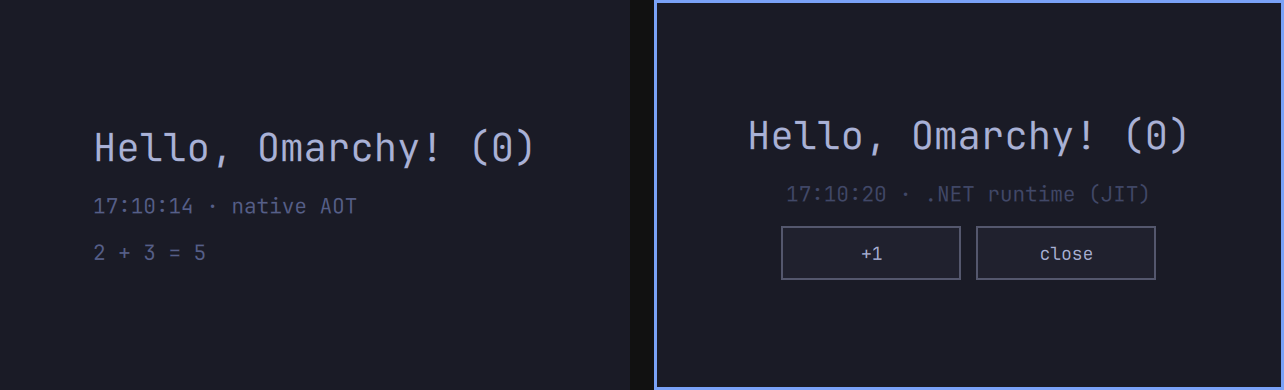
One Backend.cs works as a window app (left) and as a panel (right):
This repository
| Path | What's in it |
|---|---|
template/ |
The omarchy-app template, exactly what a new app gets. That includes bridge/ (the C# side, the C++ host and the build targets) and the agent skill in .agents/skills/omasharp/. |
skills/ |
create-omasharp-app, the skill agents install once to start new apps (With an agent). |
analyzers/ |
Omasharp.Analyzers, the build-time checks every app gets (rules). |
pack/ |
Builds the Omasharp.Templates package. |
examples/ |
hello, one Backend.cs as a window app and a panel, omacalc, Omarchy's calculator ported to C#, a pomodoro timer, and a system monitor with graphs drawn in C#. |
scripts/ |
test.sh runs everything CI checks. lint.sh checks formatting. |
tools/ |
Benchmark helpers for contributors. |
docs/ |
How Omasharp works. |
assets/ |
The logo and icon. |
Contributing
Issues and pull requests are welcome, whether you wrote them or your agent did. Start with CONTRIBUTING.md.
License
MIT, see LICENSE. The omacalc example keeps omacalc's MIT license and its font's OFL (details).
-
.NETStandard 2.0
- No dependencies.
NuGet packages
This package is not used by any NuGet packages.
GitHub repositories
This package is not used by any popular GitHub repositories.