HybridRedisCache 6.1.0
dotnet add package HybridRedisCache --version 6.1.0
NuGet\Install-Package HybridRedisCache -Version 6.1.0
<PackageReference Include="HybridRedisCache" Version="6.1.0" />
<PackageVersion Include="HybridRedisCache" Version="6.1.0" />
<PackageReference Include="HybridRedisCache" />
paket add HybridRedisCache --version 6.1.0
#r "nuget: HybridRedisCache, 6.1.0"
#:package HybridRedisCache@6.1.0
#addin nuget:?package=HybridRedisCache&version=6.1.0
#tool nuget:?package=HybridRedisCache&version=6.1.0




HybridRedisCache
HybridRedisCache is a Redis-focused, two-level caching library for .NET applications. It combines a fast
in-process memory cache (L1) with a shared Redis cache (L2). Reads check L1 first, then Redis on a local miss;
values retrieved from Redis can repopulate L1.
This is not a capacity-triggered fallback. L1 and L2 have independent expiration policies, and Redis provides the shared cache used by all application instances.
Cache layers
In-memory cache (L1)
The local cache lives inside each application process. It offers the lowest latency, but every server or pod has its own copy and loses that copy when the process stops.
Redis cache (L2)
Redis is a shared, in-memory data store available to all application instances. It allows instances to reuse cached data after local misses and helps preserve cache availability when an application instance restarts.
The important challenge in a two-level cache is invalidation: when one instance changes a Redis key, local copies held
by other instances can become stale. HybridRedisCache uses Redis keyspace notifications to invalidate those local
copies across instances. See Server requirements.
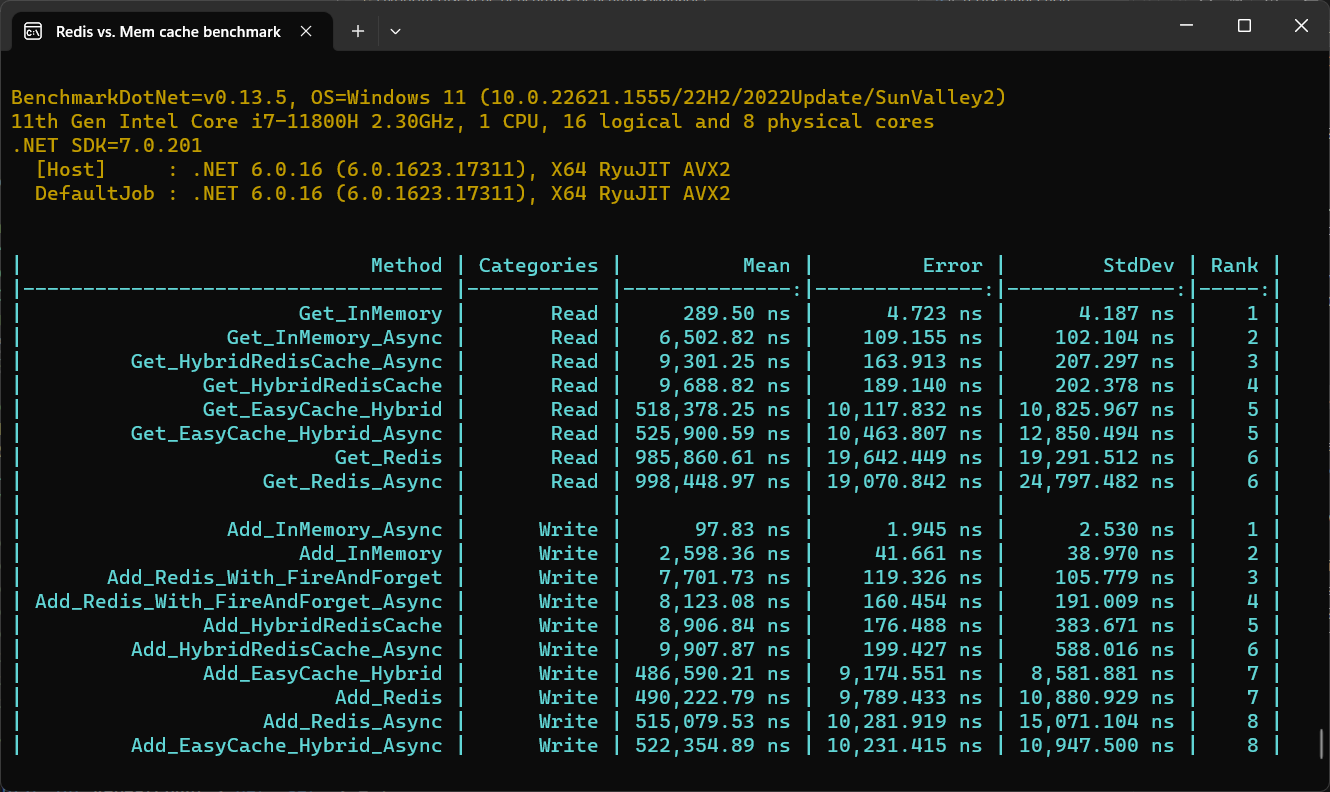
Redis vs. In-Memory caching in single instance benchmark
Installation
You can install the HybridRedisCache package using NuGet:
PM> Install-Package HybridRedisCache
Installing via the .NET Core command line interface:
dotnet add package HybridRedisCache
Usage
Simple usage in console applications
To use HybridCache, you can create an instance of the HybridCache class and then call its Set and Get methods to
cache and retrieve data, respectively.
Here's an example:
using HybridRedisCache;
using HybridRedisCache.Serializers;

...

// Create a new instance of HybridCache with cache options
var options = new HybridCachingOptions()
{
    DefaultLocalExpirationTime = TimeSpan.FromMinutes(1),
    DefaultDistributedExpirationTime = TimeSpan.FromDays(1),
    InstancesSharedName = "SampleApp",
    ThrowIfDistributedCacheError = true,
    RedisConnectionString = "localhost:6379",
    ConnectRetry = 10,
    AbortOnConnectFail = true,
    ReconfigureOnConnectFail = true,
    MaxReconfigureAttempts = 10,
    EnableLogging = true,
    EnableTracing = true,
    FlushLocalCacheOnBusReconnection = true,
    TracingActivitySourceName = nameof(HybridRedisCache),
    EnableRedisClientTracking = true,
    EnableMeterData = true,
    WarningHeavyDataThresholdBytes = 20 * 1024, // 20KB
    SelfWriteNotificationWindow = TimeSpan.FromSeconds(5), // see "Server requirements"
    DataSizeHistogramMetricName = "my_app_keys_data_size_histogram_metric",
    SerializerType = SerializerType.Bson, // Bson, MessagePack, MemoryPack, or custom
    // Serializer = new CustomBinarySerializer(),
};
var cache = new HybridCache(options);

// Cache a string value with the key "mykey" for 1 minute
cache.Set("mykey", "myvalue", TimeSpan.FromMinutes(1));

// Retrieve the cached value with the key "mykey"
var value = cache.Get<string>("mykey");

// Retrieve the value or create and cache it when it does not exist
var retrievedValue = await cache.GetAsync(
    "mykey",
    dataRetriever: key => CreateValueTaskAsync(key, ...),
    localExpiry: TimeSpan.FromMinutes(1),
    redisExpiry: TimeSpan.FromHours(6));
Configure Startup class for Web APIs
var builder = WebApplication.CreateBuilder(args);

builder.Services.AddHybridRedisCaching(options =>
{
    options.AbortOnConnectFail = false;
    options.InstancesSharedName = "RedisCacheSystem.Demo";
    options.DefaultLocalExpirationTime = TimeSpan.FromMinutes(1);
    options.DefaultDistributedExpirationTime = TimeSpan.FromDays(10);
    options.ThrowIfDistributedCacheError = true;
    options.RedisConnectionString = "localhost:6379,redis0:6380,redis1:6380,allowAdmin=true,keepAlive=180";
    options.ConnectRetry = 10;
    options.EnableLogging = true;
    options.EnableTracing = true;
    options.TracingActivitySourceName = nameof(HybridRedisCache);
    options.FlushLocalCacheOnBusReconnection = true;
});
Use the cache in a controller
[ApiController]
[Route("api/[controller]")]
public sealed class WeatherForecastController : ControllerBase
{
    private readonly IHybridCache _cache;

    public WeatherForecastController(IHybridCache cache)
    {
        _cache = cache;
    }

    [HttpPut("{id:int}")]
    public async Task<IActionResult> Set(
        int id,
        WeatherForecast forecast,
        CancellationToken token)
    {
        await _cache.SetAsync(
            $"weather:{id}",
            forecast,
            localExpiry: TimeSpan.FromMinutes(1),
            redisExpiry: TimeSpan.FromHours(6),
            token: token);

        return NoContent();
    }

    [HttpGet("{id:int}")]
    public Task<WeatherForecast> Get(int id, CancellationToken token)
    {
        return _cache.GetAsync<WeatherForecast>($"weather:{id}", token: token);
    }
}
More Redis commands
These methods talk to Redis directly. The ones that change a key also remove its local copy, on this instance and (through key-space notifications) on every other instance.
| Method | Redis command | What it does |
|---|---|---|
GetAll / GetAllAsync |
GET (pipelined) |
Reads many keys. Keys in the local cache are not sent to Redis. |
GetAndExpireAsync |
GETEX |
Reads a key and sets a new TTL (null removes the TTL). |
KeyRenameAsync |
RENAME / RENAMENX |
Renames a key. Condition.NotExists renames only if the new key is free. |
KeyPersistAsync |
PERSIST |
Removes the TTL, so the key never expires. |
KeyTouchAsync |
TOUCH |
Marks a key as used, so LRU eviction keeps it longer. |
HyperLogLogAddAsync, HyperLogLogLengthAsync |
PFADD, PFCOUNT |
Counts unique values with ~0.81% error in at most 12 KB. |
StringSetBitAsync, StringGetBitAsync, StringBitCountAsync |
SETBIT, GETBIT, BITCOUNT |
Bit flags and counts. |
ServerInfoAsync, SlowlogGetAsync, ClientListAsync, MemoryStatsAsync |
INFO, SLOWLOG, CLIENT LIST, MEMORY STATS |
Server monitoring (slow log and client list need AllowAdmin). |
// Read many keys at once; missing keys are not in the result
IDictionary<string, User> users = await cache.GetAllAsync<User>(["user:1", "user:2", "user:3"]);

// Read a session and extend it by 20 minutes in one command
var session = await cache.GetAndExpireAsync<Session>("session:42", TimeSpan.FromMinutes(20));

// Rename only if "report:final" does not exist yet
bool renamed = await cache.KeyRenameAsync("report:draft", "report:final", Condition.NotExists);

// Unique visitors per day
await cache.HyperLogLogAddAsync("visitors:2026-09-28", ["10.0.0.1", "10.0.0.2", "10.0.0.1"]);
long uniqueVisitors = await cache.HyperLogLogLengthAsync("visitors:2026-09-28"); // 2

// Daily check-in flags: bit N = day N
await cache.StringSetBitAsync("checkin:user:7", offset: 3, bit: true);
long daysCheckedIn = await cache.StringBitCountAsync("checkin:user:7");

// Monitoring
string memoryInfo = await cache.ServerInfoAsync("memory");
CommandTrace[] slowCommands = await cache.SlowlogGetAsync(count: 10);
"Set only if the key is missing" (SETNX) is not a new method: use SetAsync(key, value, when: Condition.NotExists).
Features
HybridCache is a caching library that provides a number of advantages over traditional in-memory caching solutions.
One of its key features is the ability to persist caches between instances and sync data for all instances.
With HybridCache, you can create multiple instances of the cache that share the same Redis cache,
allowing you to scale out your application and distribute caching across multiple instances.
This ensures that all instances of your application have access to the same cached data,
regardless of which instance originally created the cache.
When a Redis key is changed or removed, Redis keyspace notifications tell the other application instances to evict their local copies. A subsequent read reloads the current value from Redis. This reduces latency while limiting the window in which another instance could serve stale local data.
Other features of HybridCache include:
- Multiple cache layers: Supports both in-memory and Redis caching layers, allowing for flexible caching strategies.
- Automatic expiration: Cached data expires based on an absolute time-to-live (TTL).
- Single-flight data retrieval: When many callers miss the same key at once,
GetAsyncwith a data retriever runs the retriever only once and all callers share its result. The key names the value, so callers that pass different retrievers for the same key still get one shared value. - Fire-and-forget caching: Enables quickly setting a value in the cache without waiting for a response, improving performance for non-critical cache operations.
- Asynchronous caching operations: Provides asynchronous cache operations to enhance application responsiveness and scalability.
- Batch reads:
GetAll/GetAllAsyncread many keys at once; keys already in the local cache are not sent to Redis. - Redis helpers:
GetAndExpireAsync(GETEX),KeyRenameAsync,KeyPersistAsync,KeyTouchAsync, HyperLogLog (HyperLogLogAddAsync,HyperLogLogLengthAsync), bits (StringSetBitAsync,StringGetBitAsync,StringBitCountAsync) and server admin (ServerInfoAsync,SlowlogGetAsync,ClientListAsync,MemoryStatsAsync). For "set only if missing" (SETNX) useSetAsync(..., when: Condition.NotExists). - Distributed key locking: Ensures control over race conditions across multiple services, preventing conflicts with shared resources.
- Client synchronization with Redis messages: Keeps all clients in sync through Redis bus messages. For example, if a key is updated or removed by one client, other clients will automatically clear the key from their local cache, ensuring consistency across instances.
Overall, HybridCache provides a powerful and flexible caching solution that helps enhance the performance and
scalability of your applications while ensuring that cached data remains consistent across all instances.
Why not use Microsoft's HybridCache?
Microsoft's HybridCache is an excellent
general-purpose cache. It uses MemoryCache as its primary cache and any configured IDistributedCache
implementation as its secondary cache. Redis is one possible secondary backend, but the abstraction is intentionally
not Redis-specific.
The main difference for applications running on multiple servers or pods is local-cache invalidation. Microsoft documents that removing a key or tag invalidates the current server and the secondary cache, but does not affect in-memory entries on other servers. Those servers can continue serving their existing L1 value until its local expiration.
HybridRedisCache is designed specifically for Redis and uses Redis keyspace notifications to evict matching L1
entries in other application instances.
| Feature | Microsoft HybridCache |
HybridRedisCache |
|---|---|---|
| L1 in-process memory cache | Yes | Yes |
| L2 cache | Any IDistributedCache provider |
Redis |
| Read-through caching and concurrent request coalescing | Yes | Yes |
| Cross-instance L1 invalidation after a Redis key changes | No | Yes, through Redis keyspace notifications |
Direct Redis IDatabase access |
No | Yes |
| Redis pub/sub | No | Yes |
| Distributed Redis locks | No | Yes |
| Redis hashes and Lua scripts | No | Yes |
| Redis Sentinel and server operations | No | Yes |
| Serialization | Built-in JSON/string support and custom serializers | BSON, MessagePack, MemoryPack, or a custom serializer |
| Tag-based logical invalidation | Yes | No |
Choose Microsoft HybridCache when you want a general cache abstraction and short L1 staleness bounded by local TTL
is acceptable. Choose HybridRedisCache when Redis-specific operations or prompt cross-instance L1 invalidation are
requirements.
Cross-instance invalidation requires Redis keyspace notifications. If they are not enabled, other instances can keep stale local entries until their L1 TTL expires, just as with a cache that has no cross-instance invalidation channel.
Cancellation tokens
Every asynchronous API accepts an optional trailing CancellationToken:
using var cts = new CancellationTokenSource(TimeSpan.FromSeconds(2));

await cache.SetAsync("mykey", "myvalue", token: cts.Token);
var value = await cache.GetAsync<string>("mykey", token: cts.Token);
What cancelling actually does.
StackExchange.Redisdoes not accept aCancellationTokenon its command APIs. Cancelling therefore stops your call from waiting and throwsOperationCanceledException; the command has already been handed to the multiplexer and the server may still apply it. Use the token to bound how long a caller waits, not to guarantee a write never lands.
Metrics
Metrics are published through System.Diagnostics.Metrics (no prometheus-net dependency), so they flow to
OpenTelemetry, dotnet-counters or any MeterListener. Set EnableMeterData = true and register the
meter on the host — without the registration nothing is collected:
builder.Services.AddOpenTelemetry().WithMetrics(m => m
    .AddMeter(HybridRedisCache.KeyMeter.MeterName)   // "HybridRedisCache"
    .AddPrometheusExporter());                       // or any other exporter
| Instrument | Type | Tags | Meaning |
|---|---|---|---|
hybrid_cache_lookups |
counter | cache, layer (local, redis), result (hit, miss) |
One measurement per layer touched by a read. A local miss falls through to Redis, so one read can produce a local/miss and a redis/hit. |
hybrid_cache_data_bytes (DataSizeHistogramMetricName) |
histogram, unit By |
cache |
Size of each payload written to Redis. |
The cache tag carries InstancesSharedName, so several caches in one process stay distinguishable.
Server requirements
- Redis 6.0+ for general use.
- Redis 8.0+ for
HashSetAsync(key, IDictionary<string, string>, ...)(issuesHSETEX) andHashFieldGetAndDeleteAsync(issuesHGETDEL). notify-keyspace-eventsmust be enabled for cross-instance local cache invalidation.HybridCachetries to enable it at startup withCONFIG SET notify-keyspace-events KA. Managed services such as Azure Cache for Redis and AWS ElastiCache blockCONFIG SET; there the call is logged as an error and startup continues. Enablenotify-keyspace-eventsthrough the provider's own configuration, otherwise local cache entries only expire via their own TTL and may serve stale data until then.- An instance ignores the notification for its own write for
SelfWriteNotificationWindow(default 5 seconds), so caching a value does not immediately invalidate it again. Raise it only with care: a write by another instance that lands inside the window looks like our own and is ignored, which serves a stale local value until its TTL. A window that is too short only costs a local miss, so err on the short side.
When should I enable caching?
Each time the value of a cached key is modified in the database, Redis pushes an invalidation message to all the clients that are caching the key. This tells the clients to flush the key’s locally cached value, which is invalid. This behavior implies a trade-off between local cache hits and invalidation messages: keys that show a local cache hit rate greater than the invalidation message rate are the best candidates for local tracking and caching.
Installation of Redis Cache with docker
Step 1
Install docker on your OS.
Step 2
Open bash and type below commands:
docker pull redis:8.2
docker run --name redis -p 6379:6379 -d redis:8.2
Use a Redis 8.x tag.
HashSetAsync(key, IDictionary<string, string>, ...)issuesHSETEXandHashFieldGetAndDeleteAsyncissuesHGETDEL; both are Redis 8.0+. See Server requirements. Avoidredis:latest— it silently moves between major versions.
Verify that Redis is running:
docker exec -it redis redis-cli
ping
Building and testing
Prerequisites
- .NET 10 SDK — the library multi-targets
net8.0,net9.0andnet10.0, so building the solution needs the newest of those installed. - Docker — required only for the container-backed test suite, described below.
The two test suites
The tests are split by what they need to run:
| Suite | Base class | Needs Docker? |
|---|---|---|
| In-process | InProcessCacheTest |
No |
| Container-backed | BaseCacheTest |
Yes |
The in-process suite runs Microsoft Garnet, a Redis-compatible server, inside the test process. No daemon, no image pull. Run it anywhere with:
dotnet run --project src/HybridRedisCache.Test -- \
  -filter "/*/*/InProcess*/*" -filter "/*/*/SerializerTests/*" -filter "/*/*/ArgumentCheckTest/*" \
  -filter "/*/*/ObjectHelperTest/*" -filter "/*/*/SetAllBehaviorTests/*" \
  -filter "/*/*/CancellationTokenTests/*" -filter "/*/*/CacheLookupMeteringTests/*"
Why
dotnet runand-filter. The suite is xunit v3, which runs on Microsoft.Testing.Platform.dotnet runstarts xunit's own runner, whose query filter language takes/assembly/namespace/class/method(repeat-filterto OR them) in place of VSTest's--filter "FullyQualifiedName~...".
The container-backed suite uses Testcontainers to start a real
Redis. It exists because Garnet does not implement everything this library uses — key-space notifications
(CONFIG SET notify-keyspace-events), pub/sub, and the Redis 8 HSETEX / HGETDEL hash commands. Anything
covering those behaviours must live here.
Docker prerequisites for the container-backed suite
1. A running Docker daemon. Testcontainers talks to /var/run/docker.sock.
2. Non-root access to the daemon. Testcontainers connects to the socket as whoever owns the test
process and has no way to escalate, so running the tests with sudo does not help — an IDE such as
Rider runs as your own user. Your user must be able to reach the socket unaided. On Linux:
sudo usermod -aG docker $USER
Then log out and back in — group membership is applied at login, so an existing shell or IDE will keep failing until you start a new session. Symptoms of missing this step:
Docker is either not running or misconfigured. Please ensure that Docker is running
and that the endpoint is properly configured.
  Details: Failed to connect to Docker endpoint at 'unix:///var/run/docker.sock'.
permission denied while trying to connect to the docker API at unix:///var/run/docker.sock
Verify with:
docker info --format '{{.ServerVersion}}' # must succeed without sudo
If Docker was installed as a snap, the
dockergroup may not exist yet. Create it and restart the service first:sudo addgroup --system docker && sudo snap disable docker && sudo snap enable docker.
3. The images. Testcontainers pulls these on first run; pre-pulling avoids a first-run timeout:
docker pull redis:8.2
docker pull testcontainers/ryuk:0.14.0   # Testcontainers' container-cleanup sidecar
The
ryuktag is chosen by theTestcontainerspackage, not by this repo, so it changes when that package is upgraded. If the pull 404s, let Testcontainers pull it itself on the first test run, or read the current tag from the package.
You do not need to start Redis yourself — each test class starts and disposes its own container on a
random port. The image tag is pinned in BaseCacheTest.RedisImage and must stay on Redis 8.x.
Once the above is in place, run everything:
dotnet test --solution src/HybridRedisCache.sln
The --solution flag is required: global.json opts this repo into the Microsoft.Testing.Platform
runner that xunit v3 uses, and it takes the solution through a flag rather than as a bare path.
Contributing
Contributions are welcome! If you find a bug or have a feature request, please open an issue or submit a pull request.
If you'd like to contribute to HybridRedisCache, please follow these steps:
- Fork the repository.
- Create a new branch for your changes.
- Make your changes and commit them.
- Push your changes to your fork.
- Submit a pull request.
License
HybridRedisCache is licensed under the Apache License, Version 2.0. See
the LICENSE file for more information.
| Product | Versions Compatible and additional computed target framework versions. |
|---|---|
| .NET | net8.0 is compatible. net8.0-android was computed. net8.0-browser was computed. net8.0-ios was computed. net8.0-maccatalyst was computed. net8.0-macos was computed. net8.0-tvos was computed. net8.0-windows was computed. net9.0 is compatible. net9.0-android was computed. net9.0-browser was computed. net9.0-ios was computed. net9.0-maccatalyst was computed. net9.0-macos was computed. net9.0-tvos was computed. net9.0-windows was computed. net10.0 is compatible. net10.0-android was computed. net10.0-browser was computed. net10.0-ios was computed. net10.0-maccatalyst was computed. net10.0-macos was computed. net10.0-tvos was computed. net10.0-windows was computed. |
-
net10.0
- MemoryPack (>= 1.21.4)
- MessagePack (>= 3.1.10)
- Microsoft.Extensions.Caching.Memory (>= 10.0.12)
- Newtonsoft.Json (>= 13.0.4)
- StackExchange.Redis (>= 3.3.1)
-
net8.0
- MemoryPack (>= 1.21.4)
- MessagePack (>= 3.1.10)
- Microsoft.Extensions.Caching.Memory (>= 10.0.12)
- Newtonsoft.Json (>= 13.0.4)
- StackExchange.Redis (>= 3.3.1)
-
net9.0
- MemoryPack (>= 1.21.4)
- MessagePack (>= 3.1.10)
- Microsoft.Extensions.Caching.Memory (>= 10.0.12)
- Newtonsoft.Json (>= 13.0.4)
- StackExchange.Redis (>= 3.3.1)
NuGet packages
This package is not used by any NuGet packages.
GitHub repositories
This package is not used by any popular GitHub repositories.
| Version | Downloads | Last Updated |
|---|---|---|
| 6.1.0 | 62 | 9/28/2026 |
| 6.0.0 | 123 | 7/18/2026 |
| 5.2.0 | 228 | 12/30/2025 |
| 5.1.0 | 351 | 12/7/2025 |
| 5.0.2 | 360 | 11/4/2025 |
| 5.0.1 | 240 | 10/25/2025 |
| 5.0.0 | 240 | 10/25/2025 |
| 4.0.0 | 319 | 10/13/2025 |
| 3.9.0 | 307 | 10/5/2025 |
| 3.8.0 | 245 | 10/4/2025 |
| 3.7.0 | 325 | 10/1/2025 |
| 3.6.0 | 317 | 9/30/2025 |
| 3.5.0 | 286 | 9/7/2025 |
| 3.4.0 | 311 | 9/3/2025 |
| 3.3.0 | 242 | 8/23/2025 |
| 3.2.2 | 303 | 7/29/2025 |
| 3.2.1 | 296 | 7/28/2025 |
| 3.2.0 | 292 | 7/27/2025 |
| 3.0.5 | 238 | 7/19/2025 |
| 3.0.4 | 434 | 12/1/2024 |
### Breaking
- Metrics moved from prometheus-net to `System.Diagnostics.Metrics`. The `prometheus-net` dependency is gone; hosts now collect through OpenTelemetry (or any `MeterListener`) by registering the meter: `AddMeter(HybridRedisCache.KeyMeter.MeterName)`.
### Added
- New `hybrid_cache_lookups` counter recording every cache read, tagged with `cache` (the instance shared name), `layer` (`local`, `redis`) and `result` (`hit`, `miss`). A local miss falls through to redis, so a single read can produce two measurements.
- The data-size histogram now carries the `By` unit, explicit bucket boundaries and the same `cache` tag.
- `GetAll` / `GetAllAsync`: read many keys at once; keys already in the local cache are not sent to Redis.
- `GetAndExpireAsync` (GETEX), `KeyRenameAsync` (RENAME / RENAMENX), `KeyPersistAsync`, `KeyTouchAsync`.
- HyperLogLog: `HyperLogLogAddAsync`, `HyperLogLogLengthAsync`. Bits: `StringSetBitAsync`, `StringGetBitAsync`, `StringBitCountAsync`.
- Server admin: `ServerInfoAsync`, `SlowlogGetAsync`, `ClientListAsync`, `MemoryStatsAsync`.
- `SelfWriteNotificationWindow` option (default 5 seconds, unchanged behaviour).
### Fixed
- `GetAsync` with a data retriever is now single-flight per key: concurrent misses share one retriever run.
- Clearing the local cache no longer races with reads (`ObjectDisposedException`).
- `RENAME` now removes the local copies of both keys on every instance.
- `PingAsync` no longer reports a healthy server as down (`ConnectRetry = 0`, slow replies).
- The second internal `MemoryCache` is now disposed.
### Dependencies
- `StackExchange.Redis` 3.0.17 -> 3.3.1 (raises the minimum consumers must resolve), `MessagePack` 3.1.8 -> 3.1.10, `Microsoft.Extensions.Caching.Memory` 10.0.10 -> 10.0.12.