Hto3.SimpleSpecsDetector
1.5.0
dotnet add package Hto3.SimpleSpecsDetector --version 1.5.0
NuGet\Install-Package Hto3.SimpleSpecsDetector -Version 1.5.0
<PackageReference Include="Hto3.SimpleSpecsDetector" Version="1.5.0" />
<PackageVersion Include="Hto3.SimpleSpecsDetector" Version="1.5.0" />
<PackageReference Include="Hto3.SimpleSpecsDetector" />
paket add Hto3.SimpleSpecsDetector --version 1.5.0
#r "nuget: Hto3.SimpleSpecsDetector, 1.5.0"
#:package Hto3.SimpleSpecsDetector@1.5.0
#addin nuget:?package=Hto3.SimpleSpecsDetector&version=1.5.0
#tool nuget:?package=Hto3.SimpleSpecsDetector&version=1.5.0

Hto3.SimpleSpecsDetector




Fully managed .NET library to detect the specs of the hardware, available in .NET Framework or .NET Core flavors (.NET Standard). This library intends to keep direct and simple, don't expect to retrieve all geek info like HWiNFO, AIDA64 or Speccy provides.
This library is ideal for obtaining simple information from Desktops and Servers, perhaps for a troubleshooting or inventory, or simply to use in the log of your application.
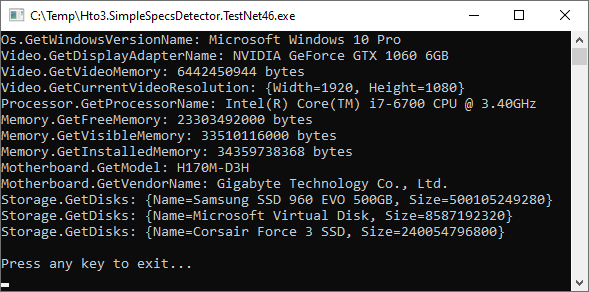
Example
Supported Windows Versions
- Windows 11
- Windows Server 2022
- Windows 10
- Windows Server 2019
- Windows Server 2016
- Windows 8.1
- Windows Server 2012 R2
- Windows 8
- Windows Server 2012
- Windows 7
- Windows Server 2008 R2
- Windows Server 2008
Discontinuated support. Use up to version 1.2.3
Windows VistaWindows Server 2003 R2Windows Server 2003Windows XP 64-Bit EditionWindows XP
Supported Linux Versions
- Same as .NET supported list (link).
Supported .NET Versions
- .NET Framework 4.6.1 to 4.8.1
- .NET 6.0
- .NET 7.0
- .NET 8.0
- .NET 9.0
- .NET 10.0
Discontinuated support. Use up to version 1.2.9
.NET Core 3.x (through .NET Standard).NET 5.0
Related projects:
- https://openhardwaremonitor.org/ The Open Hardware Monitor supports most hardware monitoring chips found on todays mainboards. The CPU temperature can be monitored by reading the core temperature sensors of Intel and AMD processors. The sensors of ATI and Nvidia video cards as well as SMART hard drive temperature can be displayed. There is support from .NET Framework version 4.5 and above, besides the original project, you can find forks spread out there, for example supporting .NET Standard [1]. Open Hardware Monitor is much more complete compared with this project, specialized to retrieve sensors data.
Features
Os
GetOsVersionNumberWindows: Get the correct Windows version following the Microsoft table (https://docs.microsoft.com/en-us/windows/win32/sysinfo/operating-system-version). Linux: Get the VERSION_ID value.GetOsVersionNameGet the OS version name.GetInstalledFrameworkVersionGet the higher .NET Framework version installed on machine. This method can detect starting from 4.0 version.GetSystemUpTimeGet system up time.GetKernelVersionGet the OS kernel version.
Processor
GetProcessorNameGet the processor name.GetProcessorUsageMensure and get the current processor percent usage, where 0 is no load and 1 is full load. Default mensure time is 1 second.
Video
GetDisplayAdapterNameGet the display adapter name.GetVideoMemoryGet amount of memory of the display adapter. Result in bytes.GetCurrentVideoResolutionGet the resolution in pixels of the current display in use (focused).
Memory
GetFreeMemoryNumber of bytes of physical memory currently unused and available.GetInstalledMemoryGet the amount of installed physical memory in bytes.GetVisibleMemoryThe total amount of physical memory (in Bytes) available to the OperatingSystem. This value does not necessarily indicate the true amount of physical memory, but what is reported to the OperatingSystem as available to it.
Motherboard
GetVendorNameGet the vendor name.GetModelGet the motherboard model.GetBIOSVersionGet the BIOS version.
Storage
GetDisksGet all connected hard disks. The information available is the hard disk name and size.
Sound
GetSoundCardsGet all connected sound cards.
Printer
GetPrintersGet all installed printers.
Network
GetNetworkCardsGet all connected network cards.GetNetworkThroughputMensure 1 second and get the current network traffic throughput. Result in Bytes.
Sample App
class Program
{
    static void Main(string[] args)
    {
        //Os
        Console.WriteLine("Os.GetOsVersionNumber: {0}", HardwareDetector.OsDetector.GetOsVersionNumber());
        Console.WriteLine("Os.GetOsVersionName: {0}", HardwareDetector.OsDetector.GetOsVersionName());
        Console.WriteLine("Os.GetInstalledFrameworkVersion: {0}", HardwareDetector.OsDetector.GetInstalledFrameworkVersion());
        Console.WriteLine("Os.GetSystemUpTime: {0}", HardwareDetector.OsDetector.GetSystemUpTime());
        Console.WriteLine("Os.GetKernelVersion: {0}", HardwareDetector.OsDetector.GetKernelVersion());

        //Video
        Console.WriteLine("Video.GetDisplayAdapterName: {0}", HardwareDetector.VideoDetector.GetDisplayAdapterName());
        Console.WriteLine("Video.GetVideoMemory: {0} bytes", HardwareDetector.VideoDetector.GetVideoMemory());
        Console.WriteLine("Video.GetCurrentVideoResolution: {0}", HardwareDetector.VideoDetector.GetCurrentVideoResolution());

        //Processor
        Console.WriteLine("Processor.GetProcessorName: {0}", HardwareDetector.ProcessorDetector.GetProcessorName());
        Console.WriteLine("Processor.GetProcessorUsage: {0}%", HardwareDetector.ProcessorDetector.GetProcessorUsage().Result * 100);

        //Memory
        Console.WriteLine("Memory.GetFreeMemory: {0} bytes", HardwareDetector.MemoryDetector.GetFreeMemory());
        Console.WriteLine("Memory.GetVisibleMemory: {0} bytes", HardwareDetector.MemoryDetector.GetVisibleMemory());
        Console.WriteLine("Memory.GetInstalledMemory: {0} bytes", HardwareDetector.MemoryDetector.GetInstalledMemory());

        //Motherboard
        Console.WriteLine("Motherboard.GetModel: {0}", HardwareDetector.MotherboardDetector.GetModel());
        Console.WriteLine("Motherboard.GetVendorName: {0}", HardwareDetector.MotherboardDetector.GetVendorName());
        Console.WriteLine("Motherboard.GetBIOSVersion: {0}", HardwareDetector.MotherboardDetector.GetBIOSVersion());

        //Storage
        foreach (var disk in HardwareDetector.StorageDetector.GetDisks())
            Console.WriteLine("Storage.GetDisks: {0}", disk);

        //Printers
        foreach (var printer in HardwareDetector.PrinterDetector.GetPrinters())
            Console.WriteLine("Printer.GetPrinters: {0}", printer);

        //Sound cards
        foreach (var soundCard in HardwareDetector.SoundDetector.GetSoundCards())
            Console.WriteLine("Sound.GetSoundCards: {0}", soundCard);

        //Network cards
        foreach (var networkAdapter in HardwareDetector.NetworkDetector.GetNetworkCards())
            Console.WriteLine("Network.GetNetworkCards: {0}", networkAdapter);
        Console.WriteLine("Network.GetNetworkThroughput: {0}", HardwareDetector.NetworkDetector.GetNetworkThroughput(NetworkInterface.GetAllNetworkInterfaces().Last().Description).Result);
    }
}
| Product | Versions Compatible and additional computed target framework versions. |
|---|---|
| .NET | net5.0 was computed. net5.0-windows was computed. net6.0 is compatible. net6.0-android was computed. net6.0-ios was computed. net6.0-maccatalyst was computed. net6.0-macos was computed. net6.0-tvos was computed. net6.0-windows was computed. net7.0 is compatible. net7.0-android was computed. net7.0-ios was computed. net7.0-maccatalyst was computed. net7.0-macos was computed. net7.0-tvos was computed. net7.0-windows was computed. net8.0 is compatible. net8.0-android was computed. net8.0-browser was computed. net8.0-ios was computed. net8.0-maccatalyst was computed. net8.0-macos was computed. net8.0-tvos was computed. net8.0-windows was computed. net9.0 is compatible. net9.0-android was computed. net9.0-browser was computed. net9.0-ios was computed. net9.0-maccatalyst was computed. net9.0-macos was computed. net9.0-tvos was computed. net9.0-windows was computed. net10.0 is compatible. net10.0-android was computed. net10.0-browser was computed. net10.0-ios was computed. net10.0-maccatalyst was computed. net10.0-macos was computed. net10.0-tvos was computed. net10.0-windows was computed. |
| .NET Core | netcoreapp2.0 was computed. netcoreapp2.1 was computed. netcoreapp2.2 was computed. netcoreapp3.0 was computed. netcoreapp3.1 was computed. |
| .NET Standard | netstandard2.0 is compatible. netstandard2.1 is compatible. |
| .NET Framework | net461 is compatible. net462 was computed. net463 was computed. net47 is compatible. net471 was computed. net472 was computed. net48 is compatible. net481 was computed. |
| MonoAndroid | monoandroid was computed. |
| MonoMac | monomac was computed. |
| MonoTouch | monotouch was computed. |
| Tizen | tizen40 was computed. tizen60 was computed. |
| Xamarin.iOS | xamarinios was computed. |
| Xamarin.Mac | xamarinmac was computed. |
| Xamarin.TVOS | xamarintvos was computed. |
| Xamarin.WatchOS | xamarinwatchos was computed. |
-
.NETFramework 4.6.1
- No dependencies.
-
.NETFramework 4.7
- No dependencies.
-
.NETFramework 4.8
- No dependencies.
-
.NETStandard 2.0
- Microsoft.Win32.Registry (>= 5.0.0)
- System.Management (>= 6.0.2)
-
.NETStandard 2.1
- Microsoft.Win32.Registry (>= 5.0.0)
- System.Management (>= 6.0.2)
-
net10.0
- System.Management (>= 10.0.5)
-
net6.0
- System.Management (>= 8.0.0)
-
net7.0
- System.Management (>= 8.0.0)
-
net8.0
- System.Management (>= 8.0.0)
-
net9.0
- System.Management (>= 9.0.14)
NuGet packages
This package is not used by any NuGet packages.
GitHub repositories
This package is not used by any popular GitHub repositories.
| Version | Downloads | Last Updated |
|---|---|---|
| 1.5.0 | 772 | 3/12/2026 |
| 1.4.0 | 167 | 12/30/2025 |
| 1.2.9 | 852 | 3/27/2022 |
| 1.2.8 | 667 | 1/29/2022 |
| 1.2.7 | 525 | 11/29/2021 |
| 1.2.5 | 531 | 11/13/2021 |
| 1.2.3 | 660 | 5/9/2021 |
| 1.2.2 | 517 | 4/11/2021 |
| 1.2.1 | 521 | 2/16/2021 |
| 1.2.0 | 575 | 12/13/2020 |
| 1.0.7 | 617 | 10/29/2020 |
| 1.0.6 | 732 | 1/21/2020 |
| 1.0.5 | 736 | 9/28/2019 |
| 1.0.4 | 745 | 9/8/2019 |
| 1.0.3 | 753 | 8/7/2019 |
| 1.0.2 | 753 | 8/6/2019 |
| 1.0.1 | 767 | 7/24/2019 |
| 1.0.0 | 740 | 6/30/2019 |