HtmlForgeX 2.2.0
dotnet add package HtmlForgeX --version 2.2.0
NuGet\Install-Package HtmlForgeX -Version 2.2.0
<PackageReference Include="HtmlForgeX" Version="2.2.0" />
<PackageVersion Include="HtmlForgeX" Version="2.2.0" />
<PackageReference Include="HtmlForgeX" />
paket add HtmlForgeX --version 2.2.0
#r "nuget: HtmlForgeX, 2.2.0"
#:package HtmlForgeX@2.2.0
#addin nuget:?package=HtmlForgeX&version=2.2.0
#tool nuget:?package=HtmlForgeX&version=2.2.0
HtmlForgeX - HTML / CSS / JavaScript generator for .NET





If you would like to contact me you can do so via Twitter or LinkedIn.




About
HtmlForgeX is a .NET library that simplifies the creation of HTML documents, pages and reports.
It provides a fluent API to create HTML / CSS / JavaScript without knowing any of it.
It is designed to be simple and easy to use, and to provide a way to create HTML content in a more readable and maintainable way.
I have similar project PSWriteHTML for PowerShell that is used by many people. This project aims to provide similar functionality for .NET developers.
As I am not really a developer, and I hardly know what I'm doing if you know how to help out - please do.
- If you see bad practice, please open an issue/submit PR.
- If you know how to do something in HTML/CSS/JS/C# that could help this project - please open an issue/submit PR
- If you see something that could work better - please open an issue/submit PR
- If you see something that I made a fool of myself - please open an issue/submit PR
- If you see something that works not the way I think it works - please open an issue/submit PR
I hope you get the drift? If it's bad - open an issue/fix it! I don't know what I'm doing! The main thing is - it has to work with .NET Framework 4.7.2, .NET Standard 2.0 and so on.
This project is under development and as such there's a lot of things that can and will change, especially if some people help out.
Report pages and empty views
ReportPackage builds a single file, a bundle, or hosted pages from one ReportManifest. It carries the manifest's
language to each page. Bundle links resolve to the manifest's page files, and entity panels are stored once in
shared files that load when the drawer opens. State columns can use Tone(value, ReportStatus) to distinguish
operational states such as recovering and maintenance. Hosts with aggregated models can pass
ReportDeliveryRequest.Tier to the delivery planner; the existing size budgets still apply.
An existing composed assessment uses the same delivery writers without rebuilding its sections:
// assessment is the completed report added with document.Body.AssessmentReport(...).
var package = ReportPackage.From(assessment);
var result = package.Save("output/report.html", new ReportPackageOptions {
    Mode = ReportDeliveryMode.Auto
});
ReportDeliveryMode also offers SingleFile, Bundle, Deferred, Hosted and Print for a host's own config.
Bundles load only the current page's datasets and work from file shares through script sidecars. Counts, badges,
navigation groups and typed section content keep their definitions. See composed report delivery
and the composed-report-package example.
Very large reports can defer any part of a page: tab.Defer(), panel.Defer(key), column.Defer(key) or
page.ReportDeferred(key, ...) deliver a chapter, a section or a list when the reader needs it. A bundle writes it to
content/<group>/<n>.<hash>.js files, a single file keeps it compressed in the page (with an optional size cap that
replaces oversized content by a statement), and a hosted page serves it through MapHtmlForgeXReportFragments. Links
and print load it first, and its scripts start when it arrives. See deferred report content.
Use ReportEmptyState when content has no rows. It centers a title and a muted explanation without an illustration.
Settings(...) groups the meaning and optional action; NoMatches distinguishes a search or filter that hides rows
from an empty dataset and can offer a clear button. See the report shell design and
typed component examples.
Explorer column presentation
Category values can keep stable query tokens while displaying localized labels and sorting in a declared order. Numeric thresholds color the number itself, with the explanation in its tooltip and record drawer. Long actions can wrap to a bounded number of lines on the dataset or in one explorer's settings:
columns.Category("state", "State", row => row.State, column => column
    .ValueLabel("act", "Follow up").ValueOrder("act", "confirm"));
columns.Number("days", "Days remaining", row => row.Days, column => column
    .ToneBelow(0, AssessmentSeverity.Severe, "Expired")
    .ToneAtMost(14, AssessmentSeverity.High, "Due soon"));
columns.Text("action", "Action", row => row.Action, column => column.Wrap().MaxLines(2));
CSV displays category labels and keeps raw numbers. Host spreadsheet writers can use result.GetExportRows()
to retain numeric, date and boolean types. See column semantics and run the
report-column-semantics example for classic and CanopyX pages.
QR codes and barcodes
Use the optional HtmlForgeX.CodeGlyphX bridge for server-rendered QR codes and linear barcodes.
Codes are inline SVG, so their generation needs no browser script or network access.
Size, quiet zone, QR error correction, report colours, accessible names and captions use typed settings.
using HtmlForgeX;
using CodeGlyphX;

document.Body.CodeGlyphXQRCode("https://example.com/report", s => s
    .Size(240).ErrorCorrection(QrErrorCorrectionLevel.H)
    .AccessibleLabel("Open the report").Caption("Scan to open the report").End());
document.Body.CodeGlyphXBarcode(BarcodeType.Code128, "ASSET-1042", s => s
    .Size(320, 100).Caption("ASSET-1042").End());
The default colours follow the report's light and dark tokens. Fixed black on white is available for
scanners and static SVG readers. The print stylesheet uses black on white.
Existing QRCode(payload) calls can opt in with .UseCodeGlyphX(); unchanged calls keep EasyQRCode.
See the component reference and
migration guide. Run the codeglyphx-codes example for light, dark and system-theme pages.
Used libraries
HtmlForgeX embeds browser scripts, styles, fonts, icons, images and data. Components register the libraries they use; the package also contains assets that a particular page may not load. Dependencies include Tabler, Bootstrap, DataTables and its extensions, ApexCharts, Chart.js and its plugins, jQuery, vis-network, Font Awesome, pdfmake and others.
- ApexCharts - license MIT
- Bootstrap - license MIT
- DataTables - license MIT
- EasyQRCodeJS - license MIT (legacy browser QR renderer)
- CodeGlyphX - license Apache-2.0 (server-rendered codes through the optional
HtmlForgeX.CodeGlyphXbridge) - CanopyX - license MIT (tree grids, through the optional
HtmlForgeX.CanopyXpackage) - JQuery - license MIT
- Tabler - license MIT
- VisNetwork - license MIT
Use AssetInventory.CapturePackage().ToJson() to export all declarations and the
actual loaded assembly's asset hashes. Use document.CaptureAssetInventory().ToJson()
after composing a page to identify its registered libraries. The export retains
compound dependencies, exact source URL version selectors, upstream license texts
and unresolved review issues. See dependency evidence and release delivery
for examples, version boundaries and the remaining distribution checks.
Original HtmlForgeX code and Evotec-owned assets use Evotec proprietary terms. Partner source and build rights are agreed separately. Third-party materials retain their own licenses, including distinct terms for fonts, icons and bundled code. The package includes third-party notices and version-specific upstream evidence.
Chart Support Matrix
Use the table below to see which chart types are available out of the box for each engine and where to find sample usage.
| Chart Type | ApexCharts | Chart.js | Example(s) |
|---|---|---|---|
| Line | Yes | Yes | Apex: HtmlForgeX.Examples/Charts/ChartsApexBasicDemo.cs; ChartJs: HtmlForgeX.Examples/Charts/ChartJsBasicDemo.cs |
| Area | Yes | Yes | Apex: HtmlForgeX.Examples/Charts/ChartsApexBasicDemo.cs; ChartJs: HtmlForgeX.Examples/Charts/ChartJsBasicDemo.cs |
| Column / Vertical Bar | Yes | Yes | Apex: HtmlForgeX.Examples/Charts/ChartsApexBasicDemo.cs; ChartJs: HtmlForgeX.Examples/Charts/ChartJsBasicDemo.cs |
| Horizontal Bar | Partial (via rotated axes) | Yes | ChartJs: HtmlForgeX.Examples/Charts/ChartJsShowcaseAll.cs |
| Pie | Yes | Yes | Apex: HtmlForgeX.Examples/Charts/ChartsApexBasicDemo.cs; ChartJs: HtmlForgeX.Examples/Charts/ChartJsBasicDemo.cs |
| Donut / Doughnut | Yes | Yes | Apex: HtmlForgeX.Examples/Charts/ChartsApexBasicDemo.cs; ChartJs: HtmlForgeX.Examples/Charts/ChartJsBasicDemo.cs |
| Polar Area | Yes | Yes | Apex: HtmlForgeX.Examples/Charts/ChartsApexComprehensiveDemo.cs; ChartJs: HtmlForgeX.Examples/Charts/ChartJsBasicDemo.cs |
| Radar | Yes | Yes | Apex: HtmlForgeX.Examples/Charts/ChartsApexComprehensiveDemo.cs; ChartJs: HtmlForgeX.Examples/Charts/ChartJsBasicDemo.cs |
| Scatter | Yes | Yes | Apex: HtmlForgeX.Examples/Charts/ChartsApexComprehensiveDemo.cs; ChartJs: HtmlForgeX.Examples/Charts/ChartJsBasicDemo.cs |
| Bubble | Yes | Yes | Apex: HtmlForgeX.Examples/Charts/ChartsApexComprehensiveDemo.cs; ChartJs: HtmlForgeX.Examples/Charts/ChartJsBasicDemo.cs |
| Mixed / Combo | Yes | Yes | Apex: HtmlForgeX.Examples/Charts/ChartsApexComprehensiveDemo.cs; ChartJs: HtmlForgeX.Examples/Charts/ChartJsMixedAndAreaDemo.cs |
| Heatmap | Yes | No | Apex: HtmlForgeX.Examples/Charts/ChartsApexComprehensiveDemo.cs |
| Treemap | Yes | No | Apex: HtmlForgeX.Examples/Charts/ChartsApexComprehensiveDemo.cs |
| Candlestick | Yes | No | Apex: HtmlForgeX.Examples/Charts/ChartsApexComprehensiveDemo.cs |
| Box Plot | Yes | No | Apex: HtmlForgeX.Examples/Charts/ChartsApexComprehensiveDemo.cs |
| Range Bar / Range Area | Yes | No | Apex: HtmlForgeX.Examples/Charts/ChartsApexComprehensiveDemo.cs |
| Funnel | Yes | No | Apex: HtmlForgeX.Examples/Charts/ChartsApexComprehensiveDemo.cs |
| Radial Bar | Yes | No | Apex: HtmlForgeX.Examples/Charts/ChartsApexComprehensiveDemo.cs |
| Gauge / Bullet / KPI | No | Yes | ChartJs: HtmlForgeX.Examples/Charts/ChartsChartJsKpiShowcase.cs; Gauge plugin: HtmlForgeX.Examples/ChartJs/ChartJsGaugeV3Example.cs |
| Geo Choropleth / Bubble | No | Yes | ChartJs: HtmlForgeX.Examples/Charts/ChartJsGeoWorldDemo.cs |
Notes:
- “Partial” means the effect is achievable with additional configuration (e.g., setting
indexAxis = "y"for Chart.js to render horizontal bars). - Chart.js gauges, bullets, and geo charts rely on included helper plugins; enable the corresponding libraries via the fluent API when needed. The
gaugechart type is provided by chartjs-gauge-v3 and works both online and offline.
Project folder structure
HtmlForgeX- main project- Containers - classes that represent HTML containers
- Enums - enums used in the project
- Extensions - extension methods
- Resources - resources used in the project
- Classes - C# classes describing resources
- Scripts - JavaScript files, embedded resources
- Styles - CSS files, embedded resources
HtmlForgeX.Tests- tests for the projectHtmlForgeX.Examples- demo project
Examples
See also: Docs/LAYOUT_AND_SPACING.md for automatic spacing rules and tuning (pages, rows, columns). This helps prevent adjacent cards/rows from touching even when mixed.
Example - Create a simple dashboard with different components
This example shows how to create a simple dashboard with different components like cards, tables, charts, diagrams, and more. WIth a few lines of code, you can create a complex HTML document with a lot of components.
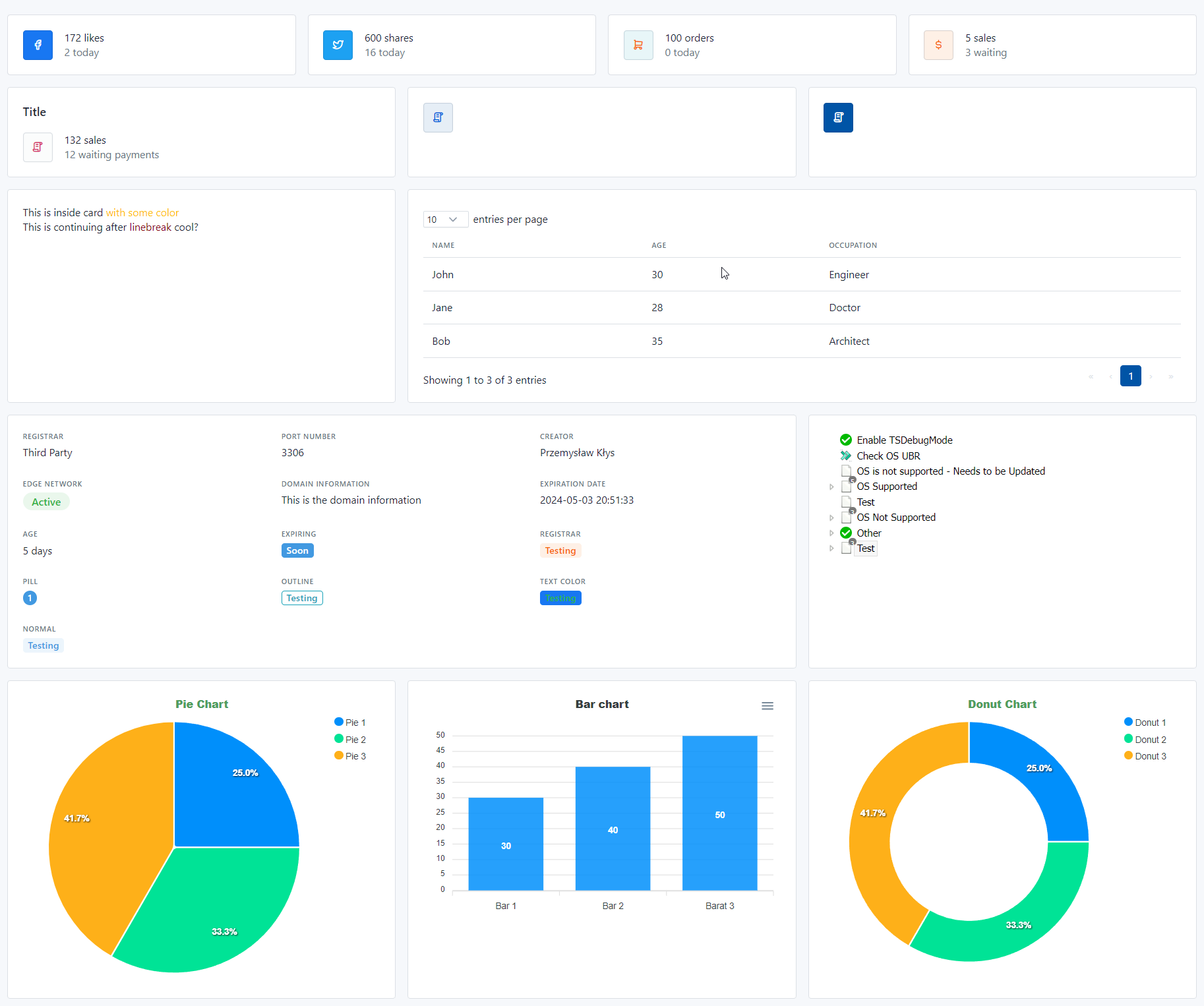
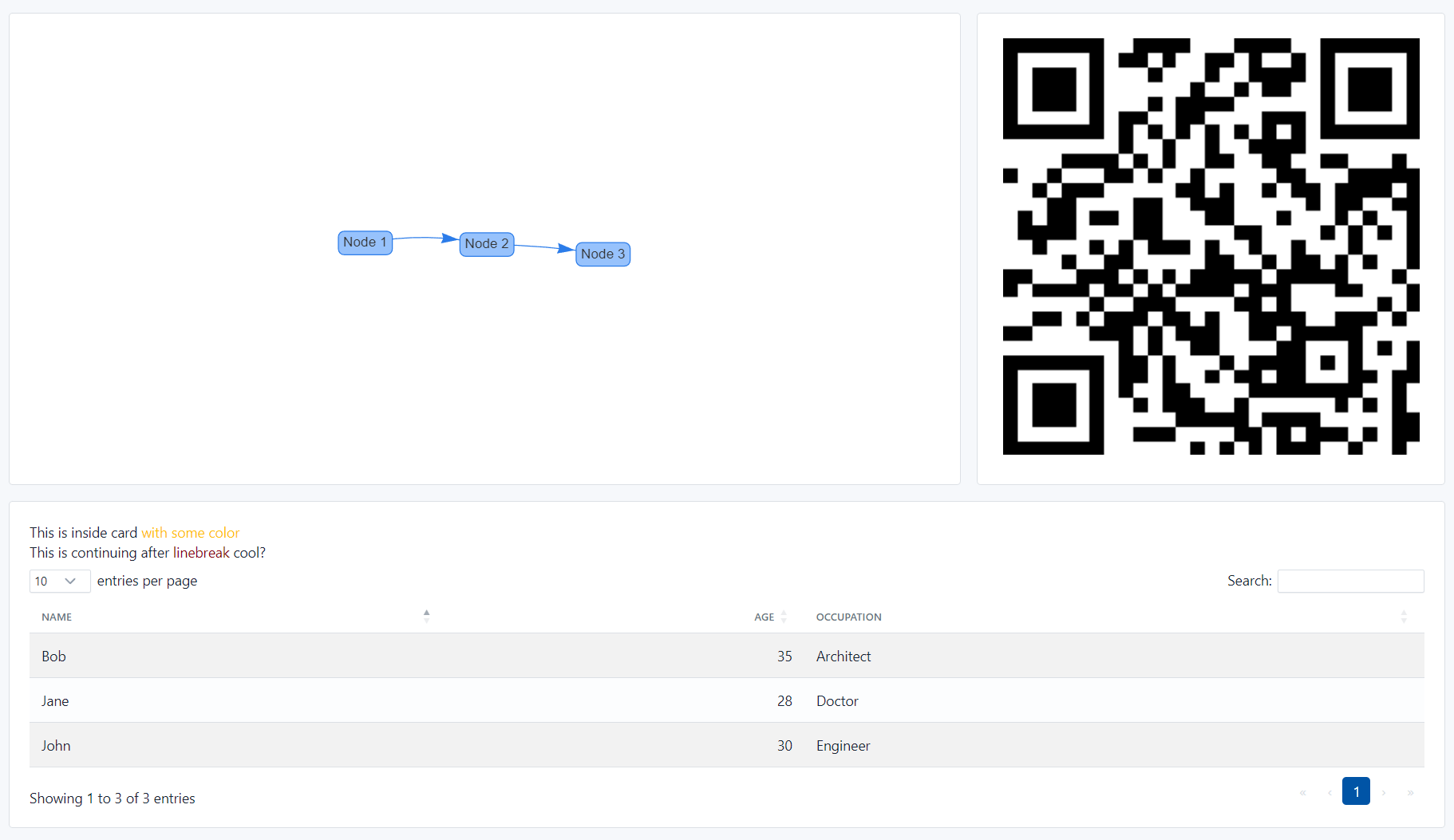
Here's how you do it - with just over 300 lines of code:
// Create a list of simple objects
var data = new List<dynamic> {
    new { Name = "John", Age = 30, Occupation = "Engineer" },
    new { Name = "Jane", Age = 28, Occupation = "Doctor" },
    new { Name = "Bob", Age = 35, Occupation = "Architect" }
};

var data1 = new List<dynamic> {
    new { Name = "John", Age = 30, Occupation = "Engineer" },
    new { Name = "Jane", Age = 28, Occupation = "Doctor" },
    new { Name = "Bob", Age = 35, Occupation = "Architect" },
    new { Name = "John", Age = 30, Occupation = "Engineer" },
};

var data2 = new List<dynamic> {
    new { Name = "John", Age = 30, Occupation = "Engineer" },
    new { Name = "Jane", Age = 28, Occupation = "Doctor" },
};

var document = new Document {
    Head = {
        Title = "Basic Demo Document Container 3", Author = "Przemysław Kłys", Revised = DateTime.Now
    },
    LibraryMode = LibraryMode.Online,
    ThemeMode = ThemeMode.Light
};
document.Body.Page(page => {
    page.Layout = TablerLayout.Fluid;
    page.Row(row => {
        // first line of 4 cards
        row.Column(TablerColumnNumber.Three, column => {
            column.CardMini().Avatar(TablerIcon.BrandFacebook).BackgroundColor(TablerColor.Facebook).TextColor(TablerColor.White).Title("172 likes").Subtitle("2 today");
        });
        row.Column(TablerColumnNumber.Three, column => {
            column.CardMini().Avatar(TablerIcon.BrandTwitter).BackgroundColor(TablerColor.Twitter).TextColor(TablerColor.White).Title("600 shares").Subtitle("16 today");
        });
        row.Column(TablerColumnNumber.Three, column => {
            column.CardMini().Avatar(TablerIcon.ShoppingCart).BackgroundColor(TablerColor.CyanLight).TextColor(TablerColor.Orange).Title("100 orders").Subtitle("0 today");
        });
        row.Column(TablerColumnNumber.Three, column => {
            column.CardMini().Avatar(TablerIcon.CurrencyDollar).BackgroundColor(TablerColor.OrangeLight).TextColor(TablerColor.White).Title("5 sales").Subtitle("3 waiting");
        });
        // second line of 3 cards
        row.Column(TablerColumnNumber.Four, column => {
            // let's build a card with an avatar manually
            column.Card(card => {
                card.Row(cardTitle => {
                    cardTitle.HeaderLevel(HeaderLevelTag.H4, "Title").Class("card-title");
                });
                card.Row(cardRow => {
                    cardRow.Column(TablerColumnNumber.Auto, avatarColumn => {
                        avatarColumn.Avatar().Icon(TablerIcon.License).BackgroundColor(TablerColor.Gray300).TextColor(TablerColor.Pink);
                    });
                    cardRow.Column(textColumn => {
                        textColumn.Text("132 sales").Weight(TablerFontWeight.Medium);
                        textColumn.Text("12 waiting payments").Style(TablerTextStyle.Muted);
                    });
                });
            });
        });
        row.Column(TablerColumnNumber.Four, column => {
            column.Card(card => {
                card.Add(new TablerAvatar().Icon(TablerIcon.License).BackgroundColor(TablerColor.BlueLight).TextColor(TablerColor.Flickr));
            });
        });
        row.Column(TablerColumnNumber.Four, column => {
            column.CardMini().Avatar(TablerIcon.License);

        });

        row.Column(TablerColumnNumber.Four, column => {
            column.Card(card => {
                card.Span("This is inside card").AddContent(" with some color").WithColor(RGBColor.Amber);
                card.LineBreak();
                card.Span("This is continuing after").AppendContent(" linebreak ").WithColor(RGBColor.RedDevil).AppendContent(" cool?");
            });
        });
        row.Column(TablerColumnNumber.Eight, column => {
            column.Card(card => {
                var table1 = (DataTablesTable)card.Table(data, TableType.DataTables);
                table1.EnableOrdering = false;
                table1.EnableSearching = false;
            });
        });
        row.Column(TablerColumnNumber.Eight, column => {
            column.Card(card => {
                card.DataGrid(dataGrid => {
                    dataGrid.AddItem("Registrar", "Third Party");
                    dataGrid.AddItem("Port number", "3306");
                    dataGrid.AddItem("Creator", "Przemysław Kłys");
                    dataGrid.AddItem("Edge network", new TablerBadgeStatus("Active", TablerColor.Green));
                    dataGrid.Title("Domain Information").Content("This is the domain information");
                    dataGrid.AddItem("Expiration date", DateTime.Now.AddDays(5).ToString());
                    dataGrid.AddItem("Age", "5 days");
                    dataGrid.Title("Expiring").Content(new TablerBadgeSpan("Soon", TablerColor.Azure, textColor: TablerColor.White));
                    dataGrid.Title("Registrar").Content(new TablerBadgeSpan("Testing", TablerColor.OrangeLight, TablerBadgeStyle.Normal));
                    dataGrid.Title("Pill").Content(new TablerBadgeSpan("1", TablerColor.Azure, TablerBadgeStyle.Pill, TablerColor.White));
                    dataGrid.Title("Outline").Content(new TablerBadgeSpan("Testing", TablerColor.Azure, TablerBadgeStyle.Outline, TablerColor.Cyan));
                    dataGrid.Title("Text Color").Content(new TablerBadgeSpan("Testing", TablerColor.Facebook, TablerBadgeStyle.Normal, TablerColor.Green));
                    dataGrid.Title("Normal").Content(new TablerBadgeSpan("Testing", TablerColor.AzureLight, TablerBadgeStyle.Normal));
                    dataGrid.Title("Tag").Content(new TablerTag("New", TablerColor.Lime).Dismissable());
                    dataGrid.Title("Large Tag").Content(new TablerTag("Download", TablerColor.Green).TagSize(TablerTagSize.Large).Dismissable());

                });
            });
        });
        row.Column(TablerColumnNumber.Four, column => {
            column.Card(4, card => {
                card.ApexChart(chart => {
                    chart.Title.Text("Pie Chart").Color(RGBColor.FruitSalad);
                    chart.AddPie("Pie 1", 30).AddPie("Pie 2", 40).AddPie("Pie 3", 50);
                });
            });
        });
        row.Column(TablerColumnNumber.Four, column => {
            column.Card(card => {
                card.ApexChart(chart => {
                    chart.Title.Text("Bar chart");
                    chart.AddBar("Bar 1", 30).AddBar("Bar 2", 40).AddBar("Barat 3", 50);
                });
            });
        });
        row.Column(TablerColumnNumber.Four, column => {
            column.Card(card => {
                card.ApexChart(chart => {
                    chart.Title.Text("Donut Chart").Color(RGBColor.FruitSalad);
                    chart.AddDonut("Donut 1", 30).AddDonut("Donut 2", 40).AddDonut("Donut 3", 50);
                });
            });
        });
        row.Column(TablerColumnNumber.Eight, column => {
            column.Card(card => {
                card.DiagramNetwork(diagam => {
                    diagam.AddNode(new { id = 1, label = "Node 1" });
                    diagam.AddNode(new { id = 2, label = "Node 2" });
                    diagam.AddNode(new { id = 3, label = "Node 3" });
                    diagam.AddEdge(new { from = 1, to = 2 });
                    diagam.AddEdge(new { from = 2, to = 3 });
                    diagam.SetOption("nodes", new { shape = "box" });
                    diagam.SetOption("edges", new { arrows = "to" });
                });
            });
        });
        row.Column(TablerColumnNumber.Four, column => {
            column.Card(card => {
                card.QRCode("https://evotec.xyz");
            });
        });
        // this will add a new row and push it all wide
        row.Column(TablerColumnNumber.Twelve, column => {
            column.Card(card => {
                card.Span("This is inside card").AddContent(" with some color").WithColor(RGBColor.Amber);
                card.LineBreak();
                card.Span("This is continuing after").AppendContent(" linebreak ").WithColor(RGBColor.RedDevil).AppendContent(" cool?");
                var table1 = ((DataTablesTable)card.Table(data, TableType.DataTables)).Style(BootStrapTableStyle.Striped);
                table1.EnableOrdering = true;
                table1.EnableSearching = true;
                table1.EnableScrollX = true;
            });
        });
    });
});

document.Save("BasicDemoDocumentContainer03.html", openInBrowser);
Example - Different components in cards
This example shows how to create different components in cards like progress bars, steps, logs, accordions, and more.
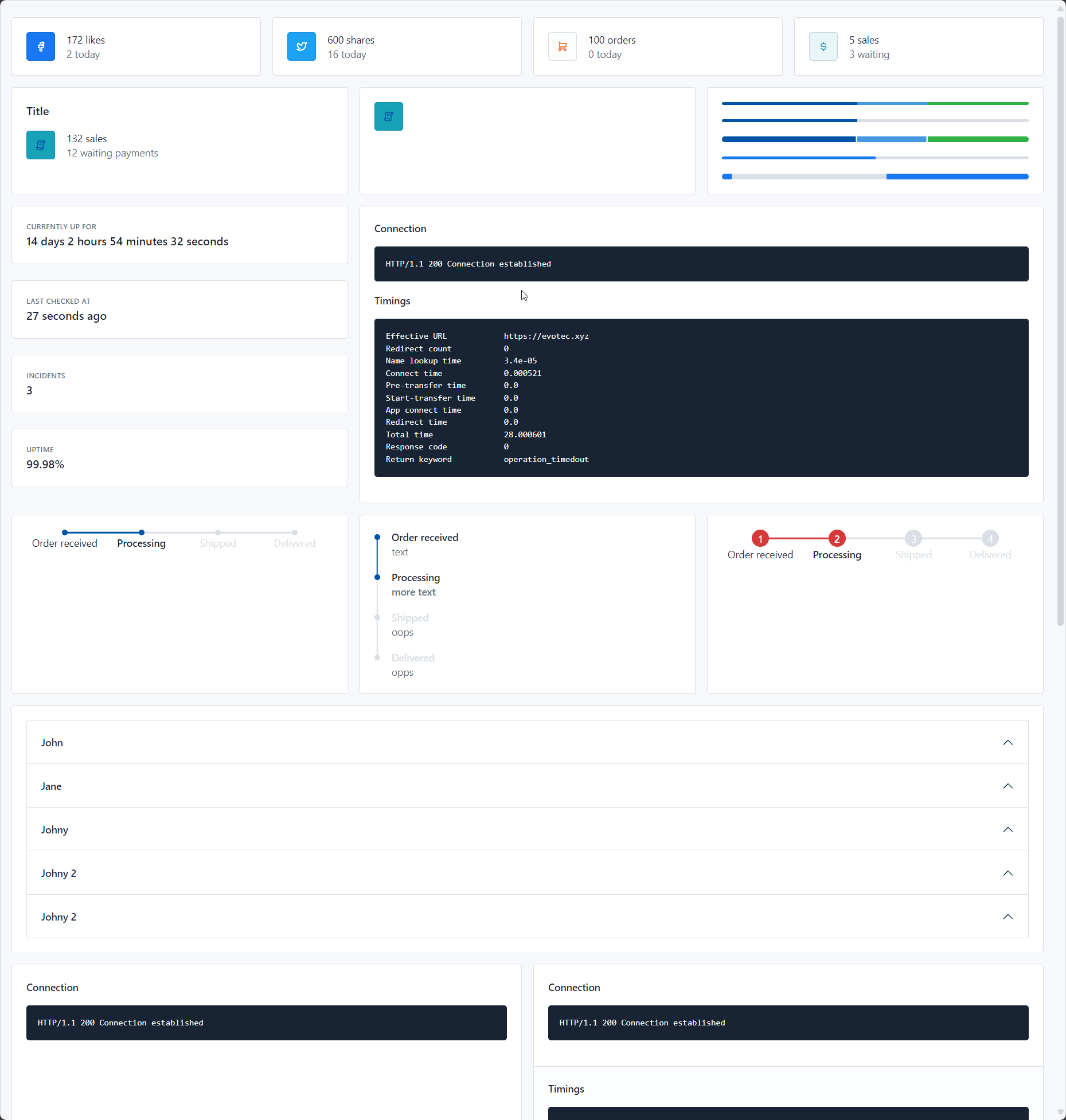
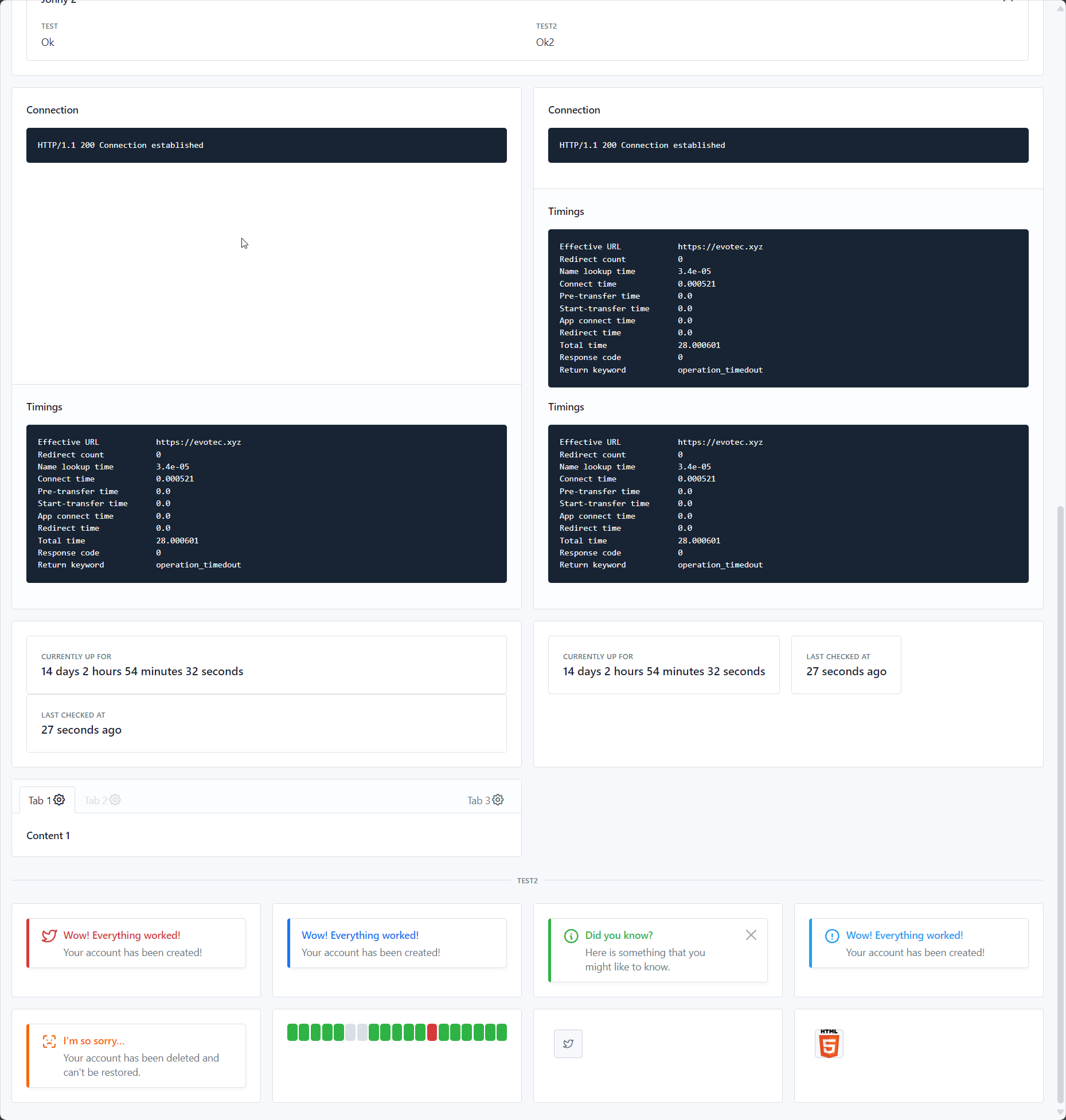
With just over 200 lines of code, you can create a complex HTML document with a lot of components:
// Create a list of simple objects
var data = new List<dynamic> {
    new { Name = "John", Age = 30, Occupation = "Engineer" },
    new { Name = "Jane", Age = 28, Occupation = "Doctor" },
    new { Name = "Bob", Age = 35, Occupation = "Architect" }
};

var logs = @"
Effective URL            https://evotec.xyz
Redirect count           0
Name lookup time         3.4e-05
Connect time             0.000521
Pre-transfer time        0.0
Start-transfer time      0.0
App connect time         0.0
Redirect time            0.0
Total time               28.000601
Response code            0
Return keyword           operation_timedout
";

var document = new Document {
    Head = {
        Title = "Basic Demo Document Container 4", Author = "Przemysław Kłys", Revised = DateTime.Now
    },
    LibraryMode = LibraryMode.Online,
    ThemeMode = ThemeMode.Light
};
document.Body.Page(page => {
    page.Layout = TablerLayout.Fluid;
    page.Row(row => {
        // first line of 4 cards
        row.Column(TablerColumnNumber.Three, column => {
            column.CardMini().Avatar(TablerIcon.BrandFacebook).BackgroundColor(TablerColor.Facebook)
                .TextColor(TablerColor.White).Title("172 likes").Subtitle("2 today");
        });
        row.Column(TablerColumnNumber.Three, column => {
            column.CardMini().Avatar(TablerIcon.BrandTwitter).BackgroundColor(TablerColor.Twitter)
                .TextColor(TablerColor.White).Title("600 shares").Subtitle("16 today");
        });
        row.Column(TablerColumnNumber.Three, column => {
            column.CardMini().Avatar(TablerIcon.ShoppingCart).BackgroundColor(TablerColor.Gray200)
                .TextColor(TablerColor.Orange).Title("100 orders").Subtitle("0 today");
        });
        row.Column(TablerColumnNumber.Three, column => {
            column.CardMini().Avatar(TablerIcon.CurrencyDollar).BackgroundColor(TablerColor.CyanLight)
                .TextColor(TablerColor.White).Title("5 sales").Subtitle("3 waiting");
        });
        // second line of 3 cards
        row.Column(TablerColumnNumber.Four, column => {
            // let's build a card with an avatar manually
            column.Card(card => {
                card.Row(cardTitle => {
                    cardTitle.HeaderLevel(HeaderLevelTag.H4, "Title").Class("card-title");
                });
                card.Row(cardRow => {
                    cardRow.Column(TablerColumnNumber.Auto, avatarColumn => {
                        avatarColumn.Avatar().Icon(TablerIcon.License).BackgroundColor(TablerColor.Cyan)
                            .TextColor(TablerColor.Blue);
                    });
                    cardRow.Column(textColumn => {
                        textColumn.Text("132 sales").Weight(TablerFontWeight.Medium);
                        textColumn.Text("12 waiting payments").Style(TablerTextStyle.Muted);
                    });
                });
            });
        });
        row.Column(TablerColumnNumber.Four, column => {
            column.Card(card => {
                card.Add(new TablerAvatar().Icon(TablerIcon.License).BackgroundColor(TablerColor.Cyan)
                    .TextColor(TablerColor.Blue));
            });
        });
        row.Column(TablerColumnNumber.Four, column => {
            column.Card(card => {
                card.ProgressBar(TablerProgressBarType.Small)
                    .Item(TablerColor.Primary, 44, "")
                    .Item(TablerColor.Info, 23, "")
                    .Item(TablerColor.Success, 33, "");
                card.LineBreak();
                card.ProgressBar(TablerProgressBarType.Small)
                    .Item(TablerColor.Primary, 44, "Test");
                card.LineBreak();
                card.ProgressBar(TablerProgressBarType.Separated)
                    .Item(TablerColor.Primary, 44, "Test")
                    .Item(TablerColor.Info, 23, "Test")
                    .Item(TablerColor.Success, 33, "Test");
                card.LineBreak();
                card.ProgressBar(TablerProgressBarType.Small, 50, TablerColor.Facebook);
                card.LineBreak();
                card.ProgressBar(TablerProgressBarType.Indeterminate, 100, TablerColor.Facebook);
            });
        });
        row.Column(TablerColumnNumber.Four, column => {
            column.Row(rowNested => {
                rowNested.Column(TablerColumnNumber.Twelve, column => {
                    column.CardBasic("Currently Up for", "14 days 2 hours 54 minutes 32 seconds");
                });
                rowNested.Column(TablerColumnNumber.Twelve, column => {
                    column.CardBasic().Title("Last checked at").Text("27 seconds ago");
                });
                rowNested.Column(TablerColumnNumber.Twelve, column => {
                    column.CardBasic("Incidents", "3");
                });
                rowNested.Column(TablerColumnNumber.Twelve, column => {
                    column.CardBasic().Title("Uptime").Text("99.98%");
                });
            });
        });
        row.Column(TablerColumnNumber.Eight, column => {
            column.Card(card => {
                card.Logs("HTTP/1.1 200 Connection established").Title(HeaderLevelTag.H4, "Connection");
                card.Logs(logs).Title(HeaderLevelTag.H4, "Timings");
            });

        });
        row.Column(TablerColumnNumber.Four, column => {
            column.Card(card => {
                card.Steps().Color(TablerColor.AzureLight)
                    .AddStep("Order received", false)
                    .AddStep("Processing", true)
                    .AddStep("Shipped", false)
                    .AddStep("Delivered", false);

            });
        });
        row.Column(TablerColumnNumber.Four, column => {
            column.Card(card => {
                card.Steps().Orientation(StepsOrientation.Vertical).Color(TablerColor.Facebook)
                    .AddStep("Order received", "text", false)
                    .AddStep("Processing", "more text", true)
                    .AddStep("Shipped", "oops", false)
                    .AddStep("Delivered", "opps", false);
            });
        });
        row.Column(TablerColumnNumber.Four, column => {
            column.Card(card => {
                card.Steps().StepCounting().Color(TablerColor.Red)
                    .AddStep("Order received", false)
                    .AddStep("Processing", true)
                    .AddStep("Shipped", false)
                    .AddStep("Delivered", false);
            });
        });
        row.Column(TablerColumnNumber.Twelve, column => {
            column.Card(card => {
                card.Accordion(accordion => {
                    // works
                    accordion.AddItem("John", new Span().AddContent("Test1"));
                    // works
                    accordion.AddItem("Jane", new Span().AddContent("Test2"));
                    // works
                    accordion.AddItem("Johny", item => {
                        item.Content(new Span().AddContent("Test2"));
                        item.Content(new TablerSteps().StepCounting().Color(TablerColor.Red)
                            .AddStep("Order received", false)
                            .AddStep("Processing", true)
                            .AddStep("Shipped", false)
                            .AddStep("Delivered", false));
                    });
                    accordion.AddItem("Johny 2").Content(item => {
                        item.Steps().StepCounting().Color(TablerColor.Red)
                            .AddStep("Order received", false)
                            .AddStep("Processing", true)
                            .AddStep("Shipped", false)
                            .AddStep("Delivered", false);
                    });

                    accordion.AddItem("Johny 2").Content(item => {
                        item.DataGrid(grid => {
                            grid.AddItem("Test", "Ok");
                            grid.AddItem("Test2", "Ok2");
                        });
                    });
                });
            });
        });
        row.Column(TablerColumnNumber.Six, column => {
            column.Card(card => {
                card.Logs("HTTP/1.1 200 Connection established").Title(HeaderLevelTag.H4, "Connection");
                card.Footer().Logs(logs).Title(HeaderLevelTag.H4, "Timings");

            });
        });

        row.Column(TablerColumnNumber.Six, column => {
            column.Card(card => {
                card.Logs("HTTP/1.1 200 Connection established").Title(HeaderLevelTag.H4, "Connection");

                card.Footer(cardFooter => {
                    cardFooter.Logs(logs).Title(HeaderLevelTag.H4, "Timings");
                    cardFooter.Logs(logs).Title(HeaderLevelTag.H4, "Timings");
                });

            });
        });

        row.Column(TablerColumnNumber.Six, column => {
            column.Card(card => {
                card.Row(rowWithinCard => {
                    rowWithinCard.Column(TablerColumnNumber.Twelve, column => {
                        column.CardBasic("Currently Up for", "14 days 2 hours 54 minutes 32 seconds");
                    });
                    rowWithinCard.Column(TablerColumnNumber.Twelve, column => {
                        column.CardBasic().Title("Last checked at").Text("27 seconds ago");
                    });
                });
            });
        });
        row.Column(TablerColumnNumber.Six, column => {
            column.Card(card => {
                card.Row(rowWithinCard => {
                    rowWithinCard.Column(TablerColumnNumber.MediumAuto, column => {
                        column.CardBasic("Currently Up for", "14 days 2 hours 54 minutes 32 seconds");
                    });
                    rowWithinCard.Column(TablerColumnNumber.MediumAuto, column => {
                        column.CardBasic().Title("Last checked at").Text("27 seconds ago");
                    });
                });
            });
        });

        row.Column(TablerColumnNumber.Six, column => {
            column.Tabs(tabs => {
                //tabs.Navigation(TabNavigation.Fill);
                tabs.AddTab("Tab 1", new Strong("Content 1")).Active();
                tabs.AddTab("Tab 2", new Strong("Content 2")).Disabled();
                tabs.AddTab("Tab 3", new Strong("Content 3")).MoveTabs(TabState.MoveStart);
            });
        });


    });

    page.Divider("Test2");

    page.Row(row => {
        // first line of 4 cards
        row.Column(TablerColumnNumber.Three, column => {
            column.Card(card => {
                card.Alert("Wow! Everything worked!", "Your account has been created!")
                    .Icon(TablerIcon.BrandTwitter).Color(TablerColor.Danger);
            });
        });
        row.Column(TablerColumnNumber.Three, column => {
            column.Card(card => {
                card.Alert("Wow! Everything worked!", "Your account has been created!")
                    .Color(TablerColor.Facebook);
            });
        });
        row.Column(TablerColumnNumber.Three, column => {
            column.Card(card => {
                card.Alert("Did you know?", "Here is something that you might like to know.", TablerColor.Green,
                    TablerAlertType.Dismissible).Icon(TablerIcon.InfoCircle);
            });
        });
        row.Column(TablerColumnNumber.Three, column => {
            column.Card(card => {
                card.Alert("Wow! Everything worked!", "Your account has been created!")
                    .Icon(TablerIcon.ExclamationCircle).Color(TablerColor.Twitter);
            });
        });
        row.Column(TablerColumnNumber.Three, column => {
            column.Card(card => {
                card.Alert("I'm so sorry…", "Your account has been deleted and can't be restored.")
                    .Icon(TablerIcon.FaceIdError).Color(TablerColor.Warning);
            });
        });
        row.Column(TablerColumnNumber.Three, column => {
            column.Card(card => {
                card.Tracking()
                    .Block("Operational", TablerColor.Success)
                    .Block("Operational", TablerColor.Success)
                    .Block("Operational", TablerColor.Success)
                    .Block("Operational", TablerColor.Success)
                    .Block("Operational", TablerColor.Success)
                    .Block("No data", TablerColor.Failed)
                    .Block("No data", TablerColor.Failed)
                    .Block("Operational", TablerColor.Success)
                    .Block("Operational", TablerColor.Success)
                    .Block("Operational", TablerColor.Success)
                    .Block("Operational", TablerColor.Success)
                    .Block("Operational", TablerColor.Success)
                    .Block("Downtime", TablerColor.Danger)
                    .Block("Operational", TablerColor.Success)
                    .Block("Operational", TablerColor.Success)
                    .Block("Operational", TablerColor.Success)
                    .Block("Operational", TablerColor.Success)
                    .Block("Operational", TablerColor.Success)
                    .Block("Operational", TablerColor.Success);
            });
        });
        row.Column(TablerColumnNumber.Three, column => {
            column.Card(card => {
                card.Avatar().Icon(TablerIcon.BrandTwitter).Margin(TablerMarginStyle.M2);
            });
        });
        row.Column(TablerColumnNumber.Three, column => {
            column.Card(card => {
                card.Avatar()
                    .Image(
                        "https://upload.wikimedia.org/wikipedia/commons/thumb/6/61/HTML5_logo_and_wordmark.svg/1920px-HTML5_logo_and_wordmark.svg.png")
                    .Size(AvatarSize.MD)
                    .Margin(TablerMarginStyle.M2);
            });
        });
    });
});
document.Save("BasicDemoDocumentContainer04.html", openInBrowser);
Support This Project
If you find this project helpful, please consider supporting its development. Your sponsorship will help the maintainers dedicate more time to maintenance and new feature development for everyone.
It takes a lot of time and effort to create and maintain this project. By becoming a sponsor, you can help ensure that it stays free and accessible to everyone who needs it.
To become a sponsor, you can choose from the following options:
Your sponsorship is completely optional and not required for using this project. We want this project to remain open-source and available for anyone to use for free, regardless of whether they choose to sponsor it or not.
If you work for a company that uses our .NET libraries or PowerShell Modules, please consider asking your manager or marketing team if your company would be interested in supporting this project. Your company's support can help us continue to maintain and improve this project for the benefit of everyone.
Thank you for considering supporting this project!
Please share with the community
Please consider sharing a post about HtmlForgeX and the value it provides. It really does help!





Email library
HtmlForgeX.Email lives in this repository and builds from HtmlForgeX.sln. It keeps its
own NuGet package and email-specific renderer with no runtime NuGet dependencies. The HtmlForgeX PowerShell module
provides builders for both web reports and emails.
| Product | Versions Compatible and additional computed target framework versions. |
|---|---|
| .NET | net5.0 was computed. net5.0-windows was computed. net6.0 was computed. net6.0-android was computed. net6.0-ios was computed. net6.0-maccatalyst was computed. net6.0-macos was computed. net6.0-tvos was computed. net6.0-windows was computed. net7.0 was computed. net7.0-android was computed. net7.0-ios was computed. net7.0-maccatalyst was computed. net7.0-macos was computed. net7.0-tvos was computed. net7.0-windows was computed. net8.0 is compatible. net8.0-android was computed. net8.0-browser was computed. net8.0-ios was computed. net8.0-maccatalyst was computed. net8.0-macos was computed. net8.0-tvos was computed. net8.0-windows was computed. net9.0 was computed. net9.0-android was computed. net9.0-browser was computed. net9.0-ios was computed. net9.0-maccatalyst was computed. net9.0-macos was computed. net9.0-tvos was computed. net9.0-windows was computed. net10.0 is compatible. net10.0-android was computed. net10.0-browser was computed. net10.0-ios was computed. net10.0-maccatalyst was computed. net10.0-macos was computed. net10.0-tvos was computed. net10.0-windows was computed. |
| .NET Core | netcoreapp2.0 was computed. netcoreapp2.1 was computed. netcoreapp2.2 was computed. netcoreapp3.0 was computed. netcoreapp3.1 was computed. |
| .NET Standard | netstandard2.0 is compatible. netstandard2.1 was computed. |
| .NET Framework | net461 was computed. net462 was computed. net463 was computed. net47 was computed. net471 was computed. net472 is compatible. net48 was computed. net481 was computed. |
| MonoAndroid | monoandroid was computed. |
| MonoMac | monomac was computed. |
| MonoTouch | monotouch was computed. |
| Tizen | tizen40 was computed. tizen60 was computed. |
| Xamarin.iOS | xamarinios was computed. |
| Xamarin.Mac | xamarinmac was computed. |
| Xamarin.TVOS | xamarintvos was computed. |
| Xamarin.WatchOS | xamarinwatchos was computed. |
-
.NETFramework 4.7.2
- System.ComponentModel.Annotations (>= 5.0.0)
- System.Text.Json (>= 10.0.13)
- TimeZoneConverter (>= 8.0.0)
-
.NETStandard 2.0
- System.ComponentModel.Annotations (>= 5.0.0)
- System.Text.Json (>= 10.0.13)
- TimeZoneConverter (>= 8.0.0)
-
net10.0
- TimeZoneConverter (>= 8.0.0)
-
net8.0
- TimeZoneConverter (>= 8.0.0)
NuGet packages (10)
Showing the top 5 NuGet packages that depend on HtmlForgeX:
| Package | Downloads |
|---|---|
|
HtmlForgeX.Markdown
Advanced Markdown integration for HtmlForgeX powered by OfficeIMO.Markdown. Maps Markdown blocks to HtmlForgeX elements and registers libraries via HtmlForgeX. |
|
|
HtmlForgeX.ChartForgeX
Core-focused ChartForgeX integration for HtmlForgeX. Embeds charts, static visual contracts and topology diagrams, with optional HTML interaction and report theme binding. |
|
|
HtmlForgeX.CanopyX
Optional CanopyX integration for HtmlForgeX. Hosts tree grids, flat data grids and materialized report explorers, with document-managed assets, the Evotec theme and script-free grid snapshots. |
|
|
EventViewerX.Reporting
Typed HTML, Excel, and email reporting for EventViewerX. |
|
|
HtmlForgeX.ChartForgeX.Stories
Optional typed story, transcript and completed-image components over ChartForgeX.Stories for HtmlForgeX. |
GitHub repositories (1)
Showing the top 1 popular GitHub repositories that depend on HtmlForgeX:
| Repository | Stars |
|---|---|
|
EvotecIT/EventViewerX
Windows Event Log tooling for PowerShell and .NET: typed queries, reporting, export, WEC, automation, and the PSEventViewer module.
|
| Version | Downloads | Last Updated |
|---|---|---|
| 2.2.0 | 402 | 10/24/2026 |
| 2.1.0 | 210 | 10/20/2026 |
| 2.0.0 | 1,141 | 10/19/2026 |
| 1.4.0 | 596 | 10/9/2026 |
| 1.3.0 | 190 | 10/9/2026 |
| 1.2.0 | 1,243 | 10/5/2026 |
| 1.1.0 | 6,143 | 9/24/2026 |
| 1.0.0 | 329 | 9/22/2026 |
| 0.56.0 | 2,871 | 8/20/2026 |
| 0.55.0 | 596 | 8/19/2026 |
| 0.54.0 | 1,826 | 8/2/2026 |
| 0.53.0 | 2,407 | 7/26/2026 |
| 0.52.0 | 230 | 7/26/2026 |
| 0.51.0 | 228 | 7/26/2026 |
| 0.50.0 | 385 | 7/21/2026 |
| 0.49.0 | 1,318 | 7/11/2026 |
| 0.48.0 | 246 | 7/10/2026 |
| 0.47.0 | 231 | 7/10/2026 |
| 0.46.0 | 365 | 6/28/2026 |
| 0.45.0 | 1,155 | 6/13/2026 |