Genocs.CleanArchitecture.Template
5.1.0
dotnet new install Genocs.CleanArchitecture.Template@5.1.0










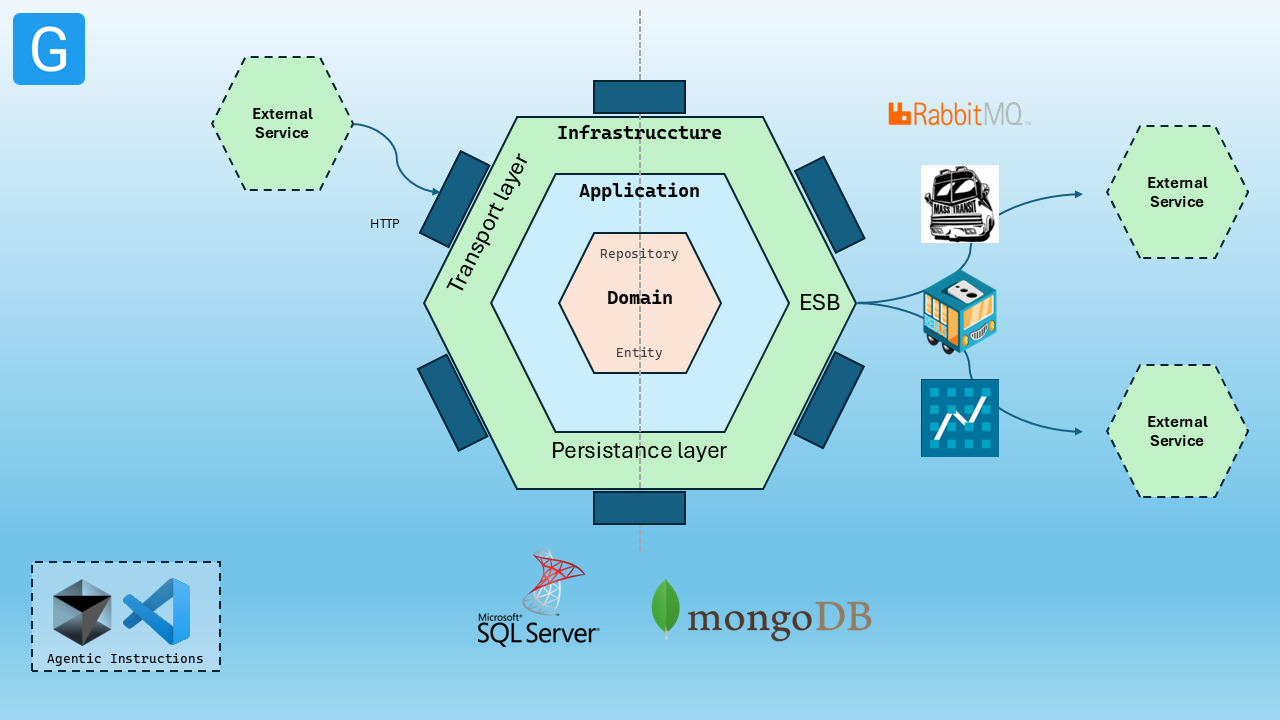
Genocs Clean Architecture Template
A comprehensive .NET 10 project template that follows Clean Architecture principles and Domain-Driven Design (DDD). This template helps you rapidly scaffold microservices applications with built-in support for multiple databases, message brokers, and enterprise patterns.
✨ Features
- 🏗️ Clean Architecture - Domain, Application, Infrastructure, and Presentation layers
- 🎯 Domain-Driven Design - Rich domain models with proper separation of concerns
- 📨 CQRS Pattern - Command and event-driven workflows via
Genocs.Common.CQRS - 🚌 Message Brokers - Azure Service Bus, MassTransit, NServiceBus, and Rebus options
- 🗃️ Multiple Databases - MongoDB, EF Core (SQL Server), and InMemory options
- 🔍 Telemetry and Logging - Built-in telemetry/logging integration with monitoring stack assets
- 🐳 Containerization - Docker and Kubernetes ready
- ☁️ Infrastructure as Code - Bicep, Terraform, Helm, and Kubernetes manifests included
- ⚡ Background Services - Worker services for async processing
- 🧪 Comprehensive Testing - Unit, Integration, and Acceptance tests
- 📘 API Versioning and OpenAPI - Versioned endpoints and OpenAPI support out of the box
📋 Table of Contents
- Features
- Prerequisites
- Quick Start
- Template Options
- Architecture Overview
- Development Workflow
- Troubleshooting
- Community & Support
- Contributing
- License
📋 Prerequisites
- .NET 10 SDK
- IDE (choose one):
- Visual Studio with .NET 10 support
- Visual Studio Code with C# tooling
- JetBrains Rider
- Optional for local infrastructure (depends on selected template options):
- Docker Desktop
- MongoDB for
--database mongodb - SQL Server for
--database sqlserver(default) - RabbitMQ for
--service-bus masstransit|rebus|nservicebus - Azure Service Bus namespace for
--service-bus azureservicebus
🚀 Quick Start
Install the Template
# Install the latest version
dotnet new install Genocs.CleanArchitecture.Template

# Or install a specific version
dotnet new install Genocs.CleanArchitecture.Template::5.1.0

# View all available options
dotnet new gnx-cleanarchitecture --help

# Create a project using template defaults
dotnet new gnx-cleanarchitecture --name "CompanyName.ServiceName"

# Create a project with explicit options
dotnet new gnx-cleanarchitecture \
  --name "CompanyName.ServiceName" \
  --database inmemory \
  --service-bus nservicebus \
  --use-cases basic
🏗️ Architecture Overview
The template generates a solution with the following structure:
src/
├── AcceptanceTests/ # Acceptance Tests
├── Application/ # Use cases and application services
├── Contracts/ # API and message contracts (commands, events, messages)
├── Contracts.NServiceBus/ # Included when --service-bus nservicebus is selected
├── Domain/ # Core business logic and entities
├── Infrastructure/ # Data access and external services
├── IntegrationTests/ # Integration Tests
├── UnitTests/ # Unit Tests
├── WebApi/ # REST API controllers and middleware
├── Worker/ # Background services and message handlers
└── ...
Key Components
- Domain Layer: Entities, value objects, domain services
- Application Layer: CQRS handlers, interfaces, DTOs
- Infrastructure Layer: Repositories, message brokers, databases
- Presentation Layer: Controllers, middleware, API documentation
Miscellaneous
Useful commands:
# How to get the list of installed templates
dotnet new -u

# How to get the list of templates
dotnet new list
🔧 Development Workflow
Local Development
In order to run the infrastructure components locally using Docker, follow these steps:
NOTE
- Make sure you have Docker installed and running on your machine.
- Adjust the
.envfile in the./infrastructure/dockerfolder to match your configuration needs (you can copy the.env.examplefile as a starting point).
cd ./infrastructure/docker

# Setup the infrastructure.
# Use this file to setup the basic infrastructure components (RabbitMQ, MongoDB)
docker compose -f ./infrastructure.yml --env-file ./.env --project-name genocs up -d

# Use this file only in case you want to setup Redis and PostgreSQL (no need if you use MongoDB)
docker compose -f ./infrastructure-db.yml --env-file ./.env --project-name genocs up -d

# Use this file only in case you want to setup monitoring infrastructure components (Prometheus, Grafana, InfluxDB, Jaeger, Seq)
docker compose -f ./infrastructure-monitoring.yml --env-file ./.env --project-name genocs up -d

# Use this file only in case you want to setup scaling infrastructure components (Fabio, Consul)
docker compose -f ./infrastructure-scaling.yml --env-file ./.env --project-name genocs up -d

# Use this file only in case you want to setup security infrastructure components (Vault)
docker compose -f ./infrastructure-security.yml --env-file ./.env --project-name genocs up -d

# Use this file only in case you want to setup sqlserver database (no need if you use PostgreSQL)
docker compose -f ./infrastructure-sqlserver.yml --env-file ./.env --project-name genocs up -d

# Use this file only in case you want to setup mySql database (no need if you use PostgreSQL)
docker compose -f ./infrastructure-mysql.yml --env-file ./.env --project-name genocs up -d

# Use this file only in case you want to setup oracle database (no need if you use PostgreSQL)
docker compose -f ./infrastructure-oracle.yml --env-file ./.env --project-name genocs up -d

# Use this file only in case you want to setup elk stack
docker compose -f ./infrastructure-elk.yml --env-file ./.env --project-name genocs up -d

# Use this file only in case you want to setup AI ML components prepared by Genocs
docker compose -f ./infrastructure-ml.yml --env-file ./.env --project-name genocs up -d

cd ..
Running the application:
# Run the API
dotnet run --project src/WebApi/Host.csproj

# Run the Worker
dotnet run --project src/Worker/Host.csproj

# Run all tests
dotnet test

# Run specific test projects
dotnet test src/UnitTests
dotnet test src/IntegrationTests
dotnet test src/AcceptanceTests
Building and Running with Docker:
# Build Docker WebApi image
docker build -t genocs/clean-architecture-template -f ./src/WebApi/Dockerfile .

# Run Docker WebApi container
docker run -d -p 8080:80 --name clean-architecture-template genocs/clean-architecture-template

# Stop and remove Docker WebApi container
docker stop clean-architecture-template
docker rm clean-architecture-template
💬 Community & Support
Get Help
Stay Connected
Show Your Support
- ⭐ Star this repository
- 🔄 Share with your team

🔧 Troubleshooting
Common Issues
For more details on getting started, read the documentation
Please check the documentation for more details.
Contributing
Contributions are welcome. See CONTRIBUTING.md for guidelines and development workflow.
Changelog
View complete Changelog.
License
This project is licensed with the MIT license.
Code Contributors
This project exists thanks to all the people who contribute. Submit your PR and join the team!
Financial Contributors
Become a financial contributor and help me sustain the project.
Support the Project on Opencollective

⚙️ Template Options
| Option | Description | Values | Default |
|---|---|---|---|
--name |
Project name | {Company.Project.Service} |
Required |
--database |
Database provider | mongodb, sqlserver, inmemory |
sqlserver |
--service-bus |
Message broker | azureservicebus, masstransit, nservicebus, rebus |
rebus |
--use-cases |
Use case complexity | full, basic, readonly |
full |
This package has no dependencies.
NuGet packages
This package is not used by any NuGet packages.
GitHub repositories
This package is not used by any popular GitHub repositories.
Release notes:
- Release 5.0.x
- Updated to .NET 10
- Improved Docker support
- Added new templates for CQRS and Event Sourcing