ElBruno.ClockTray
1.0.0
dotnet tool install --global ElBruno.ClockTray --version 1.0.0
dotnet new tool-manifest
dotnet tool install --local ElBruno.ClockTray --version 1.0.0
#tool dotnet:?package=ElBruno.ClockTray&version=1.0.0
nuke :add-package ElBruno.ClockTray --version 1.0.0
🕐 ClockTray — Toggle Windows Taskbar Clock


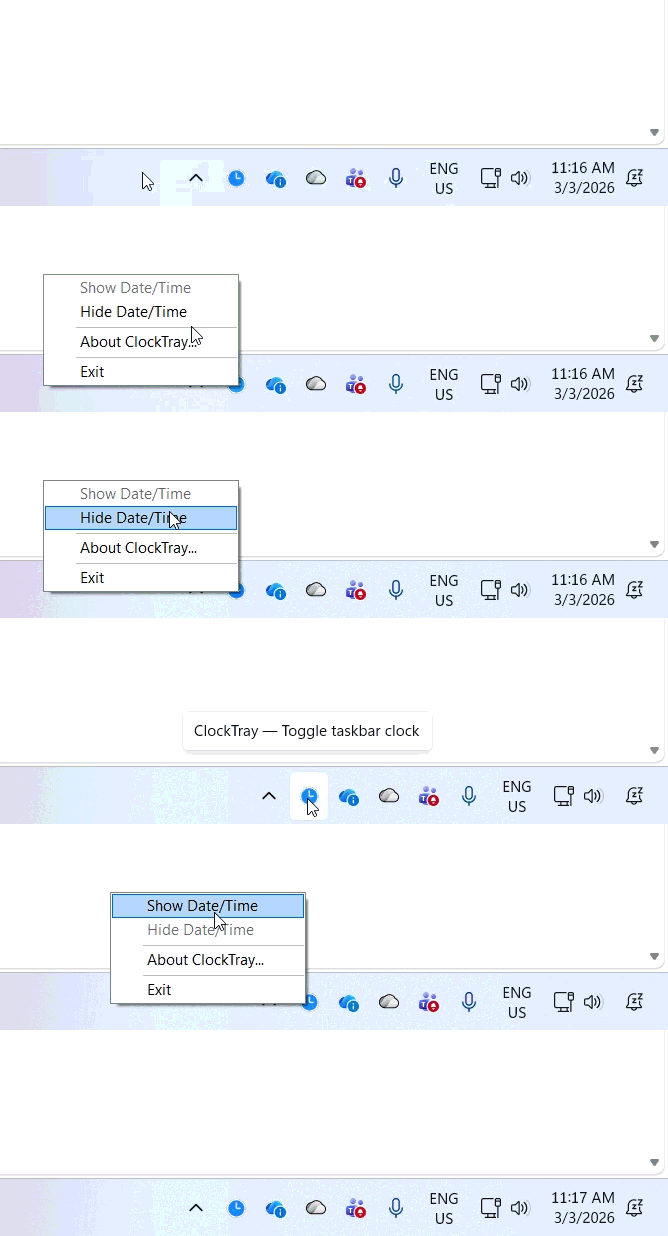
A lightweight Windows system tray application that lets you show or hide the taskbar date/time with a single click or keyboard shortcut.
Features
- System tray icon with right-click context menu
- Show/Hide Date & Time in the Windows taskbar
- Global hotkey:
Ctrl+Alt+Tto toggle - Windows 11 23H2+: Instant toggle via
WM_SETTINGCHANGE(no Explorer restart) - Older Windows: Falls back to policy registry key + Explorer restart
- Chinese Lunar Calendar Overlay: Optional floating overlay showing lunar calendar info
- Sexagenary Cycle (干支): Heavenly Stems and Earthly Branches year display
- Chinese Zodiac (生肖): Current zodiac animal
- Lunar Date Display: Traditional Chinese month and day names
- 24 Solar Terms (节气): Shows current or upcoming solar term
- CJK Font Support: Auto-detects best available Chinese font
- CLI Commands: Use
clocktray show,clocktray hide, andclocktray statusto control the clock from scripts and automation
Installation
Install as a .NET Global Tool
dotnet tool install --global ElBruno.ClockTray
After installation, run clocktray from any command prompt to launch the system tray app.
CLI Commands
ClockTray includes command-line commands for automation and scripting:
clocktray show        # Show the taskbar clock
clocktray hide        # Hide the taskbar clock
clocktray status      # Check current visibility state
clocktray --help      # Display help and command list
These commands are useful for presentations, streaming, scripts, and automation. For detailed examples, options, and troubleshooting, see the CLI Reference Guide.
Examples:
# Check if clock is visible
clocktray status

# Hide clock before a presentation
clocktray hide

# Show clock when done
clocktray show

# Use in a script
if clocktray status | findstr "Visible" > nul (
    echo Clock is visible
)
Build from source
git clone https://github.com/elbruno/ElBruno.ClockTray.git
cd ElBruno.ClockTray
dotnet build
dotnet run
Publish as self-contained executable
dotnet publish -c Release -r win-x64 --self-contained
Chinese Calendar Overlay
ClockTray includes an optional floating overlay that displays Chinese lunar calendar information, inspired by the classic KClock tool. Toggle it from the system tray right-click menu → Show Chinese Calendar.
The overlay shows:
- Current time and Gregorian date
- Sexagenary cycle year (干支) with zodiac animal (生肖)
- Lunar month and day in traditional Chinese numerals
- Chinese day of the week
- Current or upcoming solar term (节气)
For detailed information about the calendar calculations, see Chinese Calendar Documentation.
Requirements
- Windows 10 or 11
- .NET 10 SDK
Usage
- Run the app — it starts minimized to the system tray (clock icon near the Windows clock)
- Right-click the tray icon to Show/Hide the taskbar date & time, or Exit
- Double-click the tray icon to toggle
- Ctrl+Alt+T anywhere to toggle via global hotkey
Architecture
| File | Purpose |
|---|---|
Program.cs |
Entry point, runs the ApplicationContext |
ClockTrayApplicationContext.cs |
NotifyIcon, context menu, app lifecycle |
ClockToggler.cs |
Registry read/write + SendMessageTimeout P/Invoke |
HotkeyWindow.cs |
Global hotkey via RegisterHotKey P/Invoke |
ChineseCalendarHelper.cs |
Lunar calendar conversions (stems, branches, zodiac, month/day names) |
SolarTermCalculator.cs |
24 solar terms astronomical calculation |
LunarClockOverlay.cs |
Floating always-on-top calendar overlay window |
Contributing
Contributions are welcome! Please open an issue or submit a pull request.
This project could potentially evolve into a PowerToys module. If you're interested in helping make that happen, let's discuss it in the issues.
👋 About the Author
Hi! I'm ElBruno 🧡, a passionate developer and content creator exploring AI, .NET, and modern development practices.
Made with ❤️ by ElBruno
If you like this project, consider following my work across platforms:
- 📻 Podcast: No Tienen Nombre — Spanish-language episodes on AI, development, and tech culture
- 💻 Blog: ElBruno.com — Deep dives on embeddings, RAG, .NET, and local AI
- 📺 YouTube: youtube.com/elbruno — Demos, tutorials, and live coding
- 🔗 LinkedIn: @elbruno — Professional updates and insights
- 𝕏 Twitter: @elbruno — Quick tips, releases, and tech news
License
MIT © Bruno Capuano
| Product | Versions Compatible and additional computed target framework versions. |
|---|---|
| .NET | net10.0 is compatible. net10.0-android was computed. net10.0-browser was computed. net10.0-ios was computed. net10.0-maccatalyst was computed. net10.0-macos was computed. net10.0-tvos was computed. net10.0-windows was computed. |
This package has no dependencies.