Crumpled.AgentSpecs
1.0.0
dotnet add package Crumpled.AgentSpecs --version 1.0.0
NuGet\Install-Package Crumpled.AgentSpecs -Version 1.0.0
<PackageReference Include="Crumpled.AgentSpecs" Version="1.0.0" />
<PackageVersion Include="Crumpled.AgentSpecs" Version="1.0.0" />
<PackageReference Include="Crumpled.AgentSpecs" />
paket add Crumpled.AgentSpecs --version 1.0.0
#r "nuget: Crumpled.AgentSpecs, 1.0.0"
#:package Crumpled.AgentSpecs@1.0.0
#addin nuget:?package=Crumpled.AgentSpecs&version=1.0.0
#tool nuget:?package=Crumpled.AgentSpecs&version=1.0.0
Crumpled.AgentSpecs
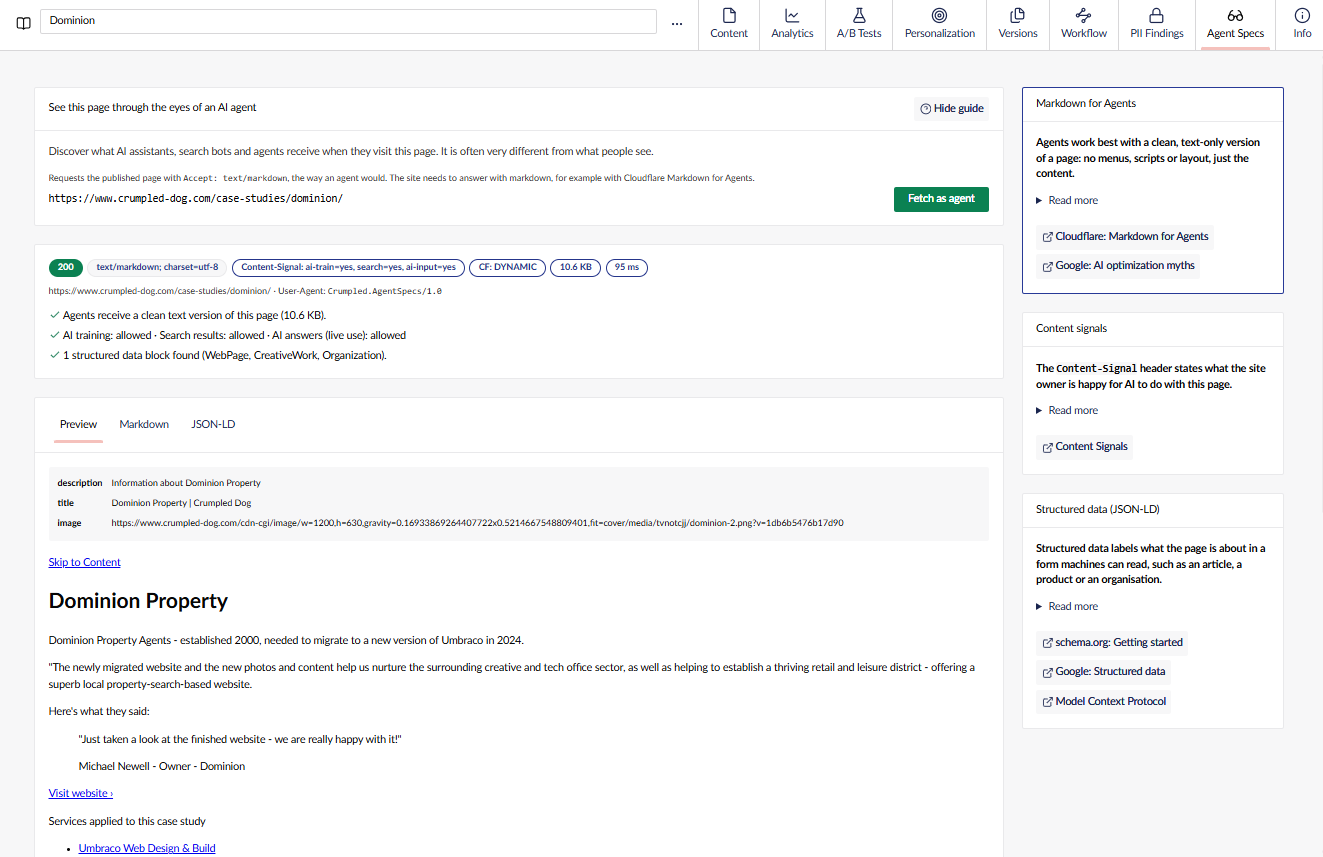
See your Umbraco pages the way AI agents see them. Crumpled.AgentSpecs adds an Agent Specs view to every
content item in the backoffice. Pick one of the item's front-end URLs, click Fetch as agent, and it requests
the live page with Accept: text/markdown and shows you the markdown and JSON-LD that
Cloudflare Markdown for Agents
serves to agents.

Installation
dotnet add package Crumpled.AgentSpecs
No configuration is required. Optional settings:
{
  "Crumpled": {
    "AgentSpecs": {
      "UserAgent": "MyCompany-AgentSpecs/1.0",
      "BaseUrl": "https://www.example.com",
      "ExcludedDocumentTypes": [ "folder", "siteSettings" ],
      "TimeoutSeconds": 30,
      "MaxBodyBytes": 8388608
    }
  }
}
| Setting | Default | Description |
|---|---|---|
UserAgent |
Crumpled.AgentSpecs/1.0 |
The User-Agent sent with every request. Set this if your WAF or bot rules need to recognise (or allow-list) the request. |
BaseUrl |
(none) | The origin that root-relative document URLs (sites without a hostname set) are resolved against. When empty, the backoffice request's own scheme and host are used, which assumes the site only accepts trusted Host headers. Set this to pin a trusted origin. |
ExcludedDocumentTypes |
(none) | Aliases of document types that don't get the Agent Specs view, such as folders or settings nodes with no page of their own. Matched case-insensitively against the document's own document type (compositions are ignored). An excluded document also offers no URLs to request. |
TimeoutSeconds |
30 |
How long to wait for the page. |
MaxBodyBytes |
8388608 |
The response is cut off (and flagged as truncated) beyond this size. |
How it works
- The Agent Specs view lists the content item's URLs, the same ones shown in the Links panel, defaulting to the culture you are editing.
- Nothing is requested until you click Fetch as agent.
- The backoffice asks a small authenticated Management API endpoint to make the request, so it works whatever
domain the site is served from (no CORS problems). The endpoint only accepts URLs that belong to the content
item, and only follows redirects within the requested origin (same host, port and scheme, plus an
httptohttpsupgrade). - The response is split into its parts and shown in three tabs:
- Preview - the front matter and the rendered markdown.
- Markdown - the raw response in a read-only code editor, with a copy button.
- JSON-LD - each JSON-LD block in a collapsible JSON viewer, with a link to check the page in the Schema Markup Validator. The validator fetches the page itself, so the link only appears for publicly reachable pages (not localhost or private hostnames), and it never includes an access token.
If the site does not answer with text/markdown, you'll see the raw response and a warning that the URL didn't
answer with markdown. Only published pages can be requested.
Customising which URLs are offered
By default the view offers every URL Umbraco lists for the item. If your site narrows or rewrites the URLs editors
see (for example it hides hostnames that don't belong to the current environment, or adds an access token so a
locked-down front end can be requested), implement IAgentSpecsUrlProcessor and register it:
public class MyUrlProcessor : IAgentSpecsUrlProcessor
{
    public Task<IReadOnlyList<AgentSpecsUrlTarget>> ProcessAsync(IReadOnlyList<string> urls, CancellationToken cancellationToken)
    {
        // Keep the URLs for the current environment's hostname, and request them with an access token.
        IReadOnlyList<AgentSpecsUrlTarget> targets = urls
            .Where(url => url.StartsWith("https://www.example.com/"))
            .Select(url => new AgentSpecsUrlTarget(Url: url, RequestUrl: url + "?token=..."))
            .ToList();

        return Task.FromResult(targets);
    }
}

public class MyComposer : IComposer
{
    public void Compose(IUmbracoBuilder builder) =>
        builder.Services.AddScoped<IAgentSpecsUrlProcessor, MyUrlProcessor>();
}
Urlis the document URL as shown to the editor. It is what identifies the target, and entries that aren't one of the document's own URLs are ignored, so a processor can narrow or rewrite but never add URLs.RequestUrlis what is actually requested. It never leaves the server, and any query parameter it adds toUrlis redacted from the URLs reported back in the response.- The last registration wins, so a site can replace processing registered by another package.
- Use a scoped (or transient) registration if the processor depends on request-scoped services such as the current backoffice user.
Requirements
- The site must answer
Accept: text/markdownrequests with markdown. The easiest way is Cloudflare Markdown for Agents, enabled for the site's zone (or the relevant paths).
Sites without Cloudflare
Agent Specs only needs a text/markdown response, so it works with any site that does content negotiation, not
just Cloudflare. Two options:
- Install AI Visibility for Umbraco,
which serves markdown for
Accept: text/markdownrequests (and.mdURLs). - Or add a small middleware of your own. This sketch uses ReverseMarkdown to convert the HTML response when the client asks for markdown:
// Program.cs - before app.UseUmbraco()
app.Use(async (context, next) =>
{
    var wantsMarkdown = HttpMethods.IsGet(context.Request.Method)
        && !context.Request.Path.StartsWithSegments("/umbraco")
        && context.Request.GetTypedHeaders().Accept.Any(a => a.MediaType.Equals("text/markdown", StringComparison.OrdinalIgnoreCase));
    if (!wantsMarkdown) { await next(); return; }

    var original = context.Response.Body;
    await using var buffer = new MemoryStream();
    context.Response.Body = buffer;
    try { await next(); } finally { context.Response.Body = original; }

    buffer.Position = 0;
    if (context.Response.StatusCode != 200 || context.Response.ContentType?.StartsWith("text/html") != true)
    {
        await buffer.CopyToAsync(original);
        return;
    }

    var markdown = new ReverseMarkdown.Converter().Convert(Encoding.UTF8.GetString(buffer.ToArray()));
    context.Response.ContentType = "text/markdown; charset=utf-8";
    context.Response.ContentLength = null;
    context.Response.Headers.Append("Vary", "Accept");
    await original.WriteAsync(Encoding.UTF8.GetBytes(markdown));
});
The DemoSite in this repo has a fuller version, MarkdownForAgentsMiddleware,
which also strips headers, navigation and footers, and adds front matter and a trailing JSON-LD block the way
Cloudflare does. It exists for testing only and is not part of the package.
The JSON-LD tab appears when the response ends with a fenced json block, which is the format Cloudflare
uses. If your middleware doesn't append one, you'll still get the Preview and Markdown tabs.
Each Umbraco major has its own package version line, so pick the one that matches your site:
| Package version | Umbraco CMS | Branch |
|---|---|---|
1.x |
17 | release/v1 |
# Umbraco 17
dotnet add package Crumpled.AgentSpecs --version "1.*"
Contributing
See CONTRIBUTING.md for the branching strategy and formatting requirements.
License
| Product | Versions Compatible and additional computed target framework versions. |
|---|---|
| .NET | net10.0 is compatible. net10.0-android was computed. net10.0-browser was computed. net10.0-ios was computed. net10.0-maccatalyst was computed. net10.0-macos was computed. net10.0-tvos was computed. net10.0-windows was computed. |
-
net10.0
- Microsoft.AspNetCore.OpenApi (>= 10.0.11)
- Umbraco.Cms.Api.Management (>= 17.7.0 && < 18.0.0)
NuGet packages
This package is not used by any NuGet packages.
GitHub repositories
This package is not used by any popular GitHub repositories.
| Version | Downloads | Last Updated |
|---|---|---|
| 1.0.0 | 84 | 11/2/2026 |