Consolonia.PreviewHost
11.3.12.71
dotnet tool install --global Consolonia.PreviewHost --version 11.3.12.71
This package contains a .NET tool you can call from the shell/command line.
dotnet new tool-manifest
dotnet tool install --local Consolonia.PreviewHost --version 11.3.12.71
This package contains a .NET tool you can call from the shell/command line.
#tool dotnet:?package=Consolonia.PreviewHost&version=11.3.12.71
The NuGet Team does not provide support for this client. Please contact its maintainers for support.
nuke :add-package Consolonia.PreviewHost --version 11.3.12.71
The NuGet Team does not provide support for this client. Please contact its maintainers for support.

Consolonia.PreviewHost
This is a tool which enables a live view of a consolonia axaml file, or a consolonia project.
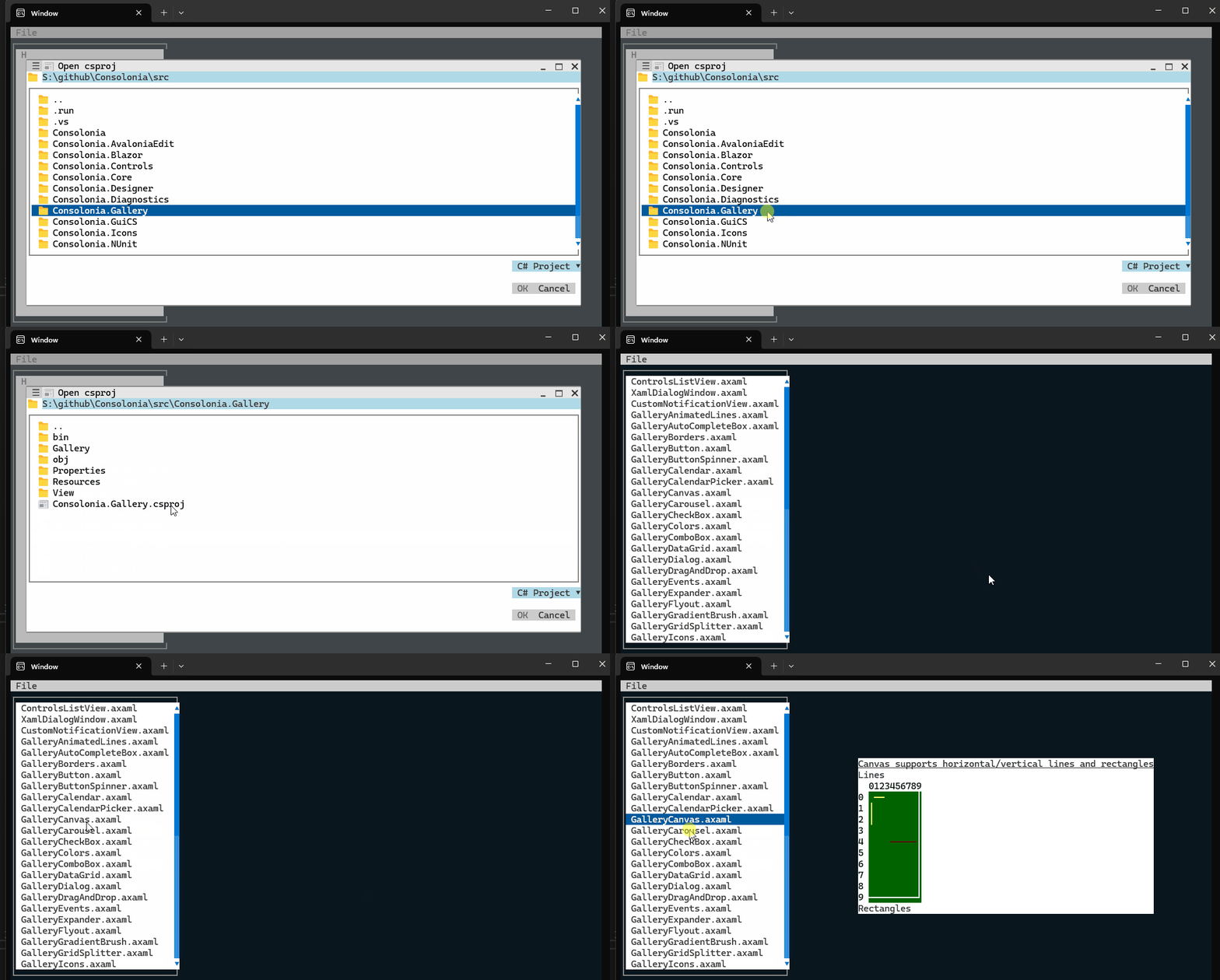
Installation
To install the tool, you can use the following command:
dotnet tool install -g Consolonia.PreviewHost
Usage
To use the tool, you can use the following command:
Consolonia.PreviewHost <path-to-axaml-file>|<path-to-project-file>|<path-to-project-directory>
It will monitor the file or directory for changes, and will automatically update the preview when changes are detected.
Run the following command to monitor the project or folder:
Conoslonia.PreviewHost <path-to-project-file-or-folder>
Run following command to monitor a given .axaml file.
Conoslonia.PreviewHost <.axaml file name>
NOTE: In single file mode the tool will exit when you hit escape key
Running inside Visual Studio
- Open the solution in Visual Studio.
- Open a Terminal (View → Terminal).
- run the following command
Consolonia.PreviewHost .
Running inside Visual Studio Code
To integrate the tool with Visual Studio Code, you can use the following steps:
- Open the project directory in Visual Studio Code.
- Open a terminal inside of visual studio code
- run the following command
Consolonia.PreviewHost .
| Product | Versions Compatible and additional computed target framework versions. |
|---|---|
| .NET | net8.0 is compatible. net8.0-android was computed. net8.0-browser was computed. net8.0-ios was computed. net8.0-maccatalyst was computed. net8.0-macos was computed. net8.0-tvos was computed. net8.0-windows was computed. net9.0 was computed. net9.0-android was computed. net9.0-browser was computed. net9.0-ios was computed. net9.0-maccatalyst was computed. net9.0-macos was computed. net9.0-tvos was computed. net9.0-windows was computed. net10.0 was computed. net10.0-android was computed. net10.0-browser was computed. net10.0-ios was computed. net10.0-maccatalyst was computed. net10.0-macos was computed. net10.0-tvos was computed. net10.0-windows was computed. |
Compatible target framework(s)
Included target framework(s) (in package)
Learn more about Target Frameworks and .NET Standard.
This package has no dependencies.
| Version | Downloads | Last Updated |
|---|---|---|
| 11.3.12.71 | 153 | 5/4/2026 |
| 11.3.7-beta.2027 | 432 | 11/18/2025 |
| 11.3.7-beta.1941 | 143 | 11/8/2025 |
| 11.3.7-beta.1831 | 142 | 10/25/2025 |
| 11.3.7-beta.1773 | 129 | 10/17/2025 |
| 11.3.4-beta.1699 | 120 | 10/10/2025 |
| 11.3.4-beta.1685 | 183 | 10/9/2025 |
| 11.3.4-beta.1648 | 193 | 10/1/2025 |
| 11.3.4-beta.1604 | 258 | 9/19/2025 |
| 11.3.4-beta.1598 | 269 | 9/19/2025 |
| 11.3.4-beta.1573 | 313 | 9/16/2025 |
| 11.3.4-beta.1547 | 162 | 9/13/2025 |
| 11.3.4-beta.1545 | 162 | 9/13/2025 |
| 11.3.4-beta.1533 | 160 | 9/13/2025 |
| 11.3.4-beta.1527 | 164 | 9/13/2025 |
| 11.3.4-beta.1499 | 126 | 9/12/2025 |
| 11.3.4-beta.1483 | 183 | 9/11/2025 |
| 11.3.4-beta.1464 | 178 | 9/9/2025 |
| 11.3.4-beta.1456 | 186 | 9/8/2025 |
| 11.3.4-beta.1452 | 194 | 9/8/2025 |
Loading failed