Consolonia 12.0.3.7
dotnet add package Consolonia --version 12.0.3.7
NuGet\Install-Package Consolonia -Version 12.0.3.7
This command is intended to be used within the Package Manager Console in Visual Studio, as it uses the NuGet module's version of Install-Package.
<PackageReference Include="Consolonia" Version="12.0.3.7" />
For projects that support PackageReference, copy this XML node into the project file to reference the package.
<PackageVersion Include="Consolonia" Version="12.0.3.7" />
<PackageReference Include="Consolonia" />
For projects that support Central Package Management (CPM), copy this XML node into the solution Directory.Packages.props file to version the package.
paket add Consolonia --version 12.0.3.7
The NuGet Team does not provide support for this client. Please contact its maintainers for support.
#r "nuget: Consolonia, 12.0.3.7"
#r directive can be used in F# Interactive and Polyglot Notebooks. Copy this into the interactive tool or source code of the script to reference the package.
#:package Consolonia@12.0.3.7
#:package directive can be used in C# file-based apps starting in .NET 10 preview 4. Copy this into a .cs file before any lines of code to reference the package.
#addin nuget:?package=Consolonia&version=12.0.3.7
#tool nuget:?package=Consolonia&version=12.0.3.7
The NuGet Team does not provide support for this client. Please contact its maintainers for support.

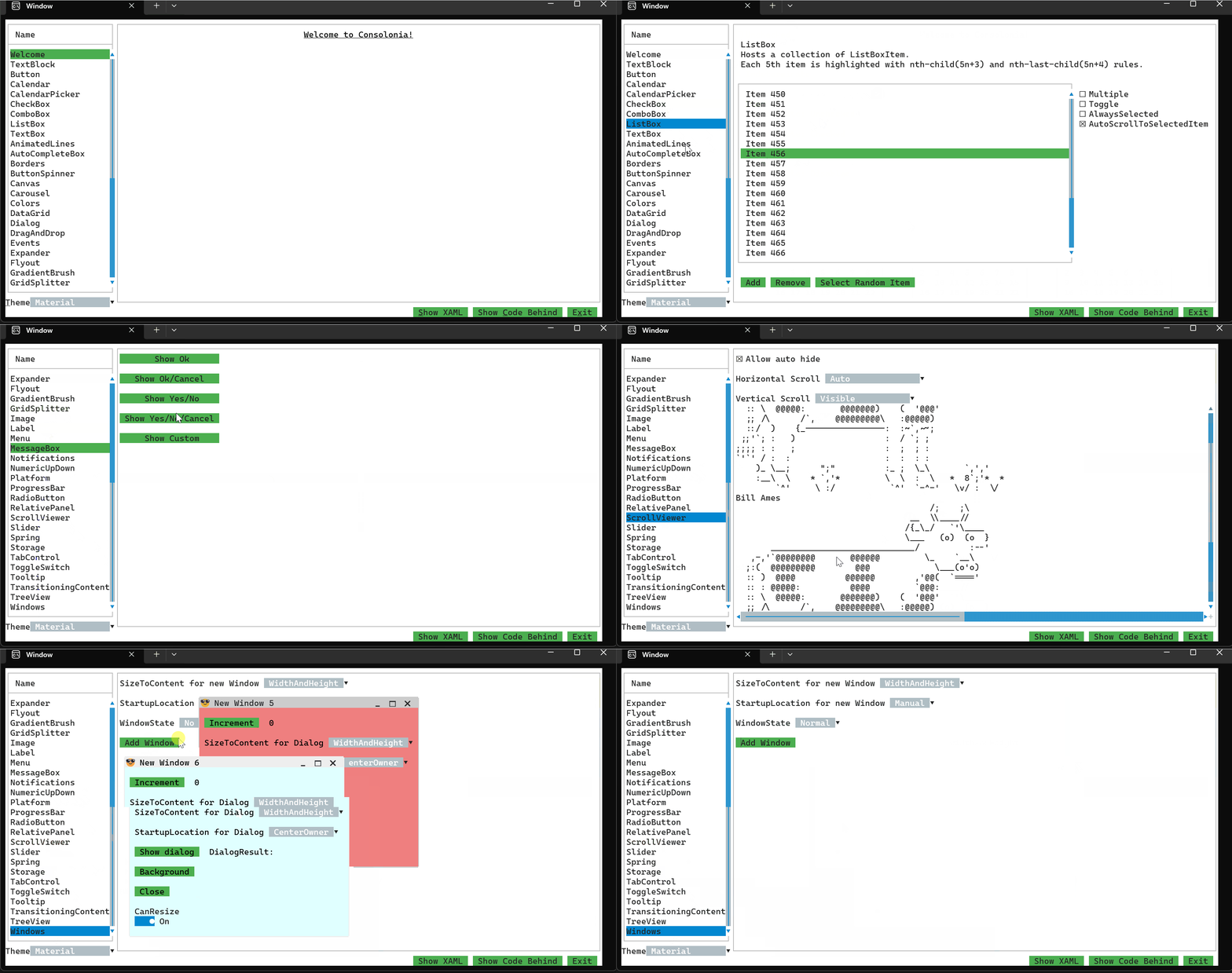
🚀 Modern UI Power, Now in Your Console
This package is a meta package which includes everything you need to build Console applications using Consolonia and Avalonia.
Usage
Define an application with a theme (See Consolonia.Themes.TurboVision for themes)
Define a Window
HelloWorldWindow.axaml
<Window xmlns="https://github.com/avaloniaui"
        xmlns:x="http://schemas.microsoft.com/winfx/2006/xaml"
        x:Class="HelloWorldWindow">
    <TextBlock Text="Hello World" />
</Window>

## Define an application
You need to define an application that defines a theme and sets the main window.

HelloWorldApp.cs
```csharp
// use HelloWorldWindow as the MainWindow for the application
public class HelloWorldApp : ConsoloniaApplication<HelloWorldWindow>
{
    public override void Initialize()
    {
        // set the theme
        Styles.Add(new FluentTheme());
    }
}
Setup program.cs
Program.cs
[STAThread]
private static void Main(string[] args)
{
    BuildAvaloniaApp()
        .StartWithConsoleLifetime(args);
}

public static AppBuilder BuildAvaloniaApp()
    => AppBuilder.Configure<HelloWorldApp>()
        .UseConsolonia()
        .UseAutoDetectedConsole()
        .LogToException();
| Product | Versions Compatible and additional computed target framework versions. |
|---|---|
| .NET | net8.0 is compatible. net8.0-android was computed. net8.0-browser was computed. net8.0-ios was computed. net8.0-maccatalyst was computed. net8.0-macos was computed. net8.0-tvos was computed. net8.0-windows was computed. net9.0 was computed. net9.0-android was computed. net9.0-browser was computed. net9.0-ios was computed. net9.0-maccatalyst was computed. net9.0-macos was computed. net9.0-tvos was computed. net9.0-windows was computed. net10.0 was computed. net10.0-android was computed. net10.0-browser was computed. net10.0-ios was computed. net10.0-maccatalyst was computed. net10.0-macos was computed. net10.0-tvos was computed. net10.0-windows was computed. |
Compatible target framework(s)
Included target framework(s) (in package)
Learn more about Target Frameworks and .NET Standard.
-
net8.0
- Consolonia.Controls (>= 12.0.3.7)
- Consolonia.Core (>= 12.0.3.7)
- Consolonia.PlatformSupport (>= 12.0.3.7)
- Consolonia.Themes (>= 12.0.3.7)
NuGet packages (2)
Showing the top 2 NuGet packages that depend on Consolonia:
| Package | Downloads |
|---|---|
|
Consolonia.Blazor
This package provides the ability to use Blazor .razor files to create console apps using Consolonia. |
|
|
Gui.SystemDialogs.Consolonia.Sharp
Consolonia / Avalonia 11 implementation of Gui.SystemDialogs.Sharp services. |
GitHub repositories (2)
Showing the top 2 popular GitHub repositories that depend on Consolonia:
| Repository | Stars |
|---|---|
|
MCCTeam/Minecraft-Console-Client
Lightweight console for Minecraft chat and automated scripts. Currently supports up to Minecraft 26.2
|
|
|
aaru-dps/Aaru
Aaru Data Preservation Suite
|
| Version | Downloads | Last Updated |
|---|---|---|
| 12.0.3.7 | 154 | 7/31/2026 |
| 12.0.3.6-alpha.2669 | 40 | 7/28/2026 |
| 12.0.3.6-alpha.2667 | 44 | 7/28/2026 |
| 11.3.12.6 | 1,024 | 5/5/2026 |
| 11.3.12.6-alpha.2596 | 66 | 5/23/2026 |
| 11.3.12.6-alpha.2594 | 68 | 5/23/2026 |
| 11.3.12.6-alpha.2592 | 73 | 5/23/2026 |
| 11.3.12.6-alpha.2587 | 63 | 5/19/2026 |
| 11.3.12.6-alpha.2586 | 62 | 5/19/2026 |
| 11.3.12.6-alpha.2585 | 62 | 5/19/2026 |
| 11.3.12.6-alpha.2584 | 59 | 5/19/2026 |
| 11.3.12.6-alpha.2574 | 67 | 5/8/2026 |
| 11.3.12.6-alpha.2570 | 72 | 5/8/2026 |
| 11.3.12.6-alpha.2569 | 77 | 5/8/2026 |
| 11.3.12.6-alpha.2563 | 53 | 5/7/2026 |
| 11.3.12.5-alpha.2547 | 62 | 5/5/2026 |
| 11.3.12.5-alpha.2543 | 55 | 5/5/2026 |
| 11.3.12.5-alpha.2538 | 59 | 5/5/2026 |
| 11.3.12.5-alpha.2536 | 61 | 5/5/2026 |
| 11.3.12.5-alpha.2534 | 49 | 5/5/2026 |
Loading failed