C1.Win.GanttView
10.0.20252.761
.NET 6.0
This package targets .NET 6.0. The package is compatible with this framework or higher.
.NET Framework 4.6.2
This package targets .NET Framework 4.6.2. The package is compatible with this framework or higher.
dotnet add package C1.Win.GanttView --version 10.0.20252.761
NuGet\Install-Package C1.Win.GanttView -Version 10.0.20252.761
This command is intended to be used within the Package Manager Console in Visual Studio, as it uses the NuGet module's version of Install-Package.
<PackageReference Include="C1.Win.GanttView" Version="10.0.20252.761" />
For projects that support PackageReference, copy this XML node into the project file to reference the package.
<PackageVersion Include="C1.Win.GanttView" Version="10.0.20252.761" />
<PackageReference Include="C1.Win.GanttView" />
For projects that support Central Package Management (CPM), copy this XML node into the solution Directory.Packages.props file to version the package.
paket add C1.Win.GanttView --version 10.0.20252.761
The NuGet Team does not provide support for this client. Please contact its maintainers for support.
#r "nuget: C1.Win.GanttView, 10.0.20252.761"
#r directive can be used in F# Interactive and Polyglot Notebooks. Copy this into the interactive tool or source code of the script to reference the package.
#:package C1.Win.GanttView@10.0.20252.761
#:package directive can be used in C# file-based apps starting in .NET 10 preview 4. Copy this into a .cs file before any lines of code to reference the package.
#addin nuget:?package=C1.Win.GanttView&version=10.0.20252.761
#tool nuget:?package=C1.Win.GanttView&version=10.0.20252.761
The NuGet Team does not provide support for this client. Please contact its maintainers for support.
About
ComponentOne GanttView for WinForms delivers a Microsoft Project-like user experience for project management. It provides a graphical diagram that helps to plan, coordinate, and track specific tasks in a project.
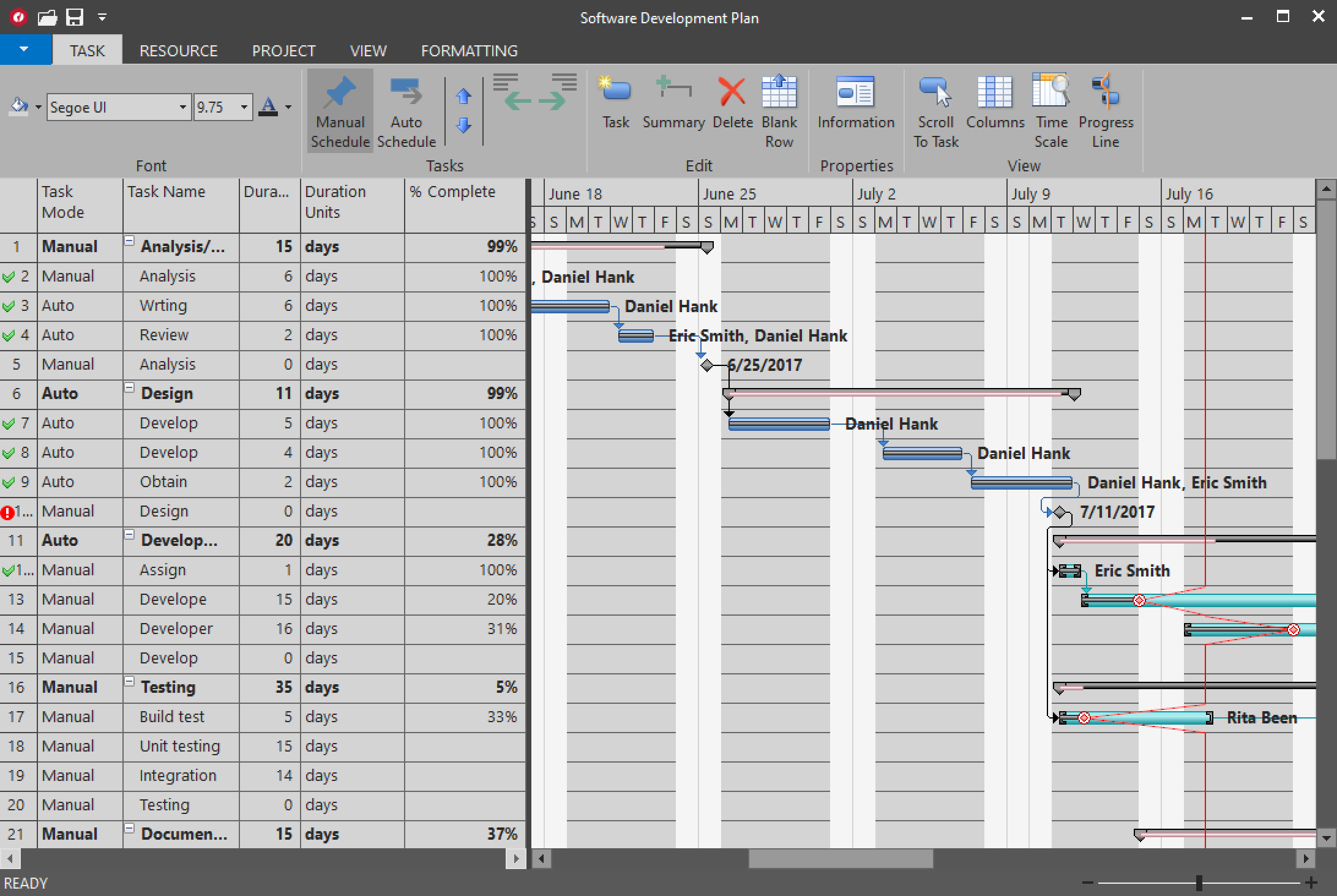
Key Features:
- Automatic and manual scheduling, calendar and time scale configuration, completion indicator.
- Constraints, predecessors, deadlines, conflict validation, manage a list of resources, percent complete of tasks, milestones.
- Store project schedule as XML file. Load project from XML file.
- Create custom columns in the grid that can save and load data from the stored XML.
- Customizable bar styles, built-in toolstrip commands, themable scrollbars.
- Import and export to Microsoft Project.
Learn more at developer.mescius.com/componentone/winforms-ui-controls/custom-gantt-view-winforms.
Resources
| Product | Versions Compatible and additional computed target framework versions. |
|---|---|
| .NET | net6.0-windows7.0 is compatible. net7.0-windows was computed. net8.0-windows was computed. net8.0-windows7.0 is compatible. net9.0-windows was computed. net10.0-windows was computed. net10.0-windows7.0 is compatible. |
| .NET Framework | net462 is compatible. net463 was computed. net47 was computed. net471 was computed. net472 was computed. net48 is compatible. net481 was computed. |
Compatible target framework(s)
Included target framework(s) (in package)
Learn more about Target Frameworks and .NET Standard.
-
.NETFramework 4.6.2
- C1.ScheduleCore (>= 10.0.20252.79)
- C1.Win.FlexGrid (>= 10.0.20252.761)
- C1.Win.ScheduleCore (>= 10.0.20252.79)
- C1.Win.SuperTooltip (>= 10.0.20252.761)
-
.NETFramework 4.8
- C1.ScheduleCore (>= 10.0.20252.79)
- C1.Win.FlexGrid (>= 10.0.20252.761)
- C1.Win.ScheduleCore (>= 10.0.20252.79)
- C1.Win.SuperTooltip (>= 10.0.20252.761)
-
net10.0-windows7.0
- C1.ScheduleCore (>= 10.0.20252.79)
- C1.Win.FlexGrid (>= 10.0.20252.761)
- C1.Win.SuperTooltip (>= 10.0.20252.761)
-
net6.0-windows7.0
- C1.ScheduleCore (>= 10.0.20252.79)
- C1.Win.FlexGrid (>= 10.0.20252.761)
- C1.Win.SuperTooltip (>= 10.0.20252.761)
-
net8.0-windows7.0
- C1.ScheduleCore (>= 10.0.20252.79)
- C1.Win.FlexGrid (>= 10.0.20252.761)
- C1.Win.SuperTooltip (>= 10.0.20252.761)
NuGet packages
This package is not used by any NuGet packages.
GitHub repositories
This package is not used by any popular GitHub repositories.
| Version | Downloads | Last Updated |
|---|---|---|
| 10.0.20252.761 | 124 | 3/20/2026 |
| 10.0.20252.755 | 133 | 2/12/2026 |
| 10.0.20252.740 | 612 | 12/1/2025 |
| 8.0.20251.721 | 418 | 9/18/2025 |
| 8.0.20251.714 | 317 | 7/11/2025 |
| 8.0.20251.709 | 279 | 5/30/2025 |
| 8.0.20251.708 | 340 | 5/16/2025 |
| 8.0.20242.700 | 327 | 3/5/2025 |
| 8.0.20242.693 | 251 | 12/27/2024 |
| 8.0.20242.688 | 223 | 11/20/2024 |
| 8.0.20242.681 | 205 | 11/12/2024 |
| 8.0.20241.672 | 281 | 9/3/2024 |
| 8.0.20241.664 | 220 | 7/8/2024 |
| 8.0.20241.657 | 352 | 5/29/2024 |
| 8.0.20233.643 | 269 | 3/12/2024 |
| 8.0.20233.636 | 227 | 1/19/2024 |
| 8.0.20233.631 | 305 | 11/21/2023 |
| 6.0.20232.620 | 307 | 9/25/2023 |
| 6.0.20232.611 | 307 | 7/18/2023 |
| 6.0.20231.603 | 350 | 5/31/2023 |
Loading failed