C1.WPF.RichTextBox
10.0.20252.1321
dotnet add package C1.WPF.RichTextBox --version 10.0.20252.1321
NuGet\Install-Package C1.WPF.RichTextBox -Version 10.0.20252.1321
This command is intended to be used within the Package Manager Console in Visual Studio, as it uses the NuGet module's version of Install-Package.
<PackageReference Include="C1.WPF.RichTextBox" Version="10.0.20252.1321" />
For projects that support PackageReference, copy this XML node into the project file to reference the package.
<PackageVersion Include="C1.WPF.RichTextBox" Version="10.0.20252.1321" />
<PackageReference Include="C1.WPF.RichTextBox" />
For projects that support Central Package Management (CPM), copy this XML node into the solution Directory.Packages.props file to version the package.
paket add C1.WPF.RichTextBox --version 10.0.20252.1321
The NuGet Team does not provide support for this client. Please contact its maintainers for support.
#r "nuget: C1.WPF.RichTextBox, 10.0.20252.1321"
#r directive can be used in F# Interactive and Polyglot Notebooks. Copy this into the interactive tool or source code of the script to reference the package.
#:package C1.WPF.RichTextBox@10.0.20252.1321
#:package directive can be used in C# file-based apps starting in .NET 10 preview 4. Copy this into a .cs file before any lines of code to reference the package.
#addin nuget:?package=C1.WPF.RichTextBox&version=10.0.20252.1321
#tool nuget:?package=C1.WPF.RichTextBox&version=10.0.20252.1321
The NuGet Team does not provide support for this client. Please contact its maintainers for support.
About
The ComponentOne WPF RichTextBox provides a complete rich text editor for WPF with a built-in ribbon. It supports HTML and RTF text formats.
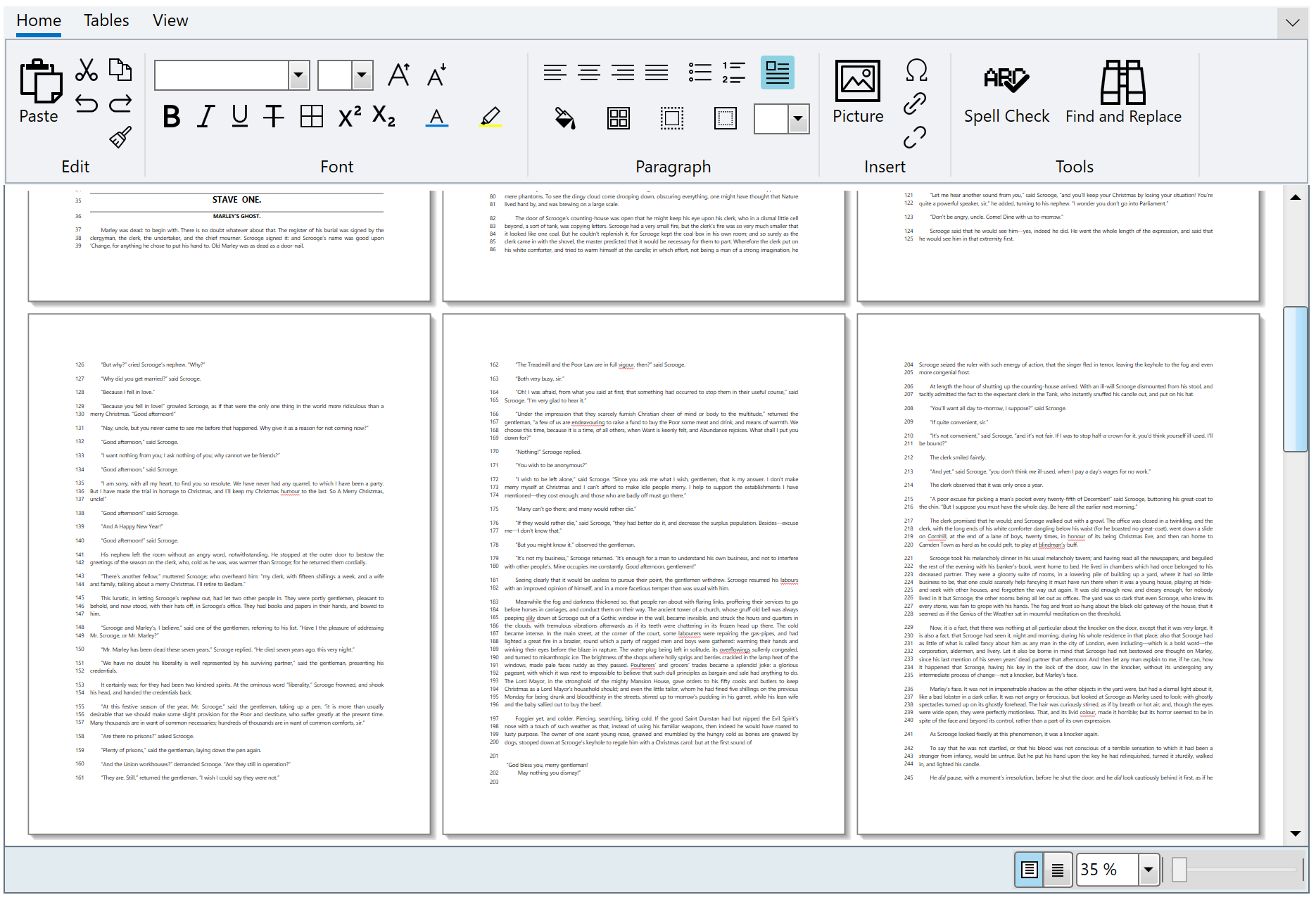
Key Features:
- Format text styles, alignment, wrapping, bulleted lists, pictures, tables and hyperlinks
- Users will enjoy revision history, clipboard support, and built-in spell-checking while editing
- Edit documents in either draft view or print layout like Microsoft Word
- Use the included C1RichTextBoxRibbon to provide a complete toolbar UI or create your own toolbar
- The C1RichTextBox control imports and converts RTF and HTML documents to the C1Document model for display & editing
- Supports input for Chinese, Japanese, and Korean languages
Learn more at developer.mescius.com/componentone/wpf-ui-controls/rich-text-editor-wpf.
Resources
| Product | Versions Compatible and additional computed target framework versions. |
|---|---|
| .NET | net6.0-windows7.0 is compatible. net7.0-windows was computed. net8.0-windows was computed. net9.0-windows was computed. net10.0-windows was computed. |
Compatible target framework(s)
Included target framework(s) (in package)
Learn more about Target Frameworks and .NET Standard.
-
net6.0-windows7.0
- C1.WPF.Core (= 10.0.20252.1321)
- C1.WPF.Input (= 10.0.20252.1321)
- System.Drawing.Common (>= 8.0.8)
NuGet packages (2)
Showing the top 2 NuGet packages that depend on C1.WPF.RichTextBox:
| Package | Downloads |
|---|---|
|
C1.WPF.RichTextBox.Ribbon
The C1RichTextBoxRibbon control presents all the commands that can be applied to C1RichTextBox. |
|
|
C1.WPF.ExpressionEditor
Expression Editor for WPF is a control that enables creating and editing expressions at run-time. |
GitHub repositories
This package is not used by any popular GitHub repositories.
| Version | Downloads | Last Updated |
|---|---|---|
| 10.0.20252.1321 | 97 | 3/20/2026 |
| 10.0.20252.1308 | 229 | 2/12/2026 |
| 10.0.20252.1221 | 598 | 12/1/2025 |
| 9.0.20251.1133 | 476 | 9/18/2025 |
| 9.0.20251.1102 | 348 | 7/11/2025 |
| 9.0.20251.1069 | 460 | 5/16/2025 |
| 8.0.20242.1051 | 540 | 3/3/2025 |
| 8.0.20242.1032 | 330 | 2/26/2025 |
| 8.0.20242.1005 | 338 | 12/27/2024 |
| 8.0.20242.966 | 389 | 11/12/2024 |
| 8.0.20241.921 | 373 | 9/3/2024 |
| 8.0.20241.854 | 387 | 7/8/2024 |
| 8.0.20241.795 | 388 | 5/29/2024 |
| 8.0.20233.731 | 687 | 3/12/2024 |
| 8.0.20233.702 | 384 | 1/19/2024 |
| 8.0.20233.681 | 388 | 11/29/2023 |
| 8.0.20233.668 | 269 | 11/8/2023 |
| 7.0.20233.662 | 286 | 11/10/2023 |
| 6.0.20232.624 | 388 | 9/11/2023 |
| 6.0.20232.591 | 430 | 7/17/2023 |
Loading failed