BlitzBridge 0.6.0
{ "servers": { "BlitzBridge": { "type": "stdio", "command": "dnx", "args": ["BlitzBridge@0.6.0", "--yes", "--", "--transport", "stdio"] } } }
.vscode/mcp.json settings file.
dotnet tool install --global BlitzBridge --version 0.6.0
dotnet new tool-manifest
dotnet tool install --local BlitzBridge --version 0.6.0
#tool dotnet:?package=BlitzBridge&version=0.6.0
nuke :add-package BlitzBridge --version 0.6.0
Blitz Bridge
Blitz Bridge is a read-only MCP server for Azure SQL diagnostics: it lets agents run a tightly allowlisted Brent Ozar First Responder Kit (FRK) surface against preconfigured targets so teams can get fast, structured diagnostics without handing agents raw SQL credentials or arbitrary query access.
flowchart LR
    A[Need SQL diagnostics for agents] --> B{Choose install path}
    B --> C[Stdio local tool<br/>fastest dev setup]
    B --> D[Docker Compose demo<br/>5-minute eval]
    B --> E[Azure deployment with azd<br/>production posture]
    C --> F[Configure profiles + role grants]
    D --> F
    E --> F
    F --> G[Connect agent client config]
Install
As an MCP package from NuGet (one-shot via dnx)
Use this when you want MCP clients to fetch and run Blitz Bridge without a prior global tool install.
dnx BlitzBridge --yes -- --init-config
dnx BlitzBridge --yes -- --transport stdio
- Requires .NET 10 SDK (Preview 6+) so
dnxis available. dnxis a shortcut for one-shotdotnet tool exec.--init-configcreates%APPDATA%\blitz-bridge\profiles.json(Windows) or~/.config/blitz-bridge/profiles.json(Linux/macOS).- If you use a non-default config file, include
--config <path>in your MCP client args.
As a local tool (stdio)
Use this when you want the quickest path for local or workstation use.
dotnet tool install -g BlitzBridge
blitzbridge --init-config
blitzbridge --transport stdio --config path/to/profiles.json
--init-config creates a starter profiles.json and exits without starting the server.
- Default path (when
--configis omitted):- Windows:
%APPDATA%\blitz-bridge\profiles.json - Linux/macOS:
~/.config/blitz-bridge/profiles.json
- Windows:
- Optional custom path:
blitzbridge --init-config --config ./profiles.beta.json
Client config examples:
examples/client-configs/claude-desktop.jsonexamples/client-configs/claude-code.jsonexamples/client-configs/cursor.jsonexamples/client-configs/vscode-mcp.json(VS Code:.vscode/mcp.jsonor usersettings.jsonundermcp)
Try it in 5 minutes (Docker Compose)
Use this when you want to evaluate behavior quickly with the included sample environment.
cd samples/docker-compose-demo
cp .env.example .env
# Edit .env with your token/password values
docker compose up --build
See full walkthrough: samples/docker-compose-demo/README.md.
Deploy to Azure (azd)
Use this for production-style deployment on Azure Container Apps with managed identity, Key Vault, and diagnostics.
azd env new
azd up
Or one-click via ARM template (Azure portal):
Deployment guide: docs/deployment-azure.md.
Configure
1) Apply least-privilege SQL role grants
Run docs/sql/blitz-bridge-role.sql in the target database. It grants only:
EXECUTEon allowed FRK proceduresVIEW SERVER STATEVIEW DATABASE STATE
It also includes commented examples for managed identity and SQL auth user mapping.
2) Configure target profiles
Blitz Bridge uses profile-based target config:
{
  "SqlTargets": {
    "Profiles": {
      "primary-sql-target": {
        "ConnectionString": "Server=tcp:...;Database=DBAtools;Authentication=Active Directory Default;Encrypt=True;ApplicationIntent=ReadOnly;",
        "AllowedDatabases": ["AppDb"],
        "AllowedProcedures": ["sp_Blitz", "sp_BlitzCache", "sp_BlitzFirst", "sp_BlitzIndex", "sp_BlitzLock", "sp_BlitzWho"],
        "Enabled": true,
        "CommandTimeoutSeconds": 60,
        "AiMode": 2
      }
    }
  }
}
Connect an agent
Start with examples/client-configs/:
claude-desktop.json(stdio)claude-code.json(stdio)cursor.json(stdio)vscode-mcp.json(stdio; VS Code usesserverskey, notmcpServers)claude-desktop-hosted.json(HTTP + bearer token)python-mcp-client.py(Python MCP SDK sample: list tools + callazure_sql_target_capabilities)
VS Code troubleshooting
If VS Code logs spawn http://localhost:5000/mcp ENOENT, a stale HTTP entry is registered for the same server name. Run MCP: List Servers from the Command Palette, remove conflicting blitz-bridge entries (workspace .vscode/mcp.json and user settings.json → mcp.servers), then MCP: Restart Server.
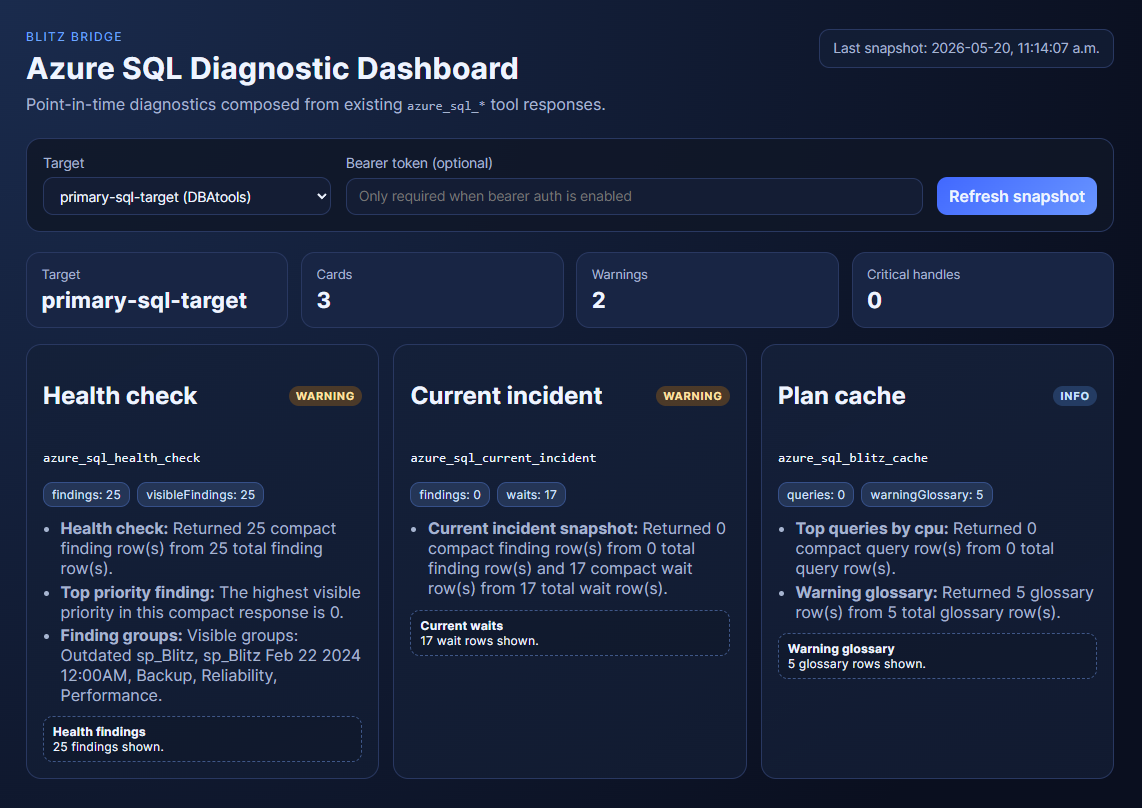
Optional hosted dashboard (HTTP only)
Blitz Bridge exposes dashboard endpoints only when started with --dashboard in HTTP mode:
blitzbridge --transport http --dashboard
- Dashboard routes (
/mcp/dashboard/*) are disabled unless--dashboardis set. - Dashboard access is not available in stdio mode.
- Dashboard views are on-demand, point-in-time diagnostics from existing
azure_sql_*tool calls (not real-time monitoring). - Dashboard requests use the same HTTP security boundary as other hosted endpoints (bearer auth middleware + configured CORS policy).
Tool surface
Query tools
azure_sql_target_capabilities— list profiles and allowed proceduresazure_sql_health_check— run sp_Blitz to diagnose database health issuesazure_sql_blitz_cache— run sp_BlitzCache for query plan analysis and cached-query performanceazure_sql_blitz_index— run sp_BlitzIndex for index recommendations and table structure reviewazure_sql_current_incident— run sp_BlitzFirst to surface immediate blocking, waits, and active problems
Detail fetching (progressive disclosure)
azure_sql_fetch_detail_by_handle— fetch expanded sections from query tools without re-querying the entire result set
Default behavior: All query tools return a summary plus handles to expandable sections. Agents that need full detail can drill down on demand; agents that only need summaries avoid re-running expensive procedures.
See docs/mcp-tools.md for interaction patterns and when to use progressive disclosure.
Security and responsibility boundaries
Blitz Bridge enforces read-only intent, allowlisted procedures, and profile-scoped access, but you own credential lifecycle, token distribution, and target authorization decisions.
See SECURITY.md for vulnerability reporting, guarantees, and non-goals.
Additional docs
- Product requirements:
docs/PRD.md - Implementation plan/work tracking:
docs/implementation-work-items.md - Architecture overview:
docs/architecture.md - Azure deployment guide:
docs/deployment-azure.md - SQL least-privilege role script:
docs/sql/blitz-bridge-role.sql - End-to-end test fixture:
tests/BlitzBridge.McpServer.Testsuses Testcontainers SQL Server plus the FRK andseed-test.sqlscripts for deterministic MCP coverage. - Aspire local test mode: set
BlitzBridge__Testing__UseLocalSqlServer=trueto have the AppHost start a seeded SQL Server resource, expose the MCP server through Aspire's MCP integration, and runmcp-playgroundas a simple chat-style MCP tester in the browser.
| Product | Versions Compatible and additional computed target framework versions. |
|---|---|
| .NET | net10.0 is compatible. net10.0-android was computed. net10.0-browser was computed. net10.0-ios was computed. net10.0-maccatalyst was computed. net10.0-macos was computed. net10.0-tvos was computed. net10.0-windows was computed. |
This package has no dependencies.