Avalonia3DCanvas 1.0.0
dotnet add package Avalonia3DCanvas --version 1.0.0
NuGet\Install-Package Avalonia3DCanvas -Version 1.0.0
<PackageReference Include="Avalonia3DCanvas" Version="1.0.0" />
<PackageVersion Include="Avalonia3DCanvas" Version="1.0.0" />
<PackageReference Include="Avalonia3DCanvas" />
paket add Avalonia3DCanvas --version 1.0.0
#r "nuget: Avalonia3DCanvas, 1.0.0"
#:package Avalonia3DCanvas@1.0.0
#addin nuget:?package=Avalonia3DCanvas&version=1.0.0
#tool nuget:?package=Avalonia3DCanvas&version=1.0.0
Avalonia 3D Canvas Control
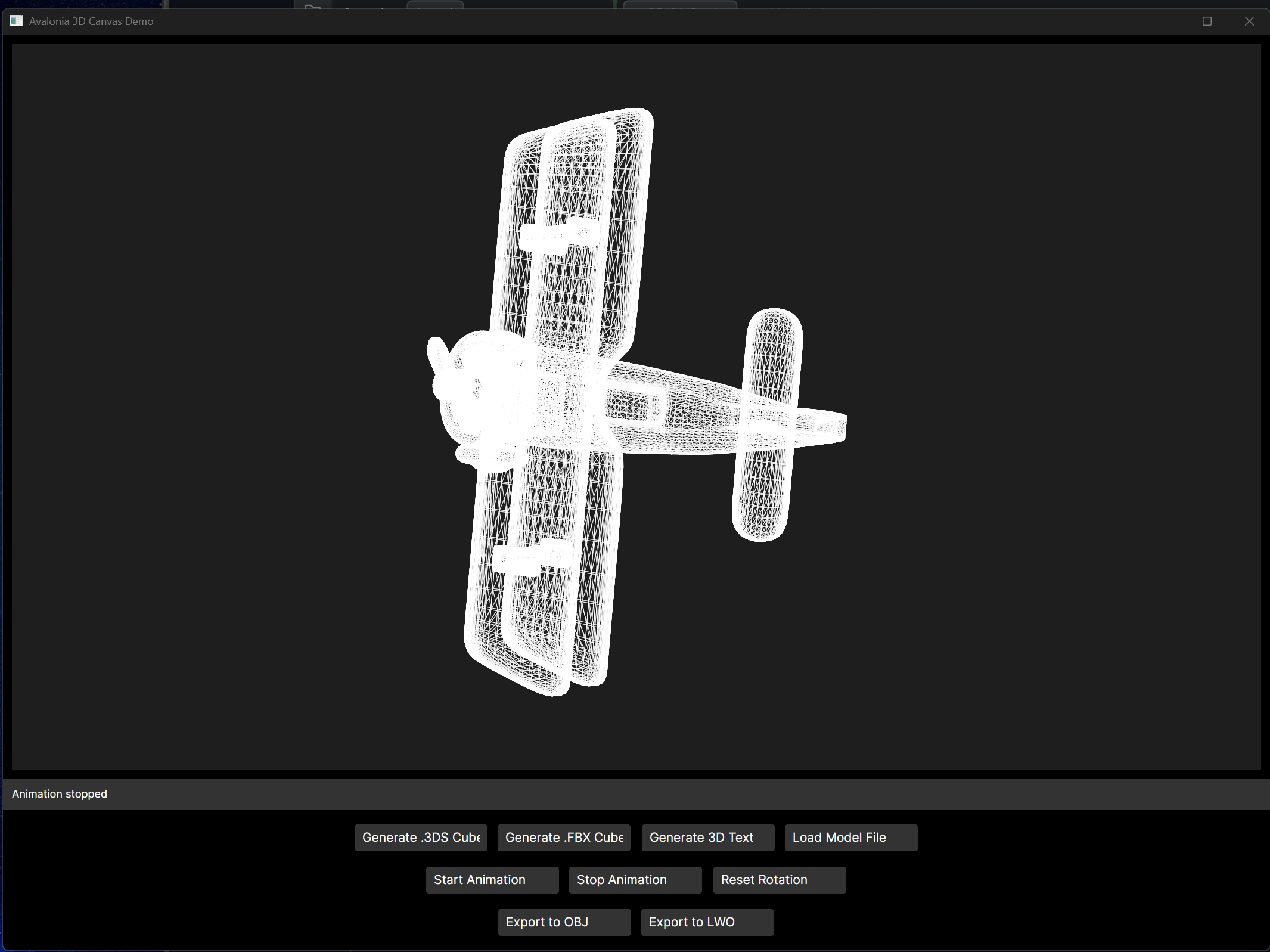
A .NET 9 Avalonia control library for displaying 3D models from multiple file formats (.3DS, .OBJ, .STL, .PLY, .FBX) with automatic rotation and canvas resizing.
Projects
Avalonia3DCanvas
The control library containing the Canvas3D control and multiple 3D file format loaders.
Features:
- Load and display multiple 3D model formats:
- .3DS - 3D Studio files
- .OBJ - Wavefront OBJ files
- .STL - Stereolithography files (ASCII and binary)
- .PLY - Polygon File Format (ASCII)
- .FBX - Filmbox files (ASCII only, basic support)
- Automatic file format detection based on extension
- Wireframe rendering with customizable line color and thickness
- Automatic model centering and scaling to fit canvas
- Canvas automatically resizes based on container
- Smooth rotation animation on X, Y, and Z axes
- Configurable rotation speed
Avalonia3DCanvas.Demo
A demo application showcasing the Canvas3D control with interactive buttons.
Features:
- Generate a sample cube for testing
- Load custom .3DS files via file picker
- Start/stop rotation animation
- Reset rotation to initial state
- Real-time status updates
Usage
Running the Demo
dotnet run --project Avalonia3DCanvas.Demo
Using the Control in Your Project
Add a reference to the Avalonia3DCanvas project or NuGet package
Add the namespace to your XAML:
xmlns:canvas3d="clr-namespace:Avalonia3DCanvas;assembly=Avalonia3DCanvas"
- Add the control to your layout:
<canvas3d:Canvas3D Name="MyCanvas3D"
                   LineColor="Cyan"
                   LineThickness="1.5"
                   RotationSpeed="0.02"/>
- Control the canvas from code:
// Load any supported 3D model file (auto-detects format)
MyCanvas3D.LoadModel("path/to/model.obj");
MyCanvas3D.LoadModel("path/to/model.stl");
MyCanvas3D.LoadModel("path/to/model.3ds");

// Start animation
MyCanvas3D.StartAnimation();

// Stop animation
MyCanvas3D.StopAnimation();

// Reset rotation
MyCanvas3D.ResetRotation();
Canvas3D Properties
| Property | Type | Default | Description |
|---|---|---|---|
| ModelPath | string | null | Path to the 3D model file to load |
| RotationSpeed | double | 0.02 | Speed of rotation (radians per frame) |
| LineColor | IBrush | White | Color of the wireframe lines |
| LineThickness | double | 1.0 | Thickness of the wireframe lines |
Public Methods
LoadModel(string filePath)- Load a 3D model from file (auto-detects format: .3ds, .obj, .stl, .ply, .fbx)StartAnimation()- Start the rotation animationStopAnimation()- Stop the rotation animationResetRotation()- Reset rotation to initial angles (0, 0, 0)
Getting 3D Model Files
You can obtain 3D model files from:
- The demo app's "Generate Sample Cube" button (creates a simple test .3DS cube)
- Free 3D model websites (Thingiverse, Sketchfab, TurboSquid, etc.)
- 3D modeling software like Blender (free), 3ds Max, Maya (export as .OBJ, .STL, .FBX, etc.)
- 3D scanning apps and hardware
Technical Details
Supported File Formats
3DS (3D Studio):
- Vertex data (TRI_VERTEXL)
- Face data (TRI_FACEL)
- Basic mesh structure
- Binary format
OBJ (Wavefront):
- Vertex positions (v)
- Face definitions (f)
- Triangle fan conversion for polygons
- Text-based format
STL (Stereolithography):
- ASCII and binary formats
- Triangle mesh data
- Automatic format detection
- Commonly used for 3D printing
PLY (Polygon File Format):
- ASCII format (binary not supported)
- Vertex and face data
- Flexible property system
- Stanford Triangle Format
FBX (Filmbox):
- ASCII format only (binary not supported)
- Basic vertex and polygon extraction
- Limited feature support (geometry only)
- Note: For complex FBX files, convert to OBJ for best results
3D Rendering
- Wireframe rendering using line segments
- Perspective-free 3D projection
- Automatic viewport scaling
- Center-based rotation on all three axes
- Real-time animation at ~60 FPS
Requirements
- .NET 9.0
- Avalonia 11.3.9 or later
Building
# Build the entire solution
dotnet build

# Build just the control library
dotnet build Avalonia3DCanvas/Avalonia3DCanvas.csproj

# Build just the demo app
dotnet build Avalonia3DCanvas.Demo/Avalonia3DCanvas.Demo.csproj
License
This project is provided as-is for educational and commercial use.
| Product | Versions Compatible and additional computed target framework versions. |
|---|---|
| .NET | net9.0 is compatible. net9.0-android was computed. net9.0-browser was computed. net9.0-ios was computed. net9.0-maccatalyst was computed. net9.0-macos was computed. net9.0-tvos was computed. net9.0-windows was computed. net10.0 was computed. net10.0-android was computed. net10.0-browser was computed. net10.0-ios was computed. net10.0-maccatalyst was computed. net10.0-macos was computed. net10.0-tvos was computed. net10.0-windows was computed. |
NuGet packages
This package is not used by any NuGet packages.
GitHub repositories
This package is not used by any popular GitHub repositories.
| Version | Downloads | Last Updated |
|---|---|---|
| 1.0.0 | 259 | 1/10/2026 |